# CreateOS Docs
Technical documentation for building and operating on CreateOS.
# CreateOS Docs
CreateOS ships and runs your applications and services: deployments, managed
databases and queues, custom domains, and isolated microVM sandboxes for
untrusted or AI generated code.
## Quickstarts
## App platform
Build, ship and operate applications on CreateOS.
## Connect and extend
## Account
# What is CreateOS?
CreateOS is a **complete developer ecosystem** designed to take your idea from conception to production-ready product, and ultimately to revenue. By replacing complex DevOps and fragmented tools with a single intuitive interface, CreateOS allows developers, teams, and creators to **focus on building, not gluing systems together**.
Whether you're building a prototype, scaling an AI-native service, or deploying a full-stack application, CreateOS provides **AI-assisted coding interfaces**, **frontend & backend deployments**, and **key infrastructure services**, all integrated under one roof and available at competitive rates.
[Create Now →](https://createos.sh/app/landing)
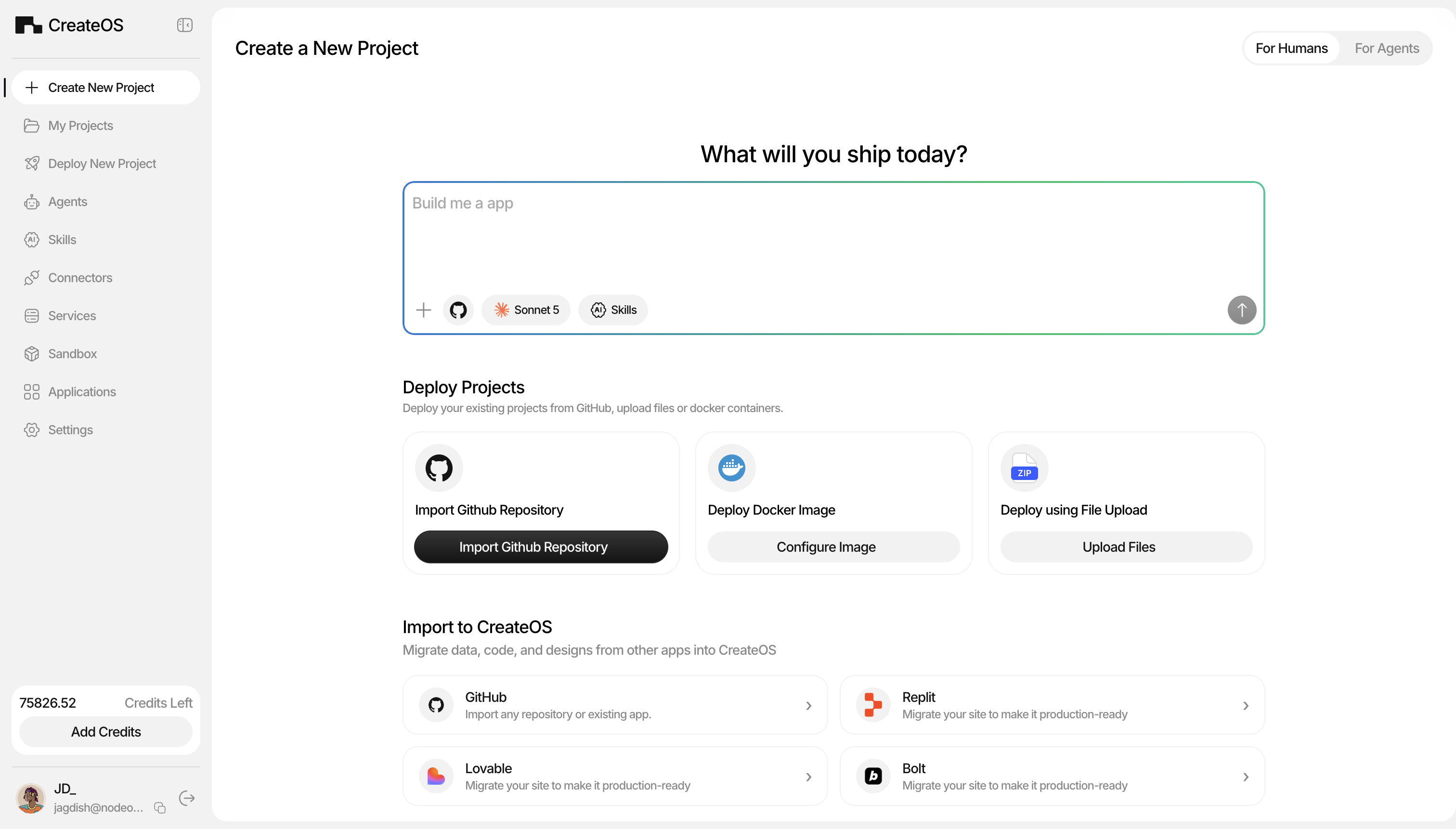
## Who is CreateOS For?
CreateOS is designed for anyone ready to turn ideas into reality, no extensive DevOps expertise required:
### Solo Developers & Indie Hackers
Build and ship products faster without managing complex infrastructure. Focus on your code while CreateOS handles deployment, scaling, and monitoring.
### Solopreneurs & Founders
Launch MVPs and validate ideas quickly with AI-assisted development. Monetize your applications through the marketplace without building payment infrastructure from scratch.
### Startups & SMEs
Automate your CI/CD pipeline and reduce infrastructure costs with competitive compute rates. Scale from prototype to production without hiring a DevOps team.
### Marketers & Non-Technical Builders
Create functional applications and landing pages using AI-powered development tools. No coding experience required, just describe what you want to build.
### Curious Minds & Learners
Experiment and learn by building real applications from scratch. See your ideas come to life with instant previews and guided AI assistance.
## Why CreateOS?
CreateOS is built for modern developers and creators who need **speed, scalability, and control**:
* **Unified Stack:** All infrastructure layers in one dashboard, no need for stitching services
* **AI-Native:** AI-assisted creation, deployment, and orchestration streamline your workflow
* **Flexible Pricing:** Pay-as-you-go or subscription models with top-up credits
* **MCP Integrations:** Works seamlessly with Cursor, VS Code, ChatGPT, Claude, and any MCP-enabled platform
[Visit CreateOS Website →](https://createos.sh/)
## What can CreateOS do?
### Create → Deploy → Monetize
CreateOS empowers you through every stage of your development journey.
## 1. Build Applications
### AI-Powered Development (Vibe-Coding)
Generate applications effortlessly using your preferred AI models. Choose from a wide range of LLMs, see instant previews in the browser, and push directly to GitHub with one click.
**Features:**
* Multi-language support: JavaScript, TypeScript, Python, Go, Rust, Java, or custom containers
* AI-assisted refactoring while preserving structure and dependencies
* Playground integration for seamless code continuation from GitHub or previous deployments
* Automatic CI/CD triggering on GitHub push
[Start Building →](https://createos.sh/app/landing)
## 2. Deploy Services
### AI-Assisted CI/CD & Infrastructure
Automate your entire deployment lifecycle with AI-powered orchestration. CreateOS handles containerization, dependency inference, infrastructure provisioning, and service management.
**Deployment Features:**
* Full CI/CD pipeline: build, test, deploy, rollback, and environment promotion
* Dynamic scaling: adjust CPU, memory, and replicas on demand
* Custom domain mapping and environment configuration
* Built-in observability: live logs, metrics, alerts, and resource monitoring
* One-click rollback to previous builds
**Infrastructure Services:**
Deploy production-ready backend services instantly:
* **Compute:** Rent CPU/GPU instances for AI inference, training, or heavy workloads
* **Database:** Managed database services with automatic backups and scaling
* **Messaging Queue:** Distributed message queuing for asynchronous workflows
* **Cache:** High-performance caching layers for optimized application performance
**AI Playground:**
Enhance your deployed applications using AI without cloning repositories locally. Changes deploy automatically on every commit.
[Deploy Now →](https://createos.sh/app/deployProject)
## 3. Monetize Your Work
CreateOS provides multiple revenue streams for developers and creators to turn their expertise into income.
### Template Marketplace
**For Users:**
Browse and deploy production-ready templates across categories like AI/ML, Analytics, Authentication, Automation, Databases, Blockchain, and more. Purchase templates using credits, with pricing set by contributors.
* **Organized by:** Developer/Enterprise needs, Compute type (CPU/GPU), and specialized categories
* **Quick Deployment:** One-click deployment with automatic GitHub integration
* **Full Control:** Manage CI/CD pipelines and build on top of purchased templates
**For Contributors:**
List your projects as templates and earn revenue from every deployment.
**Submission Requirements:**
* GitHub-based projects with complete source code
* Template name, images, video tutorial, and comprehensive description
* Use case documentation and appropriate categorization
* Contributor-set pricing in credits
**Monetization Features:**
* Set your own pricing for template deployments
* Receive credits for each purchase
* Update templates with 3 free revisions (additional updates require credits)
* Optional security scanning to display security scores and improve credibility
* Boost visibility with credit-based marketing plans for enhanced discoverability
**Important:** Template purchases share your complete codebase. If you prefer IP protection, list as an Application instead.
[Browse Templates →](https://createos.sh/app/templates)
***
### Application Store
**For Users:**
Deploy fully functional applications without credits. Payment is handled directly through in-app purchases set by contributors.
* **Diverse Categories:** Productivity, Games, Entertainment, Crypto, and more
* **Instant Deployment:** No credits required; flexible contributor-based pricing
* **Easy Management:** Access all deployed apps in the "My Apps" section
**For Contributors:**
Monetize production-ready applications while maintaining complete code ownership and IP protection.
**Key Advantages:**
* **IP Protection:** Unlike templates, retain full source code ownership
* **Custom Pricing:** Set your own payment models and pricing structure
* **Platform Requirements:** Applications must be deployed and functional on CreateOS
* **Revenue Control:** Direct in-app payment with contributor-determined pricing
**Submission Requirements:**
* Application name, high-quality images, and video demonstration
* Comprehensive feature description and use case documentation
* Appropriate category selection
* Credits consumed for application listing
**Monetization Features:**
* Complete control over pricing and payment terms
* Full IP protection, no source code sharing required
* Professional review process ensures quality standards
* Immediate App Store visibility upon approval
[Explore App Store →](https://createos.sh/app/landing)
## Getting Started
Whether you're a developer looking to streamline your workflow or a creator ready to monetize your expertise, CreateOS provides the complete platform to bring your ideas to market.
[Get Started Now →](/Get-Started/Create-Application)
# Get Started
Five ten-minute paths, pick the one that matches what you have: an idea and no code ([Create a project from scratch](/Get-Started/Create-Application)), a GitHub repository ([Deploy a project](/Get-Started/Deploy-Github-Project)), a need for Postgres, Redis or Kafka ([Deploy a database](/Get-Started/Deploy-Service)), a packaged application ([Deploy an application](/Get-Started/Deploy-App)), or raw compute ([Rent a server](/Get-Started/Rent-Server)). For isolated code execution for agents, start with [Sandbox](/Sandbox) instead.
* [Create a project from scratch](/Get-Started/Create-Application)
* [Deploy a project](/Get-Started/Deploy-Github-Project)
* [Deploy a database](/Get-Started/Deploy-Service)
* [Deploy an application](/Get-Started/Deploy-App)
* [Rent a server](/Get-Started/Rent-Server)
# Create an App from Scratch
This tutorial walks through creating and deploying an app on CreateOS using the prompt-based interface. You'll describe what you want to build, iterate through prompts, and finish with a live application at a unique, persistent URL, ready to share immediately.
[Create an App →](https://createos.sh/app/landing)
## Steps
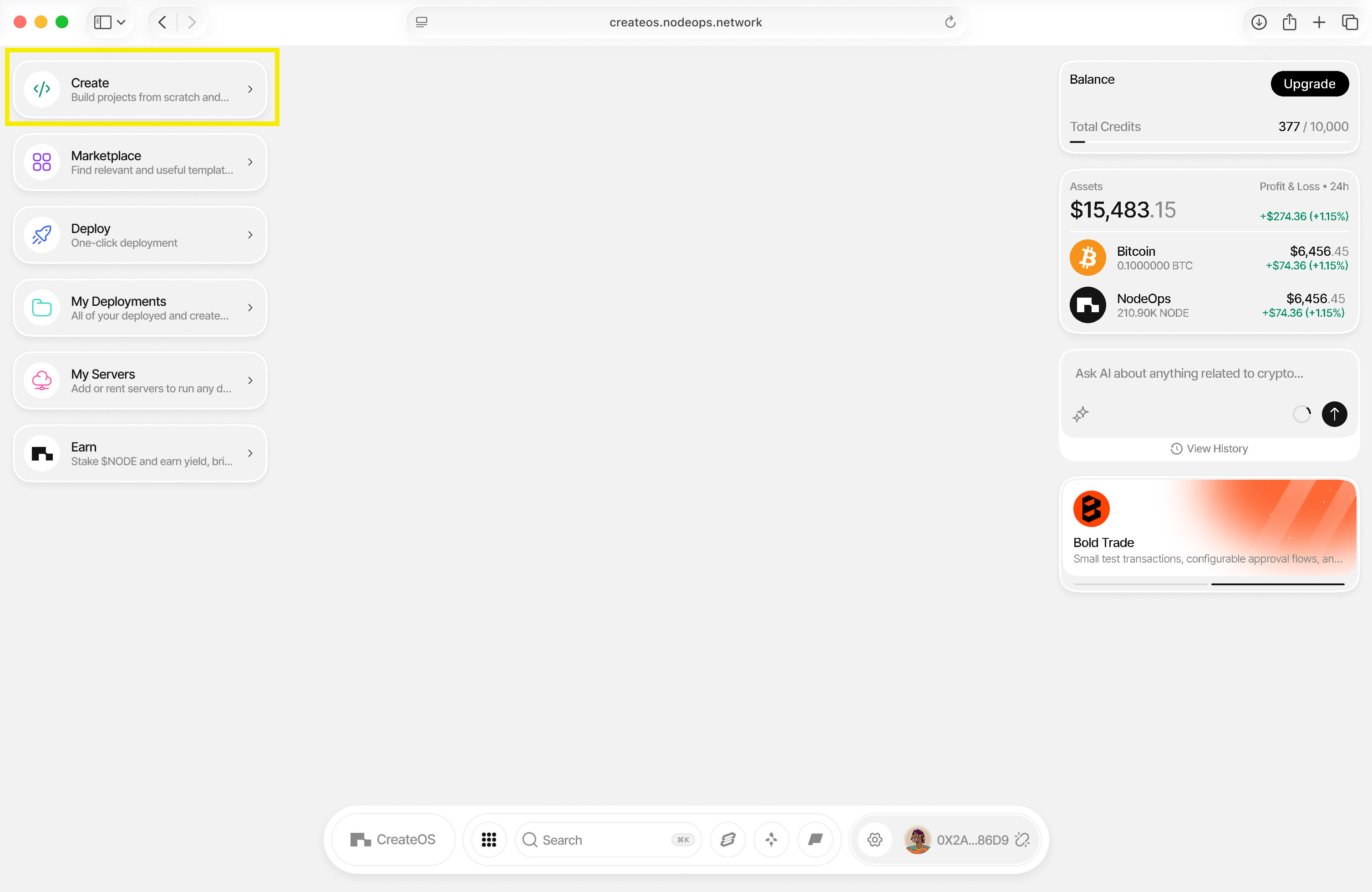
### Step 1: Access the Create Interface
1. Go to [CreateOS Platform](https://createos.sh/app/landing) and log in
2. Click **"Create"** from the menu on the left
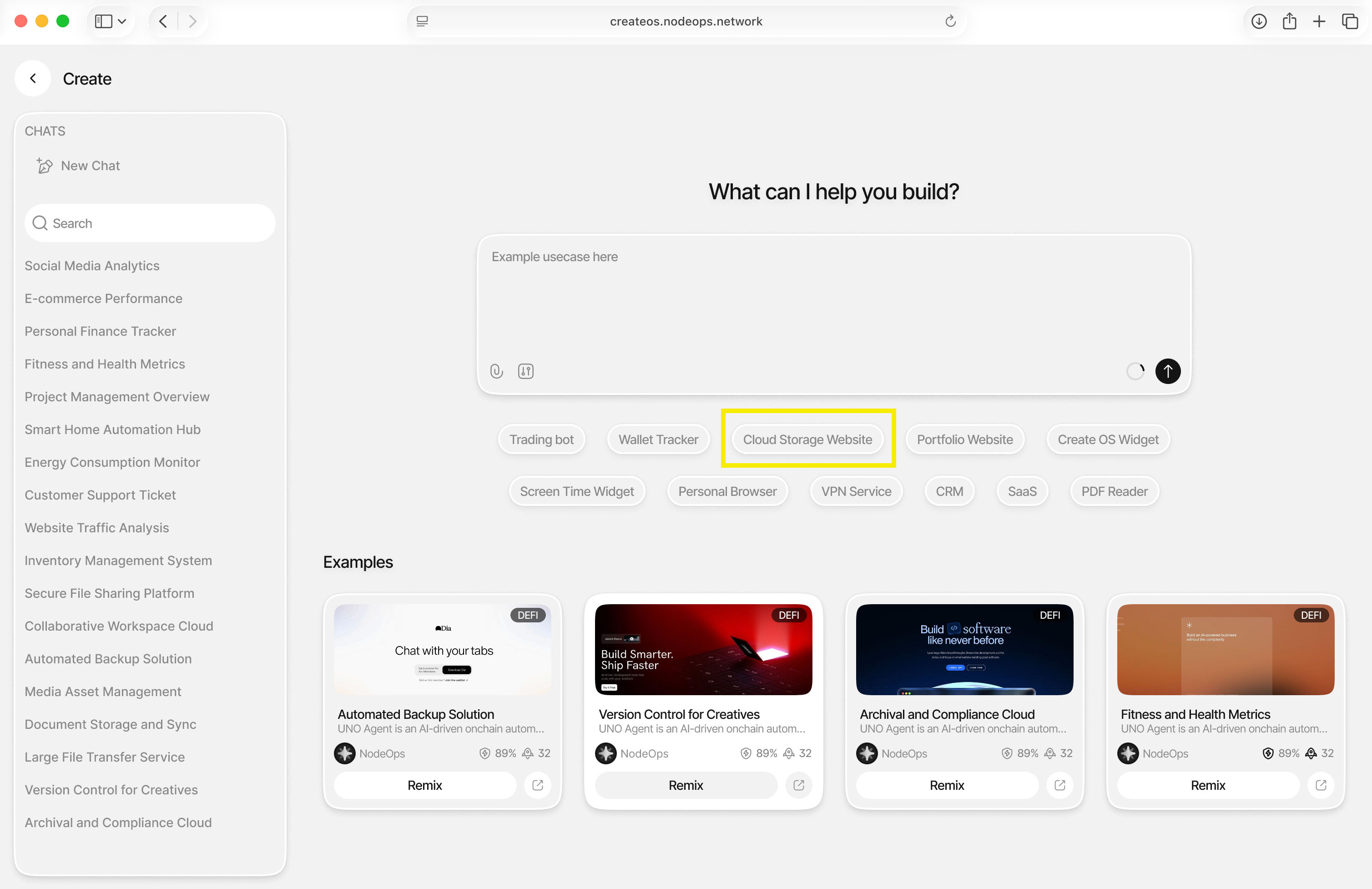
### Step 2: Describe Your App
1. You'll be brought to the prompt interface where you can describe what you want to build
2. Need inspiration? Try one of the suggested prompts
3. For this tutorial, click on **"Cloud Storage Solution"** (or enter your own idea)
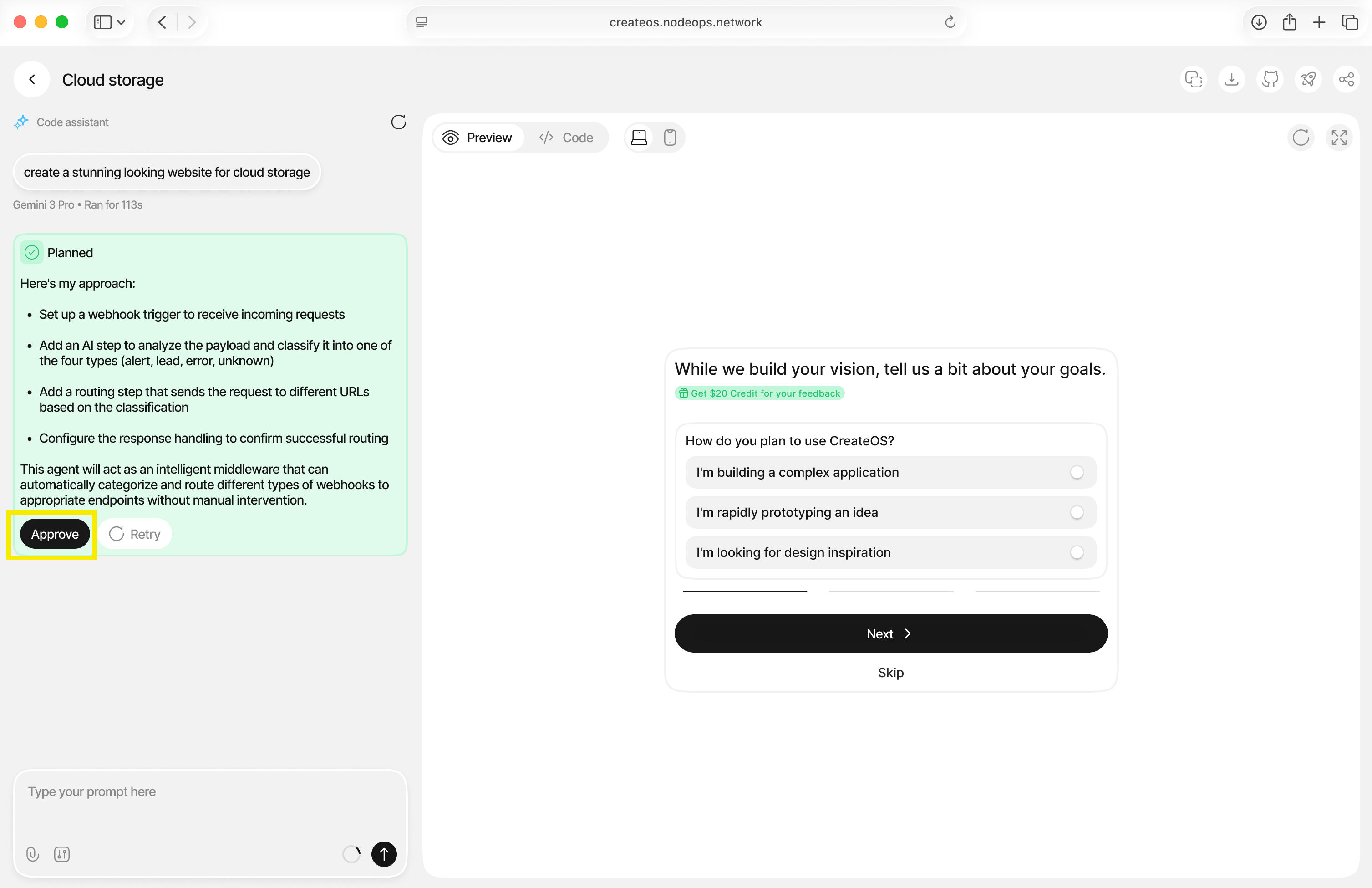
### Step 3: Review and Approve
1. CreateOS will take a few seconds to generate your application
2. You may receive responses from CreateOS confirming its plan
3. Click **"Approve"** to continue with the generation
### Step 4: Preview Your App
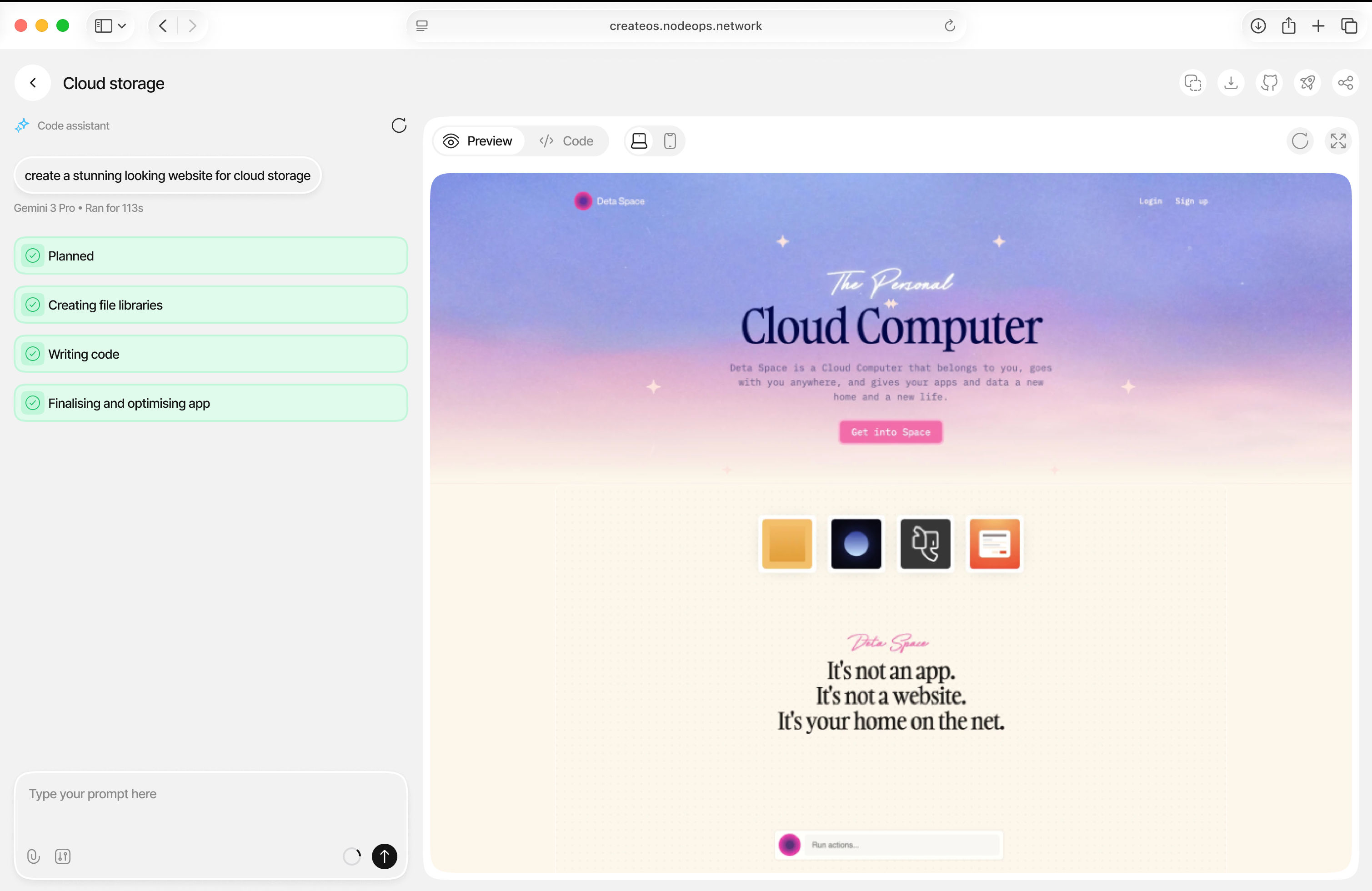
1. CreateOS will generate a preview of your application
2. Your app will be automatically deployed with a **unique and shareable link**
3. From here, you can continue to modify the build with additional prompts
## Switch Between AI Models
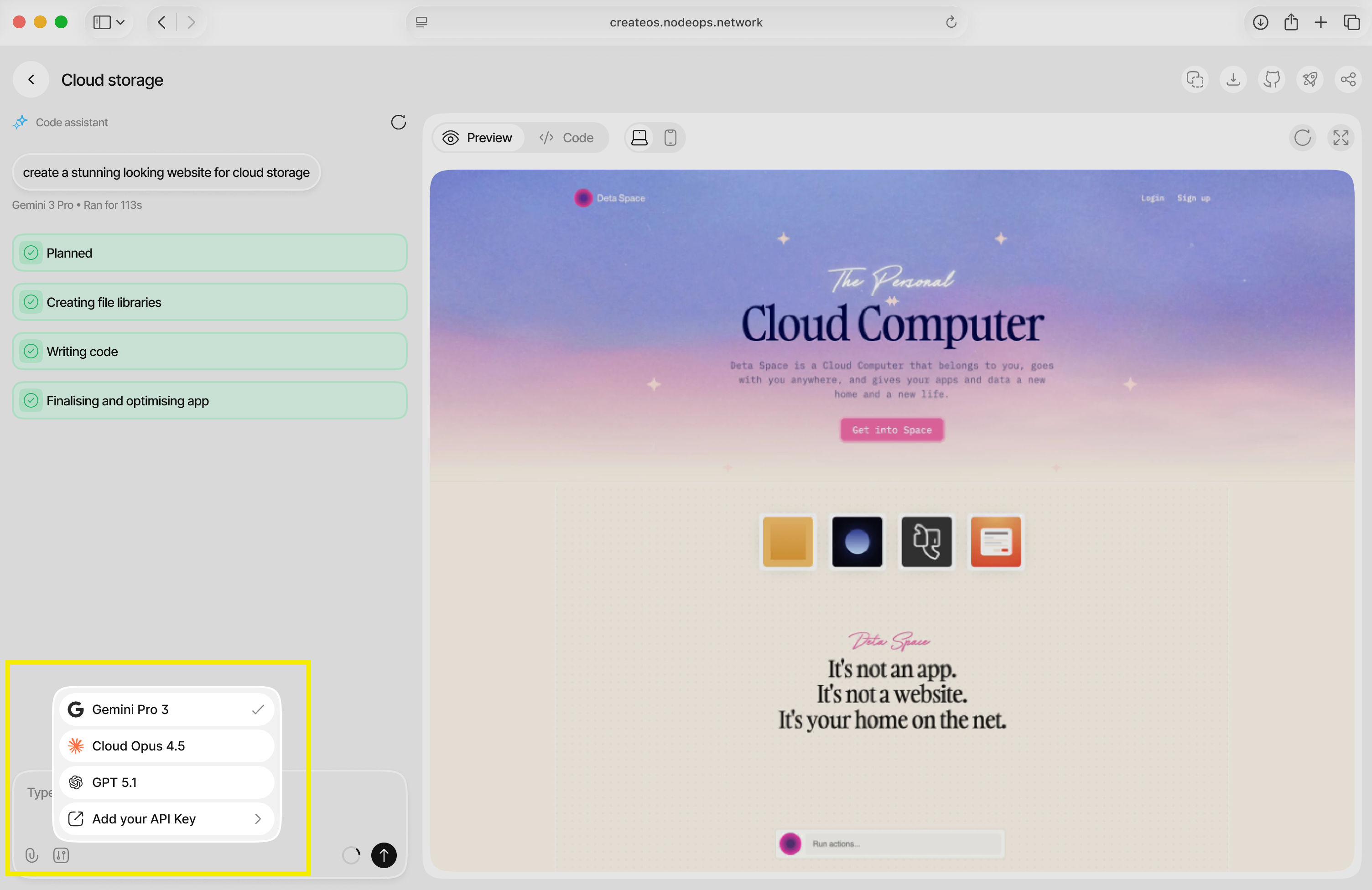
> **💡 Tip:** CreateOS natively comes with Gemini Pro 3, Claude Opus 4.5, and GPT 5.1. You can cycle between models or bring your own by adding your API key.
## What's Next
**You've just created an application on CreateOS!**
Now you have a live application with a persistent, shareable URL, with no repository setup, no deployment pipelines, and no context switching.
This flow is built for speed, helping you move from idea to production in minutes so you can test, share, and iterate immediately.
Next, head to the dashboard to manage, monitor, and evolve your application as it grows.
# Deploy Your First App on CreateOS
**CreateOS is a unified workspace where ideas move seamlessly from concept to live deployment, without context switching across tools, infrastructure, or workflows.**
It combines creation, deployment, and coordination into a single AI-assisted environment, so builders can go from idea to working application in minutes, not weeks. Instead of stitching together fragmented tools, CreateOS keeps execution fluid, end-to-end, and owned by the person building.
This tutorial walks you through deploying your first app on CreateOS, so you can experience that execution flow firsthand.
[Deploy Project →](https://createos.sh/app/deployProject)
## Deployment Steps
### Step 1: Access the Deploy Section
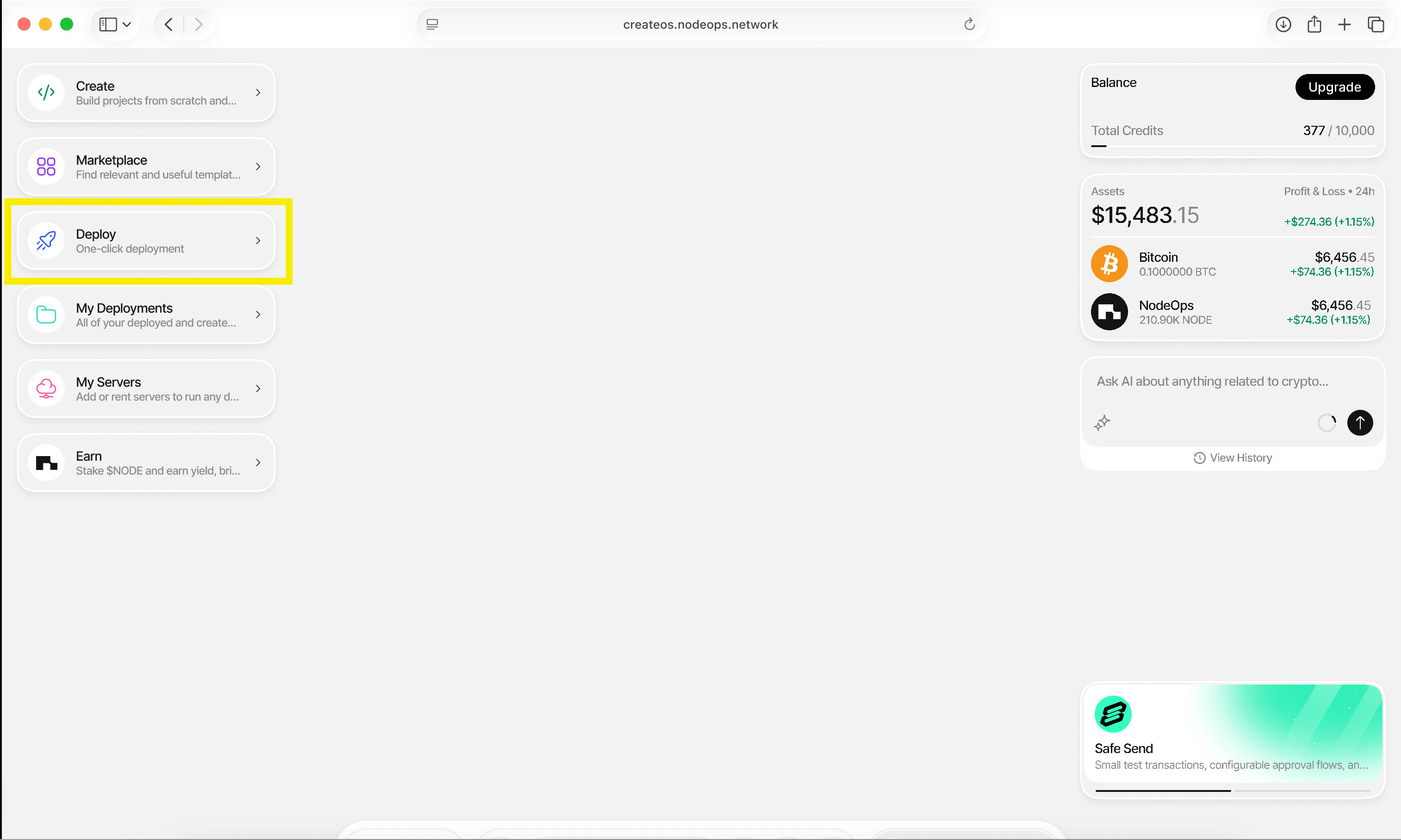
1. Go to [CreateOS Platform](https://createos.sh/app/) and sign in
2. Click **"Deploy"** from the menu on the left
### Step 2: Choose Deployment Method
CreateOS offers multiple deployment options:
* **Import from GitHub** (recommended for this tutorial)
* Deploy from Docker image
* Upload a file
* Deploy from template
Click **"Import from GitHub"** to connect your GitHub account.
### Step 3: Authorize GitHub Access
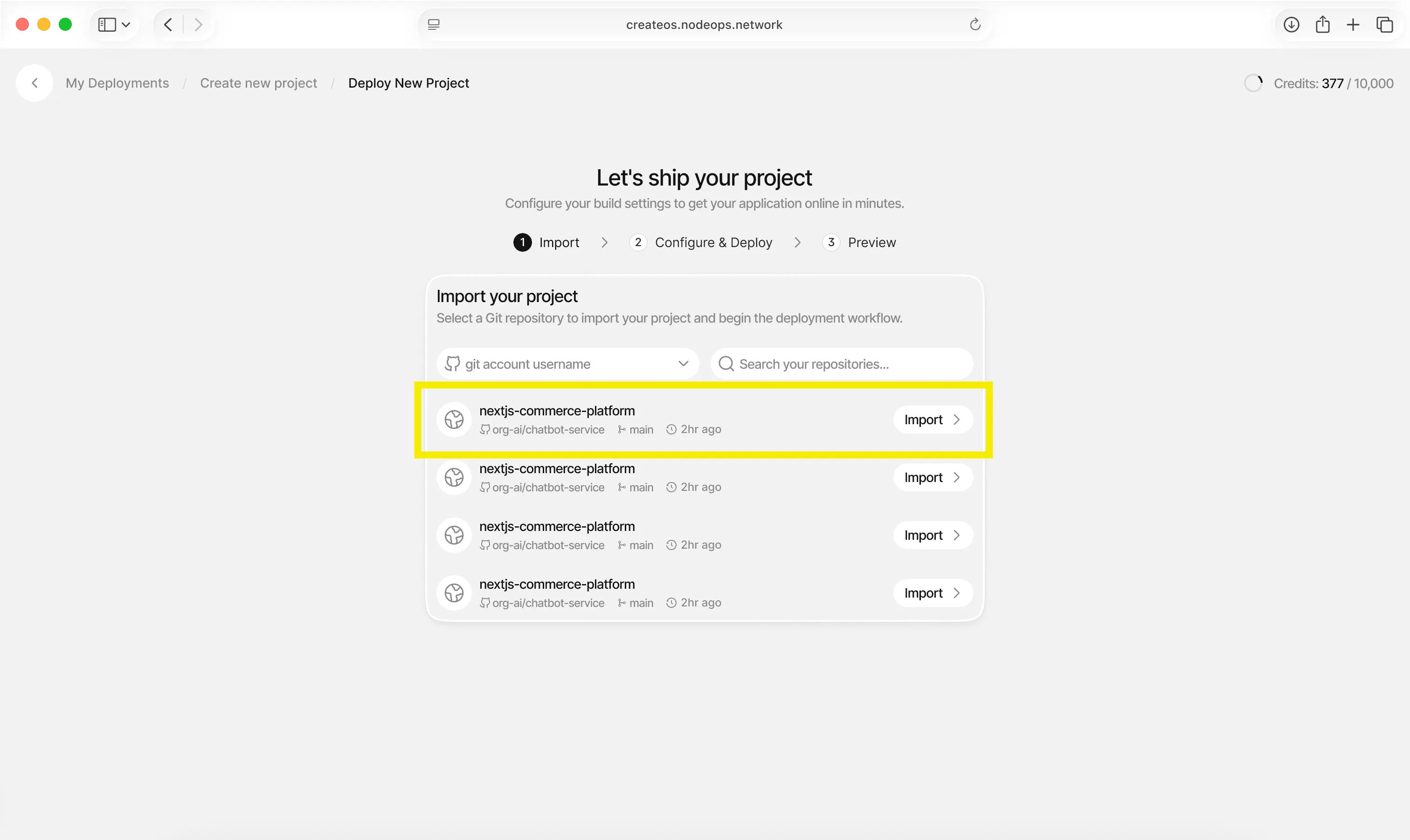
1. Complete the GitHub OAuth authentication
2. You'll see a list of your repositories
3. Select the repository you want to deploy
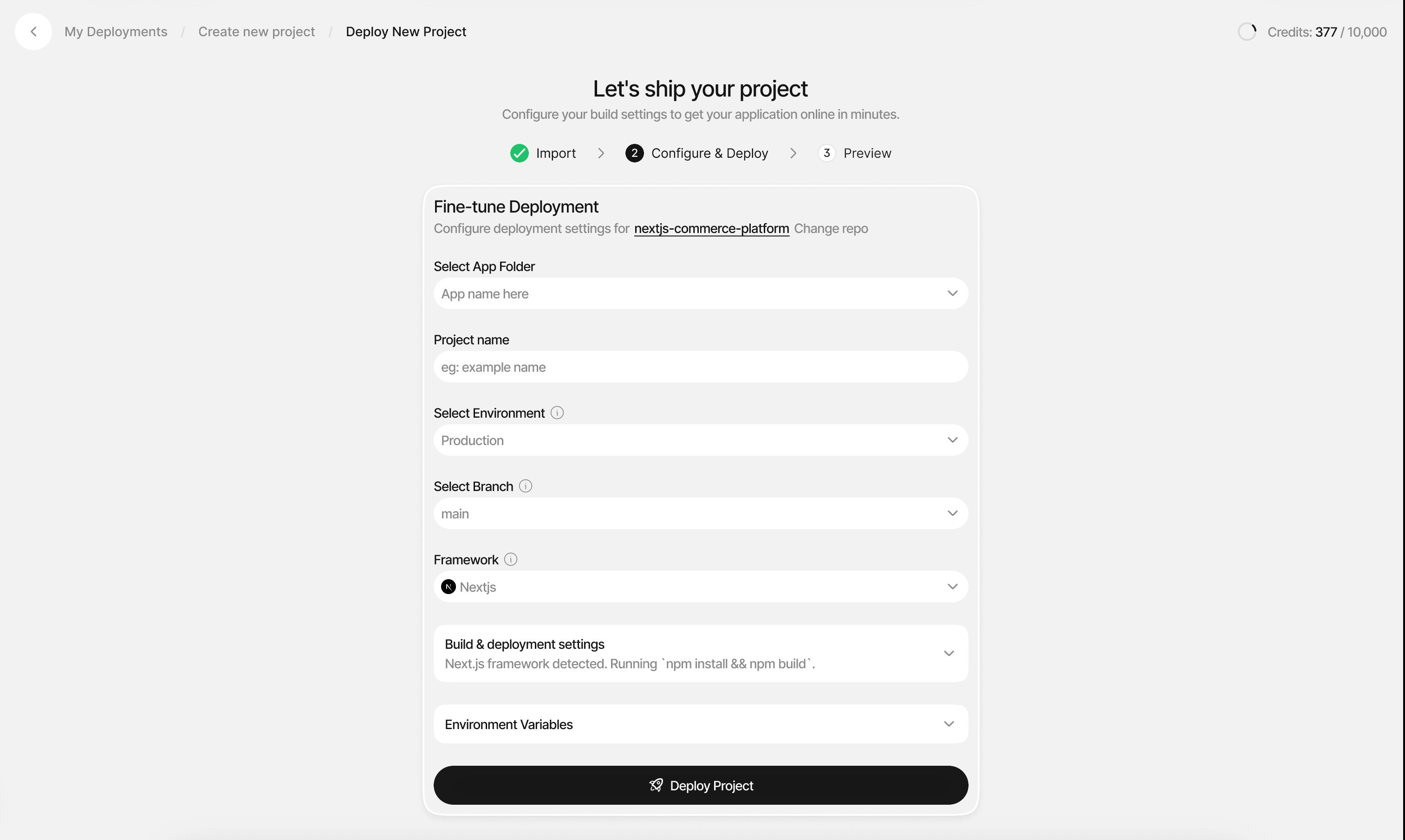
### Step 4: Configure Project Details
Fill in the following project information:
| Setting | Description |
| ---------------- | ----------------------------------------------------- |
| **Folder** | Select or create a folder to organize your deployment |
| **Project Name** | Give your project a descriptive name |
| **Environment** | Choose between Production, Staging, or custom |
| **Branch** | Select the Git branch to deploy from |
| **Framework** | Select your project's framework |
> **💡 Tip:** Folders keep deployments of one project together. For example, you can organize your frontend, backend, and database deployments into a single folder.
### Step 5: Configure Build Settings
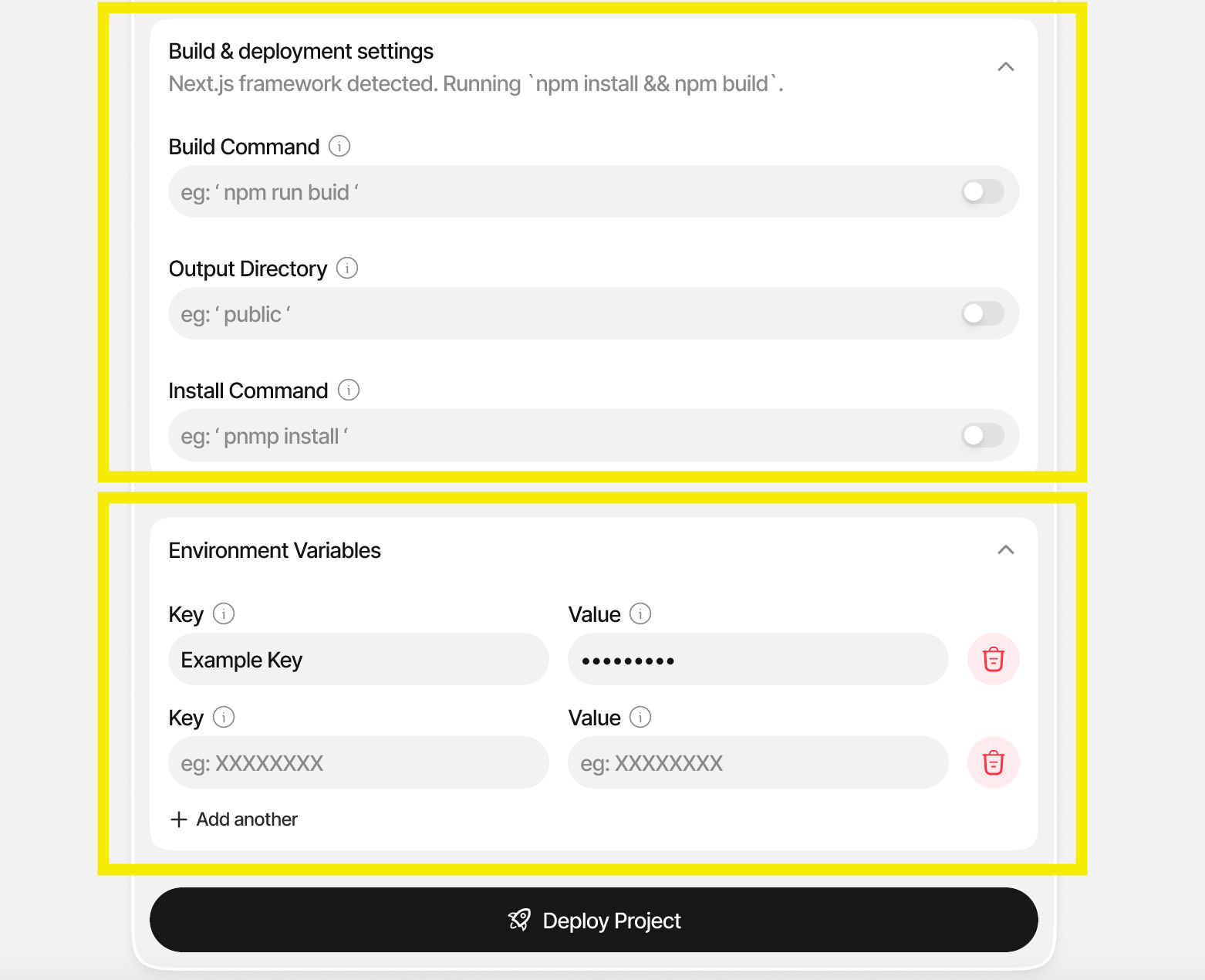
1. **Environment Variables:** Add any required environment variables for your application
2. **Build Commands:** CreateOS will auto-detect your framework, but you can customize build and deployment commands if needed
3. Review the auto-detected configuration and make any necessary adjustments
### Step 6: Deploy Your Project
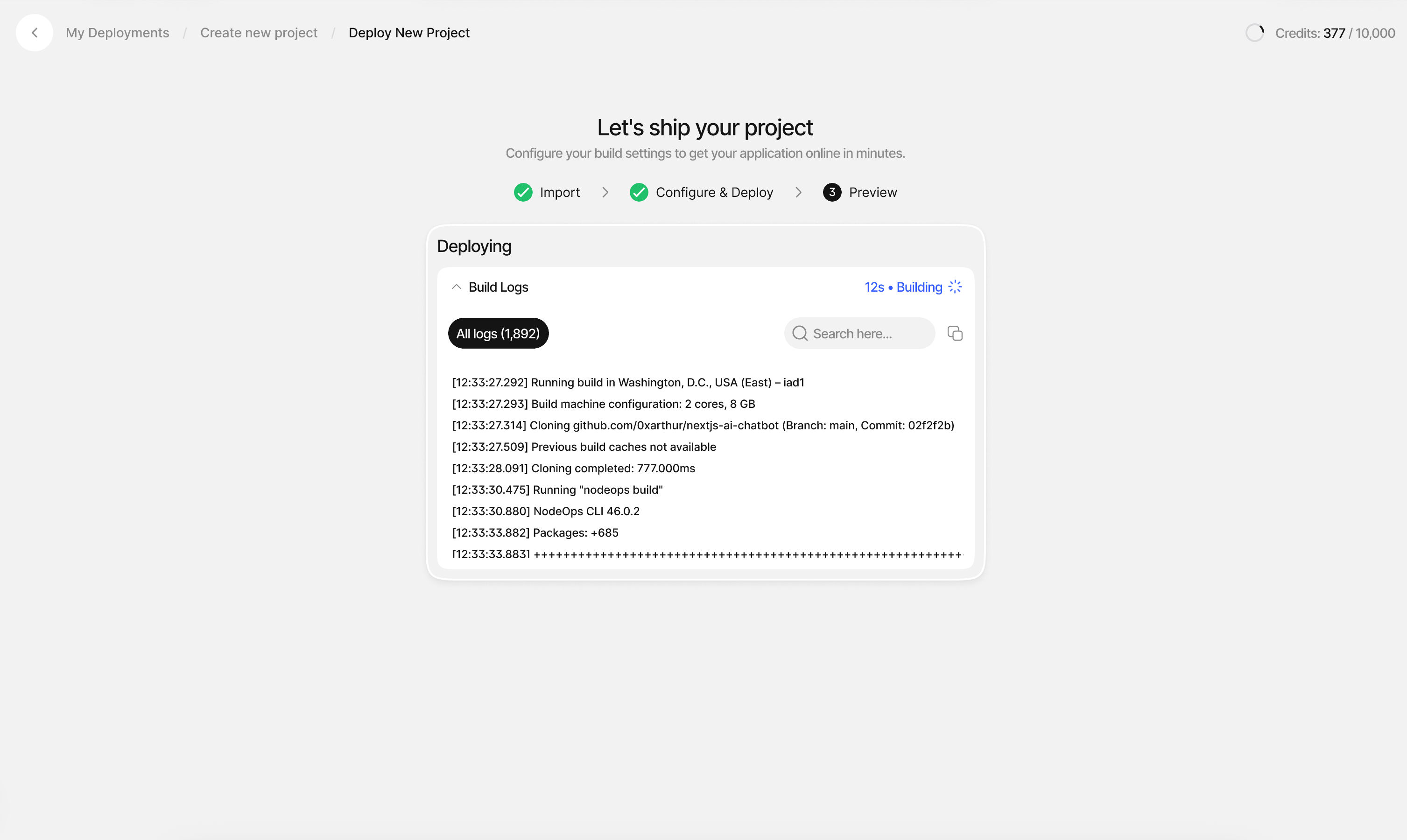
1. Click **"Deploy Project"** when ready
2. Watch your deployment progress with **visible running logs** in real-time
3. Monitor the build process as CreateOS containerizes your code and provisions infrastructure
### Step 7: Deployment Complete
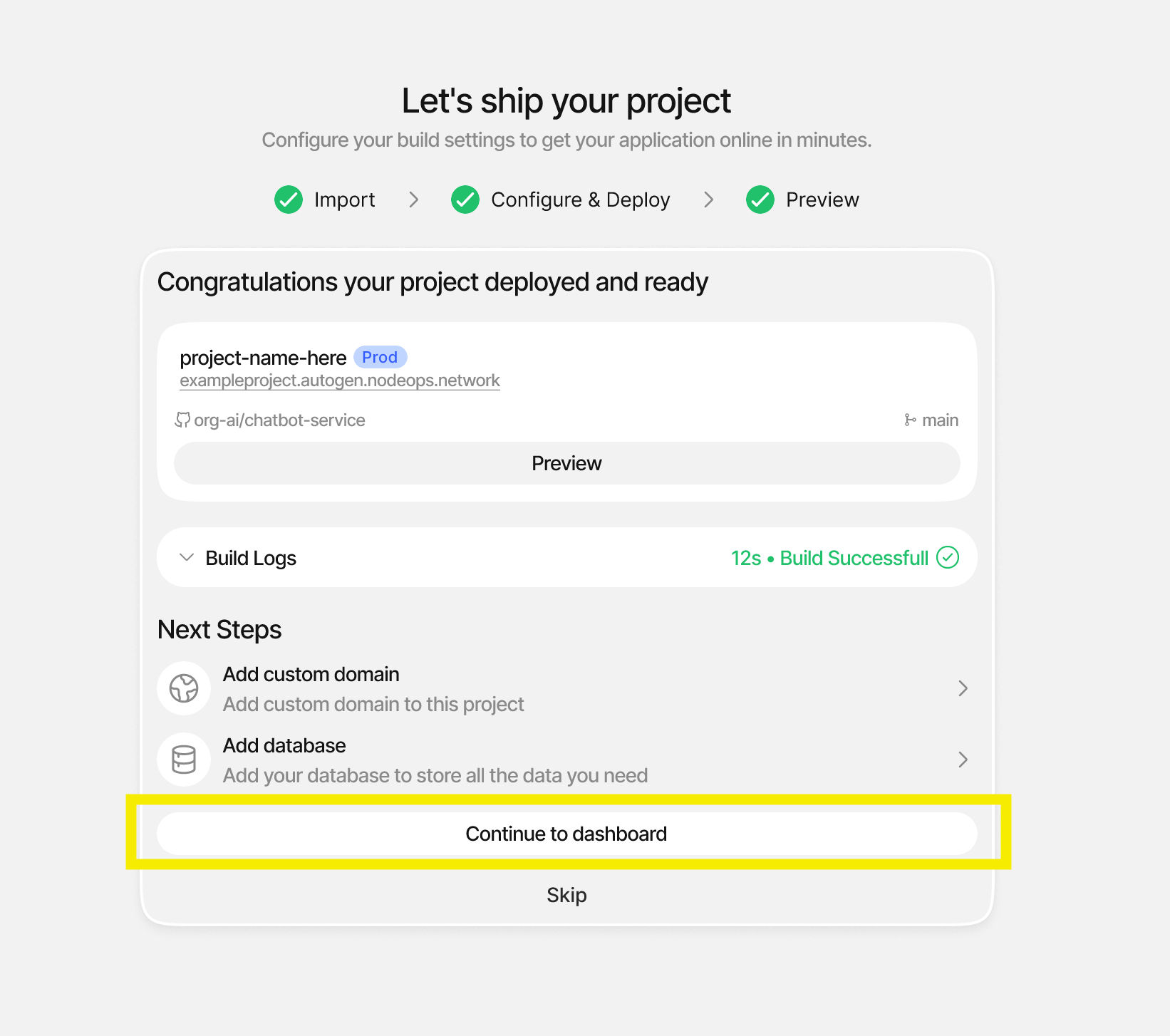
Once your build is complete, you can:
* **Preview your app:** View your live application
* **Add a custom domain:** Map your own domain to the deployment
* **Add a database:** Connect backend services with one click
### Step 8: Explore the Dashboard
**🎉 Congratulations!** Your application is now live and running.
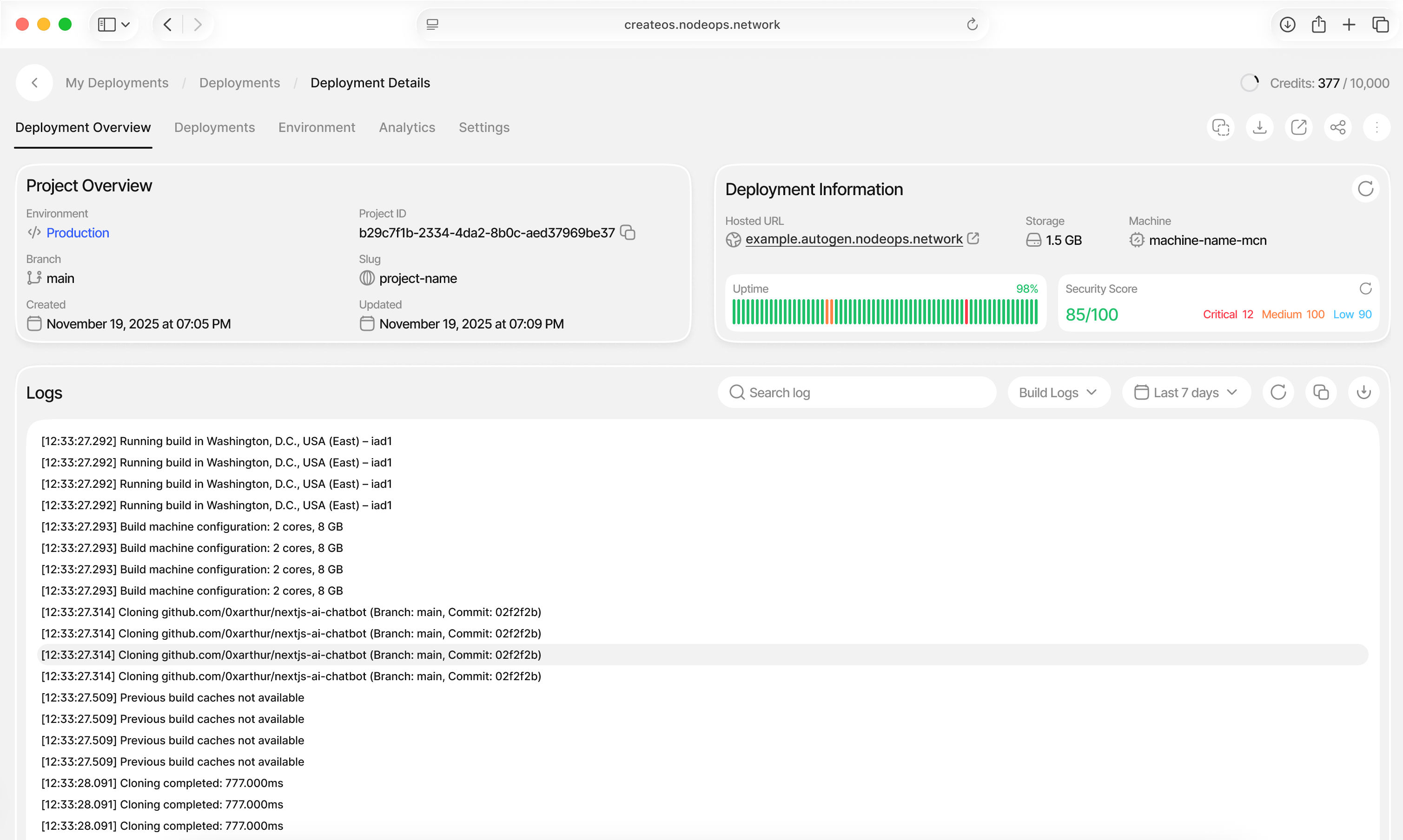
From the deployment dashboard, you can:
* **Monitor Deployments:** Track all active deployments and their status
* **Manage Environments:** Switch between Production, Staging, and custom environments
* **View Analytics:** Access performance metrics and usage data
* **Modify Settings:** Configure custom domains, build commands, and environment variables
* **Access Logs:** Review build and runtime logs
* **Rollback Builds:** Instantly revert to previous versions if needed
## What's Next
You've just deployed a live application on CreateOS using the GitHub flow. Your app is now running, accessible, and fully under your control.
This is only one way to deploy on CreateOS. GitHub is ideal when you already have a repo and want a fast, familiar path to production, but it's not the only execution flow available.
### Continue Your Journey
From here, you can:
* **[Explore Dashboard Settings](https://createos.sh/app/myDeployments):** Deep dive into deployment configuration and optimization
* **Iterate and Redeploy:** Push updates to GitHub and trigger automatic redeployments
* **Monetize Your Work:** List your project as a template or application on the CreateOS marketplace
* **Scale Your Infrastructure:** Add databases, caching layers, and compute resources
* **Automate Workflows:** Set up CI/CD pipelines and environment promotions
## Other Deployment Methods
**Deploy from Docker Image:**
Use pre-built containers for faster deployment and consistent environments.
[Deploy Docker project ->](https://createos.sh/app/deployProject/docker)
**Upload a File:**
Deploy directly from ZIP archives or compressed project files.
[Deploy Manual project folder ->](https://createos.sh/app/deployProject/file-upload)
**Deploy from Template:**
Start with production-ready templates from the CreateOS marketplace.
[Deploy Templates ->](https://createos.sh/app/templates)
# How to Deploy a Database
In this tutorial, you'll learn how to deploy a production-ready database on CreateOS in just a few clicks.
By the end of this guide, you'll have a live PostgreSQL or MongoDB database and know exactly where to find your connection details, ready to plug into your app and keep building.
[Deploy Services →](https://createos.sh/app/deployProject)
## Steps
### Step 1: Access the Deploy Section
1. Go to [CreateOS Platform](https://createos.sh/app/) and sign in
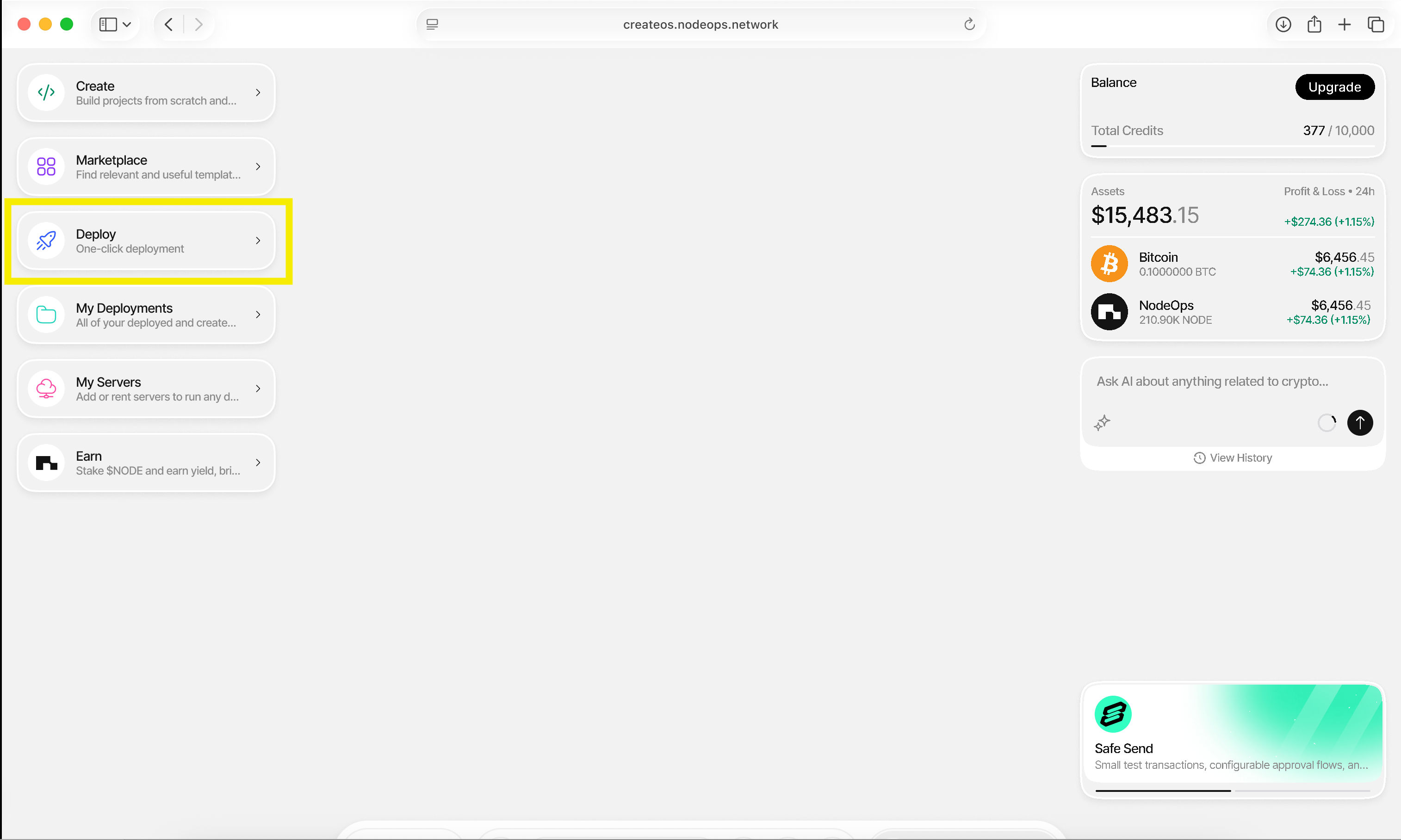
2. Click **"Deploy"** from the menu on the left
### Step 2: Select Database Deployment
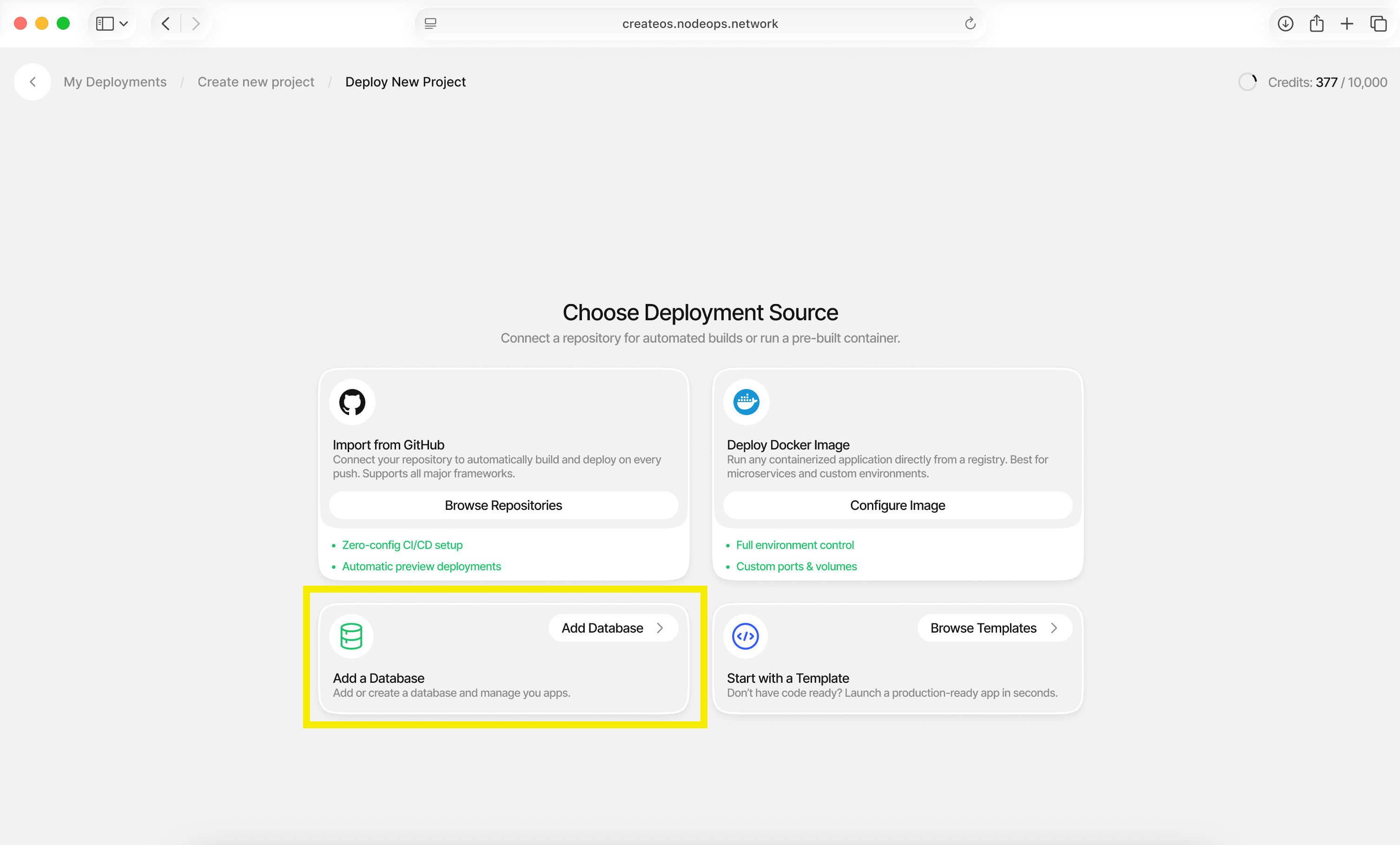
1. Choose **"Deploy a Database"**
### Step 3: Configure Database Settings
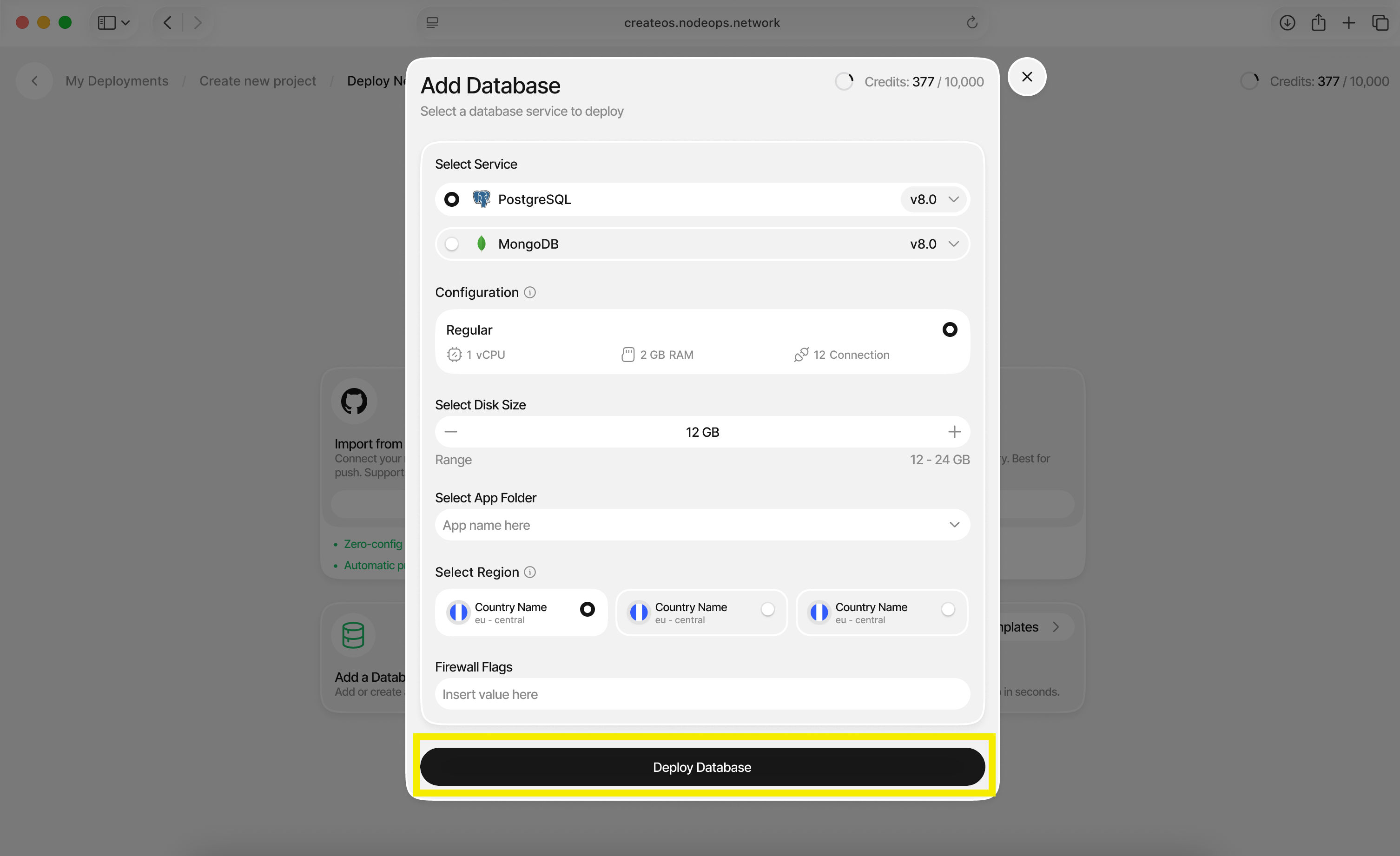
Configure your database with the following options:
| Setting | Description |
| ---------------------- | --------------------------------------------- |
| **Database Type** | Choose between PostgreSQL or MongoDB |
| **Disk Size** | Select the storage capacity for your database |
| **Application Folder** | Organize your database (optional) |
| **Region** | Select the deployment region |
Click **"Deploy Database"** when ready.
### Step 4: Access Connection Details
1. Once deployment is complete, you'll be redirected to the dashboard
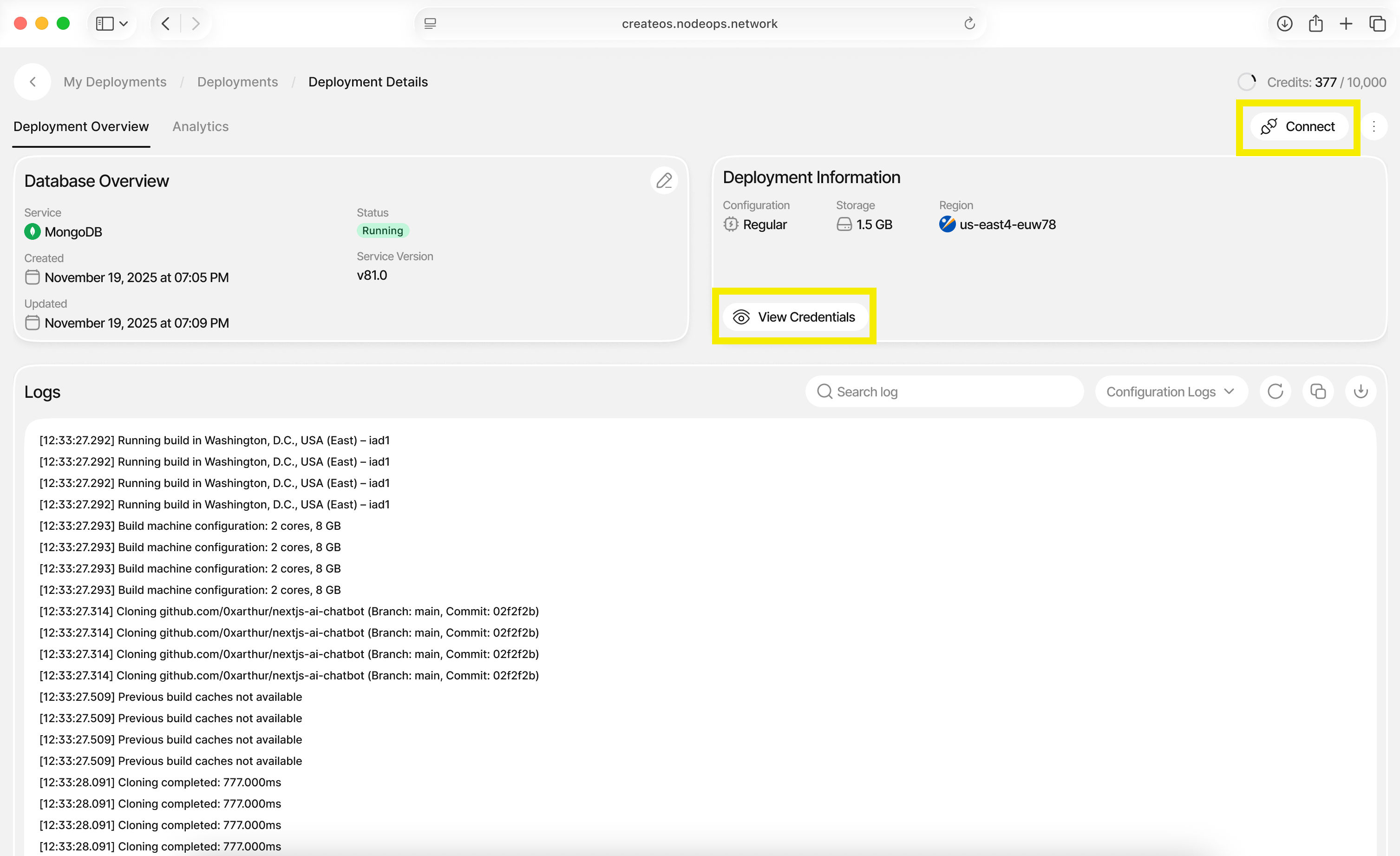
2. Click **"Connect"** on the top right or **"View Credentials"**
3. Copy your connection credentials to use in your application
## What's Next
**That's it. Your database is now live.**
From here, you can copy your credentials, connect your application, and continue building without breaking your execution flow. CreateOS handles the underlying infrastructure so you can stay focused on shipping features, iterating quickly, and moving toward production.
If you haven't already, the next step is to connect this database to your deployed app or explore additional CreateOS features to extend your project.
# Deploy an Application
This tutorial walks you through deploying a ready-made application on CreateOS in just a few minutes.
There are no repositories to configure, no infrastructure decisions to manage. As soon as deployment finishes, your app is live at a unique, persistent, and shareable URL.
By the end of this guide, you'll have a running application you can immediately test, share, and build on.
## Steps
### Step 1: Access the Templates Section
1. Go to [CreateOS Platform](https://createos.sh/app/) and sign in
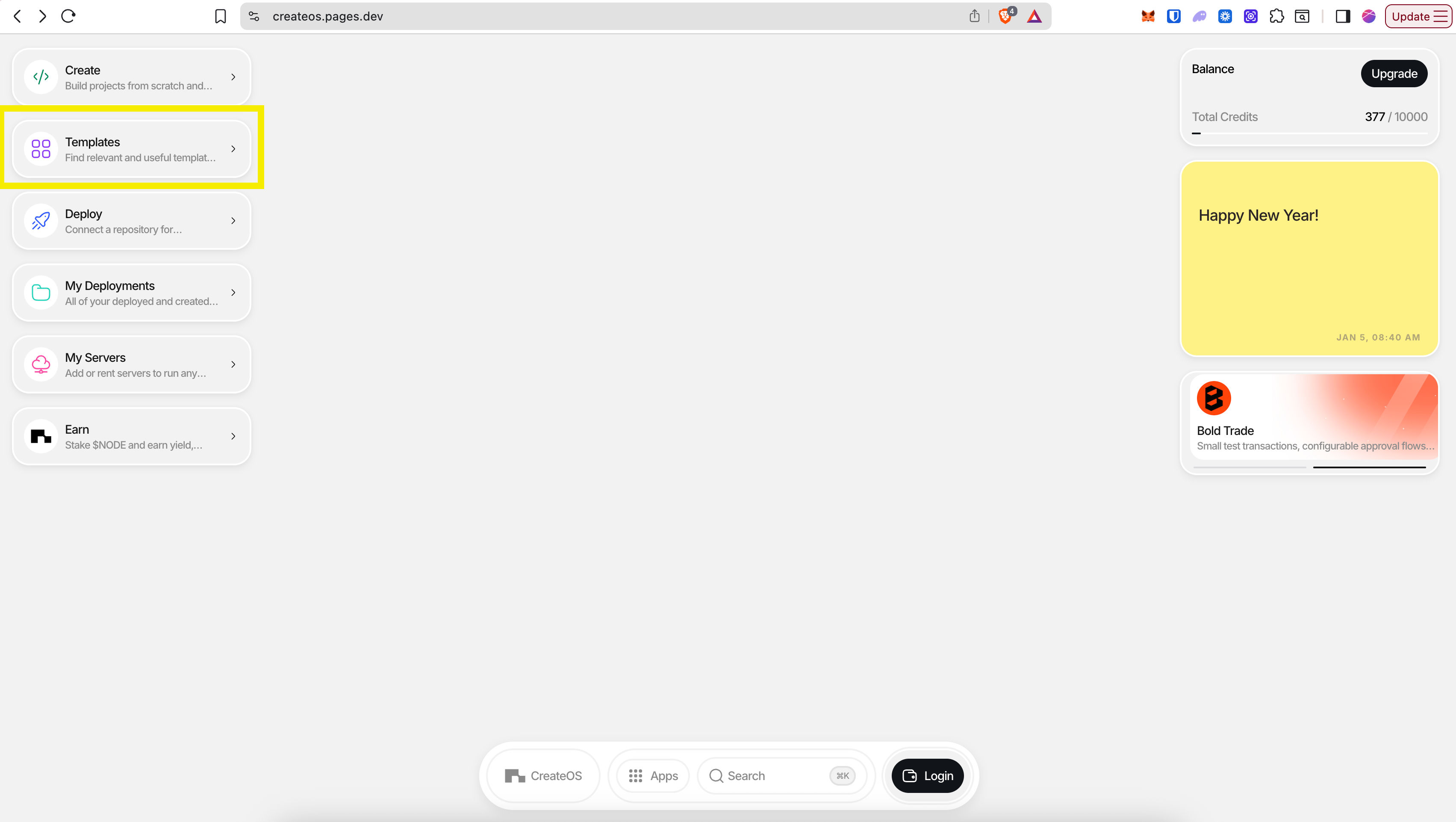
2. Click **"Templates"** from the menu on the left
### Step 2: Browse and Select a Template
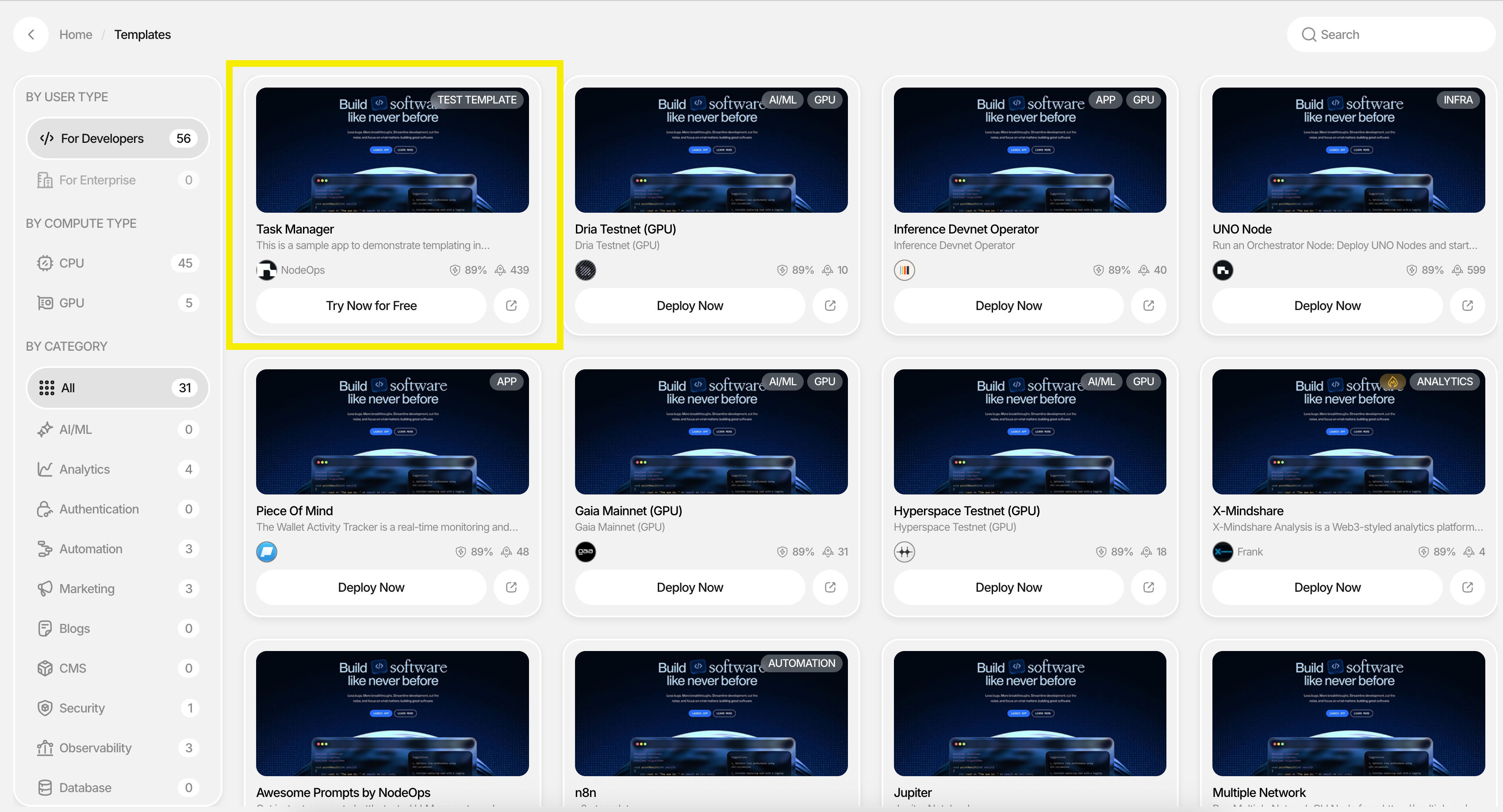
1. You'll be brought to the templates marketplace
2. Filter templates by:
* **Category** (AI/ML, Analytics, Authentication, etc.)
* **Compute Type** (CPU/GPU)
* **User Type** (Developer/Enterprise)
3. For this tutorial, try the free starter template **"Task Manager"** on the top left
### Step 3: Select a Provider
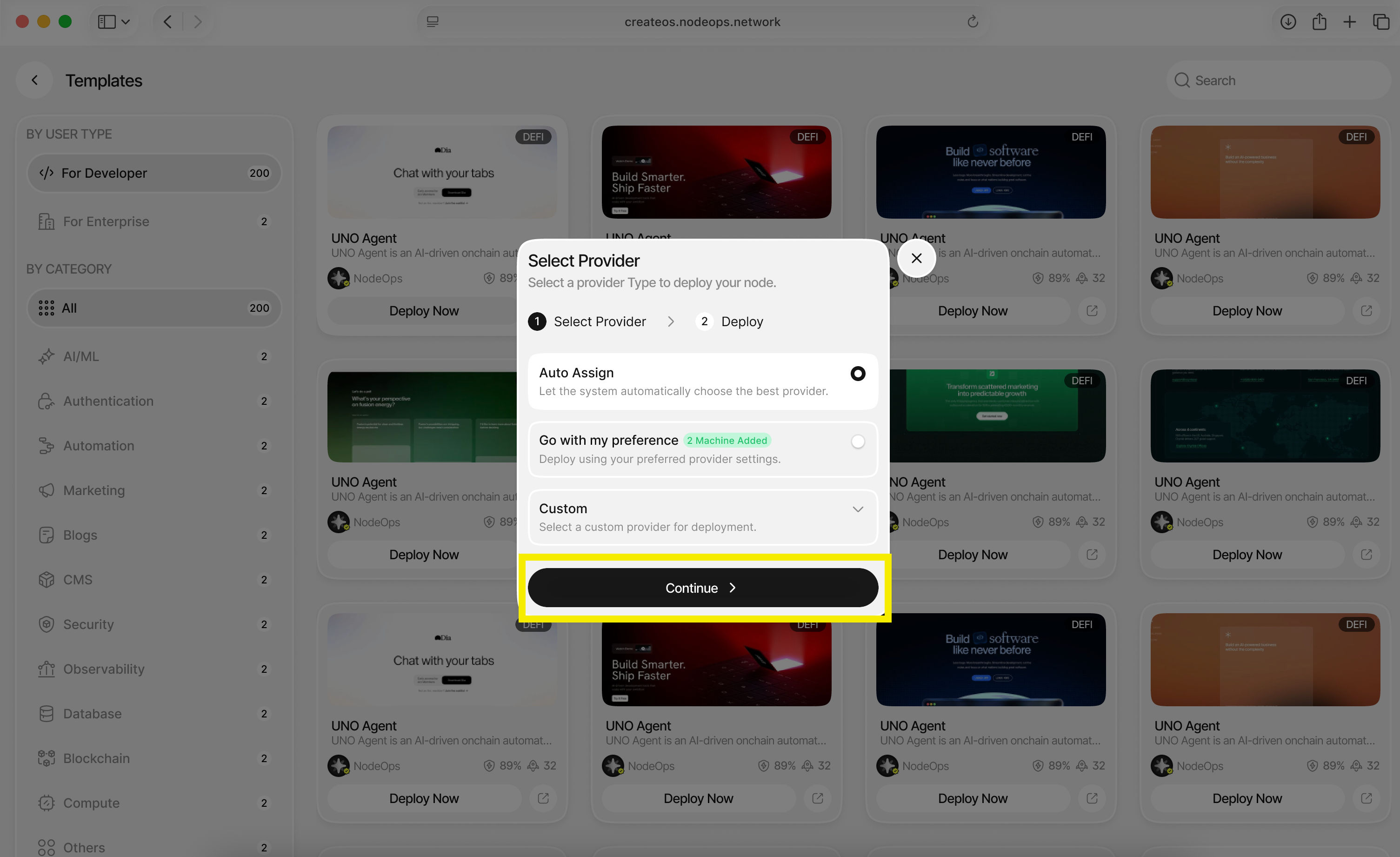
A provider is the server where your application will be deployed.
**Choose one of the following options:**
* **Auto Assign:** Let CreateOS automatically select the best provider (recommended)
* **Go with my preference:** Select a specific server or cluster
* **Custom:** Configure custom server settings
Click **"Continue"** after making your selection.
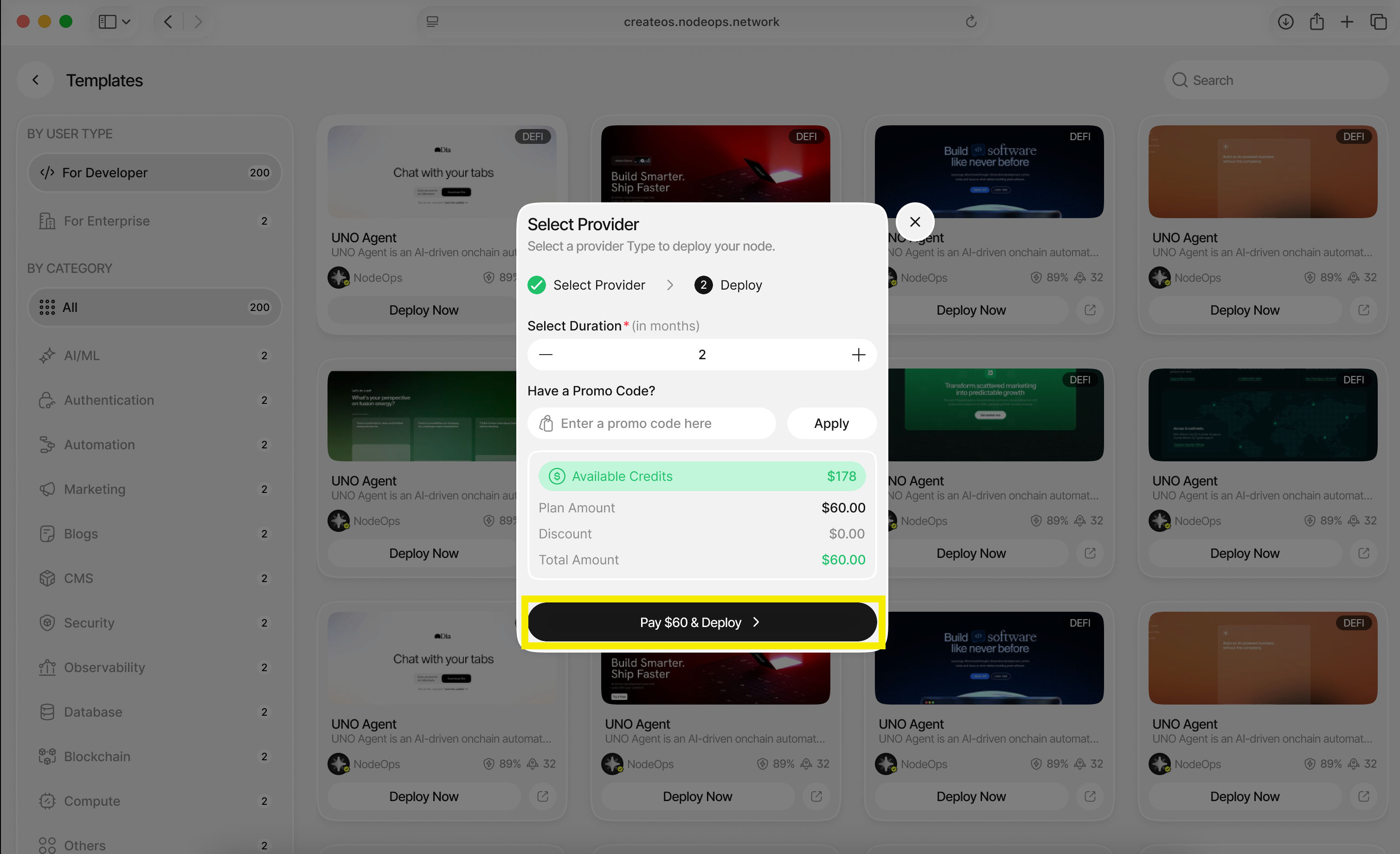
### Step 4: Configure Deployment Duration
In the final dialogue:
1. Select the **duration** you want your application to live for (in months)
2. Enter a **promo code** if you have one
3. Click **"Deploy"**
### Step 5: Access Your Deployed Application
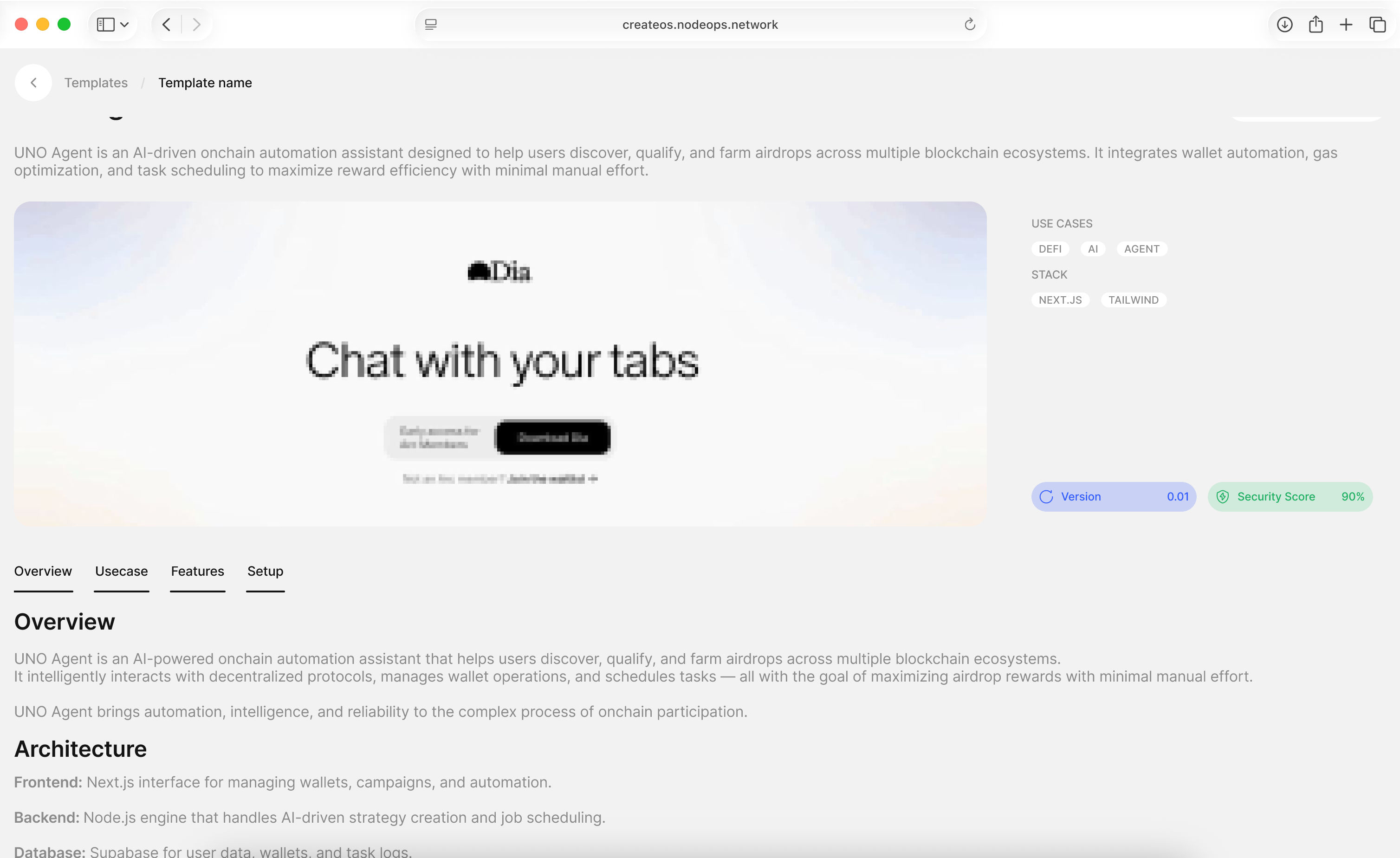
**🎉 Your application has been deployed!**
You will find it under the **Deployments** tab, where you can:
* View your live application URL
* Monitor deployment status
* Access the application dashboard
## What's Next
**Your application is now live.**
In just a few steps, you've gone from selecting a template to deploying a real application with a persistent URL, without setting up servers, pipelines, or switching tools.
# Rent a Server
This tutorial walks you through renting a server on CreateOS in under five minutes.
By the end of this guide, you'll have an active server ready to run workloads, host applications, or power deployments across CreateOS.
[Rent Servers →](https://createos.sh/app/myServers)
## Steps
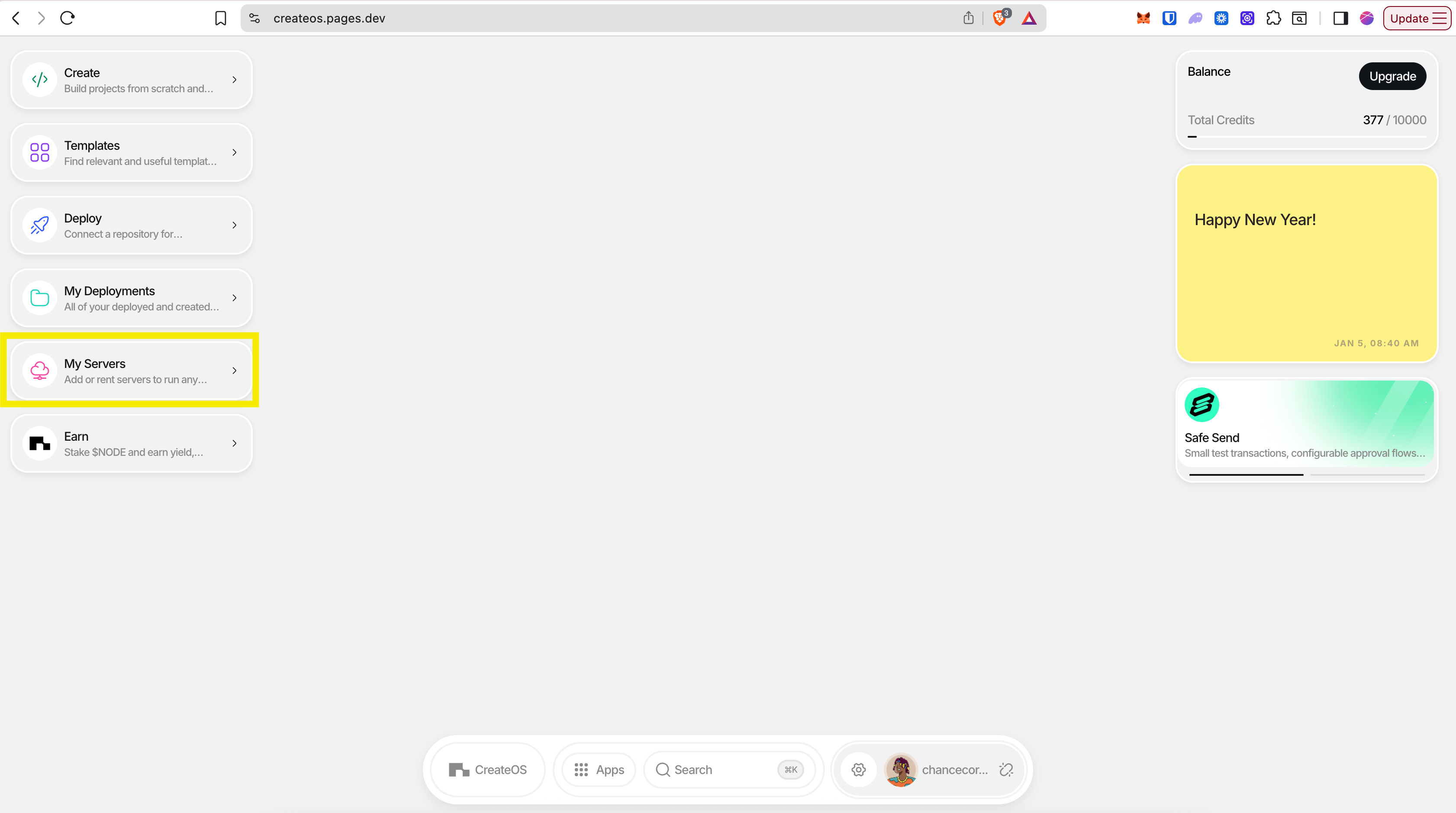
### Step 1: Access My Servers
1. Go to [CreateOS Platform](https://createos.sh/app/) and sign in
2. Click **"My Servers"** from the menu on the left
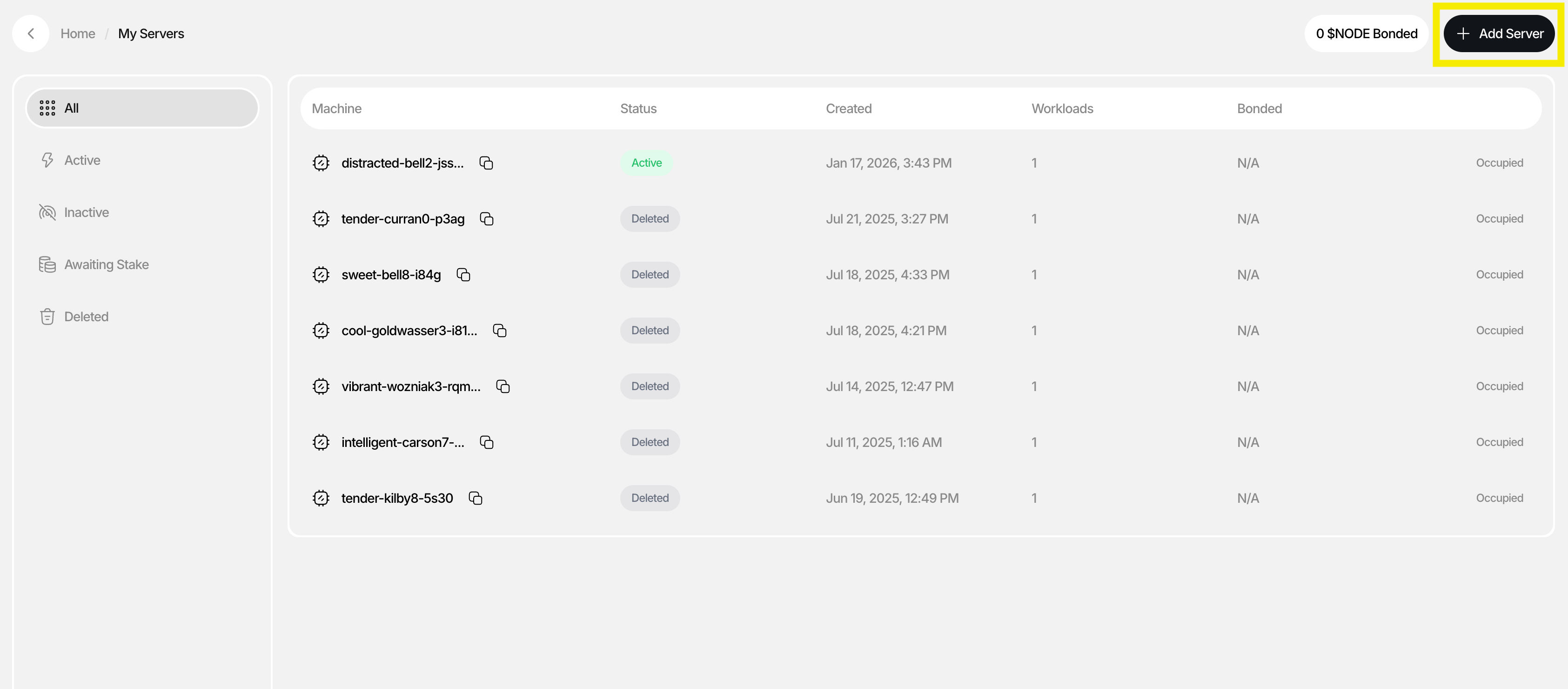
### Step 2: Add a New Server
1. You'll see the "My Servers" page showing all your active and inactive servers
2. Click **"Add Server"** on the top right
### Step 3: Choose Server Type
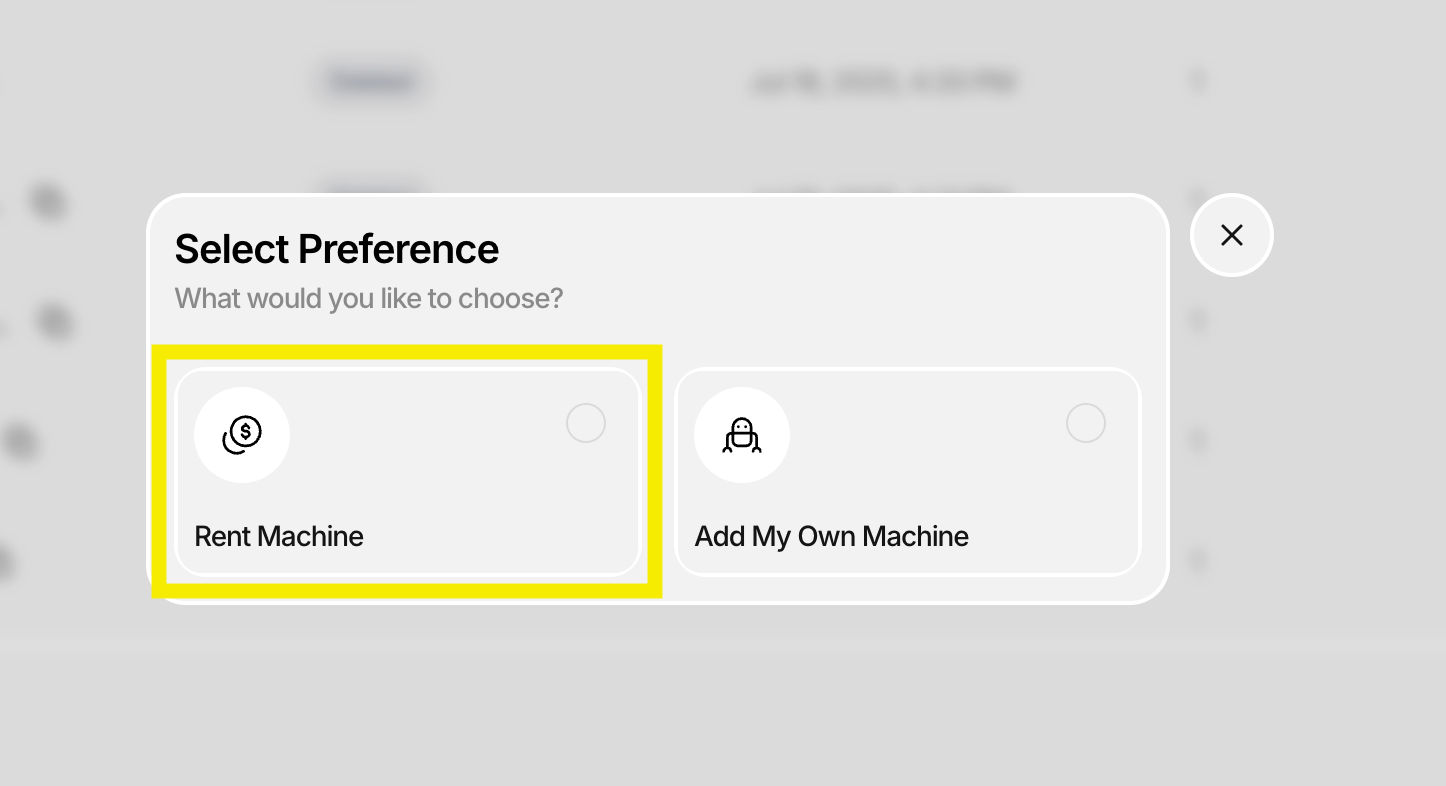
A dialogue will appear with two options:
* **Rent Machine** (recommended for this tutorial)
* **Add Your Own Machine**
Click **"Rent Machine"**
### Step 4: Configure Server Resources
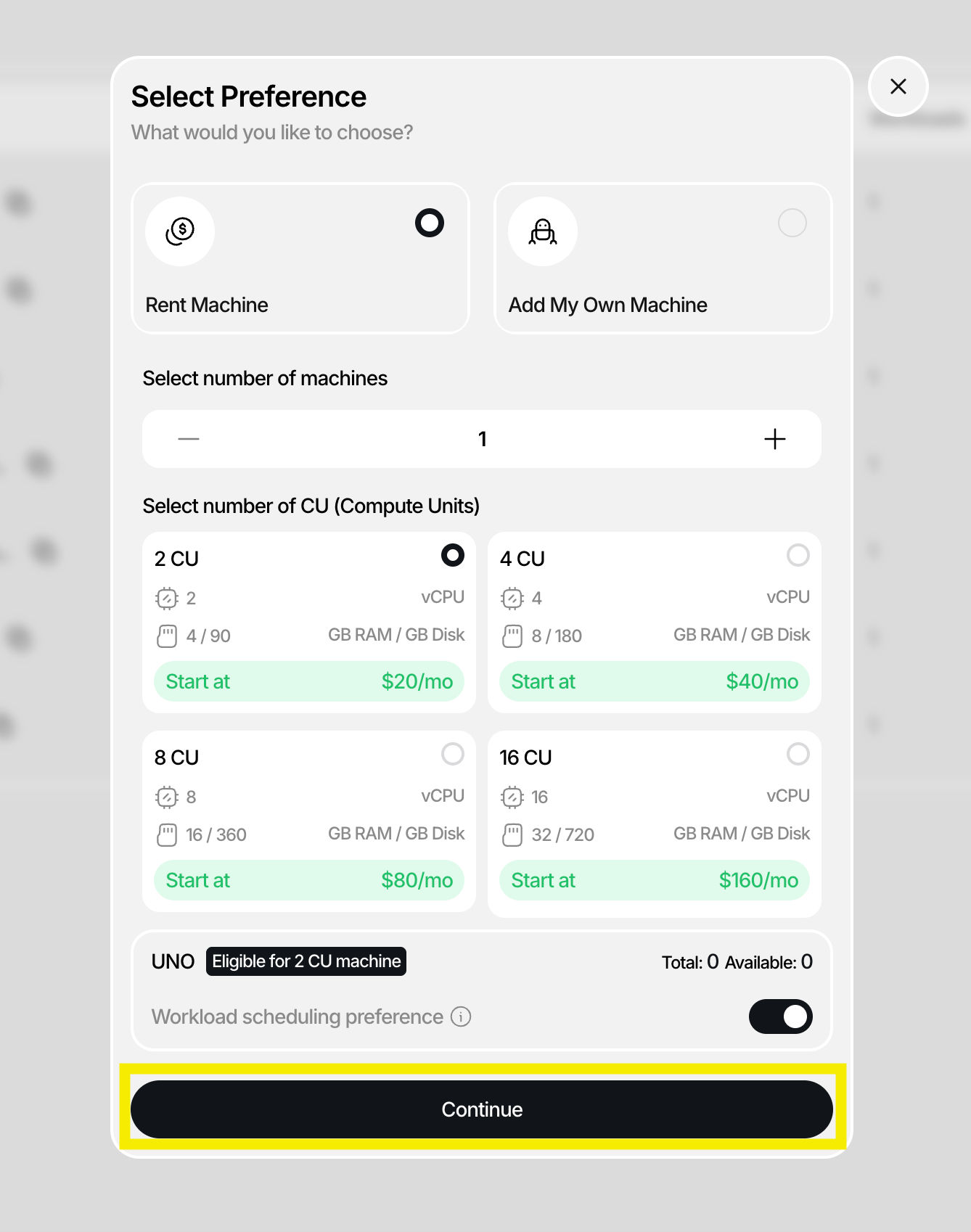
Select your server specifications:
| Setting | Description |
| ---------------------- | --------------------------------- |
| **Number of Machines** | How many servers you want to rent |
| **Compute Units** | CPU/GPU resources per machine |
Click **"Continue"** after configuring.
### Step 5: Set Deployment Duration
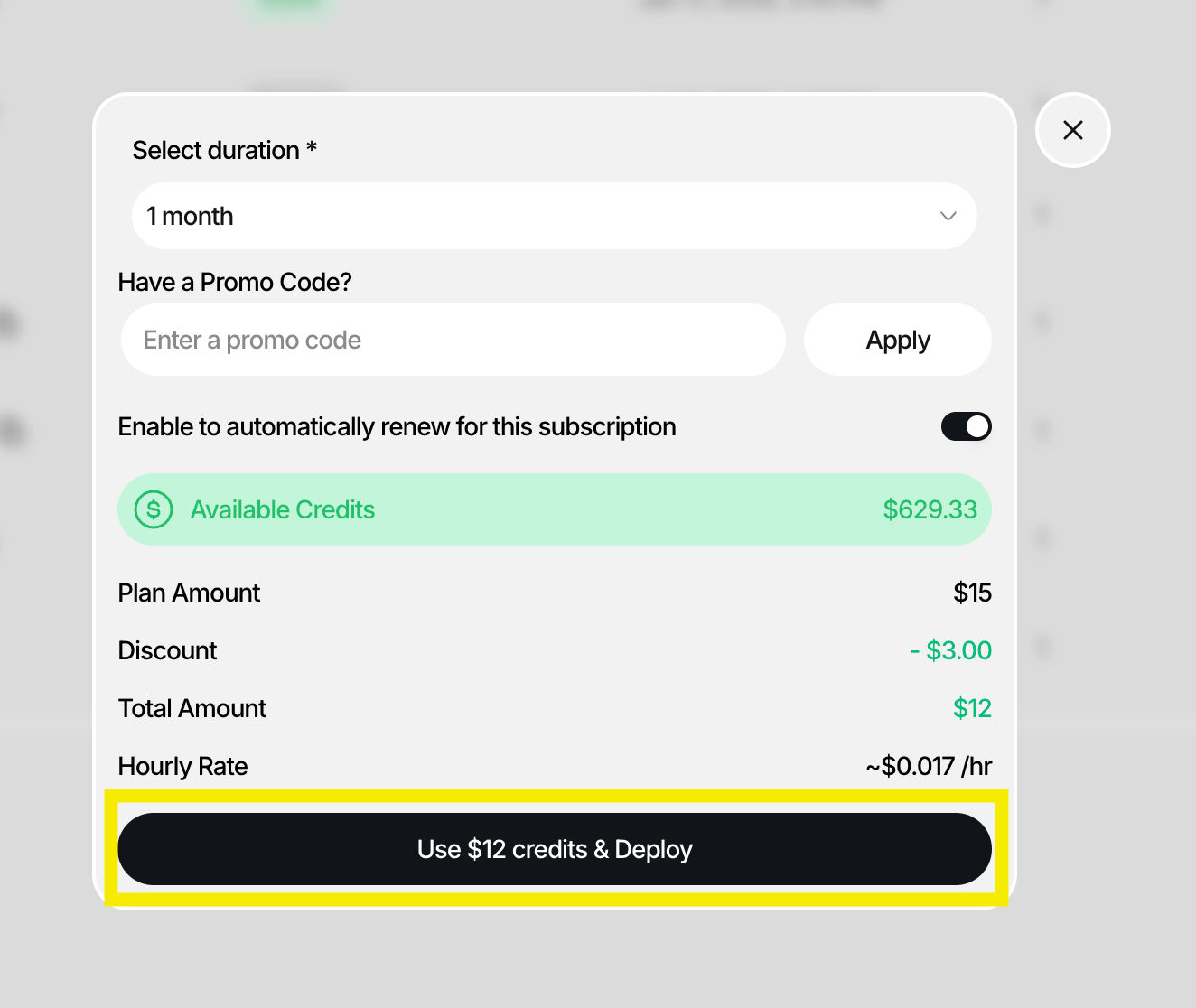
In the final dialogue:
1. Select the **duration** for how long you want the server to be active
2. Enter a **promo code** if you have one
3. Click **"Deploy"**
### Step 6: Verify Server Deployment
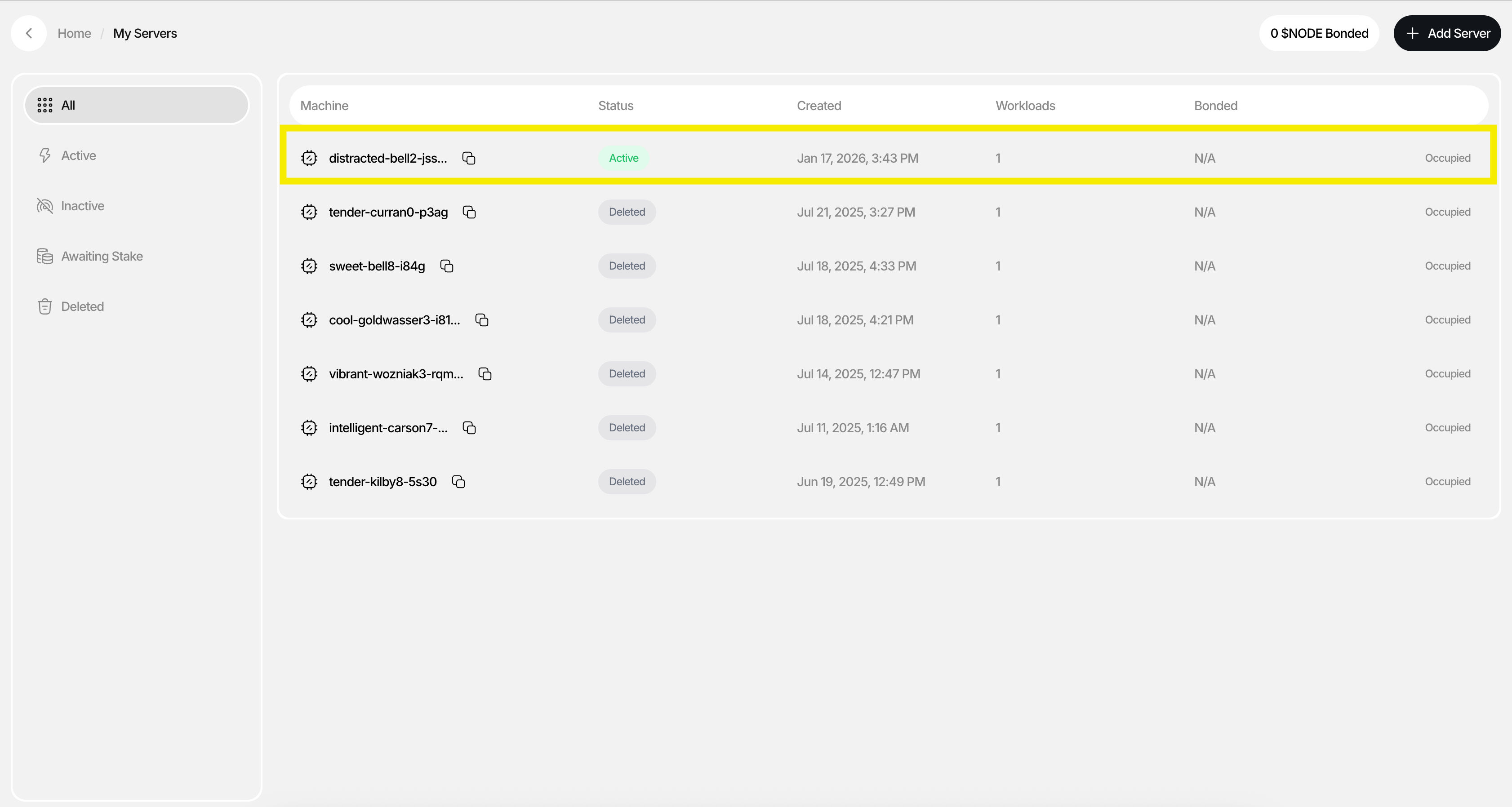
1. If deployment was successful, you'll see your new server in the **My Servers** list with a status of **"Active"**
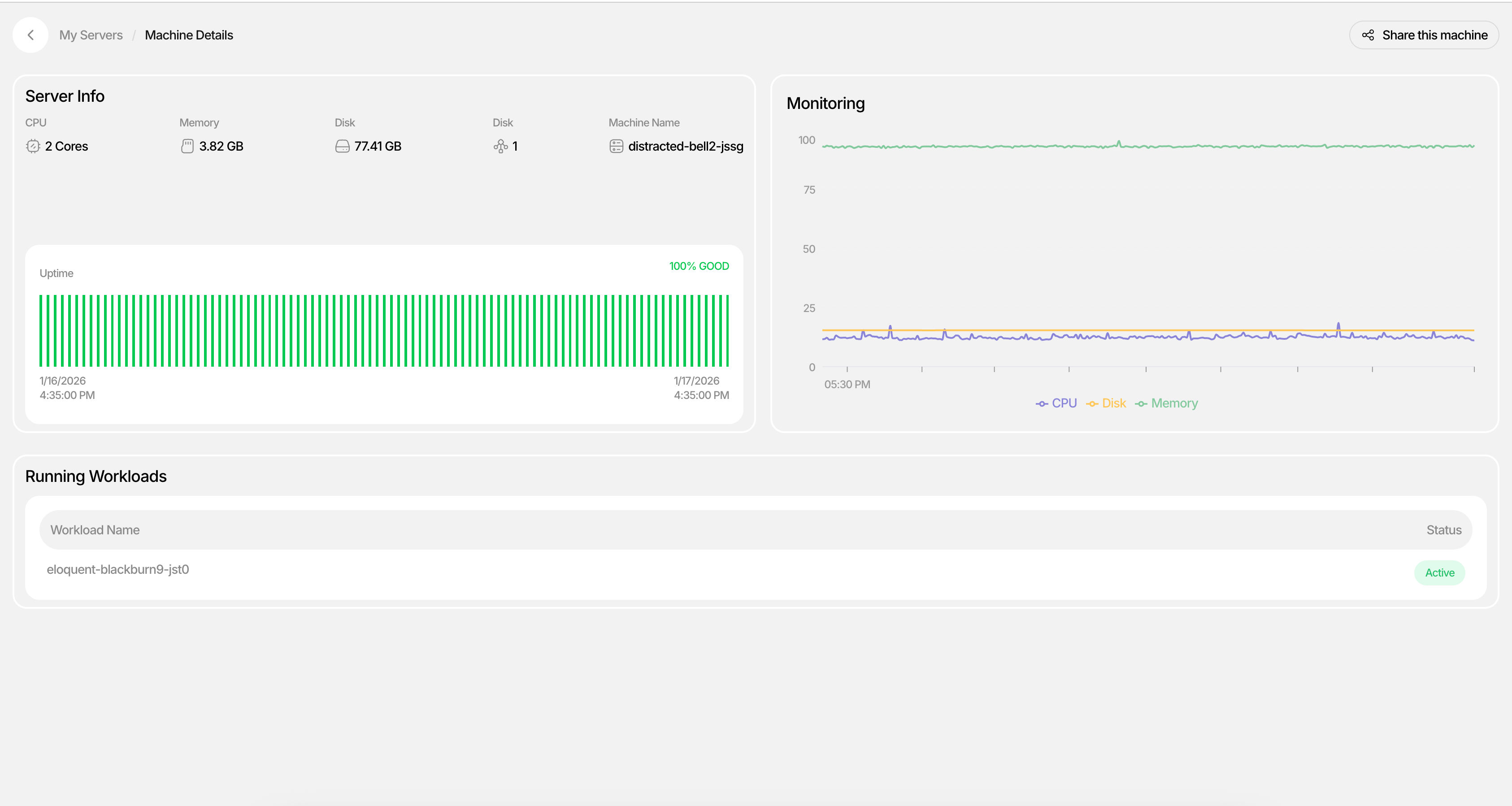
2. Click into the server to view **Machine Details**
3. Monitor **workloads**, **CPU usage**, and **uptime** in real-time
**Your server is now live.**
In just a few steps, you've provisioned a machine with the compute resources you need, with no setup overhead, no long-term commitments, and no context switching. Once deployed, your server appears under My Servers, where you can monitor status, workloads, CPU usage, and uptime in real time.
## What's Next
From here, you can:
* Start deploying applications to your server
* Attach databases and services
* Scale your infrastructure as your project grows
**You've rented your first server. Now put it to work.**
# CLI
The `createos` CLI deploys projects, manages environments and domains, schedules cron jobs, scales workloads and drives sandboxes from a terminal or a CI pipeline. Install it and sign in with [Getting Started](/CLI/Getting-Started), then use the guides below; every command and flag is listed in the [Command Reference](/CLI/Command-Reference). Source: [GitHub](https://github.com/NodeOps-app/createos-cli).
* [Overview](/CLI/Overview)
* [Getting Started](/CLI/Getting-Started)
* [Deployments](/CLI/Deployments)
* [Environment Variables](/CLI/Environment-Variables)
* [Custom Domains](/CLI/Domains)
* [Scaling](/CLI/Scaling)
* [Cron Jobs](/CLI/Cron-Jobs)
* [Sandboxes](/CLI/Sandbox)
* [CI/CD Usage](/CLI/CI-CD)
* [Command Reference](/CLI/Command-Reference)
* [Troubleshooting](/CLI/Troubleshooting)
# CreateOS CLI
The official command-line interface for the CreateOS platform. Deploy, manage, and scale your infrastructure from the terminal.
## What you can do
| Category | Commands | What it does |
| ------------- | ---------------------------- | --------------------------------------------------------- |
| **Deploy** | `deploy` | Push code to production from your terminal |
| **Manage** | `env`, `domains`, `cronjobs` | Environment variables, custom domains, scheduled tasks |
| **Monitor** | `status`, `deployments logs` | Health dashboard, real-time log streaming |
| **Scale** | `scale` | Adjust replicas, CPU, and memory |
| **Sandboxes** | `sandbox` | MicroVM sandboxes: create, exec, shell, sync, and destroy |
| **Scaffold** | `templates`, `init` | Browse templates, link projects |
| **Automate** | `--output json`, `--force` | CI/CD-ready with machine-readable output |
## Requirements
* **macOS** (Intel or Apple Silicon) or **Linux** (x86\_64 or ARM64)
* A CreateOS account (sign up free)
* An existing project on CreateOS (or create one via the dashboard)
## Quick install
```bash
brew tap nodeops-app/tap
brew install createos
```
Or on any platform:
```bash
curl -sfL https://raw.githubusercontent.com/NodeOps-app/createos-cli/main/install.sh | sh -
```
## Quick start
```bash
createos login # sign in via browser
createos init # link to your project
createos deploy # deploy
createos status # check health
```
## Pages in this section
**Guides**
* [Getting Started](/CLI/Getting-Started): Install, authenticate, link, deploy
**Features**
* [Deployments](/CLI/Deployments): Deploy, view logs, retrigger, cancel
* [Environment Variables](/CLI/Environment-Variables): Manage env vars and .env files
* [Custom Domains](/CLI/Domains): Add, verify DNS, manage
* [Scaling](/CLI/Scaling): Replicas, CPU, memory
* [Cron Jobs](/CLI/Cron-Jobs): Scheduled HTTP tasks
* [Sandboxes](/CLI/Sandbox): MicroVM sandboxes for dev, agents, and experiments
* [CI/CD Usage](/CLI/CI-CD): Non-interactive mode, scripting, GitHub Actions
**Reference**
* [Command Reference](/CLI/Command-Reference): Every command with flags and examples
* [Troubleshooting](/CLI/Troubleshooting): Common issues and fixes
## Open source
The CLI is open source and built in Go.
* **GitHub:** github.com/NodeOps-app/createos-cli
* **License:** MIT
# Getting Started
Install the CLI, authenticate, link your project, and deploy in under 2 minutes.
## Prerequisites
* macOS or Linux (Windows: download binary)
* A CreateOS account
## Step 1: Install
### macOS (Homebrew)
```bash
brew tap nodeops-app/tap
brew install createos
```
### macOS / Linux (curl)
```bash
curl -sfL https://raw.githubusercontent.com/NodeOps-app/createos-cli/main/install.sh | sh -
```
### Verify
```bash
createos version
```
Expected output:
```
CreateOS CLI (version: v0.0.7)
Channel: stable
Commit: abc123
```
## Step 2: Authenticate
### Browser login (recommended)
```bash
createos login
```
Opens your default browser for OAuth sign-in. The CLI stores the session and auto-refreshes it, so you won't need to re-login.
### API token (for CI/CD and headless environments)
```bash
createos login --token
```
Paste your API key when prompted. Get your key from **Profile Settings > API Keys** in the CreateOS dashboard.
### Verify authentication
```bash
createos whoami
```
Expected output:
```
ID: abc-123-def
Email: you@example.com
Created At: January 15, 2026
```
## Step 3: Link your project
Navigate to your project directory and link it:
```bash
cd my-api/
createos init
```
The CLI lists your projects and lets you pick one interactively. If you know the ID:
```bash
createos init --project
```
This creates a `.createos.json` file in your directory. All subsequent commands auto-detect the project, so there is no need to pass `--project` every time.
> `.createos.json` is automatically added to `.gitignore`.
## Step 4: Deploy
```bash
createos deploy
```
The CLI auto-detects your project type and deploys:
| Project type | What happens |
| ---------------- | ------------------------------------------ |
| **VCS (GitHub)** | Triggers deployment from the latest commit |
| **Upload** | Zips your local directory and uploads it |
| **Docker image** | Deploys the specified image |
Build logs stream in real-time. When deployment succeeds, you get your live URL:
```
Building v12...
Step 1/4: Installing dependencies...
Step 2/4: Building application...
Step 3/4: Running tests...
Step 4/4: Packaging container...
✓ Deployed (v12)
ℹ Live at: https://my-api.nodeops.app
```
### Deploy a specific branch
```bash
createos deploy --branch staging
```
### Deploy a Docker image
```bash
createos deploy --image myapp:v1.0
```
## Step 5: Verify
Check your project status:
```bash
createos status
```
Open in browser:
```bash
createos open
```
Tail runtime logs:
```bash
createos deployments logs -f
```
## Next steps
| Task | Command | Docs |
| ------------------------- | -------------------------------- | --------------------------------------------------- |
| Set environment variables | `createos env set KEY=value` | [Environment Variables](/CLI/Environment-Variables) |
| Add a custom domain | `createos domains add myapp.com` | [Custom Domains](/CLI/Domains) |
| Scale resources | `createos scale --replicas 2` | [Scaling](/CLI/Scaling) |
| Schedule a cron job | `createos cronjobs create` | [Cron Jobs](/CLI/Cron-Jobs) |
| Use in CI/CD | `createos deploy --project $ID` | [CI/CD Usage](/CLI/CI-CD) |
| See all commands | `createos --help` | [Command Reference](/CLI/Command-Reference) |
## Updating
The CLI checks for updates automatically. To upgrade:
```bash
createos upgrade
```
Or via Homebrew:
```bash
brew tap nodeops-app/tap
brew upgrade createos
```
# Deployments
Create, monitor, and manage deployments from the terminal.
## Deploy
```bash
createos deploy
```
The CLI detects your project type automatically:
* **VCS projects**: deploys from the latest commit on the default branch
* **Upload projects**: zips your local directory and pushes it
* **Image projects**: deploys a Docker image
### Flags
| Flag | Description |
| ----------------- | --------------------------------------------------- |
| `--project ` | Project ID (auto-detected from `.createos.json`) |
| `--branch ` | Branch to deploy from (VCS projects only) |
| `--image [` | Docker image reference (image projects only) |
| `--dir ` | Directory to deploy (upload projects, default: `.`) |
### Examples
```bash
# Deploy from a specific branch
createos deploy --branch staging
# Deploy a Docker image
createos deploy --image myapp:v2.0
# Deploy a specific project in CI
createos deploy --project abc-123-def
```
## List deployments
```bash
createos deployments list
```
Shows all deployments with version, status, URL, and timestamp.
## View logs
### Runtime logs
```bash
createos deployments logs
```
### Real-time log streaming
```bash
createos deployments logs -f
```
Polls every 2 seconds. Press `Ctrl+C` to stop.
### Custom polling interval
```bash
createos deployments logs -f --interval 5s
```
### Build logs
```bash
createos deployments build-logs
```
Shows the build-time output (dependency install, compilation, packaging).
## Retrigger
Re-deploy from the same source:
```bash
createos deployments retrigger
```
## Cancel
Stop a running deployment:
```bash
createos deployments cancel
```
Use `--force` in CI to skip the confirmation prompt.
## Wake up
Resume a sleeping deployment:
```bash
createos deployments wakeup
```
## Interactive selection
When no deployment ID is provided, the CLI lists your deployments and lets you pick one interactively. In non-interactive mode (CI/pipes), pass the deployment ID via positional argument or use the `--project` and `--deployment` flags.
# Managing Environment Variables
Set, view, and sync environment variables between your local development environment and CreateOS.
## List Variables
```bash
createos env list
```
Values are shown in full by default. Use `--hide` to mask them:
```bash
createos env list --hide
```
## Set Variables
```bash
# Set a single variable
createos env set DATABASE_URL=postgres://localhost:5432/mydb
# Set multiple at once
createos env set API_KEY=sk-xxx SECRET=my-secret NODE_ENV=production
```
## Remove a Variable
```bash
createos env rm API_KEY
```
## Sync with Local Files
### Pull remote variables to a local `.env` file
```bash
createos env pull
```
This creates a `.env.` file (e.g., `.env.production`). The CLI auto-adds `.env.*` to your `.gitignore`.
### Push local variables to remote
```bash
createos env push
```
The CLI reads your `.env.` file, shows what will change, and asks for confirmation. Use `--force` to skip confirmation in CI.
### Specify a custom file
```bash
createos env pull --file .env.local
createos env push --file .env.staging
```
## CI/CD Usage
```bash
# Set from CI secrets
createos env set DATABASE_URL=$DB_URL --project --environment
# Pull for local debugging
createos env pull --project --environment --force
```
# Custom Domains
Add, verify, and manage custom domains for your projects.
## Add a Domain
```bash
createos domains add api.myapp.com
```
After adding, the CLI shows the DNS records you need to configure:
```
✓ Domain "api.myapp.com" added successfully.
Configure your DNS with the following records:
Type Name Value
A api.myapp.com 203.0.113.50
TXT _verify.api createos-verify=abc123
```
## Verify DNS Propagation
After configuring DNS records at your registrar:
```bash
createos domains verify
```
The CLI polls every 10 seconds and confirms when verification succeeds:
```
ℹ Waiting for DNS verification of api.myapp.com...
⏳ pending
⏳ pending
✓ Domain api.myapp.com is verified!
```
### Check once without waiting
```bash
createos domains verify --no-wait
```
## List Domains
```bash
createos domains list
```
Shows domain names, linked environment, verification status, and any messages:
```
ID Domain Environment Status Message
abc123 api.myapp.com production ✓ active
def456 staging.app.com staging ⏳ pending Awaiting DNS
```
## Delete a Domain
```bash
createos domains delete
```
Requires confirmation. Use `--force` in CI.
# Scaling Resources
Adjust replicas, CPU, and memory for your project environments from the terminal.
## View Current Settings
```bash
createos scale --show
```
Output:
```
Current scale settings:
Replicas: 1
CPU: 200m
Memory: 512MB
```
## Scale Resources
```bash
createos scale --replicas 2 --cpu 300 --memory 512
```
The CLI shows a before/after comparison:
```
Before After
Replicas 1 2
CPU 200m 300m
Memory 512MB 512MB
✓ Scaling complete.
```
## Limits
| Resource | Min | Max |
| -------- | ----- | ------ |
| Replicas | 1 | 3 |
| CPU | 200m | 500m |
| Memory | 500MB | 1024MB |
The CLI validates these limits before sending the request. If you need higher limits, contact support or use the Enterprise plan.
## Scale Individual Resources
You can adjust one dimension at a time. The others remain unchanged:
```bash
# Only replicas
createos scale --replicas 3
# Only CPU
createos scale --cpu 500
# Only memory
createos scale --memory 1024
```
# Scheduling Cron Jobs
Create and manage HTTP cron jobs that call your API endpoints on a schedule.
## Create a Cron Job
### Interactive
```bash
createos cronjobs create
```
The CLI walks you through naming, schedule, HTTP path, and method selection.
### Non-interactive
```bash
createos cronjobs create \
--name "nightly-cleanup" \
--schedule "0 0 * * *" \
--path /api/cleanup \
--method POST
```
## List Cron Jobs
```bash
createos cronjobs list
```
## View Details
```bash
createos cronjobs get
```
Shows: name, schedule, HTTP settings, status, last run, and next run.
## Update a Cron Job
```bash
createos cronjobs update --name "new-name" --schedule "*/30 * * * *"
```
Only the fields you specify are updated. Everything else stays the same.
## Suspend and Resume
Pause a job without deleting it:
```bash
createos cronjobs suspend
```
Resume:
```bash
createos cronjobs unsuspend
```
## View Execution History
```bash
createos cronjobs activities
```
Shows recent runs with status, duration, and HTTP response codes.
## Delete a Cron Job
```bash
createos cronjobs delete
```
Use `--force` to skip the confirmation prompt (for CI).
## Cron Schedule Syntax
Standard cron expressions:
| Expression | Meaning |
| ------------- | ------------------------ |
| `* * * * *` | Every minute |
| `*/5 * * * *` | Every 5 minutes |
| `0 * * * *` | Every hour |
| `0 0 * * *` | Daily at midnight |
| `0 0 * * 1` | Every Monday at midnight |
| `0 0 1 * *` | First day of every month |
# Sandboxes
The sandbox CLI documentation has moved to the dedicated Sandbox section.
* [Sandbox Overview](/Sandbox/Overview): what sandboxes are and how they work
* [CLI Overview](/Sandbox/CLI/Overview): installation, authentication, global flags, and quickstart
* [Command Reference](/Sandbox/CLI/Commands): every subcommand, flag table, and usage example
# CI/CD Usage
Every CreateOS CLI command works in non-interactive mode. Use flags instead of prompts, `--output json` for machine-readable output, and `--force` to skip confirmation prompts.
## Authentication in CI
Use an API token instead of browser OAuth:
```bash
createos login --token
```
Set the token via environment variable or pipe it in. Get your API key from **Profile Settings > API Keys** in the CreateOS dashboard.
## Common CI commands
### Deploy
```bash
createos deploy --project $CREATEOS_PROJECT_ID
```
### Set environment variables from CI secrets
```bash
createos env set \
DATABASE_URL=$DB_URL \
API_KEY=$API_KEY \
--project $CREATEOS_PROJECT_ID \
--environment $CREATEOS_ENV_ID
```
### Push a local .env file
```bash
createos env push --file .env.production --project $ID --environment $ID --force
```
### Check deployment status
```bash
createos status --project $ID --output json
```
### Delete resources without prompts
```bash
createos domains delete --project $ID --domain $DOMAIN_ID --force
createos deployments cancel --project $ID --deployment $DEPLOY_ID --force
createos cronjobs delete --project $ID --cronjob $CRON_ID --force
```
## JSON output
Add `--output json` or `-o json` to any list or get command:
```bash
# Get project list as JSON
createos projects list --output json
# Parse with jq
createos status --output json | jq '.project.status'
# Use in scripts
DEPLOY_URL=$(createos deployments list -o json | jq -r '.[0].extra.endpoint')
```
## GitHub Actions example
```yaml
name: Deploy to CreateOS
on:
push:
branches: [main]
jobs:
deploy:
runs-on: ubuntu-latest
steps:
- uses: actions/checkout@v4
- name: Install CreateOS CLI
run: curl -sfL https://raw.githubusercontent.com/NodeOps-app/createos-cli/main/install.sh | sh -
- name: Authenticate
run: createos login --token
env:
CREATEOS_API_KEY: ${{ secrets.CREATEOS_API_KEY }}
- name: Deploy
run: createos deploy --project ${{ vars.PROJECT_ID }}
```
## Environment variables
| Variable | Description |
| ------------------ | ----------------------------------------------------------------------- |
| `CREATEOS_API_URL` | Override API base URL (default: `https://api-createos.nodeops.network`) |
| `CREATEOS_DEBUG` | Set to `true` to enable debug logging |
| `CREATEOS_OUTPUT` | Set to `json` for JSON output on all commands |
## Non-interactive behavior
When the CLI detects a non-TTY environment (piped output, CI runner), it:
* Skips all interactive prompts
* Requires explicit flags for any selection (project, environment, deployment)
* Returns clear error messages if required flags are missing
* Outputs JSON by default when piped
```bash
# This works in CI (explicit flags)
createos env list --project abc-123 --environment prod-456
# This fails in CI (would need interactive selection)
createos env list
# Error: non-interactive mode: use --project and --environment flags
```
# CLI Command Reference
Complete reference for all CreateOS CLI commands.
## Global Flags
| Flag | Description |
| -------------------------- | ------------------------------------------------------- |
| `--output json`, `-o json` | Output results as JSON (supported on most commands) |
| `--debug`, `-d` | Print HTTP request/response details (tokens are masked) |
| `--api-url` | Override the API base URL |
| `--help`, `-h` | Show help for any command |
## Authentication
| Command | Description |
| ----------------- | ---------------------------------------- |
| `createos login` | Sign in via browser (OAuth) or API token |
| `createos logout` | Sign out and clear stored credentials |
| `createos whoami` | Show the currently authenticated user |
## Project Management
| Command | Description |
| -------------------------- | ------------------------------------------------ |
| `createos init` | Link the current directory to a CreateOS project |
| `createos projects list` | List all your projects |
| `createos projects get` | Show details for a specific project |
| `createos projects delete` | Delete a project |
## Deployments
| Command | Description |
| --------------------------------- | -------------------------------------------- |
| `createos deploy` | Deploy your project (auto-detects type) |
| `createos deploy --branch ` | Deploy from a specific branch (VCS projects) |
| `createos deploy --image ][` | Deploy a Docker image (image projects) |
| `createos deployments list` | List deployments for a project |
| `createos deployments logs` | View runtime logs |
| `createos deployments logs -f` | Tail logs in real-time |
| `createos deployments build-logs` | View build-time logs |
| `createos deployments retrigger` | Redeploy an existing deployment |
| `createos deployments cancel` | Cancel a running deployment |
| `createos deployments wakeup` | Wake up a sleeping deployment |
## Environment Variables
| Command | Description |
| ---------------------------- | ---------------------------------------------- |
| `createos env list` | List environment variables (masked by default) |
| `createos env set KEY=value` | Set one or more variables |
| `createos env rm KEY` | Remove a variable |
| `createos env pull` | Download variables to a local `.env` file |
| `createos env push` | Upload variables from a local `.env` file |
### Examples
```bash
# Set multiple variables at once
createos env set DATABASE_URL=postgres://... API_KEY=sk-xxx
# Pull to local file for development
createos env pull
# Push from local file to remote
createos env push --force
```
## Scaling
| Command | Description |
| ----------------------------- | ---------------------------------- |
| `createos scale --show` | View current resource allocation |
| `createos scale --replicas N` | Set number of replicas (1 to 3) |
| `createos scale --cpu N` | Set CPU in millicores (200 to 500) |
| `createos scale --memory N` | Set memory in MB (500 to 1024) |
### Example
```bash
createos scale --replicas 2 --cpu 300 --memory 512
```
## Cron Jobs
| Command | Description |
| ------------------------------ | --------------------------- |
| `createos cronjobs list` | List all cron jobs |
| `createos cronjobs create` | Create a new cron job |
| `createos cronjobs get` | Show details for a cron job |
| `createos cronjobs update` | Update a cron job |
| `createos cronjobs delete` | Delete a cron job |
| `createos cronjobs suspend` | Pause a cron job |
| `createos cronjobs unsuspend` | Resume a paused cron job |
| `createos cronjobs activities` | View execution history |
### Example
```bash
createos cronjobs create \
--name "nightly-cleanup" \
--schedule "0 0 * * *" \
--path /api/cleanup \
--method POST
```
## Custom Domains
| Command | Description |
| ------------------------------- | -------------------------------- |
| `createos domains list` | List custom domains |
| `createos domains add ` | Add a domain (shows DNS records) |
| `createos domains verify` | Check DNS propagation and wait |
| `createos domains delete` | Remove a domain |
### Workflow
```bash
# Add a domain: shows required DNS records
createos domains add api.myapp.com
# After configuring DNS, verify propagation
createos domains verify
# Or check once without waiting
createos domains verify --no-wait
```
## Templates
| Command | Description |
| ------------------------------ | ------------------------------- |
| `createos templates list` | Browse available templates |
| `createos templates info ` | Show template details |
| `createos templates use ` | Download and scaffold a project |
## Status & Open
| Command | Description |
| --------------------------- | --------------------------- |
| `createos status` | Project health dashboard |
| `createos open` | Open project URL in browser |
| `createos open --dashboard` | Open the CreateOS dashboard |
## VMs
| Command | Description |
| ------------------------ | ----------------- |
| `createos vms list` | List VM instances |
| `createos vms get` | VM details |
| `createos vms deploy` | Deploy a new VM |
| `createos vms ssh` | SSH into a VM |
| `createos vms reboot` | Reboot a VM |
| `createos vms resize` | Change VM size |
| `createos vms terminate` | Destroy a VM |
## Sandboxes
Alias: `createos sb`
MicroVM sandboxes powered by fc-spawn. See the [Sandboxes guide](/CLI/Sandbox) for full examples.
### Lifecycle
| Command | Description |
| ----------------------------------- | ----------------------------------------------- |
| `createos sandbox create` | Create a new sandbox |
| `createos sandbox list` | List sandboxes (default: running only) |
| `createos sandbox get ` | Show sandbox details |
| `createos sandbox edit ` | Change settings (ingress, SSH keys, auto-pause) |
| `createos sandbox pause ` | Snapshot and pause a running sandbox |
| `createos sandbox resume ` | Resume a paused sandbox |
| `createos sandbox fork ` | Clone a paused sandbox |
| `createos sandbox rm ` | Delete one or more sandboxes |
### Execution and files
| Command | Description |
| -------------------------------------------------- | ------------------------- |
| `createos sandbox exec -- ` | Run a one-shot command |
| `createos sandbox shell ` | Open an interactive shell |
| `createos sandbox push ` | Upload a file |
| `createos sandbox pull ` | Download a file |
| `createos sandbox sync ` | Two-way directory sync |
### Networking
| Command | Description |
| ----------------------------------------------------- | ----------------------------------- |
| `createos sandbox tunnel ` | Forward a local port to the sandbox |
| `createos sandbox network create ` | Create a private network |
| `createos sandbox network ls` | List networks |
| `createos sandbox network attach ` | Attach sandbox to network |
| `createos sandbox network detach ` | Detach sandbox from network |
| `createos sandbox firewall show ` | Show egress allowlist |
| `createos sandbox firewall set ` | Set egress allowlist |
| `createos sandbox firewall clear ` | Allow all outbound traffic |
### Disks and images
| Command | Description |
| ----------------------------------------------------- | ----------------------------------------- |
| `createos sandbox disk create ` | Register an S3 bucket as a mountable disk |
| `createos sandbox disk ls` | List disks |
| `createos sandbox disk attach :/path` | Attach disk to running sandbox |
| `createos sandbox template submit ` | Build a custom image from a Dockerfile |
| `createos sandbox template ls` | List custom templates |
| `createos sandbox shapes` | List available sandbox sizes |
| `createos sandbox rootfs` | List built-in OS images |
### Examples
```bash
# Create and run a command
createos sandbox create --shape s-1vcpu-256mb --name dev
createos sandbox exec dev -- python3 --version
# Public URL for demos
createos sandbox create --shape s-1vcpu-1gb --ingress
# Port-forward a dev server
createos sandbox tunnel dev --local 8080 --remote 3000
# Script-friendly cleanup
createos sandbox list --quiet --status failed | xargs createos sandbox rm --force
```
## Skills Marketplace
| Command | Description |
| --------------------------- | ----------------------------------------------- |
| `createos skills catalog` | Browse the skills marketplace (interactive TUI) |
| `createos skills purchased` | List your purchased skills |
## OAuth Clients
| Command | Description |
| ------------------------------------- | ------------------------------- |
| `createos oauth-clients list` | List your OAuth clients |
| `createos oauth-clients create` | Create a new OAuth client |
| `createos oauth-clients delete` | Delete an OAuth client |
| `createos oauth-clients instructions` | Setup instructions for a client |
## Other
| Command | Description |
| ------------------ | ----------------------------------------------- |
| `createos upgrade` | Self-update to the latest version |
| `createos version` | Print version, channel, and commit |
| `createos ask` | Open AI assistant for infrastructure management |
## Non-Interactive / CI Usage
All commands work in CI pipelines using flags instead of interactive prompts:
```bash
# Authenticate with token
createos login --token
# Deploy with explicit project
createos deploy --project
# Set env vars
createos env set KEY=value --project --environment
# Delete with force (skip confirmation)
createos domains delete --project --domain --force
createos deployments cancel --project --deployment --force
# JSON output for scripting
createos projects list --output json
createos status --output json | jq .
```
# Troubleshooting
Common issues and how to resolve them.
## "you're not signed in"
**Cause:** Your session has expired or you haven't logged in.
```bash
createos login
```
For CI environments:
```bash
createos login --token
```
## "no project linked to this directory"
**Cause:** No `.createos.json` file found in the current directory or any parent directory.
```bash
createos init
```
Or specify the project explicitly:
```bash
createos deploy --project
```
To find your project ID:
```bash
createos projects list
```
## "command not found: createos"
**Cause:** The CLI binary is not in your PATH.
### If installed via Homebrew
```bash
brew link createos
```
### If installed via curl
The installer places the binary in `/usr/local/bin`. Verify:
```bash
ls -la /usr/local/bin/createos
```
If missing, reinstall:
```bash
curl -sfL https://raw.githubusercontent.com/NodeOps-app/createos-cli/main/install.sh | sh -
```
## Deploy hangs or times out
**Cause:** Build is taking longer than expected, or there's a network issue.
1. Check build logs:
```bash
createos deployments build-logs
```
2. If the deployment is stuck, cancel and retry:
```bash
createos deployments cancel
createos deploy
```
3. Enable debug mode to see HTTP requests:
```bash
createos --debug deploy
```
## Interactive prompts not working
**Cause:** You're running in a non-TTY environment (CI, pipe, script).
Use explicit flags instead:
```bash
# Instead of interactive selection
createos env list --project --environment
# Skip confirmations
createos domains delete --project --domain --force
```
## "environment not found"
**Cause:** The environment ID in `.createos.json` no longer exists, or you have multiple environments and need to specify one.
```bash
# List available environments
createos environments list
# Use a specific environment
createos env list --environment
# Re-link with correct environment
createos init --project
```
## Updating the CLI
If you're on an old version and something isn't working:
```bash
createos upgrade
```
Or via Homebrew:
```bash
brew upgrade createos
```
Check your current version:
```bash
createos version
```
## Debug mode
For any issue, run the command with `--debug` to see full HTTP request/response details:
```bash
createos --debug status
```
Tokens are automatically masked in debug output.
## Getting help
* **CLI help:** `createos --help`
* **GitHub Issues:** Report a bug
* **Documentation:** [CLI Docs](/CLI/Overview)
# Build & Deploy
How a project goes from an idea to a live URL on CreateOS: [Create](/Build-Deploy/Create) a project with AI or from scratch, [Deploy](/Build-Deploy/Deploy) it from GitHub, Docker or an upload, start from a [Template or App](/Build-Deploy/Templates-And-Apps), and embed [Widgets](/Build-Deploy/Widgets). The same flows are available from the [CLI](/CLI) and over [MCP](/API-MCP/CreateOS-MCP).
* [Create](/Build-Deploy/Create)
* [Deploy](/Build-Deploy/Deploy)
* [Template & Apps](/Build-Deploy/Templates-And-Apps)
* [Widgets](/Build-Deploy/Widgets)
# Create
**Create** is a vibe-coding experience that allows you to build **full-stack applications end-to-end** using the AI model of your choice. You can select from **all top-tier LLMs**, available under **CreateOS's unified credit system**, eliminating the need to manage multiple model subscriptions independently. This enables rapid experimentation, development, and iteration from a single workspace.
## What Can You Create?
You can build **any type of frontend or backend application** using your chosen LLM. While the generated code is production-oriented, we recommend reviewing the output before deployment, as AI-generated code may occasionally require adjustments.
[Start Creating →](https://createos.sh/app/landing)
### Example Use Cases
These are just a few examples, feel free to explore and build creatively without limitations:
#### 1. Websites
* Marketing websites
* Landing pages
* Product websites
*Design a calm, premium landing page for Luma, a curated, application-based IRL event platform. The aesthetic should feel like a private members club: minimal, editorial, quiet, and intentional. Use large typography, muted colors, generous whitespace, and subtle depth.*

#### 2. Games
* Browser-based games
* Interactive demos
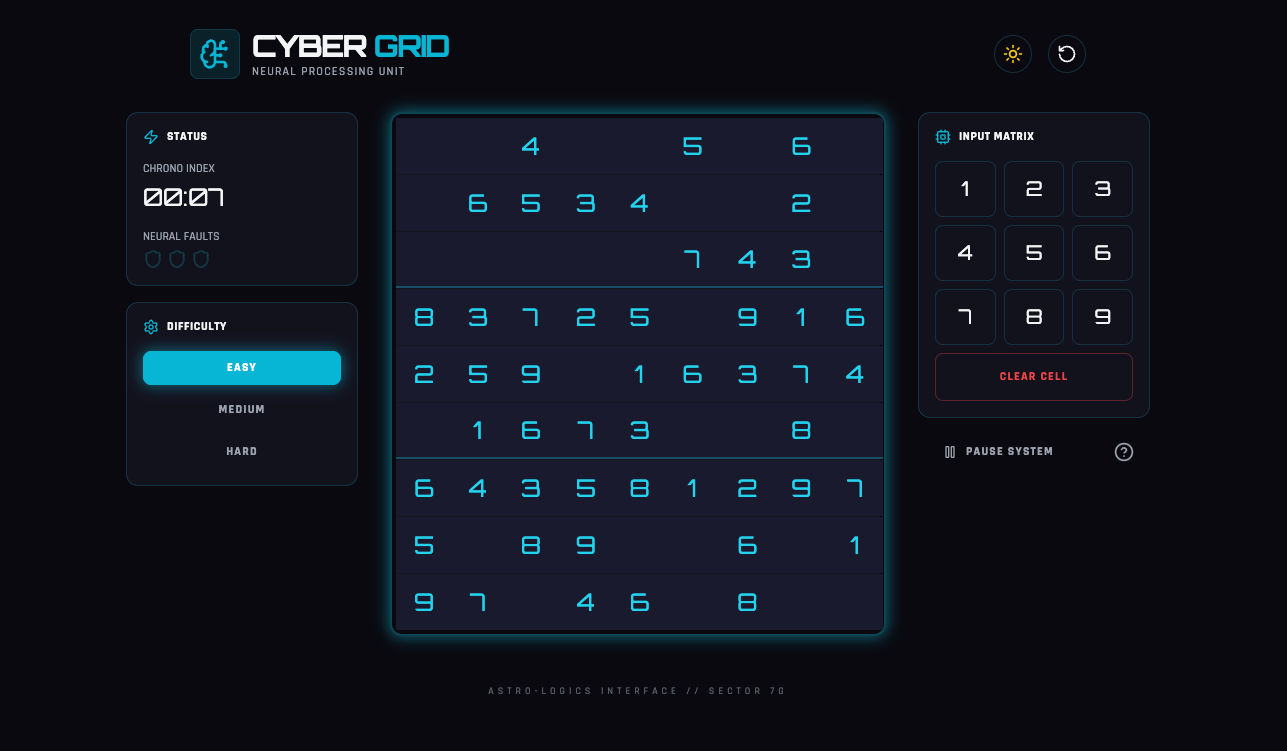
*Build me a sudoku like gaming app using vanilla js and make it a sci-fi theme with a light and dark theme*
#### 3. Productivity Applications
* Task managers
* URL shorteners
* Password strength detectors
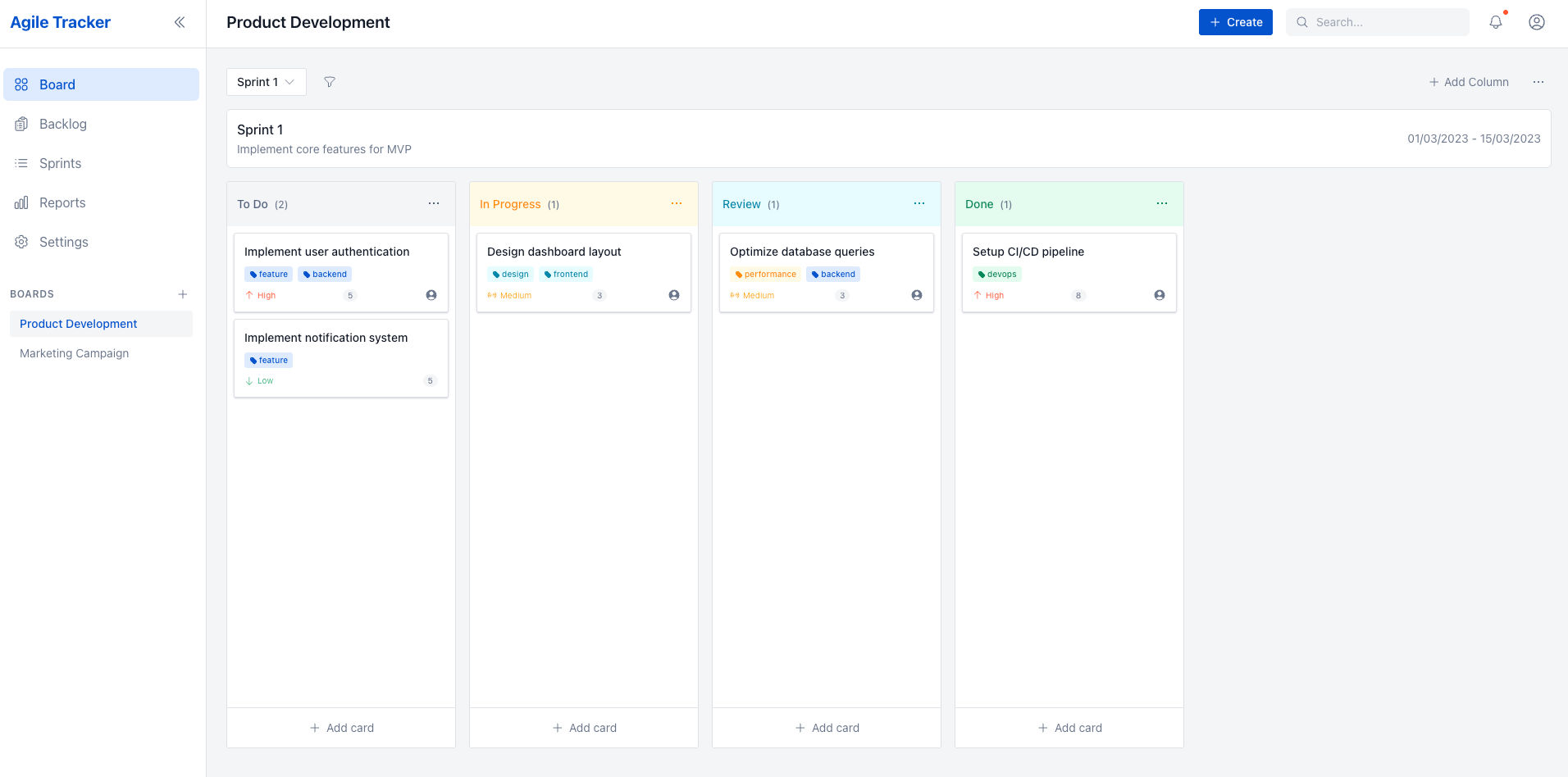
*Create a ticketing/project management system like Jira. I want the UI to be neat and professional but at the same time modern; like how atlassian does it. I need to use Kanban and it even has to be agile/scrum friendly. I even need functionalities to add story points*
## Preview Your Application
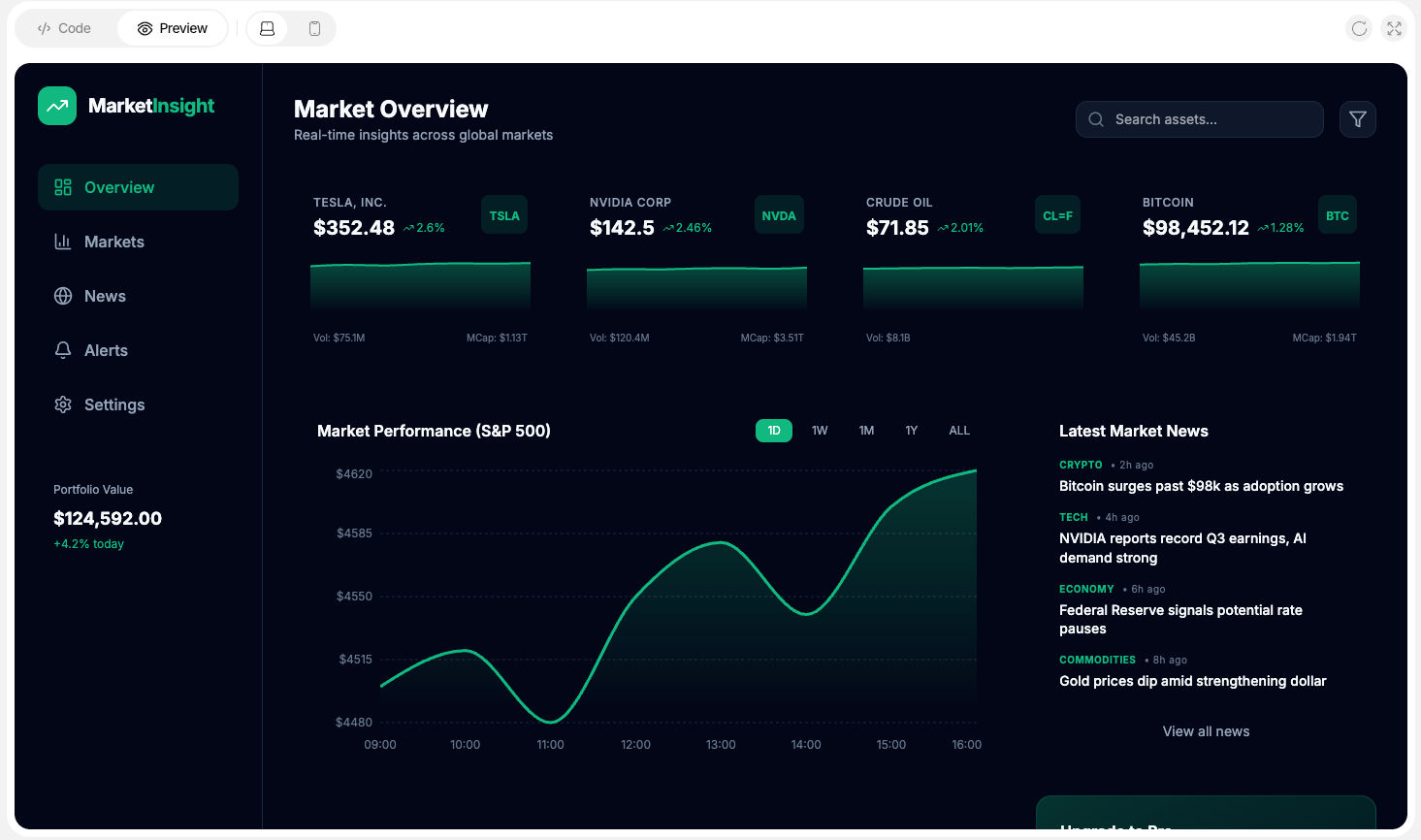
Once code generation is complete, you can preview your application directly within the CreateOS UI.
**Preview Features:**
* Desktop and mobile views
* Live refresh
* Full-screen preview mode
This allows you to validate UI, behavior, and responsiveness before deployment.
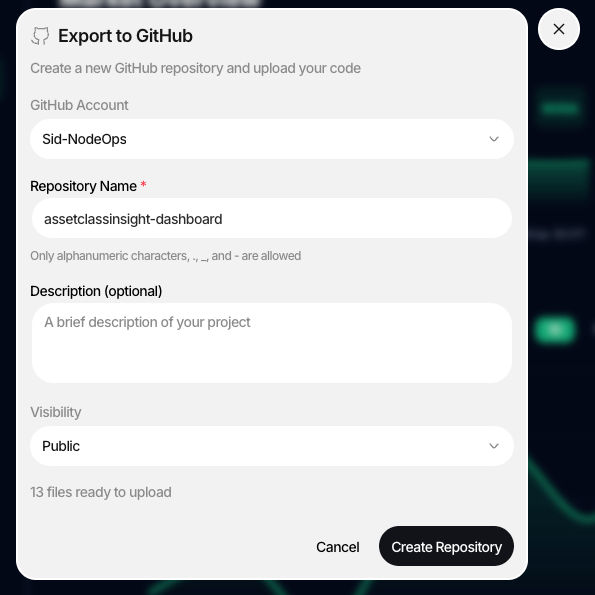
## Upload your project to GitHub
After creating a project, you can push the generated code to GitHub in just a few clicks.
**Available Options:**
* Direct GitHub push from CreateOS
* Manual download and upload to GitHub
This flexibility allows you to integrate seamlessly with your existing workflows.
## Deploy Your Vibe-Coded Application
Once your project is generated in the Create Flow, you can seamlessly move it into production using CreateOS's integrated deployment pipeline. By linking your repository to GitHub, you can deploy your application in minutes, manage continuous integration and delivery, and iterate rapidly using built-in AI-assisted tooling.
### Deployment Process
**Once your project is created:**
1. Link the project via GitHub
2. Deploy the application within minutes
3. Manage CI/CD through the **Deploy Flow**
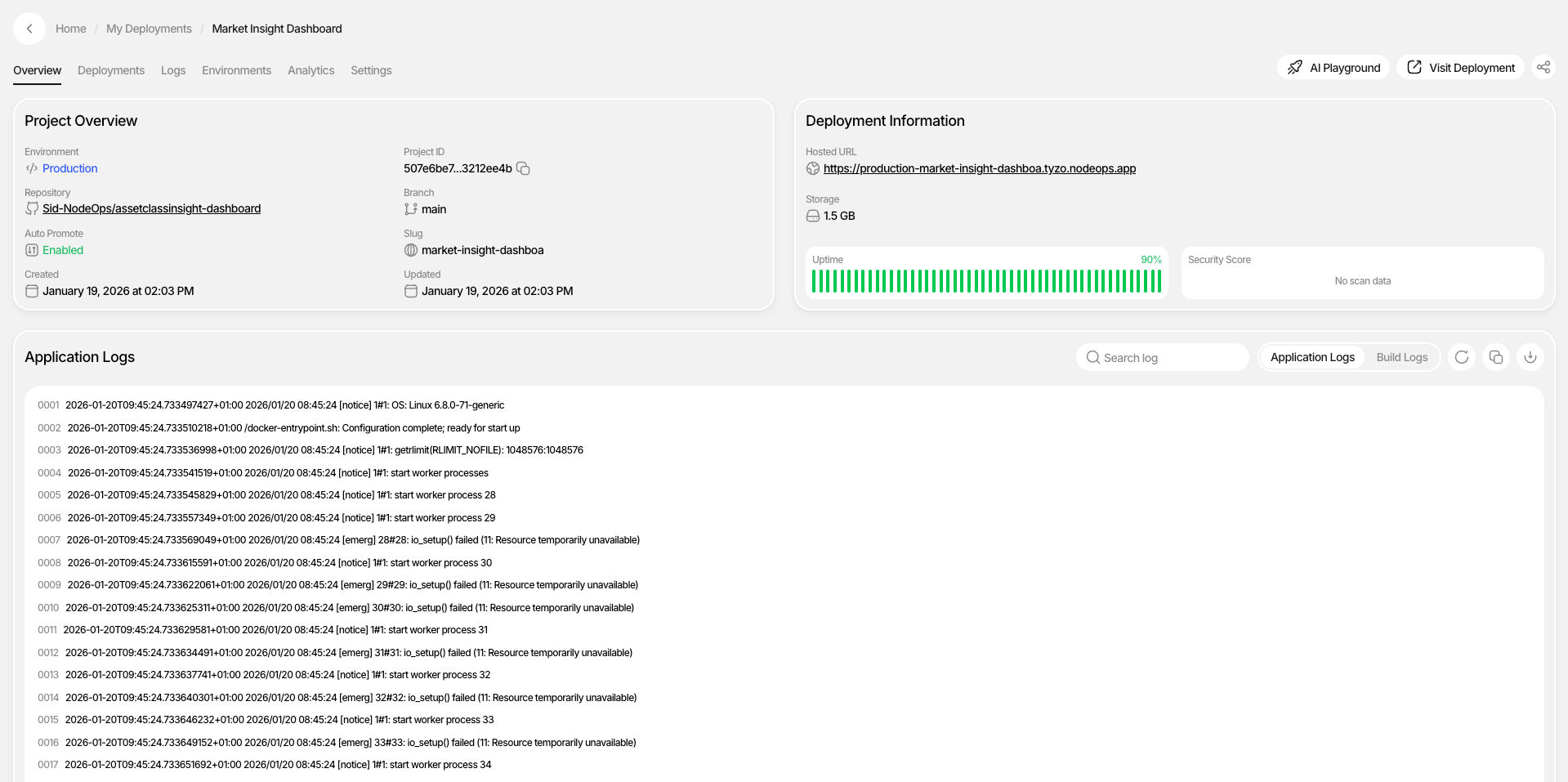
**After deployment:**
* The project appears in the **My Apps** section
* Manage builds, deployments, and updates from one dashboard
* Use the **AI Playground** to modify code without cloning locally
* Any commit automatically reflects in the deployed application
## Create MCP Integration
CreateOS supports integration with external IDEs through the **CreateOS MCP Server**, allowing you to connect the **Deploy Flow** directly to your preferred development environment.
**Supported IDEs:**
* VS Code [View Docs →](/Integrations/Integration-VS-Code)
* Cursor [View Docs →](/Integrations/Integration-Cursor)
* Claude Code [View Docs →](/Integrations/Integration-Claude-Code)
* Gemini Code Assist [View Docs →](/Integrations/Integration-Gemini-Code-Assist)
* Other MCP-compatible tools
The complete list of supported integrations is available in the [MCP Integration Documentation](/API-MCP/CreateOS-MCP).
**Setup:**
To connect, generate your **API key** from the **Profile** section and configure it in your IDE.
[Go to Profile →](https://createos.sh/app/profile)
## Multiple Chat Sessions
CreateOS allows you to maintain **multiple independent chat sessions**.
**Key Capabilities:**
* Each session represents a separate project
* Search and access previously created applications
* Resume work from where you left off
This enables parallel experimentation and long-running projects without context loss.
## Delete Session
You can delete any chat session if it is no longer needed.
**How to Delete:**
1. Hover over the project in the chat list
2. Click the **three-dot menu**
3. Select **Delete**
⚠️ **Important:** Once a session is deleted, it **cannot be recovered**.
## Token Usage & Credits
CreateOS uses a unified credit system to manage token usage across all supported AI models. Credits are calculated based on the model selected and the number of input and output tokens processed during each request.
### How Credits Are Consumed
Credits are consumed based on:
* **Model type** (e.g., frontier models vs. lightweight models)
* **Input tokens** (your prompts, context, and files)
* **Output tokens** (generated code, responses, and explanations)
Each model has its own underlying token cost, which is automatically translated into CreateOS credits. This ensures consistent and predictable usage across all supported models.
### Token Optimization
CreateOS optimizes token usage across models by intelligently managing context size and request structure. This ensures you get high-quality outputs while minimizing unnecessary token consumption. Model-specific token limits are handled automatically, allowing you to focus on building without worrying about constraints or overuse.
[View Billing →](https://createos.sh/app/profile)
# Deploy
**Deploy** is a unified deployment and operations platform designed to help developers move from code to production **without managing custom CI/CD pipelines or DevOps infrastructure**. It provides a simple, guided deployment experience while offering the flexibility required to run and scale real-world applications.
CreateOS Deploy supports multiple deployment sources, allowing you to deploy applications directly from:
* GitHub repositories
* Docker images
* Uploaded project files
* AI-generated projects from the CreateOS ecosystem
By abstracting infrastructure complexity, CreateOS Deploy allows builders to focus on shipping features, iterating quickly, and scaling confidently.
## Quickstart: Deploy Your First Application
CreateOS Deploy is designed to get your application live in minutes. This section walks you through the initial setup and project creation process.
[Get Started →](https://createos.sh/app/deployProject)
### Step 1: Sign In
To get started with CreateOS Deploy:
1. Visit [createos.sh/app](https://createos.sh/app)
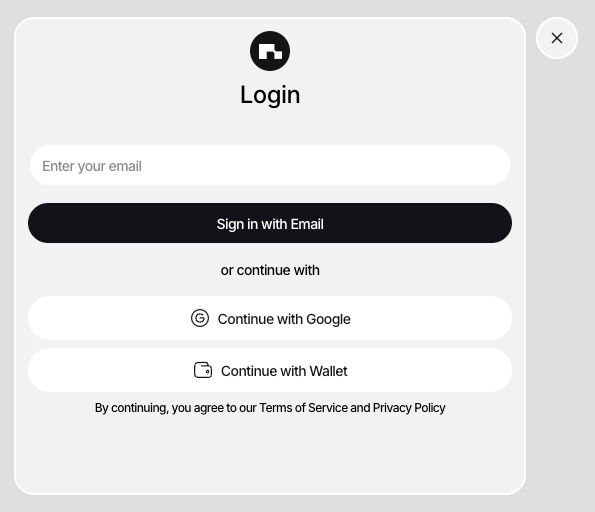
2. Sign in using one of the supported methods:
* Email
* GitHub
* Google
* Wallet (*not recommended*)
Once authenticated, you will be redirected to the CreateOS dashboard.
### Step 2: Create a New Project
Creating a project initializes the deployment workflow and defines how your application will be built and run.
1. Click **+ New Project** from the dashboard
2. Choose a deployment method:
* **GitHub Repository**
* **Docker Image**
* **Template**
* **Manual Upload**
Each method is optimized for different use cases and levels of control.
## Project Deployment
CreateOS Deploy supports multiple deployment strategies, giving you flexibility depending on how your application is structured and where it lives.
### 1. Deploying via GitHub Repository
Deploying from GitHub is the most common workflow and supports both **AI-assisted** and **manual** configuration modes.
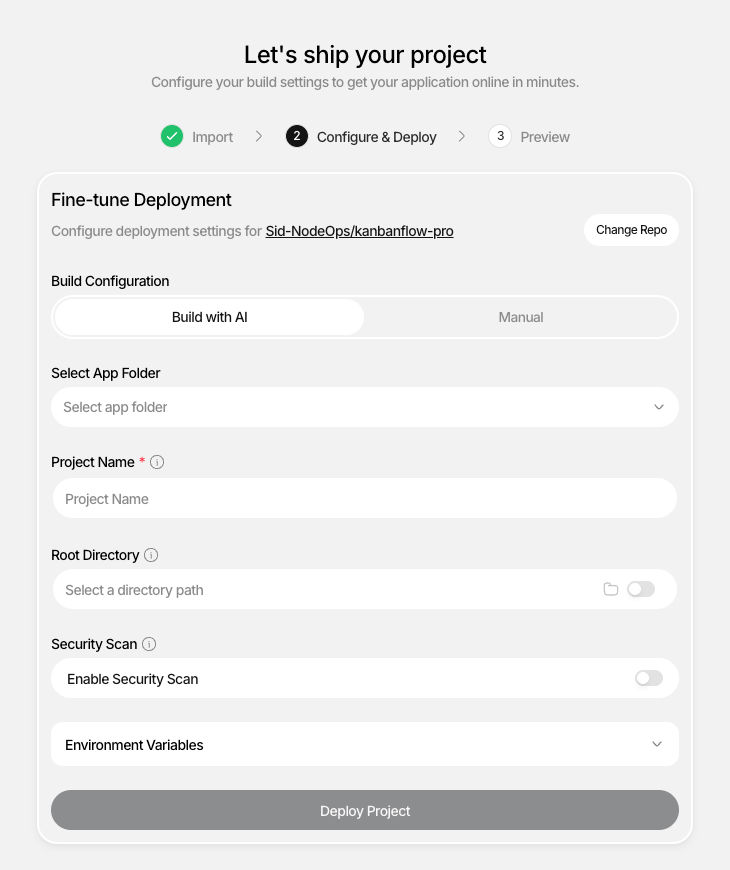
#### Option 1: Build with AI (Recommended)
This option is ideal for the fastest path to deployment.
**Steps:**
1. Select **GitHub Repository**
2. Click **Browse Repositories**
3. Choose your repository
4. Enter a project name (optional)
CreateOS AI automatically:
* Detects the framework
* Configures build and run commands
* Assigns the correct server port
* Sets up the deployment pipeline
This option requires minimal input and is best for standard projects.
#### Option 2: Manual Configuration
Choose this option if you want full control over the deployment configuration.
**Steps:**
1. Select **GitHub Repository**
2. Browse and select your repository
3. Choose the branch to deploy (`main`, `master`, `develop`, etc.)
4. Select the framework (Node.js, Python, React, Next.js, etc.)
5. Configure the server port (e.g., `3000`, `8000`, `8080`)
6. Set a project name (optional)
* This becomes your subdomain: `myproject.createos.nodeops.network`
7. Add build commands (optional)
* Example: `npm install`, `pip install -r requirements.txt`
8. Add run commands (optional)
* Example: `npm start`, `python app.py`
9. Configure environment variables (optional)
10. Click **Deploy**
CreateOS will build and deploy your application based on the provided configuration.
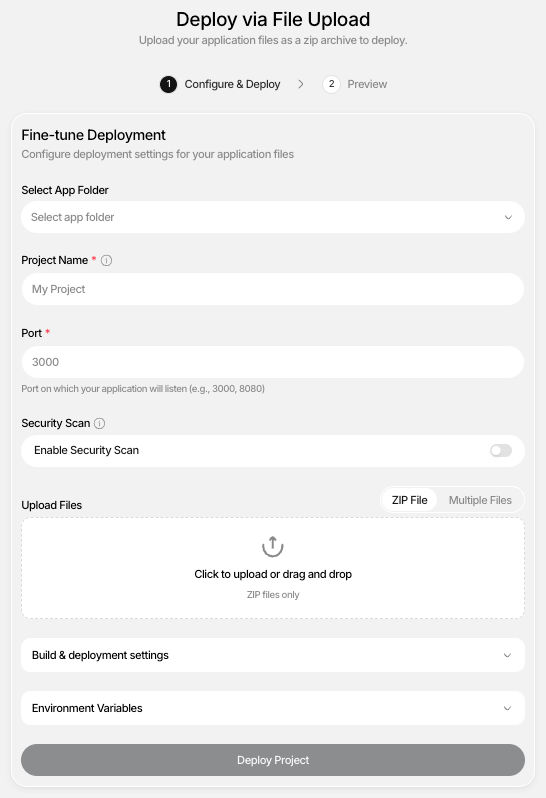
### 2. Manual Project Uploads
Manual uploads allow you to deploy applications **without connecting a repository**.
This deployment method is well-suited for:
* Local projects
* AI-generated code
* Prototypes and demos
* One-off applications
**Steps:**
1. Select **Manual Upload**
2. Upload your project files
3. Configure build and run commands
4. Set environment variables if needed
5. Click **Deploy**
CreateOS will build and deploy the uploaded project immediately.
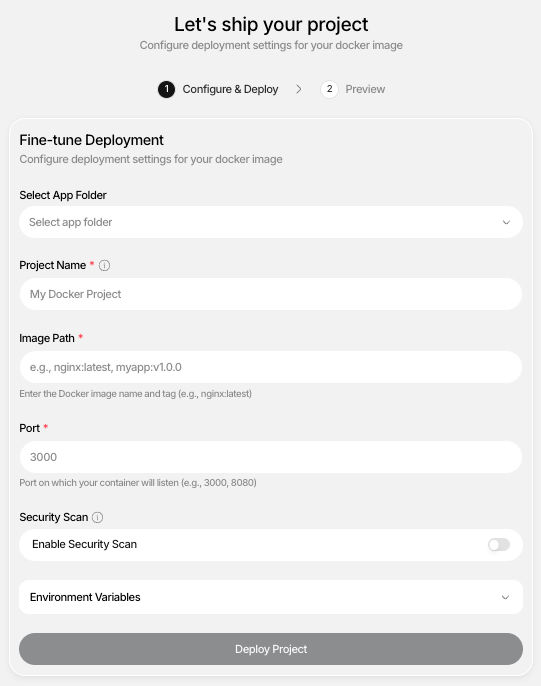
### 3. Deploying via Docker Image
Docker-based deployment is ideal for containerized applications or advanced use cases.
**Steps:**
1. Select **Docker Image**
2. Enter the Docker image URL
3. Specify the exposed port
4. Configure environment variables (optional)
5. Click **Deploy**
CreateOS pulls the image and deploys it without requiring additional setup.
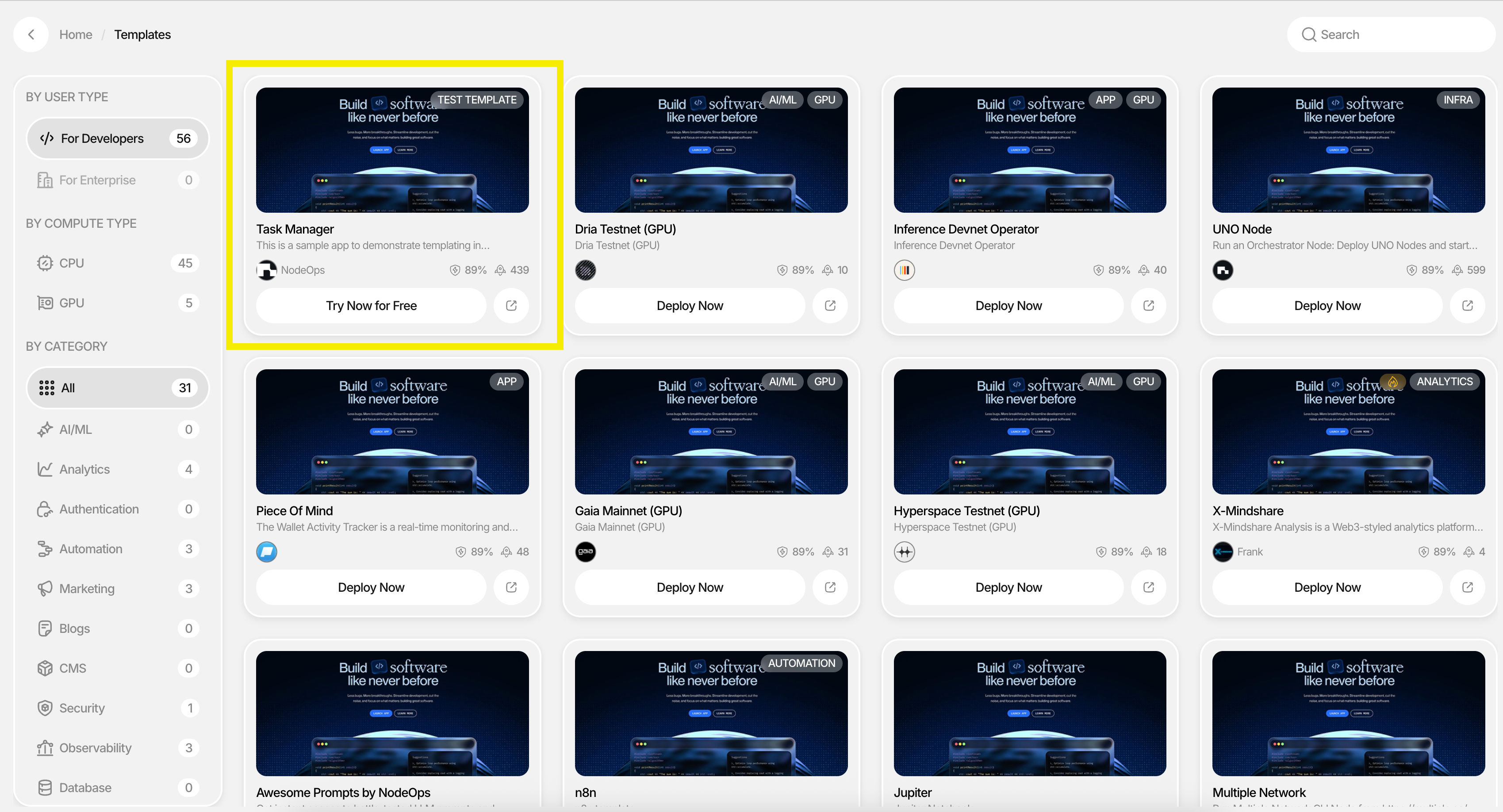
### 4. Deploying via Templates
Templates provide a pre-configured starting point for common application types.
**Steps:**
1. Select **Template**
2. Choose a template (e.g., web app, API service)
3. Customize project details
4. Click **Deploy**
Templates help you get started quickly with recommended defaults.
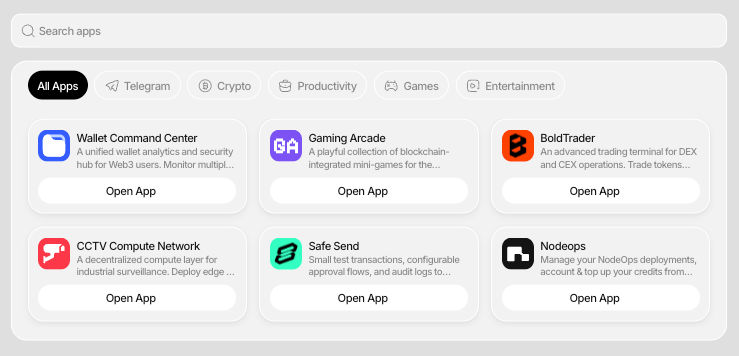
## App Folder (Multi-Project Applications)
CreateOS Deploy supports an **App Folder** model that allows you to group multiple related projects under a single logical application. This is designed for real-world systems that consist of multiple services rather than a single deployable unit.
## Managing Your Deployment
After deployment, CreateOS provides a centralized dashboard that allows you to monitor, operate, and iterate on your application throughout its lifecycle.
**Available Capabilities:**
* Build & application logs
* Application analytics
* Alerts
* Environment management
* Compute scaling
* Security scanning
* Custom domain configuration
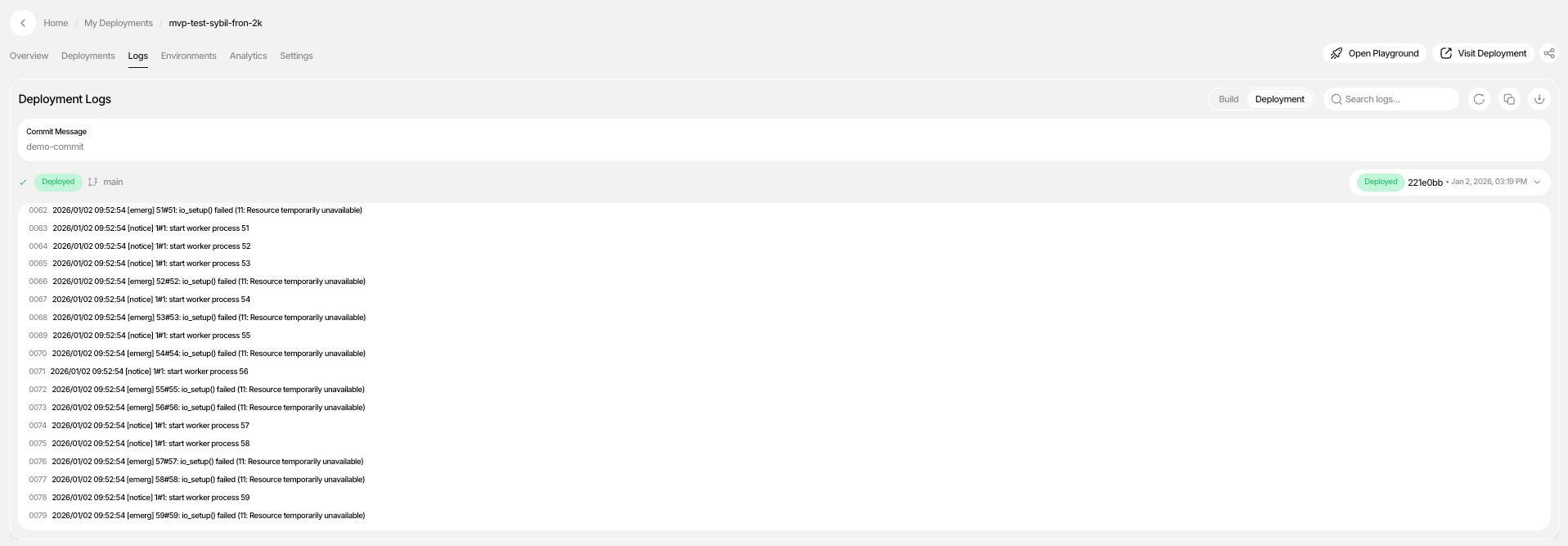
### Build & Application Logs
Build & application logs provide full visibility into the deployment lifecycle and are essential for debugging and verification.
**You can view:**
* Dependency installation
* Build steps
* Compilation output
* Deployment status
* Errors and warnings
Logs update in real time, making issue resolution faster and more transparent.
## Cron Jobs
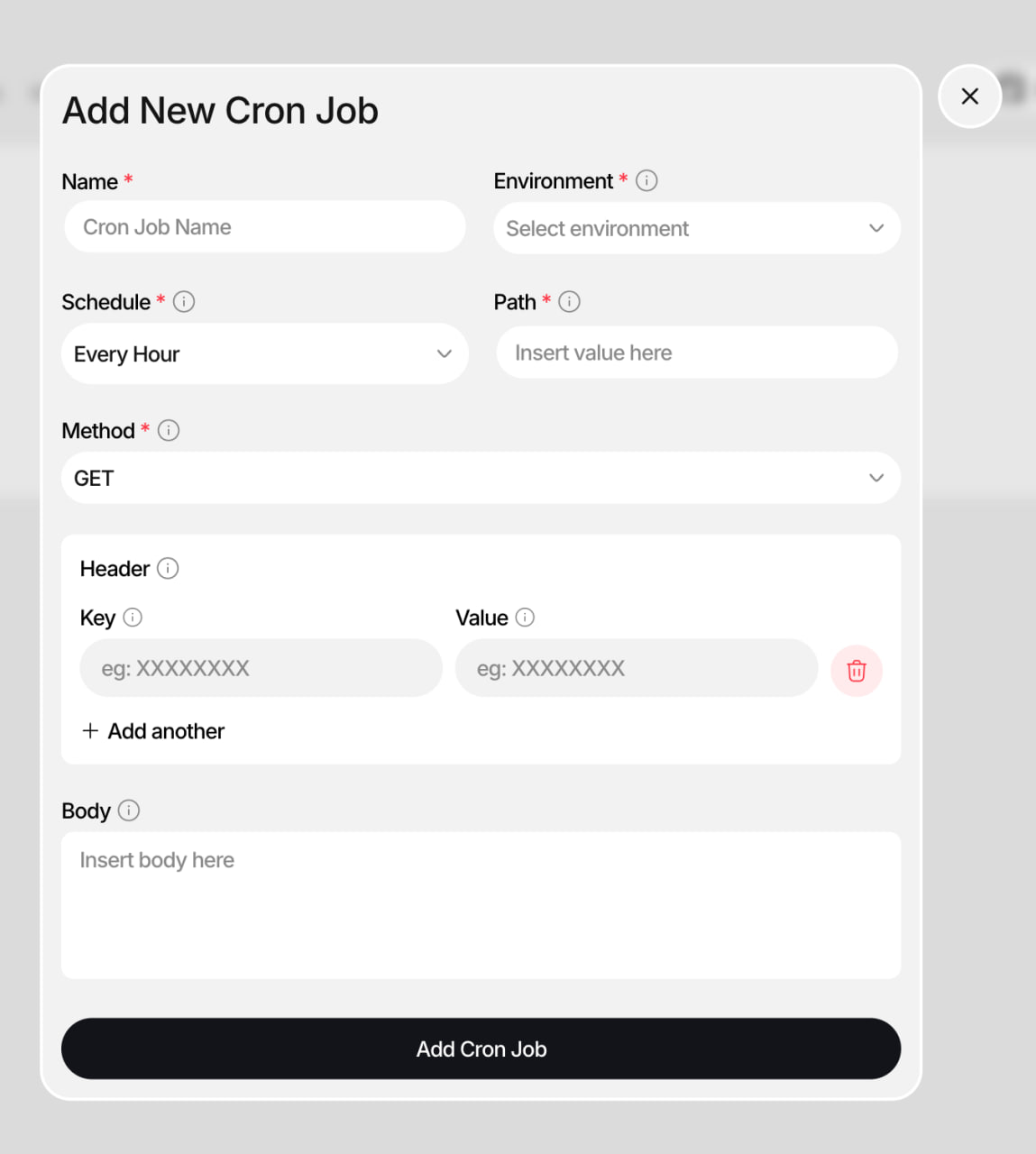
The **Cron Jobs** tab lives inside each project in CreateOS. You configure a job once, giving it a name, a schedule, and a target endpoint and CreateOS runs that HTTP call on repeat according to your schedule. You can inspect every past run, pause or resume jobs at any time, and edit job configuration without touching your deployment.
## What you can do
* Schedule an HTTP call to any endpoint in your application on a recurring basis
* Choose from preset schedules or build a custom schedule using a visual builder
* Use any HTTP method: `GET`, `POST`, `PUT`, `PATCH`, or `DELETE`
* Pass custom headers and an optional request body with each job
* Pause and resume jobs without deleting them
* Edit job configuration after creation
* View the full execution history of every job, including logs
## How it works
### Create a cron job
Open the **Cron Jobs** tab inside your project and fill out the creation form:
1. Enter a **Name** to identify the job
2. Select an **Environment**: staging or production (this cannot be changed after creation)
3. Set a **Schedule**: see schedule options below
4. Enter the **Endpoint** path to call, for example `/api/send-emails`
5. Choose an **HTTP Method**: `GET`, `POST`, `PUT`, `PATCH`, or `DELETE`
6. Optionally add **Headers** as key-value pairs, for example an authorization token
7. Optionally add a **Body**: for example a JSON payload for `POST` requests
8. Click **Create** to activate the job
### Set a schedule
The schedule picker offers preset intervals and a custom builder.
| Preset | Behavior |
| ------------ | --------------------------------- |
| Every Minute | Runs 60 times per hour |
| Every Hour | Runs once per hour |
| Every Day | Runs once per day at midnight |
| Every Week | Runs every Sunday at midnight |
| Custom | Opens the visual schedule builder |
The **Custom** builder lets you configure:
* Every X minutes: 2, 5, 10, 15, 20, or 30
* Hourly at a specific minute
* Daily at a specific time (`HH:MM`)
* Weekly on selected days at a specific time
* A raw cron expression for advanced scheduling
As you configure, a live plain-English description and the predicted next run time update in real time before you confirm.
### Manage your jobs
The Cron Jobs tab lists all configured jobs. Each job card shows the job name, last run time, current status, schedule in plain English, and the endpoint it calls.
### Pause or resume a job
Each card has a toggle switch. Switching it off **suspends** the job, so it stops running but is not deleted. Switching it back on **resumes** the job from its next scheduled interval.
### Edit a job
Select **Configure** on any job card to open the creation form pre-filled with the job's current values. You can update any field except **Environment**, which is locked after creation.
### Delete a job
⚠️ **Important:** Deleting a job permanently removes it and all of its execution history. A confirmation prompt appears before the deletion completes.
### View execution history
Each job has a collapsible **History** section. The history table shows:
* The scheduled run time for each execution
* Whether the run succeeded or failed
* The HTTP status code returned
* A snippet of the log output
Select any row to open a log drawer with the full output. From the drawer you can **copy** the log or **download** it as a `.txt` file.
## Current limitations
* There is no **Run Now** option. Jobs run on schedule only. Manual triggers are not supported in this release.
### Analytics
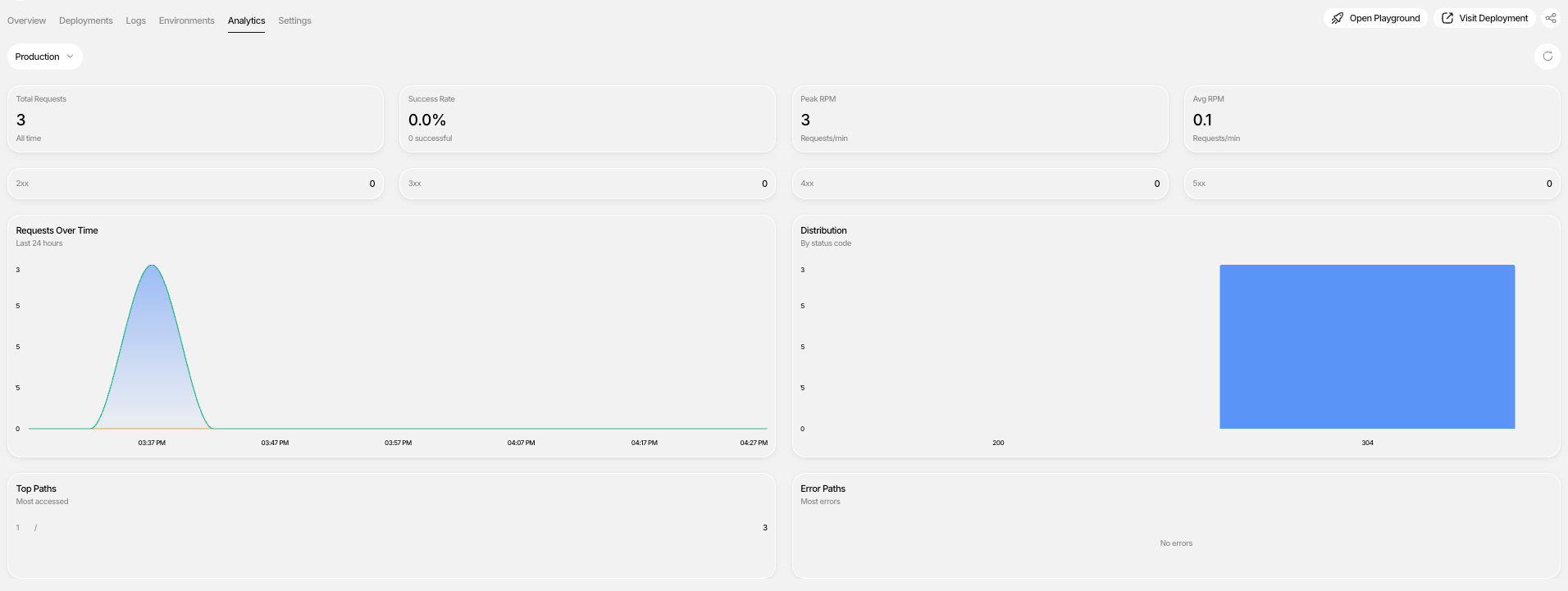
Analytics help you understand how your application is performing in production.
**You can track:**
* Request volume and traffic patterns
* Response times
* Error rates
* CPU, memory, and bandwidth usage
* Geographic distribution of traffic
These insights enable informed scaling and optimization decisions.
### Alerts
CreateOS Deploy includes built-in **alerts** to help you stay informed about the health and stability of your applications.
**Alerts notify you when important events occur, such as:**
* Deployment failures
* Application errors
* Resource usage crossing defined thresholds
* Availability or health check issues
By surfacing issues in real time, alerts allow teams to respond quickly, reduce downtime, and maintain reliable production systems without constant manual monitoring.
### Environments & Deployment Promotion
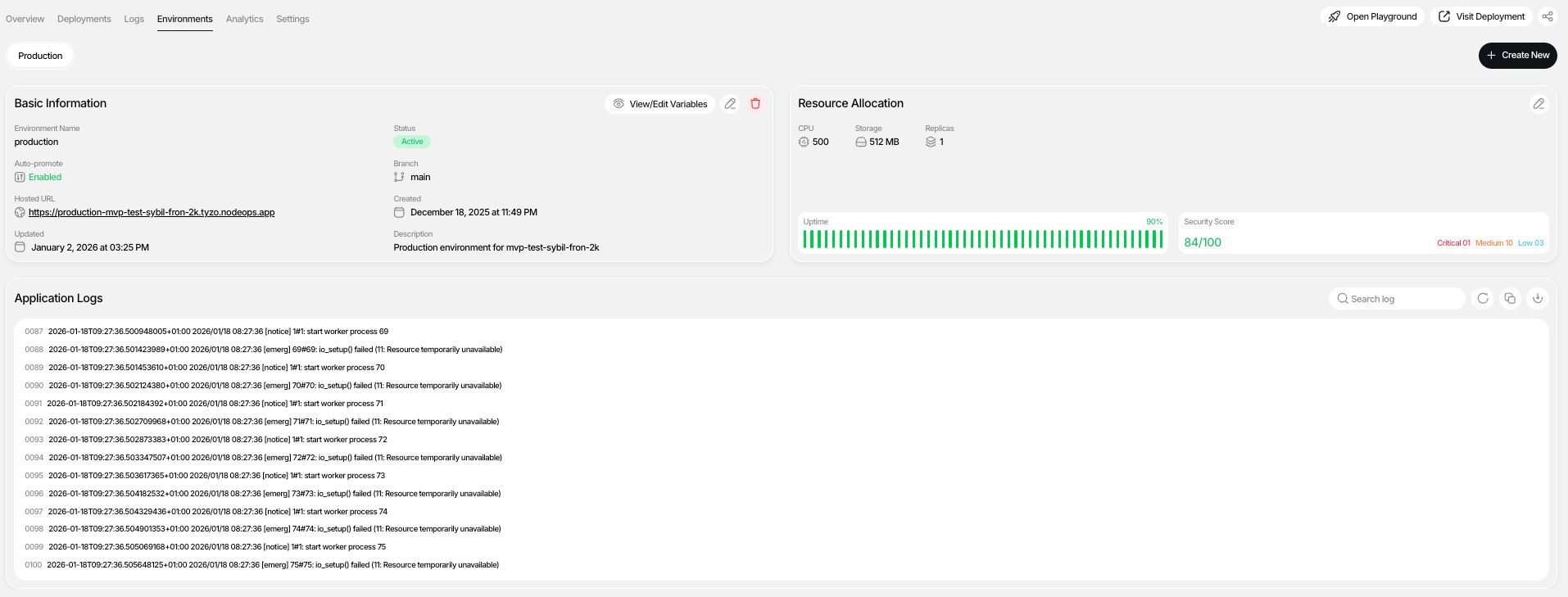
CreateOS Deploy supports **environment-based workflows** for managing live versions of your application.
**You can:**
* Create environments such as staging and production (production is the default environment created at setup)
* Promote deployments between environments
* Enable auto-promotion to always keep environments up to date
**What is Deployment Promotion?**
**Promote deployments between environments** allows you to move a specific deployment from one environment (such as staging) to another (such as production) **without rebuilding or redeploying the application**.
When you promote a deployment:
* The exact same build artifact is reused
* Code, dependencies, and configuration remain unchanged
* Only the target environment mapping is updated
This ensures consistency between environments and eliminates issues caused by rebuilding the same code multiple times.
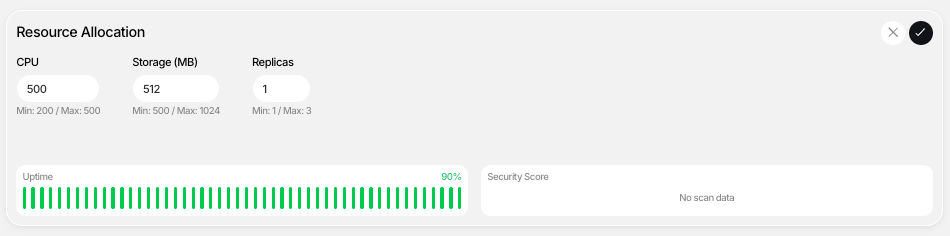
### Compute Configuration & Scaling
CreateOS Deploy makes compute resources transparent and configurable.
**You can:**
* Scale CPU and memory vertically
* Adjust replica counts horizontally
* View active compute configurations per deployment
Changes take effect immediately without rebuilding pipelines.
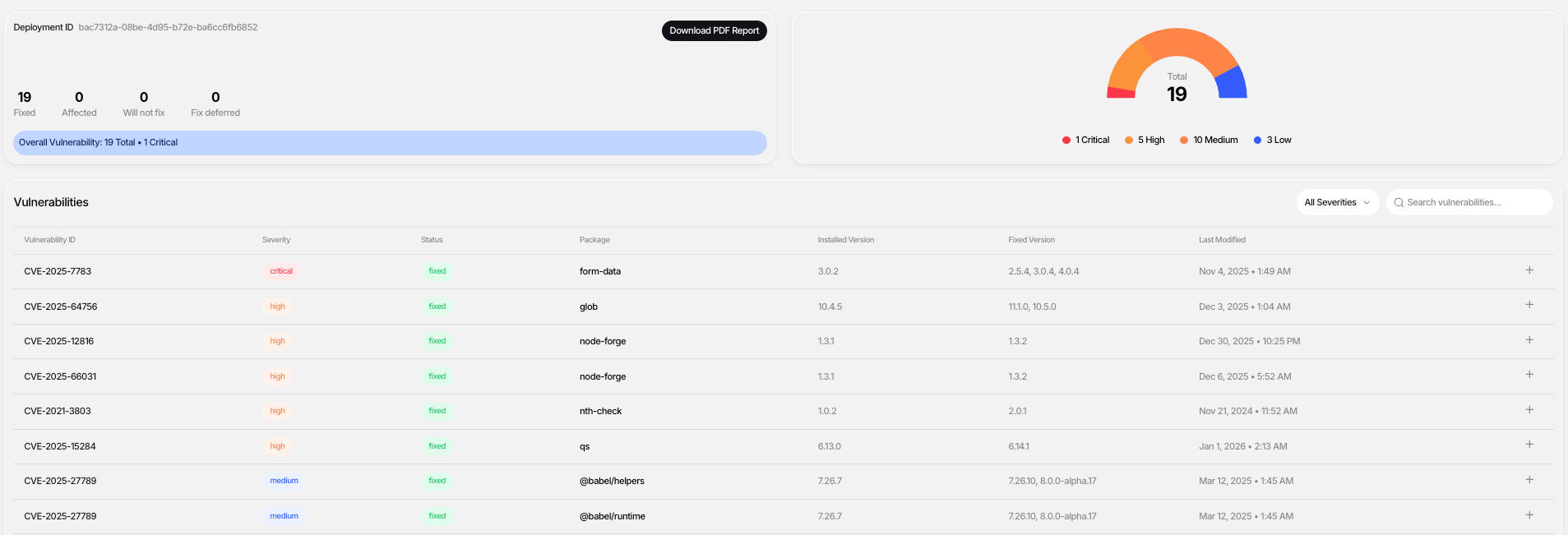
### Built-In Security Scanning
Every deployment includes an automatic security scan to surface vulnerabilities early.
**You can:**
* View a security score
* Inspect vulnerability details
* Fix issues and re-scan
* Download a detailed PDF security report
Security is integrated directly into the deployment workflow.
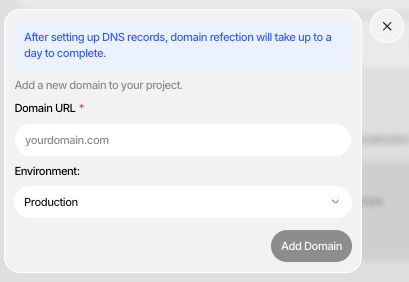
### Custom Domains
Each project is automatically assigned a CreateOS subdomain.
**You can also configure a custom domain by:**
1. Navigating to project settings
2. Adding your domain name
3. Configuring DNS records
4. Waiting for DNS propagation
5. Activating the domain
### GitHub Integration & Code Ownership
CreateOS Deploy maintains GitHub as the source of truth.
**You can:**
* Push projects to GitHub in a few clicks
* Download files and manage repositories manually
* Trigger redeployments automatically on every commit

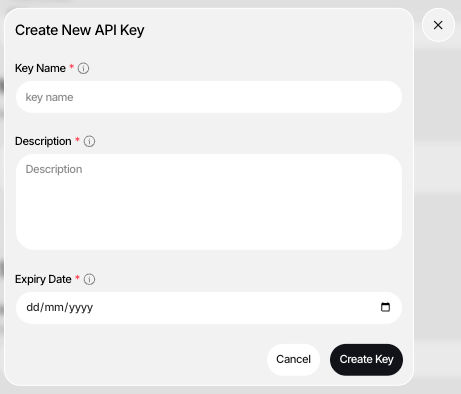
### API Keys & External Integrations
CreateOS Deploy supports API keys for secure integrations. You can configure your API keys in your Profile section.
**You can:**
* Generate API keys from your profile
* Integrate with external tools
* Automate workflows and deployments
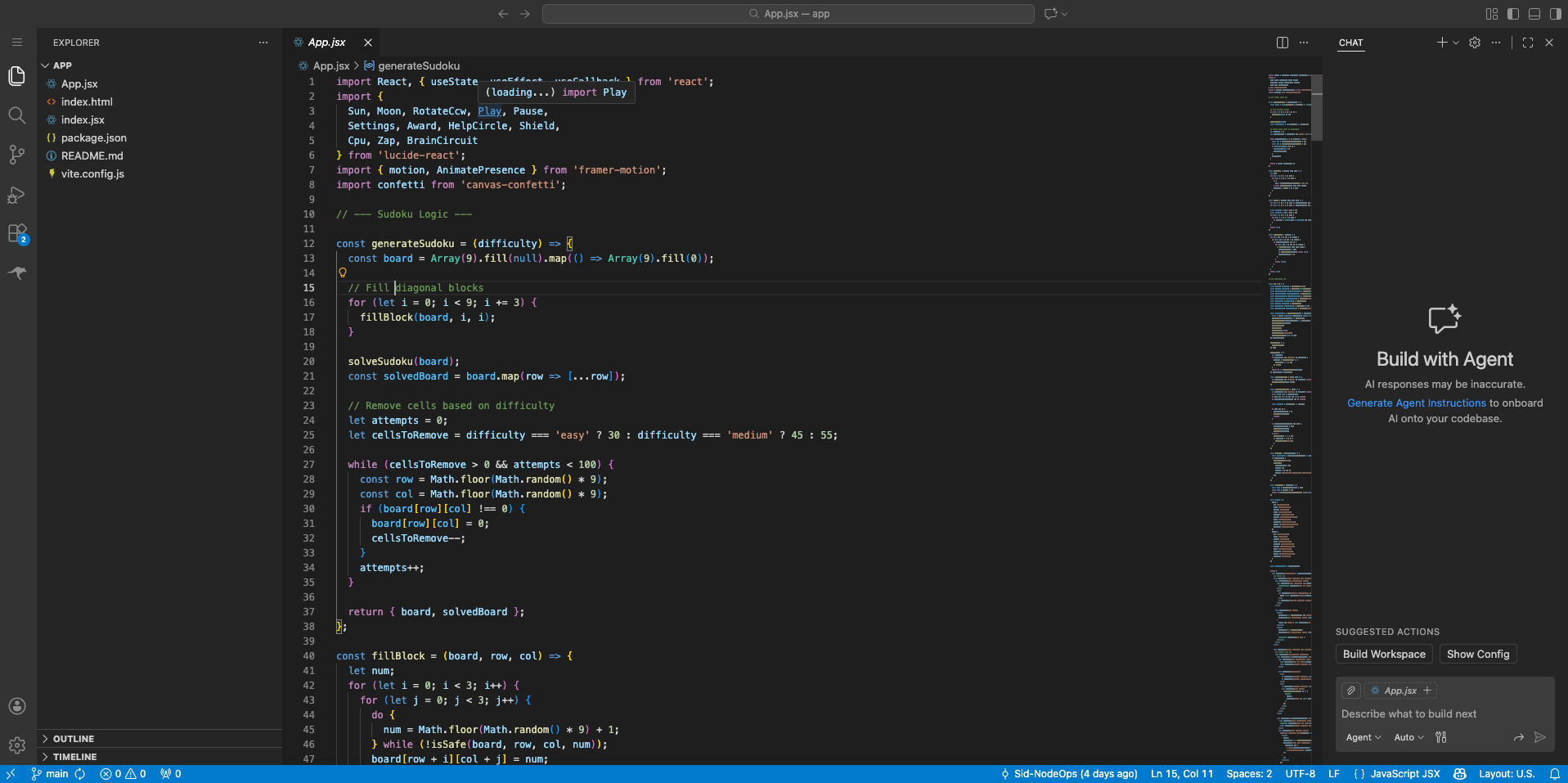
## AI Playground
The **AI Playground** is a browser-based, AI-assisted coding environment connected directly to your GitHub repository.
**Key Capabilities:**
* No local cloning required
* Inline code edits
* AI agent assistance
* Automatic deployments on commit
**Prerequisite:** GitHub Actions must be enabled.
## Multiple Projects & Session Management
CreateOS Deploy supports managing multiple projects simultaneously with clear separation and searchability.
## Deleting Projects
Projects can be deleted from the dashboard when no longer needed.
⚠️ **Important:** Deleted projects cannot be recovered.
# Template Marketplace
The CreateOS Template Marketplace is a comprehensive ecosystem where developers and enterprises can discover, deploy, and monetize production-ready templates. Browse through a curated collection of templates organized by user type (Developers, Enterprises), compute requirements (CPU, GPU), and specialized categories including AI/ML, Analytics, Authentication, Automation, Marketing, Blogs, CMS, Security, Observability, Database, Blockchain, Computing, and more.

## Deploying Templates
### Quick Deployment Process
1. **Browse and Select**: Explore the marketplace to find a template that matches your requirements
2. **Deploy Now**: Click the "Deploy Now" button on your chosen template
3. **GitHub Integration**: Connect your GitHub account to automatically fork the project to your repository
4. **Credit Transaction**: Complete the deployment using the credits required (pricing set by template contributors)
5. **Access Your Deployment**: View and manage your deployed project in the "My Deployments" dashboard
## Managing Your Template Deployments
Once deployed, your template becomes a fully manageable project within your "My Deployments" folder. Each project card provides access to:
* Complete CI/CD pipeline management
* Build customization and extension capabilities
* Full development environment access
* Deployment configuration controls
## AI Playground Integration
Transform your deployed templates into interactive development environments with seamless AI Playground integration.
### Creating an AI Playground
1. Navigate to your deployed project within "My Deployments"
2. Click the "Create AI Playground" button in the top-right corner
3. Your repository and codebase will be automatically configured
4. Begin development immediately with zero setup time
### Continuous Integration
The AI Playground maintains full CI/CD automation. Every commit automatically triggers your deployment pipeline, ensuring your changes are tested and deployed seamlessly.

## Template Contribution
Share your expertise and monetize your work by listing your projects as templates on the CreateOS marketplace.
**Important Requirements:**
* Only GitHub-based projects are eligible for template contribution
* Your complete codebase will be shared with purchasing users
* If you prefer not to share your source code, consider [listing your project as an Application on the CreateOS App Store](#) instead
## Submission Process
### Approval Workflow
```
Template Creation → Submit Template → Template Review → Approval → Marketplace Listing
```
### Rejection and Resubmission
```
Template Creation → Submit Template → Template Review → Rejected →
Review Feedback → Implement Improvements → Resubmit Template
```
## Submission Requirements
Provide the following information to submit your template:
* **Name**: Clear, descriptive template name
* **Thumbnail**: High-quality preview image or screenshot
* **Video Tutorial**: Walkthrough demonstrating template functionality
* **Description**: Comprehensive overview of features and capabilities
* **Use Case**: Target scenarios and problem-solving applications
* **Category**: Appropriate marketplace category
* **GitHub Repository**: Complete source code repository
* **Pricing**: Credit cost for template deployment
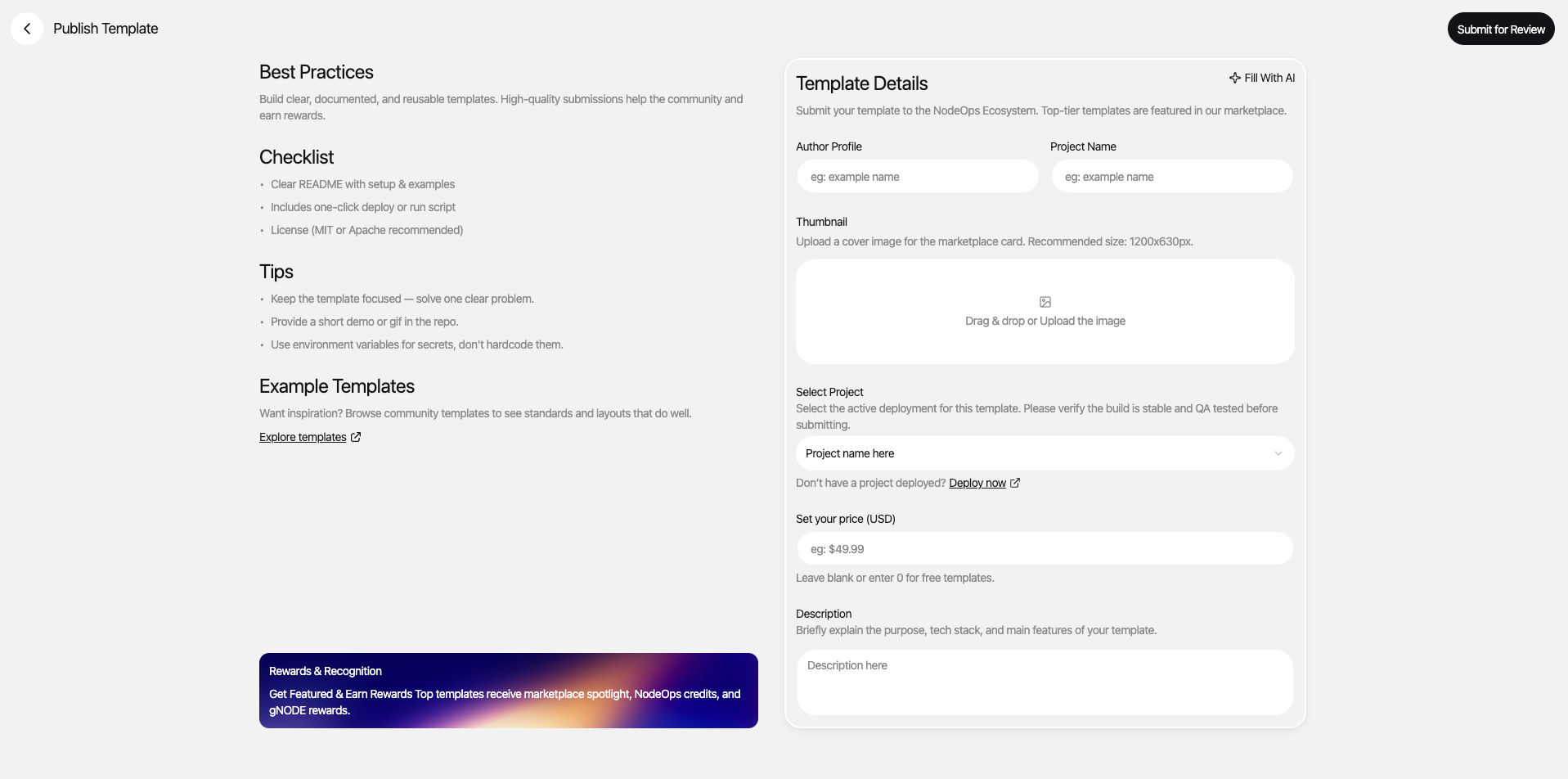
## Review Process
After submission, the NodeOps team conducts a comprehensive review of your template.
**If Approved**: Your template is immediately listed on the marketplace and available for purchase.
**If Rejected**: You'll receive detailed feedback with actionable improvement points. Make the necessary changes and resubmit for review.
**Credit Policy**: Template submissions require credits. If your submission is rejected, credits are **not refunded**; however, you can resubmit improvements for the same template without consuming additional credits.
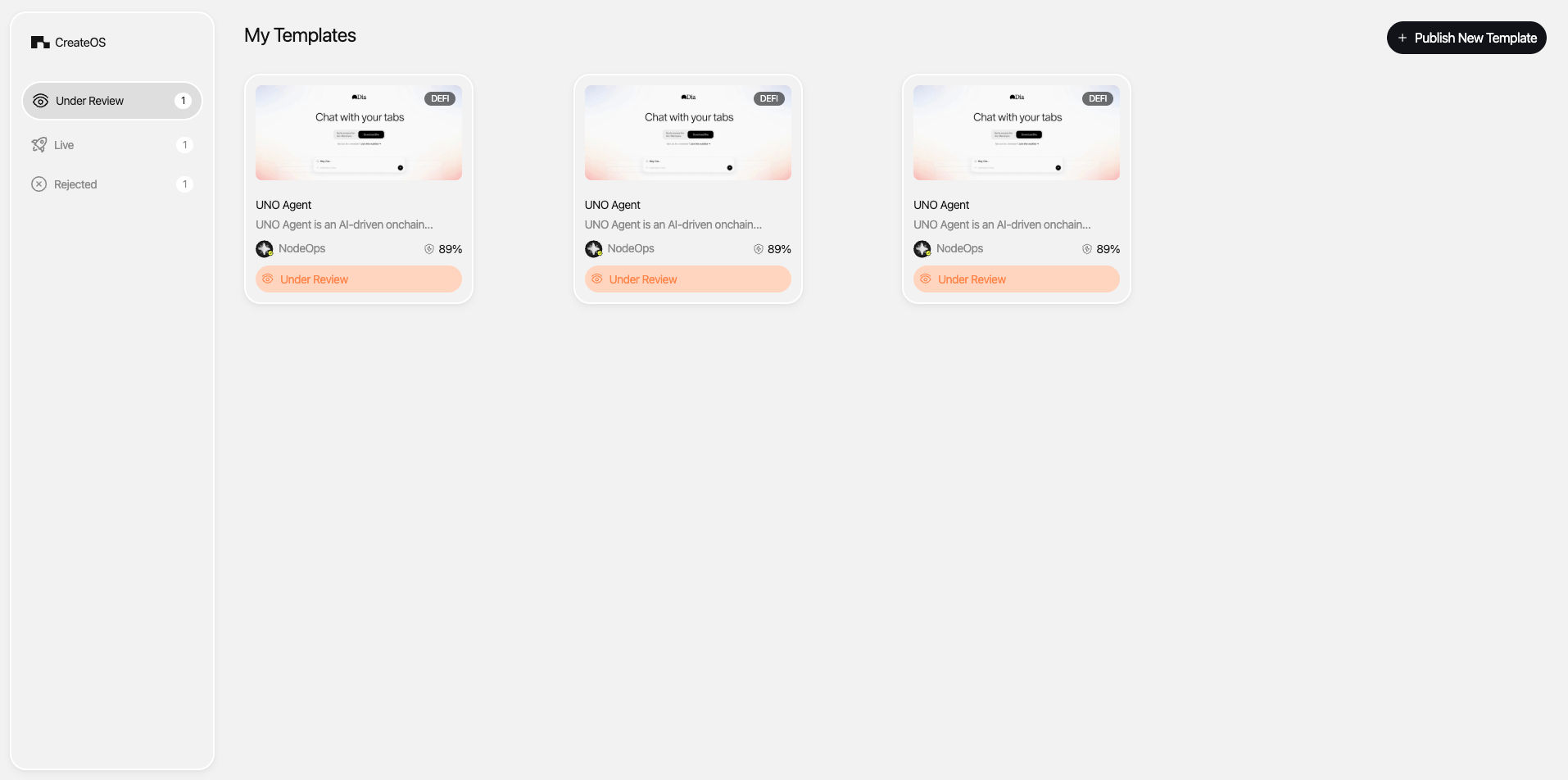
## Updating Published Templates
Contributors can update their published templates at any time to add features, fix issues, or improve documentation.
**Update Process:**
* Submit your updated template through the standard review process
* Users who have deployed your template receive automatic notifications
* Changes are reflected in the marketplace listing upon approval
**Credit Allocation:**
* **First 3 updates**: Free of charge
* **Subsequent updates**: Credit consumption applies per update
## Security Scanning
Enhance your template's credibility and trustworthiness with professional security scanning.
**Features:**
* Per-project credit-based scanning
* Unlimited security scans available
* Security score displayed alongside your template listing
* Improved visibility and marketplace positioning
A strong security score builds trust with potential users and differentiates your template in a competitive marketplace.
## Boosting Template Visibility
Maximize your template's reach with targeted visibility boosts using credit-based marketing plans.
**Benefits:**
* Enhanced marketplace positioning
* Increased discoverability in search and browse
* Featured placement opportunities
* Targeted promotion to relevant user segments
Select from flexible credit plans designed to match your marketing goals and budget, ensuring your template reaches the right audience at the right time.
# Application Store
The CreateOS App Store offers a curated collection of ready-to-use applications across diverse categories. Unlike templates, applications are fully functional solutions that can be deployed instantly.

## Deploying Applications
**Deployment Process:**
1. Visit the [App Store](#) and browse available applications
2. Select the application that meets your requirements
3. Complete payment directly through the application (pricing set by contributors)
4. Access and manage your deployed applications in the "My Apps" section
**No Credits Required**: Application deployments use in-app payment methods determined by individual contributors, providing flexible pricing options.
## Application Categories
Discover applications tailored to every need:
* **Productivity**: Tools to enhance workflow efficiency and collaboration
* **Games**: Interactive entertainment and gaming experiences
* **Entertainment**: Media, content, and creative applications
* **Crypto**: Blockchain, DeFi, and cryptocurrency solutions
* **And Many More**: Continuously expanding categories to serve every use case
## Listing Applications on the App Store
### Contributor Requirements
Contributors can monetize fully functional applications on the CreateOS App Store while maintaining complete code ownership and intellectual property protection.
**Key Advantages:**
* **IP Protection**: Unlike template contributions, you retain full ownership and control of your source code
* **Revenue Opportunities**: Set your own pricing and payment models
* **Platform Deployment**: Applications must be deployed and functional on CreateOS
* **Professional Review**: Same rigorous quality standards as the Template Marketplace
## Application Submission Process
Publishing your application follows the same proven workflow as template submissions:
```
Application Development → Submit Application → Review Process →
Approval → App Store Listing
```
**Credit Requirement**: Credits are consumed upon application submission to the App Store.
## Submission Requirements
Provide comprehensive information to showcase your application effectively:
* **Name**: Clear, memorable application name
* **Image**: High-quality preview image, logo, or screenshot
* **Video Tutorial**: Demonstration of key features and functionality
* **Description**: Detailed overview of capabilities, features, and benefits
* **Use Case**: Target audience and problem-solving applications
* **Category**: Appropriate App Store category
## Review and Approval
The NodeOps team conducts thorough reviews to ensure all applications meet quality, functionality, and security standards. Upon approval, your application becomes immediately available in the App Store, accessible to the entire CreateOS user community.
# Widget Dashboard
The CreateOS Widget Dashboard is a customizable sidebar on the right-hand side of your interface that keeps essential tools and information at your fingertips. Personalize your workspace by adding, removing, and arranging widgets to match your workflow.
## Available Widgets
### Notes Widget
Capture ideas, reminders, and documentation directly within your workspace.
**Features:**
* Quick note-taking with markdown support
* Persistent storage across sessions
* Ideal for TODO lists, API endpoints, and code snippets
### Share Price & Crypto Feeder
Monitor real-time stock market and cryptocurrency prices while you work.
**Features:**
* Live price updates for stocks and cryptocurrencies
* Track multiple assets simultaneously
* Support for major exchanges and trading pairs
* Price change indicators and percentage movements
### Credits Usage Widget
Monitor your CreateOS credit balance and consumption in real-time.
**Features:**
* Current credit balance and usage history
* Transaction tracking and spending patterns
* Budget monitoring for deployments and listings
* Low credit alerts
### Top Apps Section
Quick access to trending and popular applications from the CreateOS App Store.
**Features:**
* Curated list of top-performing applications
* Real-time trending updates
* Direct links to application pages
* Discover inspiration and market opportunities
### Games Widget
Take quick mental breaks with integrated casual games.
**Features:**
* Browser-based games with instant play
* No downloads or installations required
* Variety of game types for quick relaxation
* Play directly within your workspace
### Music Player Widget
Enhance your development experience with background music.
**Features:**
* Built-in music streaming
* Playlist creation and management
* Volume and playback controls
* Ambient soundscapes and focus-enhancing audio
## Customization
### Adding Widgets
1. Click **"Add Widget"** or **"+"** icon in the Widget Dashboard
2. Browse available widgets
3. Select the widget to add it instantly
### Removing Widgets
1. Click the **settings/menu icon** on the widget
2. Select **"Remove"** or **"Delete"**
3. Confirm removal
**Note:** Removing a widget doesn't delete its data. Re-add it later to restore content.
### Arranging Widgets
* **Drag and Drop:** Click and hold the widget header, drag to reposition
* **Resize:** Adjust widget size to maximize or minimize screen space
* **Collapse:** Minimize widgets to headers for temporary space-saving
* **Pin:** Keep important widgets at the top of your dashboard
All configurations persist across sessions and devices.
## Recommended Widget Setups
**For Developers:**\
Notes + Music Player + Credits Usage
**For Founders:**\
Credits Usage + Top Apps + Notes
**For Market Research:**\
Top Apps + Share Price & Crypto + Notes
**For Balanced Workflow:**\
Notes + Credits Usage + Games + Music Player
# Sandbox
CreateOS Sandbox runs untrusted, AI-generated and interactive workloads in Firecracker microVMs, one kernel per sandbox, with in-kernel egress allowlists, pause/resume/fork of full VM state, private networks between sandboxes, and per-second billing. Start with the [Overview](/Sandbox/Overview), run your first sandbox in the [Quickstart](/Sandbox/Quickstart), and check [Limits & defaults](/Sandbox/Limits) before sizing a workload. Product page: [createos.sh/products/sandbox](https://createos.sh/products/sandbox) · pricing: [createos.sh/pricing/sandbox](https://createos.sh/pricing/sandbox).
* [Overview](/Sandbox/Overview)
* [Quickstart](/Sandbox/Quickstart)
* [Concepts](/Sandbox/Concepts)
* [Limits & defaults](/Sandbox/Limits)
* [REST API](/Sandbox/REST-API)
* [SDK](/Sandbox/SDK)
* [CLI](/Sandbox/CLI)
* [Integrations](/Sandbox/Integrations)
* [Claude Managed Agents](/Sandbox/Claude-Managed-Agents)
* [Bring your own storage](/Sandbox/Bring-Your-Own-Storage)
* [Run on your own infrastructure](/Sandbox/Self-Hosting)
# CreateOS Sandbox
CreateOS Sandbox runs full Linux virtual machines that boot in ~30ms (p90). Each sandbox is a [Firecracker](https://firecracker-microvm.github.io/) microVM with its own kernel, root filesystem, and network identity (the isolation of a VM with the startup speed of a container).
Sandboxes are built for workloads that need real, disposable compute:
* **Running untrusted or AI-generated code**: give an agent a full machine to execute in, without risking your own.
* **Ephemeral development environments**: spin up a clean box per branch, per task, or per user.
* **CI and batch jobs**: isolated, reproducible execution that tears down when finished.
* **Interactive sessions**: shells, notebooks, and preview servers reachable over SSH or HTTPS.
## What you get
| Capability | Description | Reference |
|------------|-------------|-----------|
| **Fast boot** | A sandbox is ready to run commands within seconds of creation. | [Concepts](/Sandbox/Concepts#sandbox) · [Quickstart](/Sandbox/Quickstart) |
| **Pause, resume, fork** | Snapshot a running VM to durable storage, restore it later, or clone it into independent copies. | [REST](/Sandbox/REST-API/Pause-Resume-Fork#post-v1sandboxesidpause) · [SDK](/Sandbox/SDK/Reference/Sandbox#pause) · [CLI](/Sandbox/CLI/Commands#sandbox-pause) · [Concepts](/Sandbox/Concepts#snapshot-pause-resume) |
| **Idle auto-pause** | Set a timeout from 1 minute to 24 hours and the sandbox pauses itself once both API calls and network traffic go quiet. | [REST](/Sandbox/REST-API/Sandboxes#patch-v1sandboxesid) · [SDK](/Sandbox/SDK/Reference/Sandbox#setautopause) · [CLI](/Sandbox/CLI/Commands#sandbox-edit) · [Guide](/Sandbox/SDK/How-To/Lifecycle#auto-pause-an-idle-sandbox) |
| **Wake on request** | Hit a paused sandbox's HTTPS URL and it resumes on its own; browsers get a waiting page that reloads until the app answers. | [REST](/Sandbox/REST-API/Pause-Resume-Fork#post-v1sandboxesidresume) · [Concepts](/Sandbox/Concepts#ingress) · [Guide](/Sandbox/SDK/How-To/Expose-A-Service) |
| **Self-signal** | Let code inside the sandbox pause or delete its own box with a POST to `127.0.0.1:1029`, no API key needed. | [REST](/Sandbox/REST-API/Self-Signal) · [pause](/Sandbox/REST-API/Self-Signal#post-selfpause) · [delete](/Sandbox/REST-API/Self-Signal#post-selfdelete) |
| **Run commands** | Execute commands and stream output over the API, SDK, or CLI. No SSH key required. | [REST](/Sandbox/REST-API/Execution-And-Files#post-v1sandboxesidexec) · [SDK](/Sandbox/SDK/Reference/Sandbox#runcommand) · [CLI](/Sandbox/CLI/Commands#sandbox-exec) |
| **Managed processes** | Start reconnectable commands and shell sessions with retained output, stdin, signals, wait, stop, and PTY resize controls. Retained output is bounded to 1 MiB per process and 32 MiB per sandbox. | [REST](/Sandbox/REST-API/Managed-Processes) · [CLI](/Sandbox/CLI/Commands#sandbox-process) · [Guide](#exec-vs-process-vs-pty) |
| **Computer use** | Drive a desktop-capable sandbox: screenshots, mouse and keyboard input, window control, and extra screens you can watch in a browser. | [REST](/Sandbox/REST-API/Computer) · [SDK](/Sandbox/SDK/Reference/Computer) |
| **File transfer** | Upload and download individual files, or copy directories in and out. | [REST](/Sandbox/REST-API/Execution-And-Files#put-v1sandboxesidfiles) · [SDK](/Sandbox/SDK/Reference/Sandbox#files) · [CLI](/Sandbox/CLI/Commands#sandbox-push) |
| **Private networks** | Connect sandboxes so they reach each other over p2p encrypted network, isolated from other tenants. | [REST](/Sandbox/REST-API/Networks#post-v1sandboxesidnetworks) · [SDK](/Sandbox/SDK/Reference/Sandbox#attachnetwork) · [CLI](/Sandbox/CLI/Commands#sandbox-network) |
| **VPN access** | Join your own machine to a sandbox private network over an encrypted WireGuard tunnel, register the device once, then connect. | [Concepts](/Sandbox/Concepts#network) · [CLI](/Sandbox/CLI/Commands#networking) |
| **S3 disks** | Mount S3-compatible buckets into a running sandbox and detach them live. | [Guide](/Sandbox/Bring-Your-Own-Storage#how-to-mount-a-bucket) · [REST](/Sandbox/REST-API/Disks#post-v1sandboxesiddisks) · [SDK](/Sandbox/SDK/Reference/Sandbox#attachdisk) · [CLI](/Sandbox/CLI/Commands#sandbox-disk) |
| **Custom images** | Build your own root filesystem from a Dockerfile and boot sandboxes from it. | [REST](/Sandbox/REST-API/Templates#post-v1templates) · [SDK](/Sandbox/SDK/Reference/Sub-APIs#templatescreate) · [CLI](/Sandbox/CLI/Commands#sandbox-template) |
| **Public ingress** | Expose an HTTP service on a per-sandbox HTTPS URL. | [Concepts](/Sandbox/Concepts#ingress) · [SDK](/Sandbox/SDK/Reference/Sandbox#setingress) · [Guide](/Sandbox/SDK/How-To/Expose-A-Service#solution) |
| **Egress control** | Restrict outbound traffic to an allowlist of hosts, IPs, or CIDRs. | [REST](/Sandbox/REST-API/Egress#put-v1sandboxesidegress) · [SDK](/Sandbox/SDK/Reference/Sandbox#setegress) · [CLI](/Sandbox/CLI/Commands#sandbox-firewall) |
| **SSH gateway** | SSH into a sandbox using keys you attach, open a shell or an `ssh -L` port-forward through the gateway. | [Concepts](/Sandbox/Concepts#ssh-gateway) · [SDK](/Sandbox/SDK/Reference/Sandbox#addsshpubkeys) · [CLI](/Sandbox/CLI/Commands#sandbox-shell) |
| **Port forwarding** | Forward a local port to a service inside a running sandbox through the control plane, no SSH key required. | [CLI](/Sandbox/CLI/Commands#sandbox-tunnel) |
| **Live directory sync** | Continuously two-way sync a local directory with one inside the sandbox; one-way and mirror modes too. | [CLI](/Sandbox/CLI/Commands#sandbox-sync) |
## `exec` vs `process` vs `PTY`
Use the smallest execution surface that matches the job:
| Need | Use | Why |
|------|-----|-----|
| Run a quick command and get its exit code | `exec` | It is simple, stateless, and returns buffered or live output for one command. Buffered output is capped at 1 MiB; use streaming `exec` for larger output. |
| Run a command you may need to inspect later | `process` | It creates a process ID, retains output, and lets you attach, wait, send input, signal, or stop it later. |
| Start background work without keeping your CLI attached | `process start` | It returns immediately with a process ID you can reconnect to later. |
| Run a command and follow retained output until it exits | `process run` | It behaves like a foreground command but still leaves a managed record behind. |
| Open a disposable interactive shell right now | `sandbox shell` | It gives you an immediate terminal and does not create a reconnectable managed session. |
| Open a shell you can detach from and reattach to | `process shell` | It creates a managed PTY shell with a process ID. |
| Run a REPL, curses app, full-screen tool, or anything that checks for a TTY | `process ... --pty` | PTY mode gives the command terminal behavior, combines output into a terminal stream, and supports resize. |
Use `exec` for scripts, tests, package installs, and simple automation. Use `process` for long-running servers, agent jobs, background tasks, reconnectable logs, and commands you may need to control after they start. Add `--pty` only when the program needs terminal semantics; otherwise keep the default pipe process so stdout and stderr stay separate.
## Three ways to use it
Everything a sandbox can do is exposed through one REST API. Pick the surface that fits your workflow. They all talk to the same control plane at `https://api.sb.createos.sh`.
### REST API
The HTTP API is the source of truth. Use it directly from any language that has no SDK yet, or when you need an endpoint the SDKs and CLI don't wrap yet. TypeScript, Go, and Python teams should reach for the [SDKs](/Sandbox/SDK/Overview) instead.
→ [REST API reference](/Sandbox/REST-API/Overview)
### TypeScript SDK
`@nodeops-createos/sandbox` is a zero-dependency TypeScript client that runs on Node 20+, Bun, Deno, edge runtimes, and the browser. It gives you typed sandbox handles, streaming, retries, and typed errors.
```bash
npm install @nodeops-createos/sandbox
```
→ [SDK overview](/Sandbox/SDK/Overview)
### CLI
The `createos` CLI manages sandboxes from your terminal: create, exec, shell in, sync files, tunnel ports, and tear down. The `sandbox` command group is aliased to `sb`.
```bash
createos sandbox create --shape s-1vcpu-1gb --name my-box
```
→ [CLI overview](/Sandbox/CLI/Overview)
## Authentication
All three surfaces authenticate with a CreateOS API token sent as the `X-Api-Key` header. Generate a token from your [CreateOS dashboard](https://createos.sh/app/profile).
```bash
curl -H "X-Api-Key: $CREATEOS_API_KEY" https://api.sb.createos.sh/v1/whoami
```
## Next steps
* **[Quickstart](/Sandbox/Quickstart)**: create and run your first sandbox.
* **[Concepts](/Sandbox/Concepts)**: the vocabulary: shapes, rootfs, snapshots, networks, disks, and more.
* **[Limits & defaults](/Sandbox/Limits)**: sizes, images and what is preinstalled, lifetime and idle behaviour, concurrency, network defaults, secrets, regions.
* **[REST API](/Sandbox/REST-API/Overview)**, **[SDK](/Sandbox/SDK/Overview)**, **[CLI](/Sandbox/CLI/Overview)**: full references.
## Related
* [Limits & defaults](/Sandbox/Limits): shapes, images, per-plan concurrency, lifetime, egress and secrets, each with the API field it comes from.
* [Egress](/Sandbox/REST-API/Egress): the one default (open with no rules, deny-by-default with any rule) and the two-rule Python recipe.
* Product pages: [CreateOS Sandbox](https://createos.sh/products/sandbox), [pricing](https://createos.sh/pricing/sandbox), [egress governance](https://createos.sh/egress-governance), [sandbox networking](https://createos.sh/sandbox-networking), [self-host](https://createos.sh/self-host).
* Compared with other sandboxes on the same columns: [vs E2B](https://createos.sh/vs/e2b), [vs Modal](https://createos.sh/vs/modal), [vs Daytona](https://createos.sh/vs/daytona), [vs Vercel Sandbox](https://createos.sh/vs/vercel).
* Independent measurements: [ComputeSDK sandbox benchmark](https://www.computesdk.com/benchmarks/sandboxes/) (time-to-interactive across providers) and the [awesome-ai-coding-sandboxes](https://github.com/fhiltscher/awesome-ai-coding-sandboxes) comparison matrix.
* Background: [Firecracker microVM](https://firecracker-microvm.github.io/) is the isolation layer; [why microVMs rather than containers for agents](https://createos.sh/blogs/microvm-isolation-for-ai-agents).
# Quickstart
Create your first sandbox, run a command in it, and tear it down. This page shows the CLI and the SDK side by side. Both authenticate with a CreateOS API token (generate one from your [dashboard](https://createos.sh/app/profile)).
## CLI
### 1. Install
```bash
curl -sfL https://raw.githubusercontent.com/NodeOps-app/createos-cli/main/install.sh | sh -
# or with Homebrew
brew tap nodeops-app/tap && brew install createos
```
### 2. Sign in
```bash
createos login
```
This opens a browser to sign in. For CI, pass a token instead: `createos login --token `.
### 3. Create a sandbox
```bash
# See available sizes
createos sandbox shapes
# Create one
createos sandbox create --shape s-1vcpu-1gb --name my-box
```
### 4. Run a command
```bash
createos sandbox exec my-box -- uname -a
```
### 5. Start a reconnectable process
Use `process` when you want a command to keep a process ID so you can attach, wait, signal, or stop it later.
```bash
createos sandbox process start my-box -- python -m http.server 8000
createos sandbox process list my-box
```
For a quick one-shot command, stay with `exec`. For a persistent shell you can detach from and reattach to, use `createos sandbox process shell my-box`. Add `--pty` to `process run` or `process start` for REPLs, curses apps, or other terminal-aware commands.
### 6. Open a shell
```bash
createos sandbox shell my-box
```
### 7. Clean up
```bash
createos sandbox rm my-box --force
```
See the [CLI reference](/Sandbox/CLI/Overview) for the full command set.
## SDK
### 1. Install
```bash
npm install @nodeops-createos/sandbox
```
### 2. Create, run, destroy
```ts
import { createClient } from "@nodeops-createos/sandbox";
const client = createClient({
apiKey: process.env.CREATEOS_SANDBOX_API_KEY!,
// baseUrl defaults to https://api.sb.createos.sh
});
const sandbox = await client.createSandbox({ shape: "s-1vcpu-1gb" });
const { result } = await sandbox.runCommand("uname", ["-a"]);
console.log(result.stdout);
await sandbox.destroy();
```
See the [SDK quickstart](/Sandbox/SDK/Quickstart) and [tutorial](/Sandbox/SDK/Tutorial) to go further.
## REST API
Every operation is also a plain HTTP call:
```bash
# Create
curl -X POST https://api.sb.createos.sh/v1/sandboxes \
-H "X-Api-Key: $CREATEOS_API_KEY" \
-H "Content-Type: application/json" \
-d '{"shape": "s-1vcpu-1gb"}'
# Run a command (replace :id with the returned sandbox id)
curl -X POST https://api.sb.createos.sh/v1/sandboxes/:id/exec \
-H "X-Api-Key: $CREATEOS_API_KEY" \
-H "Content-Type: application/json" \
-d '{"cmd": "uname", "args": ["-a"]}'
```
See the [REST API reference](/Sandbox/REST-API/Overview) for every endpoint.
## Next
* Before a real workload, read [Limits & defaults](/Sandbox/Limits): the free plan runs one sandbox at a time, Pro runs twenty, and egress is open until you pass an allowlist.
* Lock outbound traffic with two rules for a Python job: see [Egress](/Sandbox/REST-API/Egress).
* Rate card and credits: [createos.sh/pricing/sandbox](https://createos.sh/pricing/sandbox). SDK source: [GitHub](https://github.com/NodeOps-app/createos-sandbox-sdk) · [npm](https://www.npmjs.com/package/@nodeops-createos/sandbox).
# Concepts
The vocabulary you'll meet across the API, SDK, and CLI.
## Sandbox
A single Firecracker microVM: the unit you create, run commands in, and destroy. Each sandbox has a stable id, a name, a status, an IP on its network, and a [shape](#shape) and [rootfs](#rootfs) chosen at creation. A sandbox moves through a lifecycle:
```
creating → running → pausing → paused → resuming → running → destroying → destroyed
```
A sandbox can also enter `error` if something goes wrong, and `forking` while a clone is being made.
## Shape
A compute size (the vCPU count and amount of RAM allocated to a sandbox). Shapes come from a fixed catalog (for example `s-1vcpu-1gb`). List them with `GET /v1/shapes`, the SDK, or `createos sandbox shapes`. You choose a shape at creation time.
## Rootfs
The root filesystem image a sandbox boots from: a Linux userland such as Ubuntu, plus any preinstalled tooling. Built-in images come from a catalog (`GET /v1/rootfs`); you can also build your own with a [template](#template). Choose one with the `rootfs` field at creation, or accept the default.
**Built-in base images**: first-party, supported by us:
| Name | Base | Notes |
|------|------|-------|
| `devbox:1` | Debian | Default. Batteries-included dev environment. |
| `ubuntu:26.04` | Ubuntu 26.04 LTS | Minimal; APT familiarity. |
| `debian:13` | Debian 13 (trixie) | Minimal; APT familiarity. |
| `alpine:3.20` | Alpine 3.20 | Minimal (musl + busybox); ~5× smaller. |
These are the fastest images to start with. Because they're first-party and kept warm on the hosts, a sandbox on a built-in base boots immediately, no image pull. A custom [template](#template) you build is slower the first time it's used on a host, since that host has to fetch it before the first boot; subsequent boots are cached and fast. Start from a built-in base and layer your dependencies via a template when you need speed on the first launch.
## Snapshot, pause, resume
A **snapshot** captures a sandbox's full state (memory and disk) to durable storage. **Pause** snapshots a running sandbox and tears down the live VM, so it stops consuming compute while keeping its identity, disks, networks, and environment. **Resume** restores it onto a compatible host. Resume time depends on snapshot size, host load, and whether that host has a cached copy. Applications should reconnect external connections after resume.
## Fork
Cloning a paused sandbox into a brand-new sandbox. The fork is a byte-identical copy of the snapshot but gets its own id, IP, placement, and bandwidth quota. The original is untouched. Forking is how you fan out many identical environments from one prepared base.
## Network
A private overlay network that connects sandboxes. Sandboxes attached to the same network reach each other by name, and are isolated from sandboxes in other networks and from other tenants. Attach a sandbox at creation or live-attach it later.
## Disk
An S3-compatible bucket registered as a mountable volume. A disk holds its bucket and endpoint configuration; credentials are encrypted at rest and never returned by the API. Disks can be attached to a running sandbox and detached live, and the mount appears inside the guest within about a second.
## Template
A custom rootfs built from a Dockerfile you submit. The build runs asynchronously and streams logs; once ready, the template can be used as the `rootfs` for new sandboxes. Templates let you bake dependencies in instead of installing them on every boot.
## Ingress
An opt-in public HTTPS URL for a sandbox, so an HTTP service running inside it is reachable from the internet. Enable it at creation (`ingress_enabled`) or later. Certificates are managed for you.
## Egress
The outbound traffic policy for a sandbox: an allowlist of hosts, IPs, or CIDRs (optionally with ports). When the allowlist is empty, all outbound traffic is allowed. Rules apply live, with no restart.
## SSH gateway
A gateway (`gateway.sb.createos.sh:2222`) that accepts SSH connections authenticated by the public keys you attach to a sandbox. Use it with SSH tooling such as `ssh -L`. Default CLI `tunnel` and `shell` commands use the API with your account credentials; `shell --ssh` selects SSH access.
## `exec`, managed `process`, and `PTY`
`exec` is the one-shot command API. It starts a command, waits for it to finish, and returns buffered or live output. It is the right tool for short scripts, probes, tests, installs, and automation where the command does not need to be managed after it starts. Buffered `exec` output is capped at 1 MiB; use streaming `exec` for larger output.
A **managed `process`** is a command with a durable process ID. It can keep running after the client disconnects, retain replayable output, accept later input, be inspected, waited on, signaled, or stopped as a complete process tree. Use it for long-running jobs, servers, agent tasks, and commands you may need to reconnect to or control. Replay output retention is bounded to 1 MiB per process and 32 MiB total per sandbox; oldest output is discarded first.
A **`PTY`** is a managed `process` with terminal semantics. Use `PTY` mode for shells, REPLs, curses or full-screen apps, and programs that behave differently when stdout is a terminal. `PTY`s combine output into one terminal stream and can be resized. Pipe processes keep stdout and stderr separate, so prefer the default pipe mode for non-interactive commands.
## Bandwidth
Each sandbox has a bandwidth quota. You can read current usage and recharge (top up) the quota. Networking pauses when the quota is exhausted until it's recharged.
## Host and region
Sandboxes run on hosts, which may live in different regions. Placement is handled for you; resume and fork pick a fresh host automatically.
## Response envelope
The REST API wraps every response in a [JSend](https://github.com/omniti-labs/jsend) envelope:
```json
{ "status": "success", "data": { } }
```
`status` is `success`, `fail` (input/validation problem), or `error` (server-side). List endpoints page their results. See the [REST API overview](/Sandbox/REST-API/Overview).
## Related
* [Limits & defaults](/Sandbox/Limits) puts numbers on every concept here: shapes, images, plan caps, bandwidth, envs.
* [Firecracker](https://firecracker-microvm.github.io/docs/) is the virtual machine monitor under every sandbox; [gVisor](https://gvisor.dev/docs/) is the user-space kernel some other providers use instead, and the difference is explained in [microVM isolation for AI agents](https://createos.sh/blogs/microvm-isolation-for-ai-agents).
* [Egress](/Sandbox/REST-API/Egress) and [Networks](/Sandbox/REST-API/Networks) are the two network primitives; the product view is [egress governance](https://createos.sh/egress-governance) and [sandbox networking](https://createos.sh/sandbox-networking).
# Limits & defaults
The numbers a buyer needs before choosing CreateOS Sandbox for a workload, on one page, each with the API field it comes from. Everything here was read back from the live control plane (`https://api.sb.createos.sh`) on 2026-09-07 and re-verified on 2026-09-08; where a value is per-account it says so and tells you which call returns yours.
## Sizes (shapes)
`GET /v1/shapes` is public and is the source of truth. As of 2026-09-07:
| Shape | vCPU | Memory | Default disk |
|---|---|---|---|
| `s-0.25vcpu-512mb` | 1 (25% quota) | 512 MiB | 10 GiB |
| `s-0.5vcpu-1gb` | 1 (50% quota) | 1 GiB | 10 GiB |
| `s-1vcpu-256mb` | 1 | 256 MiB | 10 GiB |
| `s-1vcpu-1gb` | 1 | 1 GiB | 10 GiB |
| `s-1vcpu-2gb` | 1 | 2 GiB | 10 GiB |
| `s-2vcpu-2gb` | 2 | 2 GiB | 10 GiB |
| `s-2vcpu-4gb` | 2 | 4 GiB | 10 GiB |
| `s-4vcpu-4gb` | 4 | 4 GiB | 10 GiB |
| `s-4vcpu-8gb` | 4 | 8 GiB | 10 GiB |
Disk can be raised per sandbox with `disk_mib` at create time, up to the plan's maximum disk (see below). The largest shapes (4 vCPU / 8 GB and 8 vCPU / 8 GB on Pro, 8 vCPU / 16 GB on Enterprise) unlock with the plan. No GPU shapes are offered.
## Images (rootfs)
`GET /v1/rootfs` is public. Five first-party images are kept warm on every host:
| Image | What is in it |
|---|---|
| `devbox:1` | Ubuntu 24.04 LTS · Python 3.12 with `pip` and `uv` and the common data and AI packages preinstalled (verified by exec on 2026-09-08: pandas 2.3, numpy 2.4, scipy 1.17, matplotlib 3.10, pyarrow 21, openpyxl, scikit-learn 1.8, plus openai, anthropic, langchain, llama-index, transformers, requests; 374 packages in total) · Node.js 24 · Bun 1.4 · Go 1.26 · Rust 1.83 · Docker 29 · SSH. PyPI is reachable under the default egress policy for anything else. |
| `desktop:1` | Graphical desktop with XFCE, Google Chrome, remote desktop and computer-use APIs. |
| `ubuntu:26.04` | Ubuntu 26.04 LTS, minimal. |
| `debian:13` | Debian 13, minimal. |
| `alpine:3.20` | Alpine 3.20, minimal. **This is the catalog default** when `rootfs` is omitted; pass `devbox:1` explicitly for a development toolchain. |
Need a package set beyond what `devbox:1` ships, or a pinned one? Build it once from a Dockerfile with [Templates](/Sandbox/REST-API/Templates) and boot every sandbox from it.
## Lifetime, idle and cleanup
| Behaviour | Value | Field |
|---|---|---|
| Maximum session length | **None.** A sandbox runs until you destroy it, pause it, or it auto-pauses. There is no lifetime cap to fit a job inside. | — |
| Auto-pause on idle | **Off by default.** Set `auto_pause_after_seconds` (60–86,400) to pause after that long with no exec, file transfer or tunnel activity. | `auto_pause_after_seconds` |
| What "pause" means | A Firecracker snapshot to durable storage: memory, registers and device state. Compute billing stops; the sandbox is not destroyed and keeps its disk. | [Pause, Resume & Fork](/Sandbox/REST-API/Pause-Resume-Fork) |
| Destroy | Explicit `DELETE /v1/sandboxes/{id}`. Idempotent on an already-terminal sandbox. For one-sandbox-per-run workloads, call it in a `finally` block; do not rely on idle pause as cleanup. | `DELETE /v1/sandboxes/{id}` |
| Time to interactive | ~210 ms median, ~250 ms p95 (create plus first command). | [Sandboxes](/Sandbox/REST-API/Sandboxes) |
## Concurrency and plan limits
Caps are set by plan (source: the control plane's plan table, 2026-09-08). `GET /v1/whoami` returns your `running` count, which is what the concurrent cap is measured against; a create that would exceed it fails rather than queueing. There is no queue and no burst pool: size the plan to your peak.
| Plan | Concurrent sandboxes | Sandboxes per day | Networks (concurrent / day) | Disks (concurrent / day) | Templates (concurrent / day) | Max disk | Largest shape |
|---|---:|---:|---|---|---|---|---|
| Free | 1 | 10 | 1 / 10 | 0 / 0 | 0 / 0 | 10 GiB | 1 vCPU / 1 GB |
| Beginner | 5 | 50 | 5 / 50 | 5 / 50 | 5 / 50 | 30 GiB | 4 vCPU / 4 GB |
| Pro | 20 | 200 | 20 / 200 | 20 / 200 | 20 / 200 | 50 GiB | 8 vCPU / 8 GB |
| Enterprise | 30 | 300 | 30 / 300 | 30 / 300 | 30 / 300 | 60 GiB | 8 vCPU / 16 GB |
Sizing rule of thumb: a workload of ten concurrent five-minute runs needs Pro. Free is for trying the API (one sandbox at a time, no disks or templates); Beginner covers a small service; Enterprise caps are the starting point for a negotiated limit, not a ceiling. Plan prices are on the [pricing page](https://createos.sh/pricing/sandbox).
## Network
| Behaviour | Default | Field |
|---|---|---|
| Inbound (ingress) | **Closed.** Nothing reaches a sandbox unless `ingress_enabled: true`, which exposes one HTTPS URL per sandbox. | `ingress_enabled` |
| Outbound (egress) | **Open** when the rule list is empty: the sandbox can reach any external host. **Set an allowlist before running untrusted or model-generated code.** Once any rule is present, only listed destinations pass; everything else is dropped in-kernel on the host, outside the VM, and cannot be changed from inside it. Rules take `host`, `host:port`, `*.host`, `ip`, `ip:port` and `cidr[:port]`, and apply live. | `egress` on create, [Egress](/Sandbox/REST-API/Egress) |
| Sandbox-to-sandbox | Private overlay networks, opt-in per sandbox. | `networks` |
| Bandwidth budget | 5 GiB per sandbox by default; grow it with `POST /v1/sandboxes/{id}/bandwidth/recharge`. | `bandwidth_quota_bytes` |
A deny-by-default Python job needs exactly two rules:
```json
{ "shape": "s-1vcpu-1gb", "rootfs": "devbox:1",
"egress": ["pypi.org:443", "*.pythonhosted.org:443"] }
```
## Secrets and environment
`envs` at create time: up to 64 keys, 4 KiB per value, 64 KiB total. Values are write-only (`GET` returns key names). Per-exec overrides may change a declared key's value but cannot introduce new keys, so a sandbox can never receive a secret you did not declare when you created it. Keep production credentials on the caller's side; the sandbox only needs the data file and non-secret configuration.
## Regions and residency
`region` at create time: `eu` or `us`, and it must match the control plane you are talking to. For data that must not leave your boundary, [run on your own infrastructure](/Sandbox/Self-Hosting) and [bring your own storage](/Sandbox/Bring-Your-Own-Storage).
## Billing
Per-second, while running: $0.0504 per vCPU-hour plus $0.0162 per GiB-RAM-hour, no egress fees, no charge while paused. New accounts start with 500 free credits. Full rate card: [pricing](https://createos.sh/pricing/sandbox).
## Status and compliance
CreateOS Sandbox is in alpha: APIs may change and it is not yet covered by an SLA. Certifications are in progress; ask for the current letter before committing regulated workloads, and use self-hosting as the interim control. Reliability behaviour under OOM, CPU spin and runaway processes is documented in [Reliability](https://createos.sh/products/sandbox/reliability).
## Related
* [Pricing](https://createos.sh/pricing/sandbox) for the per-second rates behind the plan table, and [Account & Billing](/Account-Billing/Pricing) for tiers and top-ups.
* [Egress](/Sandbox/REST-API/Egress), [Pause, Resume & Fork](/Sandbox/REST-API/Pause-Resume-Fork) and [Templates](/Sandbox/REST-API/Templates) for the fields referenced above.
* How the same limits compare on other providers: [vs E2B](https://createos.sh/vs/e2b), [vs Modal](https://createos.sh/vs/modal), [vs Daytona](https://createos.sh/vs/daytona).
# REST API
Every sandbox operation is a plain HTTPS call to `https://api.sb.createos.sh` with an `X-Api-Key` header and a JSend response envelope, so any language can drive sandboxes without an SDK. The reference is grouped by resource: [Sandboxes](/Sandbox/REST-API/Sandboxes) for create, list and destroy, [Execution & Files](/Sandbox/REST-API/Execution-And-Files) for running commands and moving data, [Egress](/Sandbox/REST-API/Egress) for the outbound allowlist, [Pause, Resume & Fork](/Sandbox/REST-API/Pause-Resume-Fork) for snapshots, and [Networks](/Sandbox/REST-API/Networks) for private sandbox-to-sandbox networking. Plan caps and defaults are on [Limits & defaults](/Sandbox/Limits).
* [Overview](/Sandbox/REST-API/Overview)
* [Sandboxes](/Sandbox/REST-API/Sandboxes)
* [Execution & Files](/Sandbox/REST-API/Execution-And-Files)
* [Managed Processes](/Sandbox/REST-API/Managed-Processes)
* [Pause, Resume & Fork](/Sandbox/REST-API/Pause-Resume-Fork)
* [Networks](/Sandbox/REST-API/Networks)
* [Egress](/Sandbox/REST-API/Egress)
* [Disks](/Sandbox/REST-API/Disks)
* [Templates](/Sandbox/REST-API/Templates)
* [Bandwidth & Resize](/Sandbox/REST-API/Bandwidth-And-Resize)
* [Catalog & Identity](/Sandbox/REST-API/Catalog-And-Identity)
* [Metrics](/Sandbox/REST-API/Metrics)
* [Self-Signal (In-Sandbox)](/Sandbox/REST-API/Self-Signal)
* [Webhooks](/Sandbox/REST-API/Webhooks)
* [Computer](/Sandbox/REST-API/Computer)
* [Devices & VPN](/Sandbox/REST-API/Devices)
* [Shell & Tunnels](/Sandbox/REST-API/Connections)
# REST API Overview
The CreateOS Sandbox REST API lets you create, run, and manage microVMs programmatically.
**At a glance**
* **Base URL:** `https://api.sb.createos.sh`
* **Auth:** `X-Api-Key: ` header ([get a token](https://createos.sh/app/profile))
* **Response envelope:** JSend: `{"status": "...", "data": ...}`
## Base URL
```
https://api.sb.createos.sh
```
All paths are versioned under `/v1`.
## Authentication
Every request must carry one of these headers:
| Header | Description |
|--------|-------------|
| `X-Api-Key` | Per-user API key. Sandbox ownership is scoped to the authenticated user; `GET /v1/sandboxes` returns only the caller's VMs. |
| `X-Auth-Token` | Opaque session token validated against the users service. |
| `X-Access-Token` | OAuth-style access token. |
Get your API key at [https://createos.sh/app/profile](https://createos.sh/app/profile).
```bash
curl https://api.sb.createos.sh/v1/whoami \
-H "X-Api-Key: $CREATEOS_API_KEY"
```
## Response Envelope (JSend)
Every response wraps its payload in a JSend envelope.
**Success (2xx)**
```json
{
"status": "success",
"data": { ... }
}
```
**Fail (4xx): validation or not-found**
```json
{
"status": "fail",
"data": {
"shape": "unknown shape: s-bad"
}
}
```
**Error (5xx): server fault**
```json
{
"status": "error",
"message": "internal error",
"code": 500
}
```
## Pagination
All list endpoints accept `limit` and `offset` query parameters. Paginated responses nest items under `data.data[]` alongside a `pagination` block:
```json
{
"status": "success",
"data": {
"data": [ { ... }, { ... } ],
"pagination": {
"total": 42,
"limit": 50,
"offset": 0,
"count": 42
}
}
}
```
| Field | Description |
|-------|-------------|
| `total` | Total rows matching the query, ignoring `limit`/`offset` |
| `limit` | Limit applied by the server |
| `offset` | Offset applied by the server |
| `count` | Items in this response (≤ `limit`) |
Default `limit` is 50; maximum is 500.
## ID Formats
| Resource | Format | Example |
|----------|--------|---------|
| Sandbox | `sb-` | `sb-01K…` |
| Network | `net-` | `net-01k2x…` |
| Disk | `disk_` | `disk_01KSHT…` |
| Template | `tpl_` | `tpl_01K…` |
Networks and disks can also be referenced by their user-facing name where the spec notes it.
## Content Types
| Direction | Content-Type |
|-----------|-------------|
| JSON request bodies | `application/json` |
| File upload body | `application/octet-stream` |
| File download response | `application/octet-stream` |
| Streaming exec response | `application/x-ndjson` |
| Managed process output stream | `application/x-ndjson` |
## Streaming (NDJSON)
The exec endpoint supports a streaming mode (`?stream=true`). The response is HTTP/1.1 chunked transfer with `Content-Type: application/x-ndjson`, one JSON object per line. Managed process `/connect` and the template-logs endpoint also stream NDJSON.
Each `ExecStreamEvent` line is one of:
| Frame | Shape |
|-------|-------|
| stdout chunk | `{"stdout": "…"}` |
| stderr chunk | `{"stderr": "…"}` |
| heartbeat | `{"hb": true}` (every 5 s; clients ignore) |
| terminal | `{"exit_code": N}`, last frame |
| agent error | `{"error": "…"}` |
## Standard HTTP Status Codes
| Code | Meaning |
|------|---------|
| 200 | Success |
| 202 | Accepted, async operation in progress (poll via GET) |
| 400 | Bad request / validation error |
| 401 | Missing or invalid auth |
| 402 | Payment required / quota exceeded |
| 404 | Resource not found |
| 409 | Conflict (e.g. sandbox not in correct state) |
| 429 | Rate limited |
| 503 | Service unavailable / no host capacity |
Async operations (pause, resume, fork) return 202 with an `X-Poll-After` header (suggested seconds before next poll). Poll `GET /v1/sandboxes/{id}` until `status` reaches the expected terminal value.
## API Sections
* [Sandboxes](/Sandbox/REST-API/Sandboxes): create, list, get, update, delete
* [Execution & Files](/Sandbox/REST-API/Execution-And-Files): run commands, upload and download files
* [Managed Processes](/Sandbox/REST-API/Managed-Processes): reconnectable commands, retained output, stdin, signals, wait/stop controls, and PTYs
* [Computer](/Sandbox/REST-API/Computer): screenshots, mouse, keyboard, windows, and screens
* [Shell & Tunnels](/Sandbox/REST-API/Connections): interactive connections, TCP forwarding, and SSH keys
* [Pause, Resume & Fork](/Sandbox/REST-API/Pause-Resume-Fork): lifecycle snapshots and cloning
* [Self-Signal (In-Sandbox)](/Sandbox/REST-API/Self-Signal): pause or delete a sandbox from inside itself, no API key
* [Networks](/Sandbox/REST-API/Networks): private sandbox-to-sandbox networks
* [Devices & VPN](/Sandbox/REST-API/Devices): device registration, network membership, and VPN sessions
* [Egress](/Sandbox/REST-API/Egress): outbound firewall allowlists
* [Disks](/Sandbox/REST-API/Disks): S3-backed persistent volumes
* [Templates](/Sandbox/REST-API/Templates): custom rootfs images built from Dockerfiles
* [Bandwidth & Resize](/Sandbox/REST-API/Bandwidth-And-Resize): quota management and disk resize
* [Catalog & Identity](/Sandbox/REST-API/Catalog-And-Identity): shapes, rootfs catalog, whoami
* [Webhooks](/Sandbox/REST-API/Webhooks): integration availability and lifecycle polling alternatives
## Related
* [Limits & defaults](/Sandbox/Limits) for shapes, images and per-plan caps referenced by these endpoints.
* Typed clients over the same API: [TypeScript SDK](/Sandbox/SDK/Overview) ([npm](https://www.npmjs.com/package/@nodeops-createos/sandbox)) and the [CLI](/Sandbox/CLI/Overview). The response envelope follows [JSend](https://github.com/omniti-labs/jsend).
# Sandboxes
Core CRUD and lookup for sandbox microVMs.
**At a glance**
* **Base URL:** `https://api.sb.createos.sh`
* **Auth:** `X-Api-Key: ` header. [Get a token](https://createos.sh/app/profile)
* **Response envelope:** JSend, `{"status": "...", "data": ...}`
## Sandbox status lifecycle
A sandbox moves through these statuses:
| Status | Description |
| ------------ | ------------------------------------------------------ |
| `creating` | Spawn in progress |
| `running` | Active; can exec and transfer files |
| `pausing` | Snapshot in progress |
| `paused` | Snapshotted to storage; host freed |
| `resuming` | Restoring from snapshot |
| `forking` | Bundle copy in progress (source stays paused) |
| `error` | Resume/fork exhausted retries; POST `/resume` to retry |
| `destroying` | Delete in progress |
| `destroyed` | Permanently gone |
| `failed` | Terminal failure |
## POST `/v1/sandboxes`
Create a new sandbox. Time to the first command depends on the image, available capacity, and host load.
**Auth required:** Yes
### Request body
| Field | Type | Required | Description |
| -------------------------- | -------- | -------- | ------------------------------------------------------------------------------------------------------------------------------------------------------------------------------------------------------------- |
| `shape` | string | Yes | VM shape. See `GET /v1/shapes` for the catalog. Example: `s-1vcpu-256mb` |
| `rootfs` | string | No | Rootfs catalog name. Omit for host default. See `GET /v1/rootfs`. Disabled names are rejected with 400. |
| `name` | string | No | User-facing VM name, unique per user among non-terminal sandboxes. Auto-generated (`-`) if omitted. Used as hostname and in-network DNS name. |
| `disk_mib` | integer | No | Disk size in MiB. `0` = shape default (10 GiB). |
| `ssh_pubkeys` | string\[] | No | OpenSSH public keys for SSH access. Default CLI shell and tunnel commands use API-key authentication and do not require SSH keys. |
| `envs` | object | No | Environment variables exported into every `exec`. Keys must match `^[A-Za-z_][A-Za-z0-9_]*$`. Up to 64 entries, 4 KiB per value, 64 KiB total. Values are never returned by GET, only key names. |
| `ingress_enabled` | boolean | No | When `true`, sandbox is reachable at `-.`. Off by default. |
| `networks` | object\[] | No | Private networks to join at create time. Each entry: `{"id": ""}`. |
| `disks` | object\[] | No | S3 disks to mount. Each entry: `{"disk_id": "", "mount_path": "/mnt/data", "sub_path": "optional/prefix"}`. Disk must be pre-registered via `POST /v1/disks`. |
| `egress` | string\[] | No | Outbound allowlist. Each entry is `host[:port]`, `ip[:port]`, `cidr[:port]`, or `*`. Omit / empty / `["*"]` = allow all. |
| `auto_pause_after_seconds` | integer | No | Pause after this many seconds of inactivity (no exec, file transfer, or tunnel). Range: 60-86400. Null/omitted = never auto-pause. |
| `host_id` | string | No | Pin to a specific host. 503 if the host can't fit the VM. |
| `region` | string | No | Placement region. Omit to use the receiving API's default region. Requests for another configured region are forwarded there. An unavailable region returns 503; an unreachable regional service returns 502. |
**Note:** `bandwidth_quota_bytes` is not settable at create time. Each sandbox starts with a deployment-configured allowance; the software default is 5 GiB. Read `/bandwidth` for your sandbox's actual quota and use `POST /v1/sandboxes/{id}/bandwidth/recharge` to increase it once the sandbox is running.
### Example request
```bash
curl -X POST https://api.sb.createos.sh/v1/sandboxes \
-H "X-Api-Key: $CREATEOS_API_KEY" \
-H "Content-Type: application/json" \
-d '{
"shape": "s-1vcpu-1gb",
"rootfs": "devbox:1",
"name": "my-sandbox",
"ingress_enabled": true,
"auto_pause_after_seconds": 600,
"ssh_pubkeys": ["ssh-ed25519 AAAA..."],
"envs": { "ANTHROPIC_API_KEY": "sk-ant-..." },
"egress": ["pypi.org", "1.1.1.1:53"]
}'
```
### Example response
```json
{
"status": "success",
"data": {
"id": "sb-01K...",
"name": "my-sandbox",
"ip": "192.168.0.12",
"shape": "s-1vcpu-1gb",
"rootfs": "devbox:1",
"vcpu": 1,
"mem_mib": 1024,
"disk_mib": 10240,
"spawn_ms": 87.4,
"egress": ["pypi.org", "1.1.1.1:53"],
"bandwidth_quota_bytes": 5368709120
}
}
```
**Notable errors:** `400` invalid body or disabled rootfs, `503` no host capacity.
## GET `/v1/sandboxes`
List sandboxes owned by the caller (paginated).
**Auth required:** Yes
### Query parameters
| Parameter | Type | Default | Description |
| --------- | ------- | ------- | ---------------------------------------------------------------------------------------------------------------------------------------------------------------- |
| `limit` | integer | 50 | Max results per page (maximum 500) |
| `offset` | integer | 0 | Pagination offset |
| `status` | string | | Filter by a [sandbox lifecycle status](#sandbox-status-lifecycle), including `paused`, `pausing`, `resuming`, `forking`, and `error`. Omit to list all statuses. |
### Example request
```bash
curl "https://api.sb.createos.sh/v1/sandboxes?status=running&limit=10" \
-H "X-Api-Key: $CREATEOS_API_KEY"
```
### Example response
```json
{
"status": "success",
"data": {
"data": [
{
"id": "sb-01K...",
"name": "my-sandbox",
"status": "running",
"ip": "192.168.0.12",
"vcpu": 1,
"mem_mib": 1024,
"disk_mib": 10240,
"shape": "s-1vcpu-1gb",
"rootfs": "devbox:1",
"region": "eu",
"ingress_enabled": true,
"auto_pause_after_seconds": 600,
"created_at": "2026-06-17T08:00:00Z"
}
],
"pagination": {
"total": 1,
"limit": 10,
"offset": 0,
"count": 1
}
}
}
```
## GET `/v1/sandboxes/{id}`
Get details for a single sandbox.
**Auth required:** Yes
### Path parameters
| Parameter | Description |
| --------- | ------------------------ |
| `id` | Sandbox id (`sb-`) |
### Example request
```bash
curl https://api.sb.createos.sh/v1/sandboxes/sb-01K... \
-H "X-Api-Key: $CREATEOS_API_KEY"
```
### Example response
```json
{
"status": "success",
"data": {
"id": "sb-01K...",
"name": "my-sandbox",
"status": "running",
"ip": "192.168.0.12",
"vcpu": 1,
"mem_mib": 1024,
"disk_mib": 10240,
"shape": "s-1vcpu-1gb",
"rootfs": "devbox:1",
"region": "eu",
"ingress_enabled": true,
"bandwidth_ingress_bytes": 1048576,
"auto_pause_after_seconds": 600,
"envs": ["ANTHROPIC_API_KEY"],
"ssh_pubkeys": ["ssh-ed25519 AAAA..."],
"egress": ["pypi.org"],
"created_at": "2026-06-17T08:00:00Z",
"running_at": "2026-06-17T08:00:01Z"
}
}
```
**Notable errors:** `404` sandbox not found.
`envs` returns only the key names; values are never exposed via the API.
Lifecycle fields such as `paused_at`, `last_resumed_at`, and `forked_from` are omitted when unset.
## PATCH `/v1/sandboxes/{id}`
Partially update a sandbox. Only fields you include are changed.
**Auth required:** Yes
### Path parameters
| Parameter | Description |
| --------- | ----------- |
| `id` | Sandbox id |
### Request body
| Field | Type | Required | Description |
| -------------------------- | ------- | -------- | ---------------------------------------------------------------------------------------------------------------- |
| `ingress_enabled` | boolean | No | Toggle public ingress on or off |
| `auto_pause_after_seconds` | integer | No | New idle-pause timeout. Range: 60-86400. Omit to leave unchanged. |
| `disable_auto_pause` | boolean | No | Set `true` to turn off auto-pause entirely. Takes precedence over `auto_pause_after_seconds` when both are sent. |
### Example request
```bash
curl -X PATCH https://api.sb.createos.sh/v1/sandboxes/sb-01K... \
-H "X-Api-Key: $CREATEOS_API_KEY" \
-H "Content-Type: application/json" \
-d '{"ingress_enabled": false, "auto_pause_after_seconds": 1800}'
```
### Example response
Returns the full updated `SandboxView` object (same shape as GET).
**Notable errors:** `400` invalid values, `404` not found.
## DELETE `/v1/sandboxes/{id}`
Destroy a sandbox permanently.
**Auth required:** Yes
### Path parameters
| Parameter | Description |
| --------- | ----------- |
| `id` | Sandbox id |
### Example request
```bash
curl -X DELETE https://api.sb.createos.sh/v1/sandboxes/sb-01K... \
-H "X-Api-Key: $CREATEOS_API_KEY"
```
### Example response
```json
{
"status": "success",
"data": {
"id": "sb-01K...",
"status": "destroying"
}
}
```
Idempotent: deleting an already-destroyed sandbox returns the same shape with `status: "destroyed"`. A fresh delete returns `"destroying"` and completes within a few seconds.
**Notable errors:** `404` not found.
## GET `/v1/sandboxes/by-ip/{ip}`
Look up a sandbox by its VM IP address.
**Auth required:** Yes
### Path parameters
| Parameter | Description |
| --------- | ----------------------------------- |
| `ip` | VM IP address (e.g. `192.168.0.12`) |
### Example request
```bash
curl https://api.sb.createos.sh/v1/sandboxes/by-ip/192.168.0.12 \
-H "X-Api-Key: $CREATEOS_API_KEY"
```
### Example response
Returns a `SandboxView` object (same shape as `GET /v1/sandboxes/{id}`).
**Notable errors:** `404` no sandbox found with that IP.
# Execution & Files
Run commands inside a sandbox and transfer files in and out.
***
**At a glance**
* **Base URL:** `https://api.sb.createos.sh`
* **Auth:** `X-Api-Key: ` header. [Get a token](https://createos.sh/app/profile)
* **Response envelope:** JSend, `{"status": "...", "data": ...}`
## POST `/v1/sandboxes/{id}/exec`
Run a command inside a running sandbox, either buffered (default) or as a live NDJSON stream.
Use `/exec` for quick, non-interactive one-shot commands. If a command should be listed, reattached to, sent input after start, signaled, waited on later, stopped as a process tree, or run with terminal semantics, use [Managed Processes](/Sandbox/REST-API/Managed-Processes) instead.
Buffered `exec` output is capped at 1 MiB. If stdout/stderr exceeds the cap, the response includes a truncation notice; use streaming `exec` for larger output.
**Auth required:** Yes
### Path parameters
| Parameter | Description |
| --------- | ----------- |
| `id` | Sandbox id |
### Query parameters
| Parameter | Type | Default | Description |
| --------- | ------- | ------- | ------------------------------------------------------------------------------------------------------------------------------------------- |
| `stream` | boolean | `false` | When `true`, response is `application/x-ndjson` (one `ExecStreamEvent` per line). Equivalent to setting `stream: true` in the request body. |
### Request body
| Field | Type | Required | Description |
| -------- | -------- | -------- | -------------------------------------------------------------------------------------------------------------------------------------------------------------------------------------------------------- |
| `cmd` | string | Yes | Program to execute (absolute path or PATH-resolved). |
| `args` | string\[] | No | Argument list. |
| `stdin` | string | No | Optional stdin passed to the process. |
| `env` | object | No | Per-exec environment variable overrides. Every key must have been declared in the sandbox's `envs` at create time; you can override a value but cannot introduce new keys. Undeclared keys return `400`. |
| `stream` | boolean | No | Equivalent to `?stream=true` query parameter. |
**Note:** Background processes must detach (`redirect stdio + &`) or the exec blocks until they exit. For new background work, prefer a managed process so you get a process ID and retained output.
***
### Buffered mode (default)
Returns after the command exits. Response is a standard JSend success envelope with `data.result`.
#### Example request
```bash
curl -X POST https://api.sb.createos.sh/v1/sandboxes/sb-01K.../exec \
-H "X-Api-Key: $CREATEOS_API_KEY" \
-H "Content-Type: application/json" \
-d '{"cmd": "/usr/bin/python3", "args": ["-c", "print(1+1)"]}'
```
#### Example response
```json
{
"status": "success",
"data": {
"result": {
"stdout": "2\n",
"stderr": "",
"exit_code": 0
},
"exec_ms": 124.7
}
}
```
***
### Streaming mode (`?stream=true`)
The server emits one JSON object per line over `Content-Type: application/x-ndjson` (HTTP/1.1 chunked). The terminal frame carries `exit_code`. Heartbeat lines (`{"hb":true}`) are emitted every 5 seconds so a dead client is detected and the in-VM command killed within ~5 s of disconnect.
Each line is an `ExecStreamEvent`:
| Field | Description |
| ----------- | -------------------------------------------- |
| `stdout` | stdout chunk (string) |
| `stderr` | stderr chunk (string) |
| `hb` | Heartbeat marker; clients should ignore |
| `exit_code` | Terminal frame, last event sent |
| `error` | Agent-level failure (couldn't start command) |
In any one event, exactly one field is meaningful; the rest are zero/absent.
#### Example request
```bash
curl -X POST "https://api.sb.createos.sh/v1/sandboxes/sb-01K.../exec?stream=true" \
-H "X-Api-Key: $CREATEOS_API_KEY" \
-H "Content-Type: application/json" \
-d '{"cmd": "/bin/bash", "args": ["-c", "for i in 1 2 3; do echo $i; sleep 1; done"]}'
```
#### Example stream output
```
{"stdout":"1\n"}
{"hb":true}
{"stdout":"2\n"}
{"stdout":"3\n"}
{"exit_code":0}
```
**Notable errors:** `404` sandbox not found or not running, `400` undeclared env key.
## PUT `/v1/sandboxes/{id}/files`
Upload a file into the sandbox.
**Auth required:** Yes
### Path parameters
| Parameter | Description |
| --------- | ----------- |
| `id` | Sandbox id |
### Query parameters
| Parameter | Type | Required | Description |
| --------- | ------ | -------- | ----------------------------------------------------------------------------------- |
| `path` | string | Yes | Absolute path inside the VM. `..` is rejected. Parent directories are auto-created. |
### Request body
Raw file bytes. `Content-Type: application/octet-stream`. The API accepts uploads up to **10 GiB** per file. For large files, use a streaming client and allow enough time for the transfer; client buffering and gateway timeouts may impose additional constraints.
### Example request
```bash
curl -X PUT "https://api.sb.createos.sh/v1/sandboxes/sb-01K.../files?path=/workspace/main.py" \
-H "X-Api-Key: $CREATEOS_API_KEY" \
-H "Content-Type: application/octet-stream" \
--data-binary @main.py
```
### Example response
```json
{
"status": "success",
"data": {}
}
```
**Path rules:** Path must be absolute (start with `/`). Relative paths like `script.py` are rejected with 400.
**Notable errors:** `400` invalid path or file too large, `404` sandbox not found.
## GET `/v1/sandboxes/{id}/files`
Download a file from the sandbox.
**Auth required:** Yes
### Path parameters
| Parameter | Description |
| --------- | ----------- |
| `id` | Sandbox id |
### Query parameters
| Parameter | Type | Required | Description |
| --------- | ------ | -------- | ---------------------------------------------- |
| `path` | string | Yes | Absolute path inside the VM. `..` is rejected. |
### Example request
```bash
curl -o result.csv \
"https://api.sb.createos.sh/v1/sandboxes/sb-01K.../files?path=/workspace/result.csv" \
-H "X-Api-Key: $CREATEOS_API_KEY"
```
The response body is the raw file bytes (`Content-Type: application/octet-stream`).
**Notable errors:** `404` sandbox or file not found.
### Tip: tarball directory transfer
To move a whole directory, tar it on the client, upload the bundle, then unpack inside the sandbox:
```bash
# Upload directory
tar -c mydir | curl -X PUT \
"https://api.sb.createos.sh/v1/sandboxes/sb-01K.../files?path=/tmp/bundle.tar" \
-H "X-Api-Key: $CREATEOS_API_KEY" \
-H "Content-Type: application/octet-stream" \
--data-binary @-
# Unpack inside sandbox
curl -X POST https://api.sb.createos.sh/v1/sandboxes/sb-01K.../exec \
-H "X-Api-Key: $CREATEOS_API_KEY" \
-H "Content-Type: application/json" \
-d '{"cmd": "tar", "args": ["-C", "/workspace", "-xf", "/tmp/bundle.tar"]}'
```
# Managed Processes
Managed `process` resources let you start commands that keep a process ID inside a sandbox. Unlike `/exec`, a managed `process` can be listed, inspected, reattached to, sent input, waited on, signaled, resized when it is a `PTY`, and stopped later.
Use this API for long-running commands, reconnectable output, background jobs, persistent shell sessions, and commands that need lifecycle controls after they start.
***
**At a glance**
* **Base URL:** `https://api.sb.createos.sh`
* **Auth:** `X-Api-Key: ` header. [Get a token](https://createos.sh/app/profile)
* **Response envelope:** Buffered responses use JSend, `{"status": "...", "data": ...}`
* **Stream format:** `/connect` returns `application/x-ndjson`
## When to use `exec`, `process`, or `PTY`
| Need | Use |
|------|-----|
| Quick one-shot command | `exec`: [`POST /v1/sandboxes/{id}/exec`](/Sandbox/REST-API/Execution-And-Files#post-v1sandboxesidexec) |
| Reconnectable command with retained output | `process`: `POST /v1/sandboxes/{id}/processes` without `pty` |
| Background command you will inspect or stop later | `process`, then use `GET`, `/connect`, `/wait`, `/signal`, or `DELETE` |
| Interactive shell, REPL, curses/full-screen app, or command that checks for a terminal | `PTY`: include the `pty` object |
Pipe `process` resources keep `stdout` and `stderr` separate. `PTY` processes combine terminal output into a single `pty` stream and support resize.
## Output retention
Managed process output is retained for replay and reconnect, but it is bounded:
| Limit | Value |
|-------|-------|
| Per process output journal | 1 MiB |
| Aggregate process output budget per sandbox | 32 MiB |
| Maximum single output event | 32 KiB |
When a process or sandbox exceeds these limits, the oldest retained output is discarded first. If you reconnect with an `after` sequence number older than the retained window, `/connect` returns `410 Gone` with `output_offset_expired` and the oldest available sequence number.
`cmd` is one executable name or path and `args` contains its individual arguments. Commands are executed directly, without implicit shell parsing. For pipes, redirects, globbing, or shell syntax, run a shell explicitly:
```json
{
"cmd": "/bin/bash",
"args": ["-lc", "echo hello > /tmp/out.txt"]
}
```
## POST `/v1/sandboxes/{id}/processes`
Create a managed pipe process or PTY in a running sandbox.
### Path parameters
| Parameter | Description |
|-----------|-------------|
| `id` | Sandbox id |
### Request body
| Field | Type | Required | Description |
|-------|------|----------|-------------|
| `cmd` | string | No for PTY, yes for pipe process | Program to execute. If omitted for PTY, the agent starts `/bin/bash -i -l` when Bash exists, otherwise `/bin/sh -l`. |
| `args` | string\[] | No | Argument list. |
| `cwd` | string | No | Working directory inside the sandbox. |
| `env` | object | No | Per-process environment overrides. |
| `pty` | object | No | Include to create a PTY instead of separate stdout/stderr pipes. |
| `pty.rows` | integer | No | Initial terminal rows. Defaults to `24` when omitted or zero. |
| `pty.cols` | integer | No | Initial terminal columns. Defaults to `80` when omitted or zero. |
### Create a pipe process
```bash
curl -X POST https://api.sb.createos.sh/v1/sandboxes/sb-01K.../processes \
-H "X-Api-Key: $CREATEOS_API_KEY" \
-H "Content-Type: application/json" \
-d '{
"cmd": "bash",
"args": ["-lc", "echo hello; echo warning >&2"],
"cwd": "/root",
"env": { "EXAMPLE": "value" }
}'
```
```json
{
"status": "success",
"data": {
"process_id": "proc_dGVzdF9wcm9jZXNzX2lkMQ",
"kind": "process",
"pid": 123,
"state": "running",
"leader_exited": false,
"tree_exited": false,
"created_at": "2026-08-19T12:00:00.123456Z",
"finished_at": null,
"exit_code": null,
"output": {
"oldest_seq": 0,
"newest_seq": 0,
"bytes": 0
}
}
}
```
### Create a PTY
```bash
curl -X POST https://api.sb.createos.sh/v1/sandboxes/sb-01K.../processes \
-H "X-Api-Key: $CREATEOS_API_KEY" \
-H "Content-Type: application/json" \
-d '{
"cmd": "/bin/bash",
"args": ["-i", "-l"],
"cwd": "/root",
"env": { "TERM": "xterm-256color" },
"pty": { "rows": 24, "cols": 80 }
}'
```
For a default shell PTY, the body can be as small as:
```json
{
"pty": {
"rows": 24,
"cols": 80
}
}
```
Both PTY create forms return a standard JSend response with `kind: "pty"`:
```json
{
"status": "success",
"data": {
"process_id": "proc_cHR5X3Byb2Nlc3NfaWQ",
"kind": "pty",
"pid": 124,
"state": "running",
"leader_exited": false,
"tree_exited": false,
"created_at": "2026-08-19T12:00:01.123456Z",
"finished_at": null,
"exit_code": null,
"output": {
"oldest_seq": 0,
"newest_seq": 0,
"bytes": 0
}
}
}
```
## GET `/v1/sandboxes/{id}/processes`
List managed pipe processes and PTYs in a sandbox.
```bash
curl https://api.sb.createos.sh/v1/sandboxes/sb-01K.../processes \
-H "X-Api-Key: $CREATEOS_API_KEY"
```
```json
{
"status": "success",
"data": {
"processes": [
{
"process_id": "proc_dGVzdF9wcm9jZXNzX2lkMQ",
"kind": "process",
"pid": 123,
"state": "running",
"leader_exited": false,
"tree_exited": false,
"created_at": "2026-08-19T12:00:00.123456Z",
"finished_at": null,
"exit_code": null,
"output": {
"oldest_seq": 1,
"newest_seq": 2,
"bytes": 14
}
}
]
}
}
```
## GET `/v1/sandboxes/{id}/processes/{process_id}`
Inspect one managed process.
```bash
curl https://api.sb.createos.sh/v1/sandboxes/sb-01K.../processes/proc_123 \
-H "X-Api-Key: $CREATEOS_API_KEY"
```
```json
{
"status": "success",
"data": {
"process_id": "proc_123",
"kind": "process",
"pid": 123,
"state": "exited",
"leader_exited": true,
"tree_exited": true,
"created_at": "2026-08-19T12:00:00.123456Z",
"finished_at": "2026-08-19T12:00:02.456789Z",
"exit_code": 0,
"output": {
"oldest_seq": 1,
"newest_seq": 2,
"bytes": 14
}
}
}
```
Possible lifecycle states are `starting`, `running`, `terminating`, `exited`, and `failed`.
For a signal exit, `exit_code` is `null` and `signal` carries the signal name.
### Output summary fields
Create, list, get, wait, and delete responses include an `output` summary:
```json
"output": {
"oldest_seq": 1,
"newest_seq": 2,
"bytes": 14
}
```
| Field | Description |
|-------|-------------|
| `oldest_seq` | Oldest retained output event sequence number currently available for replay. |
| `newest_seq` | Newest retained output event sequence number currently available for replay. |
| `bytes` | Retained output bytes currently held for this process. |
Use these fields to decide where to attach. For example, pass `?after=` to follow only new output, or pass `?after=0` to replay everything still retained. If you request output before `oldest_seq`, `/connect` returns `410 Gone` with `output_offset_expired`.
## GET `/v1/sandboxes/{id}/processes/{process_id}/connect`
Replay and follow ordered output events.
```bash
curl -N https://api.sb.createos.sh/v1/sandboxes/sb-01K.../processes/proc_123/connect \
-H "X-Api-Key: $CREATEOS_API_KEY"
```
Response headers:
```http
Content-Type: application/x-ndjson
Cache-Control: no-store
```
Pipe-process output preserves stdout and stderr as separate ordered events:
```json
{"type":"data","seq":1,"stream":"stdout","data_base64":"aGVsbG8K"}
{"type":"data","seq":2,"stream":"stderr","data_base64":"d2FybmluZwo="}
{"type":"exit","exit_code":0}
```
PTY output is a single terminal stream:
```json
{"type":"data","seq":1,"stream":"pty","data_base64":"cm9vdEBzYW5kYm94OiNfIA=="}
```
Idle streams emit heartbeats:
```json
{"type":"heartbeat"}
```
To reconnect after output you already consumed, pass the last sequence number:
```http
GET /v1/sandboxes/sb-01K.../processes/proc_123/connect?after=42
```
Only events with `seq > 42` are replayed. If the requested offset has been evicted from the retained output window, the API returns `410 Gone` with `output_offset_expired`.
## POST `/v1/sandboxes/{id}/processes/{process_id}/input`
Write bytes to pipe stdin or PTY input.
```bash
curl -X POST https://api.sb.createos.sh/v1/sandboxes/sb-01K.../processes/proc_123/input \
-H "X-Api-Key: $CREATEOS_API_KEY" \
-H "Content-Type: application/json" \
-d '{"data_base64": "aGVsbG8gd29ybGQK"}'
```
```json
{
"status": "success",
"data": {
"input_seq": 1
}
}
```
`input_seq` increases for each successful non-empty write. Concurrent writes are serialized in submission order. Each decoded input request is limited to 256 KiB.
## POST `/v1/sandboxes/{id}/processes/{process_id}/stdin/close`
Close stdin for a pipe process. This operation is only valid for pipe processes. A PTY returns `409 wrong_process_kind`.
```bash
curl -X POST https://api.sb.createos.sh/v1/sandboxes/sb-01K.../processes/proc_123/stdin/close \
-H "X-Api-Key: $CREATEOS_API_KEY"
```
```json
{
"status": "success",
"data": {}
}
```
## POST `/v1/sandboxes/{id}/processes/{process_id}/resize`
Resize a managed PTY. A pipe process returns `409 wrong_process_kind`.
```bash
curl -X POST https://api.sb.createos.sh/v1/sandboxes/sb-01K.../processes/proc_123/resize \
-H "X-Api-Key: $CREATEOS_API_KEY" \
-H "Content-Type: application/json" \
-d '{"rows": 40, "cols": 120}'
```
```json
{
"status": "success",
"data": {}
}
```
## POST `/v1/sandboxes/{id}/processes/{process_id}/signal`
Send a signal to a pipe process group or PTY foreground process group.
```bash
curl -X POST https://api.sb.createos.sh/v1/sandboxes/sb-01K.../processes/proc_123/signal \
-H "X-Api-Key: $CREATEOS_API_KEY" \
-H "Content-Type: application/json" \
-d '{"signal": "SIGINT"}'
```
```json
{
"status": "success",
"data": {}
}
```
Supported signals are `SIGHUP`, `SIGINT`, `SIGQUIT`, `SIGKILL`, `SIGTERM`, `SIGUSR1`, `SIGUSR2`, and `SIGWINCH`.
## GET `/v1/sandboxes/{id}/processes/{process_id}/wait`
Wait for a managed process to exit.
| Query parameter | Description |
|-----------------|-------------|
| `scope` | `leader` waits for the top-level process. `tree` waits until every process it started has also exited. Defaults to `leader`. |
| `timeout_ms` | Optional long-poll timeout in milliseconds. Omitted or zero uses the server's 30-second deadline. Maximum is 30000. |
```http
GET /v1/sandboxes/sb-01K.../processes/proc_123/wait?scope=tree&timeout_ms=30000
```
```json
{
"status": "success",
"data": {
"process_id": "proc_123",
"kind": "process",
"pid": 123,
"state": "exited",
"leader_exited": true,
"tree_exited": true,
"created_at": "2026-08-19T12:00:00.123456Z",
"finished_at": "2026-08-19T12:00:02.456789Z",
"exit_code": 0,
"output": {
"oldest_seq": 1,
"newest_seq": 5,
"bytes": 512
}
}
}
```
If the wait times out while the process is still running, the API returns `408 wait_timeout`. Call wait again to continue.
## DELETE `/v1/sandboxes/{id}/processes/{process_id}`
Terminate a managed process and everything it started.
| Query parameter | Description |
|-----------------|-------------|
| `grace_ms` | Milliseconds to wait after `SIGTERM` before force-killing remaining descendants. Defaults to `1000`; valid range is `0` to `60000`. |
```bash
curl -X DELETE "https://api.sb.createos.sh/v1/sandboxes/sb-01K.../processes/proc_123?grace_ms=1000" \
-H "X-Api-Key: $CREATEOS_API_KEY"
```
```json
{
"status": "success",
"data": {
"process_id": "proc_123",
"kind": "process",
"pid": 123,
"state": "exited",
"leader_exited": true,
"tree_exited": true,
"created_at": "2026-08-19T12:00:00.123456Z",
"finished_at": "2026-08-19T12:01:00.123456Z",
"exit_code": null,
"signal": "SIGTERM",
"output": {
"oldest_seq": 1,
"newest_seq": 5,
"bytes": 512
}
}
}
```
The agent sends `SIGTERM`, waits for the grace period, kills the process cgroup if descendants remain, waits for the complete tree to exit, and returns final process details. Repeated deletion is idempotent while the process record exists.
## Common errors
| Status | Meaning |
|--------|---------|
| `400` | Invalid request, process ID, signal, wait options, or grace period |
| `404` | Sandbox or managed process not found |
| `408` | Wait/control operation timed out or was cancelled |
| `409` | Sandbox not running, wrong process kind, process exited, or stdin closed |
| `410` | Requested output sequence was evicted from the replay journal |
| `429` | Per-sandbox managed-process limit reached |
| `502` | Owning host or guest process agent unavailable |
Common failure codes include `process_not_found`, `wrong_process_kind`, `process_exited`, `stdin_closed`, and `process_limit_reached`.
# Networks
Private networks let sandboxes talk to each other by name. Every sandbox that joins the same network is reachable at its `name` (e.g. `brave-otter`) from any peer in that network. Networks are fully isolated from each other and from the public internet. Sandbox-to-sandbox traffic stays on the overlay and is blocked at the host layer for VMs in different networks.
Get your API key from [https://createos.sh/app/profile](https://createos.sh/app/profile). Pass it as `X-Api-Key: ` on every request.
**Base URL:** `https://api.sb.createos.sh`
***
**At a glance**
* **Base URL:** `https://api.sb.createos.sh`
* **Auth:** `X-Api-Key: ` header. [Get a token](https://createos.sh/app/profile)
* **Response envelope:** JSend, `{"status": "...", "data": ...}`
## GET `/v1/networks`
List all networks owned by the caller.
**Auth required:** Yes
**Query parameters**
| Parameter | Type | Default | Description |
| --------- | ------- | ------- | ---------------------------------- |
| `limit` | integer | 50 | Max items to return (maximum 500). |
| `offset` | integer | 0 | Pagination offset. |
**Example**
```bash
curl https://api.sb.createos.sh/v1/networks \
-H "X-Api-Key: $CREATEOS_API_KEY"
```
**Success response** `200`
```json
{
"status": "success",
"data": {
"data": [
{
"id": "net-01k2x…",
"name": "backend",
"created_at": "2024-01-15T10:00:00Z",
"member_count": 2
}
],
"pagination": {
"total": 1,
"limit": 50,
"offset": 0,
"count": 1
}
}
}
```
**Notable errors:** `401` missing or invalid API key.
## POST `/v1/networks`
Create a new private network.
**Auth required:** Yes
**Request body**
| Field | Type | Required | Description |
| ------ | ------ | -------- | -------------------------------------------------------------- |
| `name` | string | Yes | User-facing network name, scoped per user. Example: `backend`. |
**Example**
```bash
curl -X POST https://api.sb.createos.sh/v1/networks \
-H "X-Api-Key: $CREATEOS_API_KEY" \
-H "Content-Type: application/json" \
-d '{"name": "backend"}'
```
**Success response** `200`
```json
{
"status": "success",
"data": {
"id": "net-01k2x…",
"name": "backend",
"created_at": "2024-01-15T10:00:00Z",
"member_count": 0
}
}
```
**Notable errors:** `400` validation failure (e.g. duplicate name). `401` unauthorized.
## GET `/v1/networks/{id}`
Get details for one network, including its current member list with per-member IPs.
**Auth required:** Yes
**Path parameters**
| Parameter | Description |
| --------- | ------------------------------------------------- |
| `id` | Network name (e.g. `backend`) or `net-` id. |
**Example**
```bash
curl https://api.sb.createos.sh/v1/networks/backend \
-H "X-Api-Key: $CREATEOS_API_KEY"
```
**Success response** `200`
```json
{
"status": "success",
"data": {
"id": "net-01k2x…",
"name": "backend",
"created_at": "2024-01-15T10:00:00Z",
"member_count": 2,
"members": [
{
"sandbox_id": "sb-01K…",
"name": "brave-otter",
"status": "running",
"ip": "10.42.0.5"
},
{
"sandbox_id": "sb-01L…",
"name": "clever-fox",
"status": "running",
"ip": "10.42.0.6"
}
]
}
}
```
**Notable errors:** `401` unauthorized. `404` network not found.
## DELETE `/v1/networks/{id}`
Delete a network. The network must have no members; detach all sandboxes first.
**Auth required:** Yes
**Path parameters**
| Parameter | Description |
| --------- | -------------------------------- |
| `id` | Network name or `net-` id. |
**Example**
```bash
curl -X DELETE https://api.sb.createos.sh/v1/networks/backend \
-H "X-Api-Key: $CREATEOS_API_KEY"
```
**Success response** `200`
```json
{
"status": "success",
"data": { "ok": true }
}
```
**Notable errors:** `401` unauthorized. `404` not found. `409` network still has active members; detach all sandboxes first.
## POST `/v1/sandboxes/{id}/networks`
Attach a running sandbox to a network. After attachment the sandbox is reachable by its `name` from other network members.
**Auth required:** Yes
**Path parameters**
| Parameter | Description |
| --------- | ----------- |
| `id` | Sandbox id. |
**Request body**
| Field | Type | Required | Description |
| ----- | ------ | -------- | --------------------------------------------- |
| `id` | string | Yes | Network name or `net-` id to attach to. |
**Example**
```bash
curl -X POST https://api.sb.createos.sh/v1/sandboxes/sb-01K.../networks \
-H "X-Api-Key: $CREATEOS_API_KEY" \
-H "Content-Type: application/json" \
-d '{"id": "backend"}'
```
**Success response** `200`
```json
{
"status": "success",
"data": { "ok": true }
}
```
**Notable errors:** `400` validation error. `401` unauthorized. `404` sandbox or network not found.
## DELETE `/v1/sandboxes/{id}/networks/{net}`
Detach a sandbox from a network.
**Auth required:** Yes
**Path parameters**
| Parameter | Description |
| --------- | -------------------------------- |
| `id` | Sandbox id. |
| `net` | Network name or `net-` id. |
**Example**
```bash
curl -X DELETE https://api.sb.createos.sh/v1/sandboxes/sb-01K.../networks/backend \
-H "X-Api-Key: $CREATEOS_API_KEY"
```
**Success response** `200`
```json
{
"status": "success",
"data": { "ok": true }
}
```
**Notable errors:** `401` unauthorized. `404` sandbox or membership not found.
## Name-based reachability
Inside a network, each member sandbox is reachable by its user-facing `name` (the same name you gave it at create time, e.g. `brave-otter`). You can `curl http://brave-otter:8080` from any peer in the same network without knowing the IP.
Networks are isolated: sandboxes in different networks cannot reach each other, and neither can sandboxes with no network at all.
You can attach a sandbox to a network at create time by passing `networks: [{"id": "backend"}]` in the `POST /v1/sandboxes` body, or at any time after creation via `POST /v1/sandboxes/{id}/networks`.
## Related
* Product explanation and cluster examples: [Sandbox networking](https://createos.sh/sandbox-networking).
* [Egress](/Sandbox/REST-API/Egress) governs traffic leaving the sandbox; private networks are separate from it.
* Per-plan network caps: [Limits & defaults](/Sandbox/Limits).
# Pause, Resume & Fork
Snapshot a sandbox to free its host, restore it later, or clone it into a new independent identity.
**At a glance**
* **Base URL:** `https://api.sb.createos.sh`
* **Auth:** `X-Api-Key: ` header. [Get a token](https://createos.sh/app/profile)
* **Response envelope:** JSend, `{"status": "...", "data": ...}`
## State preserved on pause
Pausing snapshots the full VM state to object storage:
* **Disk:** filesystem contents
* **Memory:** full RAM image (processes, open files, network connections)
* **CPU state:** exact register values and execution context
Pause releases live compute while preserving the snapshot. Resume can use the same host or another compatible host. A cached snapshot can resume faster than one that must be fetched from storage; timing depends on snapshot size, cache state, and load. Applications should reconnect external network connections after resume.
## POST `/v1/sandboxes/{id}/pause`
Pause a running sandbox, preserving disk and memory state.
**Auth required:** Yes
### Path parameters
| Parameter | Description |
| --------- | ------------------------------ |
| `id` | Sandbox id (must be `running`) |
Returns **202 Accepted** with the sandbox in `pausing` status. Poll `GET /v1/sandboxes/{id}` until `status` flips to `paused`. Completion time depends on snapshot size and storage performance. Calling pause on an already paused sandbox returns **409**; check its status before retrying.
The response header `X-Poll-After` carries the suggested number of seconds to wait before the first poll.
### Example request
```bash
curl -X POST https://api.sb.createos.sh/v1/sandboxes/sb-01K.../pause \
-H "X-Api-Key: $CREATEOS_API_KEY"
```
### Example response (202)
```json
{
"status": "success",
"data": {
"id": "sb-01K...",
"status": "pausing"
}
}
```
**Notable errors:** `409` sandbox is not running.
A sandbox can also pause itself from the inside with no API key, see [Self-Signal](/Sandbox/REST-API/Self-Signal).
## POST `/v1/sandboxes/{id}/resume`
Resume a paused sandbox.
**Auth required:** Yes
### Path parameters
| Parameter | Description |
| --------- | ---------------------------------------- |
| `id` | Sandbox id (must be `paused` or `error`) |
Returns **202 Accepted** with the sandbox in `resuming` status. Poll `GET /v1/sandboxes/{id}` until `status` flips to `running`. The server retries on different hosts if the first attempt fails. If all retry attempts are exhausted the row goes to `error`. POST `/resume` again to try with a fresh budget.
Calling resume on an already running sandbox returns **409**; check its status before retrying.
Resume checks your sandbox quota, excluding the sandbox being resumed from that count. Other non-terminal sandboxes, including paused ones, count toward the cap. If they fill the cap, resume returns **429**. Destroy an unneeded sandbox to free a slot.
### Example request
```bash
curl -X POST https://api.sb.createos.sh/v1/sandboxes/sb-01K.../resume \
-H "X-Api-Key: $CREATEOS_API_KEY"
```
### Example response (202)
```json
{
"status": "success",
"data": {
"id": "sb-01K...",
"status": "resuming"
}
}
```
**Notable errors:** `409` sandbox is not paused or in error, `429` sandbox quota reached, `402` insufficient credit, `503` no host with capacity.
## POST `/v1/sandboxes/{id}/fork`
Clone a paused sandbox into a new, independent sandbox identity.
**Auth required:** Yes
### Path parameters
| Parameter | Description |
| --------- | ----------------------------------- |
| `id` | Source sandbox id, must be `paused` |
Fork copies the snapshot into a new sandbox with:
* Separate sandbox id and IP address
* Separate bandwidth ledger
* Separate placement (may land on a different host)
By default the new sandbox auto-resumes to `running`. Pass `start_paused: true` to keep it in `paused`.
### Request body (optional)
| Field | Type | Required | Description |
| ----------------- | -------- | -------- | ------------------------------------------------------------------------------------------------------------------- |
| `start_paused` | boolean | No | Keep the new sandbox paused after the bundle copy completes. Default `false` (auto-resumes to `running`). |
| `ssh_pubkeys` | string\[] | No | SSH public keys to authorize on the new sandbox. |
| `egress` | string\[] | No | Outbound allowlist for the new sandbox. |
| `ingress_enabled` | boolean | No | Enable public ingress on the new sandbox. |
| `envs` | object | No | A nonempty map replaces the inherited environment map. Omit or send an empty map to inherit the source environment. |
The child starts with the deployment's default bandwidth allowance. Supplying `bandwidth_quota_bytes` returns `400`, including when its value is zero. Recharge after the child reaches `running` to increase its quota.
S3 disk attachments do not carry over. Fork has no `disks` request field: wait for the child to run, then attach the registered disks it needs.
### Example request
```bash
curl -X POST https://api.sb.createos.sh/v1/sandboxes/sb-01K.../fork \
-H "X-Api-Key: $CREATEOS_API_KEY" \
-H "Content-Type: application/json" \
-d '{"start_paused": true}'
```
### Example response (202)
```json
{
"status": "success",
"data": {
"id": "sb-01KNEW...",
"name": "brave-otter",
"status": "forking",
"shape": "s-1vcpu-1gb",
"vcpu": 1,
"mem_mib": 1024,
"disk_mib": 10240,
"forked_from": "sb-01K..."
}
}
```
The response carries the new sandbox id under `data`. Use `X-Poll-After` to choose when to start polling that id. Wait for `paused` when `start_paused` is true, or `running` otherwise. The initial response does not include an allocated IP.
**Notable errors:** `400` unsupported bandwidth override, `409` source sandbox is not paused, `402` insufficient credit, `429` sandbox quota reached, `503` fork unavailable.
## Polling pattern
All three lifecycle operations are asynchronous. Use this pattern to wait for completion:
```bash
ID="sb-01K..."
# Trigger the operation (e.g. resume)
curl -X POST "https://api.sb.createos.sh/v1/sandboxes/$ID/resume" \
-H "X-Api-Key: $CREATEOS_API_KEY"
# Poll until running
while true; do
STATUS=$(curl -s "https://api.sb.createos.sh/v1/sandboxes/$ID" \
-H "X-Api-Key: $CREATEOS_API_KEY" | jq -r '.data.status')
echo "status: $STATUS"
[ "$STATUS" = "running" ] && break
[ "$STATUS" = "error" ] && { echo "resume failed"; exit 1; }
sleep 2
done
```
## Related
* What pause costs and what it preserves: [Limits & defaults](/Sandbox/Limits) (lifetime, idle and cleanup).
* Why fork matters for agents: [Fork your agent's state](https://createos.sh/blogs/createos-sandbox-fork-agent-state). Product page: [CreateOS Sandbox](https://createos.sh/products/sandbox).
* SDK equivalents: [Pause, Fork & Auto-Pause](/Sandbox/SDK/How-To/Lifecycle).
# Egress
> **Sandboxes are open by default.** A sandbox with no egress rules can reach external hosts. For sandboxes that run untrusted or AI-generated code, set an allowlist before the sandbox runs any user-supplied input. CreateOS enforces the policy outside the sandbox.
Egress rules control which external hosts a sandbox can reach. There is one default and it is worth stating plainly: **an empty rule list means open egress**: all outbound traffic is allowed. **A non-empty rule list means deny-by-default**: only the listed destinations pass; everything else is dropped in-kernel on the host, outside the VM, so code inside the sandbox cannot rewrite or route around the policy. Inbound is closed regardless (see `ingress_enabled`). Pass `egress` at create time so the allowlist is in force before the first command runs; the same rules can be changed live afterwards.
A deny-by-default Python job, for example, needs exactly two rules: `["pypi.org:443", "*.pythonhosted.org:443"]`. Rules cover any port and any protocol to the listed host, IP or CIDR; `host:port` narrows to one port. Both IPv4 addresses and hostnames (with `*.` wildcards) are accepted, so there is no separate "domain allowlist" mode with its own restrictions.
Rules apply live with no sandbox restart required.
Get your API key from [https://createos.sh/app/profile](https://createos.sh/app/profile). Pass it as `X-Api-Key: ` on every request.
**Base URL:** `https://api.sb.createos.sh`
***
**At a glance**
* **Base URL:** `https://api.sb.createos.sh`
* **Auth:** `X-Api-Key: ` header. [Get a token](https://createos.sh/app/profile)
* **Response envelope:** JSend, `{"status": "...", "data": ...}`
## Rule formats
Each rule is a string in one of these forms:
| Format | Example | Effect |
| ----------- | -------------------- | ------------------------------------------------------------------------------- |
| `host` | `pypi.org` | Allow HTTP and HTTPS to that hostname on TCP ports 80 and 443. |
| `host:port` | `github.com:443` | Restrict a hostname rule to TCP 80 or 443. Use an IP/CIDR rule for other ports. |
| `*.host` | `*.pythonhosted.org` | Wildcard subdomain match. |
| `ip` | `1.1.1.1` | Allow all ports to that IP. |
| `ip:port` | `1.1.1.1:53` | Allow only that port. |
| `cidr` | `10.0.0.0/8` | Allow all ports to that CIDR block. |
| `cidr:port` | `10.0.0.0/8:8080` | Allow only that port in the block. |
| `*` | `*` | Allow all destinations (same as empty list). |
**Empty list / `null` / `["*"]`** allows outbound traffic without a destination allowlist.
There is no denylist token. To block one destination you must list all destinations you do want.
## GET `/v1/sandboxes/{id}/egress`
Read the current egress allowlist for a sandbox.
**Auth required:** Yes
**Path parameters**
| Parameter | Description |
| --------- | ----------- |
| `id` | Sandbox id. |
**Example**
```bash
curl https://api.sb.createos.sh/v1/sandboxes/sb-01K.../egress \
-H "X-Api-Key: $CREATEOS_API_KEY"
```
**Success response** `200`
```json
{
"status": "success",
"data": {
"id": "sb-01K…",
"egress": ["pypi.org", "*.pythonhosted.org", "github.com:443"]
}
}
```
**Notable errors:** `404` sandbox not found or not owned by caller.
## PUT `/v1/sandboxes/{id}/egress`
Replace the egress allowlist without restarting the sandbox. Allow time for hostname policy updates to propagate before running a workload that depends on the new rules.
**Auth required:** Yes
**Path parameters**
| Parameter | Description |
| --------- | ----------- |
| `id` | Sandbox id. |
**Request body**
| Field | Type | Required | Description |
| -------- | ---------------- | -------- | --------------------------------------------------------------------------------- |
| `egress` | array of strings | No | Full replacement allowlist. `null`, missing, `[]`, or `["*"]` all mean allow-all. |
**Example: restrict to PyPI and GitHub**
```bash
curl -X PUT https://api.sb.createos.sh/v1/sandboxes/sb-01K.../egress \
-H "X-Api-Key: $CREATEOS_API_KEY" \
-H "Content-Type: application/json" \
-d '{
"egress": [
"pypi.org",
"*.pythonhosted.org",
"github.com:443",
"1.1.1.1:53"
]
}'
```
**Success response** `200`
```json
{
"status": "success",
"data": {
"id": "sb-01K…",
"egress": ["pypi.org", "*.pythonhosted.org", "github.com:443", "1.1.1.1:53"]
}
}
```
**Example: restore allow-all**
```bash
curl -X PUT https://api.sb.createos.sh/v1/sandboxes/sb-01K.../egress \
-H "X-Api-Key: $CREATEOS_API_KEY" \
-H "Content-Type: application/json" \
-d '{"egress": []}'
```
**Notable errors:** `404` sandbox not found.
## Setting egress at sandbox creation
You can also supply the initial egress list when creating a sandbox. Pass `egress` in the `POST /v1/sandboxes` body:
```json
{
"shape": "s-1vcpu-256mb",
"egress": ["pypi.org", "github.com:443"]
}
```
See [/Sandbox/REST-API/Sandboxes](/Sandbox/REST-API/Sandboxes) for the full create request shape.
## Related
* [Limits & defaults](/Sandbox/Limits): ingress and egress defaults alongside every other limit.
* [Networks](/Sandbox/REST-API/Networks) for private sandbox-to-sandbox traffic, which egress rules do not govern.
* Product explanation with the threat model: [Egress you can prove](https://createos.sh/egress-governance). Worked example: [egress-locked managed agent worker](/Sandbox/SDK/Examples/Egress-Locked-Managed-Agent-Worker).
# Disks
Disks let you mount an S3-compatible bucket into a sandbox as a filesystem path. Register a bucket once as a named disk, then attach it to any sandbox at create time or live.
Credentials are encrypted at rest (AES-256-GCM) and are **never returned** in any API response.
Get your API key from [https://createos.sh/app/profile](https://createos.sh/app/profile). Pass it as `X-Api-Key: ` on every request.
**Base URL:** `https://api.sb.createos.sh`
***
**At a glance**
* **Base URL:** `https://api.sb.createos.sh`
* **Auth:** `X-Api-Key: ` header. [Get a token](https://createos.sh/app/profile)
* **Response envelope:** JSend, `{"status": "...", "data": ...}`
## GET `/v1/disks`
List all disks registered by the caller. Credentials are never included.
**Auth required:** Yes
**Query parameters**
| Parameter | Type | Default | Description |
| --------- | ------- | ------- | ---------------------------------- |
| `limit` | integer | 50 | Max items to return (maximum 500). |
| `offset` | integer | 0 | Pagination offset. |
**Example**
```bash
curl https://api.sb.createos.sh/v1/disks \
-H "X-Api-Key: $CREATEOS_API_KEY"
```
**Success response** `200`
```json
{
"status": "success",
"data": {
"data": [
{
"id": "disk_01KSHT…",
"name": "my-data",
"kind": "s3",
"config": {
"bucket": "my-data-bucket",
"endpoint": "https://s3.amazonaws.com",
"region": "us-east-1",
"use_path_style": false
},
"created_at": "2024-01-15T10:00:00Z"
}
],
"pagination": { "total": 1, "limit": 50, "offset": 0, "count": 1 }
}
}
```
**Notable errors:** `401` unauthorized. `503` disks feature not configured on this cluster.
## POST `/v1/disks`
Register an S3-compatible bucket as a named disk. The API probes the bucket at registration time (3-second HEAD request) to catch typos early. Credentials are encrypted and stored; they are write-only and never returned.
**Auth required:** Yes
**Request body**
| Field | Type | Required | Description |
| ------------------------ | ------- | -------- | ------------------------------------------------------------------------------------------------------------------------------------------ |
| `name` | string | Yes | User-scoped disk name. Lowercase alphanumeric and dash, 1-63 chars, must start with letter or digit. Pattern: `^[a-z0-9][a-z0-9-]{0,62}$`. |
| `kind` | string | Yes | Must be `"s3"`. |
| `config.bucket` | string | Yes | S3 bucket name. |
| `config.endpoint` | string | Yes | Full HTTP(S) base URL of the S3 endpoint (e.g. `https://s3.amazonaws.com`). |
| `config.region` | string | No | S3 region. Defaults to `"auto"` for R2/MinIO. |
| `config.use_path_style` | boolean | No | Use path-style URLs (`//`). Required for MinIO and most self-hosted S3-compatibles. |
| `credentials.access_key` | string | Yes | S3 access key ID. Write-only, never returned. |
| `credentials.secret_key` | string | Yes | S3 secret access key. Write-only, never returned. |
**Example**
```bash
curl -X POST https://api.sb.createos.sh/v1/disks \
-H "X-Api-Key: $CREATEOS_API_KEY" \
-H "Content-Type: application/json" \
-d '{
"name": "my-data",
"kind": "s3",
"config": {
"bucket": "my-data-bucket",
"endpoint": "https://s3.amazonaws.com",
"region": "us-east-1"
},
"credentials": {
"access_key": "AKIA…",
"secret_key": "wJalrX…"
}
}'
```
**Success response** `200`
```json
{
"status": "success",
"data": {
"id": "disk_01KSHT…",
"name": "my-data",
"kind": "s3",
"config": {
"bucket": "my-data-bucket",
"endpoint": "https://s3.amazonaws.com",
"region": "us-east-1",
"use_path_style": false
},
"created_at": "2024-01-15T10:00:00Z"
}
}
```
**Notable errors:**
| Status | Cause |
| ------ | ---------------------------------------------------------------------------------------------------------------------------------------------- |
| `400` | Malformed name, unsupported `kind`, missing bucket/endpoint/credentials, unreachable endpoint (probe failed), or bucket not found (404 probe). |
| `401` | Unauthorized. |
| `409` | Disk name already exists for this user. |
| `503` | Disks feature not configured. |
## GET `/v1/disks/{idOrName}`
Get a single disk by id or user-scoped name. Credentials are never returned.
**Auth required:** Yes
**Path parameters**
| Parameter | Description |
| ---------- | ------------------------------------------------------ |
| `idOrName` | `disk_` id or user-scoped name (e.g. `my-data`). |
**Example**
```bash
curl https://api.sb.createos.sh/v1/disks/my-data \
-H "X-Api-Key: $CREATEOS_API_KEY"
```
**Success response** `200`, same shape as the object in `POST /v1/disks` response.
**Notable errors:** `401` unauthorized. `404` not found or owned by another user (identical body, no existence leak across tenants). `503` disks feature not configured.
## PATCH `/v1/disks/{idOrName}`
Replace the credentials for an existing disk without deleting its registration. Use the disk ID or your disk name. Authenticate with `X-Api-Key`.
```json
{
"credentials": {
"access_key": "",
"secret_key": ""
}
}
```
Both credential fields are required. The response is the same `DiskView` as GET and does not include credentials. The API saves the new credentials and requests updates to running attachments. A successful response does not guarantee that every active mount has refreshed; check mount status before retiring the old credentials. Paused sandboxes use the saved credentials on resume.
**Notable errors:** `400` invalid credentials or bucket probe failure, `404` disk not found or not owned by you, `503` disks unavailable.
SDK equivalent: [`client.disks.rotateCredentials()`](/Sandbox/SDK/Reference/Sub-APIs#disksrotatecredentials).
## DELETE `/v1/disks/{idOrName}`
Soft-delete a disk. Returns `409` if the disk is currently attached to any sandbox; detach it first.
**Auth required:** Yes
**Path parameters**
| Parameter | Description |
| ---------- | ------------------------------------- |
| `idOrName` | `disk_` id or user-scoped name. |
**Example**
```bash
curl -X DELETE https://api.sb.createos.sh/v1/disks/my-data \
-H "X-Api-Key: $CREATEOS_API_KEY"
```
**Success response** `200`
```json
{
"status": "success",
"data": { "deleted": true }
}
```
**Notable errors:** `401` unauthorized. `404` not found. `409` disk still attached to one or more sandboxes.
## GET `/v1/sandboxes/{id}/disks`
List all disks attached to a sandbox, including live `mount_status` reported by the in-VM agent (polled every 30 seconds).
**Auth required:** Yes
**Path parameters**
| Parameter | Description |
| --------- | ----------- |
| `id` | Sandbox id. |
**Example**
```bash
curl https://api.sb.createos.sh/v1/sandboxes/sb-01K.../disks \
-H "X-Api-Key: $CREATEOS_API_KEY"
```
**Success response** `200`
```json
{
"status": "success",
"data": {
"data": [
{
"disk_id": "disk_01KSHT…",
"name": "my-data",
"kind": "s3",
"config": {
"bucket": "my-data-bucket",
"endpoint": "https://s3.amazonaws.com"
},
"mount_path": "/mnt/data",
"sub_path": "",
"mount_status": "mounted",
"mount_error": null
}
],
"pagination": { "total": 1, "limit": 50, "offset": 0, "count": 1 }
}
}
```
**`mount_status` values**
| Value | Meaning |
| --------- | ------------------------------------------------------------------------ |
| `pending` | Attachment recorded; agent has not yet mounted it. |
| `mounted` | Bucket mounted successfully. |
| `failed` | Mount errored; see `mount_error` for the truncated agent error (~1 KiB). |
**Notable errors:** `401` unauthorized. `404` sandbox not found.
## POST `/v1/sandboxes/{id}/disks`
Live-attach a disk to a running sandbox. The agent mounts it within ~1 second of detection. Only works on sandboxes with `status = "running"`.
**Auth required:** Yes
**Path parameters**
| Parameter | Description |
| --------- | ----------- |
| `id` | Sandbox id. |
**Request body**
| Field | Type | Required | Description |
| ------------ | ------ | -------- | ----------------------------------------------------------------------------------------------------------------------------------------------------------------------- |
| `disk_id` | string | Yes | `disk_` id or user-scoped name of the registered disk. |
| `mount_path` | string | Yes | Absolute path inside the VM (e.g. `/mnt/data`). Must be absolute; `..` rejected. One path per disk per sandbox; attaching the same disk to the same path is idempotent. |
| `sub_path` | string | No | Optional prefix inside the bucket to mount (e.g. `team-a/`). Defaults to bucket root. Leading/trailing slashes are normalised; `..` rejected. |
**Example**
```bash
curl -X POST https://api.sb.createos.sh/v1/sandboxes/sb-01K.../disks \
-H "X-Api-Key: $CREATEOS_API_KEY" \
-H "Content-Type: application/json" \
-d '{"disk_id": "my-data", "mount_path": "/mnt/data"}'
```
**Success response** `200`
```json
{
"status": "success",
"data": { "ok": true }
}
```
**Notable errors:**
| Status | Cause |
| ------ | ------------------------------------------------------------------------------------------------------------------- |
| `400` | Empty `disk_id`, non-absolute or `..`-containing `mount_path`, or `mount_path` already claimed by a different disk. |
| `401` | Unauthorized. |
| `404` | Sandbox or disk not found. |
| `409` | Sandbox is not in `running` state, or `mount_path` already in use by a different disk. |
## DELETE `/v1/sandboxes/{id}/disks/{disk_id}`
Live-detach a disk from a sandbox. Only the in-VM mount is dropped; the bucket contents are never touched.
A disk may be mounted at multiple paths in the same sandbox; use the `mount_path` query parameter to target a specific attachment.
**Auth required:** Yes
**Path parameters**
| Parameter | Description |
| --------- | ------------------------------------------------- |
| `id` | Sandbox id. |
| `disk_id` | Disk id (`disk_`) or user-scoped disk name. |
**Query parameters**
| Parameter | Type | Required | Description |
| ------------ | ------ | -------- | -------------------------------------------------------------------------------------------------------------------------- |
| `mount_path` | string | Yes | Absolute path of the attachment to detach. Required because one disk can be mounted at multiple paths in the same sandbox. |
**Example**
```bash
curl -X DELETE \
"https://api.sb.createos.sh/v1/sandboxes/sb-01K.../disks/disk_01KSHT...?mount_path=/mnt/data" \
-H "X-Api-Key: $CREATEOS_API_KEY"
```
**Success response** `200`
```json
{
"status": "success",
"data": { "detached": true }
}
```
**Notable errors:** `401` unauthorized. `404` disk not attached at that path (or sandbox/disk not owned by caller). First DELETE wins; a second call for the same `(disk_id, mount_path)` returns `404`.
# Templates
Templates let you build a custom container image from a Dockerfile and use it as the rootfs for any sandbox. You submit a Dockerfile, the system builds it asynchronously, and once the template reaches `ready` status you can reference it by name when creating sandboxes.
Get your API key from [https://createos.sh/app/profile](https://createos.sh/app/profile). Pass it as `X-Api-Key: ` on every request.
**Base URL:** `https://api.sb.createos.sh`
***
**At a glance**
* **Base URL:** `https://api.sb.createos.sh`
* **Auth:** `X-Api-Key: ` header. [Get a token](https://createos.sh/app/profile)
* **Response envelope:** JSend, `{"status": "...", "data": ...}`
## Dockerfile restrictions
Submitted Dockerfiles must:
* Be single-stage (exactly one `FROM`).
* Use a `FROM` base that is in the operator allowlist (e.g. `nodeops/sandbox:debian`, `nodeops/sandbox:alpine`).
* Not contain `COPY` or `ADD` instructions.
* Not use `ARG`-substituted `FROM` (e.g. `FROM ${BASE}`).
* Be at most 64 KiB.
Violations are rejected at submit time with a `400` response.
## GET `/v1/templates`
List all templates owned by the caller.
**Auth required:** Yes
**Query parameters**
| Parameter | Type | Default | Description |
| --------- | ------- | ------- | ---------------------------------- |
| `limit` | integer | 50 | Max items to return (maximum 500). |
| `offset` | integer | 0 | Pagination offset. |
**Example**
```bash
curl https://api.sb.createos.sh/v1/templates \
-H "X-Api-Key: $CREATEOS_API_KEY"
```
**Success response** `200`
```json
{
"status": "success",
"data": {
"templates": [
{
"id": "tpl_01K…",
"name": "my-python-env",
"base": "nodeops/sandbox:debian",
"status": "ready",
"ext4_size_bytes": 536870912,
"created_at": "2024-01-15T10:00:00Z",
"built_at": "2024-01-15T10:01:30Z"
}
]
}
}
```
**`status` values**
| Value | Meaning |
| ---------- | ------------------------------------------------------ |
| `pending` | Queued, not yet picked up by a builder. |
| `building` | Build in progress. |
| `ready` | Build succeeded; usable as `rootfs` in sandbox create. |
| `failed` | Build failed; check logs. |
## POST `/v1/templates`
Submit a Dockerfile for async build. Returns immediately with the new template in `pending` status. Poll `GET /v1/templates/{id}` or stream `GET /v1/templates/{id}/logs` to follow progress.
Per-user concurrent build limit defaults to 2. Exceeding it returns `429`.
**Auth required:** Yes
**Request body**
| Field | Type | Required | Description |
| ------------ | ------ | -------- | ------------------------------------------------------------------------------------------------------------------------------------------------------------------ |
| `name` | string | Yes | Friendly alias used when spawning sandboxes (`rootfs=` resolves to the latest `ready` template with this name). 1-63 chars, lowercase alphanumeric and dash. |
| `dockerfile` | string | Yes | Raw Dockerfile contents. Max 64 KiB. Must pass Dockerfile restrictions above. |
**Example**
```bash
curl -X POST https://api.sb.createos.sh/v1/templates \
-H "X-Api-Key: $CREATEOS_API_KEY" \
-H "Content-Type: application/json" \
-d '{
"name": "my-python-env",
"dockerfile": "FROM nodeops/sandbox:debian\nRUN apt-get update && apt-get install -y python3 python3-pip"
}'
```
**Success response** `200`
```json
{
"status": "success",
"data": {
"id": "tpl_01K…",
"name": "my-python-env",
"base": "nodeops/sandbox:debian",
"status": "pending",
"ext4_size_bytes": 0,
"created_at": "2024-01-15T10:00:00Z",
"built_at": null
}
}
```
**Notable errors:**
| Status | Cause |
| ------ | ---------------------------------------------------------------------------------------------------------------- |
| `400` | Invalid Dockerfile (multi-stage, disallowed base, COPY/ADD, ARG-substituted FROM, too large), or invalid `name`. |
| `429` | Concurrent build limit exceeded. |
## GET `/v1/templates/{id}`
Get details for a single template. Resolves a friendly `name` to the latest `ready` template with that name.
**Auth required:** Yes
**Path parameters**
| Parameter | Description |
| --------- | --------------------------------- |
| `id` | `tpl_` id or friendly name. |
**Query parameters**
| Parameter | Type | Description |
| --------- | ------ | ------------------------------------------------------------------------------ |
| `include` | string | Set to `dockerfile` to include the original Dockerfile source in the response. |
**Example**
```bash
curl "https://api.sb.createos.sh/v1/templates/my-python-env?include=dockerfile" \
-H "X-Api-Key: $CREATEOS_API_KEY"
```
**Success response** `200`, same shape as the object in `GET /v1/templates`. When `?include=dockerfile` is set, a `dockerfile` field is added to the data object containing the original Dockerfile source.
**Notable errors:** `404` template not found.
## GET `/v1/templates/{id}/logs`
Stream the build log for a template as NDJSON. Each line is one JSON object.
**Auth required:** Yes
**Path parameters**
| Parameter | Description |
| --------- | ---------------- |
| `id` | `tpl_` id. |
**Response format**
The response body is a stream of newline-delimited JSON objects (`Content-Type: application/x-ndjson`). Each line has this shape:
```json
{ "stream": "Step 1/3 : FROM nodeops/sandbox:debian\n" }
```
The `stream` field contains the raw build log output from the builder. The stream ends when the build completes (success or failure).
**Example**
```bash
curl https://api.sb.createos.sh/v1/templates/tpl_01K.../logs \
-H "X-Api-Key: $CREATEOS_API_KEY"
```
**Example output**
```
{"stream":"Step 1/3 : FROM nodeops/sandbox:debian\n"}
{"stream":" ---> a1b2c3d4e5f6\n"}
{"stream":"Step 2/3 : RUN apt-get update\n"}
{"stream":" ---> Running in f1e2d3c4b5a6\n"}
{"stream":"Step 3/3 : RUN apt-get install -y python3\n"}
{"stream":"Successfully built 9a8b7c6d5e4f\n"}
```
**Notable errors:** `404` template not found.
## DELETE `/v1/templates/{id}`
Delete a template.
**Auth required:** Yes
**Path parameters**
| Parameter | Description |
| --------- | --------------------------------- |
| `id` | `tpl_` id or friendly name. |
**Example**
```bash
curl -X DELETE https://api.sb.createos.sh/v1/templates/tpl_01K... \
-H "X-Api-Key: $CREATEOS_API_KEY"
```
**Success response** `200`
```json
{
"status": "success",
"data": {
"id": "tpl_01K…",
"status": "destroyed"
}
}
```
**Notable errors:** `404` template not found.
## Using a template
Once a template reaches `ready` status, pass its `name` as the `rootfs` field when creating a sandbox:
```bash
curl -X POST https://api.sb.createos.sh/v1/sandboxes \
-H "X-Api-Key: $CREATEOS_API_KEY" \
-H "Content-Type: application/json" \
-d '{"shape": "s-1vcpu-1gb", "rootfs": "my-python-env"}'
```
The name resolves to the latest `ready` template with that name, so you can rebuild (re-submit with the same `name`) and new sandboxes automatically pick up the latest version.
# Bandwidth & Resize
Each sandbox starts with a deployment-configured bandwidth allowance; the software default is 5 GiB. Read `/bandwidth` for the actual quota. When the quota is exhausted, outbound traffic stops until you top up. Disk can be grown online (no restart) to any of the fixed available sizes.
Get your API key from [https://createos.sh/app/profile](https://createos.sh/app/profile). Pass it as `X-Api-Key: ` on every request.
**Base URL:** `https://api.sb.createos.sh`
***
**At a glance**
* **Base URL:** `https://api.sb.createos.sh`
* **Auth:** `X-Api-Key: ` header. [Get a token](https://createos.sh/app/profile)
* **Response envelope:** JSend, `{"status": "...", "data": ...}`
## GET `/v1/sandboxes/{id}/bandwidth`
Read the current bandwidth quota and usage for a sandbox.
**Auth required:** Yes
**Path parameters**
| Parameter | Description |
| --------- | ----------- |
| `id` | Sandbox id. |
**Example**
```bash
curl https://api.sb.createos.sh/v1/sandboxes/sb-01K.../bandwidth \
-H "X-Api-Key: $CREATEOS_API_KEY"
```
**Success response** `200`
```json
{
"status": "success",
"data": {
"id": "sb-01K…",
"quota_bytes": 5368709120,
"used_bytes": 1073741824,
"remaining_bytes": 4294967296,
"capped": false
}
}
```
**Response fields**
| Field | Type | Description |
| ----------------- | ------- | ------------------------------------------------------------------------------------------------------------------------------------------------- |
| `id` | string | Sandbox id. |
| `quota_bytes` | integer | Total outbound bandwidth budget in bytes. |
| `used_bytes` | integer | Cumulative outbound bytes consumed by the sandbox, including across pause/resume. Recharge does not reset this counter. |
| `ingress_bytes` | integer | Inbound bytes for observation; these do not consume the outbound quota. |
| `remaining_bytes` | integer | `quota_bytes - used_bytes`. |
| `capped` | boolean | `true` when outbound traffic is currently being dropped in-kernel because usage hit the quota. Clears within ~5 seconds of a successful recharge. |
**Notable errors:** `404` sandbox not found.
## POST `/v1/sandboxes/{id}/bandwidth/recharge`
Top up a sandbox's bandwidth quota by adding bytes to the current quota. This is an additive operation; it adds to the existing quota rather than replacing it.
If the sandbox is currently capped (`capped: true`), the in-kernel DROP rule is removed within ~5 seconds after a recharge that pushes usage below the new quota.
**Auth required:** Yes
**Path parameters**
| Parameter | Description |
| --------- | ----------- |
| `id` | Sandbox id. |
**Request body**
| Field | Type | Required | Description |
| ----------- | ------- | -------- | ---------------------------------------------------------------------------------------------------------------------- |
| `add_bytes` | integer | Yes | Positive number of bytes to add, at most 100 GiB (`107374182400`) per call. Adds to the quota without resetting usage. |
**Example: add 10 GiB**
```bash
curl -X POST https://api.sb.createos.sh/v1/sandboxes/sb-01K.../bandwidth/recharge \
-H "X-Api-Key: $CREATEOS_API_KEY" \
-H "Content-Type: application/json" \
-d '{"add_bytes": 10737418240}'
```
**Success response** `200`
```json
{
"status": "success",
"data": {
"id": "sb-01K…",
"quota_bytes": 16106127360,
"used_bytes": 5368709120,
"remaining_bytes": 10737418240,
"capped": false
}
}
```
The sandbox must be running. Recharge consumes account credit; check your balance before requesting a top-up.
**Notable errors:** `400` invalid `add_bytes`, `402` insufficient credit, `404` sandbox not found, `409` sandbox is not running, `502` billing service unavailable.
## POST `/v1/sandboxes/{id}/resize`
Grow a sandbox's disk online. No sandbox restart is needed, though the resize may take a few seconds on large changes.
Disk size can only increase, not decrease. The new size must be one of the fixed menu values.
**Auth required:** Yes
**Path parameters**
| Parameter | Description |
| --------- | ----------- |
| `id` | Sandbox id. |
**Request body**
| Field | Type | Required | Description |
| ---------- | ------- | -------- | --------------------------------------------------------------------------------------------------------------------------------- |
| `disk_mib` | integer | Yes | New disk size in MiB. Must be one of: `10240`, `20480`, `30720`, `40960`, `51200`, `61440`. Must be larger than the current size. |
**Example: grow to 20 GiB**
```bash
curl -X POST https://api.sb.createos.sh/v1/sandboxes/sb-01K.../resize \
-H "X-Api-Key: $CREATEOS_API_KEY" \
-H "Content-Type: application/json" \
-d '{"disk_mib": 20480}'
```
**Success response** `200`
```json
{
"status": "success",
"data": {
"id": "sb-01K…",
"disk_mib": 20480
}
}
```
**Notable errors:** `400` invalid `disk_mib` (not in the allowed list, or smaller than current size). `404` sandbox not found.
# Catalog & Identity
These endpoints expose the static catalog (shapes, rootfs images, hosts) and identity/health utilities. Most are unauthenticated or low-overhead, useful for validating credentials, listing available options, or checking service health.
Get your API key from [https://createos.sh/app/profile](https://createos.sh/app/profile). Pass it as `X-Api-Key: ` on requests that require auth.
**Base URL:** `https://api.sb.createos.sh`
***
**At a glance**
* **Base URL:** `https://api.sb.createos.sh`
* **Auth:** `X-Api-Key: ` header. [Get a token](https://createos.sh/app/profile)
* **Response envelope:** JSend, `{"status": "...", "data": ...}`
## GET `/v1/shapes`
List the available VM shapes. Use the `id` value (e.g. `s-1vcpu-256mb`) as the `shape` field when creating a sandbox.
**Auth required:** No
**Example**
```bash
curl https://api.sb.createos.sh/v1/shapes
```
**Success response** `200`
```json
{
"status": "success",
"data": {
"data": [
{
"id": "s-1vcpu-256mb",
"vcpu": 1,
"mem_mib": 256,
"default_disk_mib": 10240
},
{
"id": "s-1vcpu-1gb",
"vcpu": 1,
"mem_mib": 1024,
"default_disk_mib": 10240
}
],
"pagination": { "total": 2, "limit": 50, "offset": 0, "count": 2 }
}
}
```
**Shape fields**
| Field | Type | Description |
| ------------------ | ------- | ------------------------------------------------------------------- |
| `id` | string | Shape identifier to pass as `shape` on sandbox create. |
| `vcpu` | integer | Number of vCPUs. |
| `mem_mib` | integer | Memory in MiB. |
| `default_disk_mib` | integer | Default disk size in MiB when `disk_mib` is omitted at create time. |
## GET `/v1/rootfs`
List available rootfs images. Use the `rootfs` field value when creating a sandbox. Disabled rootfses are filtered out. The response also indicates the recommended default.
**Auth required:** No
**Example**
```bash
curl https://api.sb.createos.sh/v1/rootfs
```
**Success response** `200`
```json
{
"status": "success",
"data": {
"rootfs": ["devbox:1", "ubuntu:26.04", "debian:13", "alpine:3.20"],
"default": "devbox:1"
}
}
```
The names listed here are the first-party base images. They're kept warm on the hosts and start immediately with no image pull, so they're the fastest way to launch a sandbox. A custom [template](/Sandbox/REST-API/Templates) you build is slower the first time it runs on a given host (the host fetches it before the first boot) and fast on every boot after that.
**Response fields**
| Field | Type | Description |
| --------- | ---------------- | ------------------------------------------------------------------------- |
| `rootfs` | array of strings | All available (non-disabled) rootfs names. |
| `default` | string | Recommended default. Used when `rootfs` is omitted on sandbox create. |
| `entries` | array | Optional rich per-rootfs metadata (name, description, etc.) when present. |
## GET `/v1/hosts`
Host enumeration is an operator-only endpoint. A customer API key does not grant access. Use the shapes and rootfs catalogs above to choose resources; CreateOS handles placement.
**Auth required:** Operator authorization.
**Query parameters**
| Parameter | Type | Default | Description |
| --------- | ------- | ------- | ---------------------------------- |
| `limit` | integer | 50 | Max items to return (maximum 500). |
| `offset` | integer | 0 | Pagination offset. |
**Success response** `200`
```json
{
"status": "success",
"data": {
"data": [
{
"id": "192.0.2.10",
"status": "active",
"free_mib": 8192,
"vm_count": 12,
"rootfses": ["devbox:1", "node"]
}
],
"pagination": { "total": 1, "limit": 50, "offset": 0, "count": 1 }
}
}
```
**Host fields**
| Field | Type | Description |
| ---------- | ---------------- | --------------------------------------------- |
| `id` | string | Host identifier (IP address). |
| `status` | string | `active`, `draining`, or `dead`. |
| `free_mib` | integer | Available memory in MiB. |
| `vm_count` | integer | Number of VMs currently running on this host. |
| `rootfses` | array of strings | Rootfs images available on this host. |
## GET `/v1/whoami`
Return the identity resolved from the bearer token plus a snapshot of the caller's sandbox counts. Useful for confirming credentials before doing real work, equivalent in spirit to `aws sts get-caller-identity`.
Counts are observational and carry no atomicity guarantee against concurrent creates/destroys.
**Auth required:** Yes
**Example**
```bash
curl https://api.sb.createos.sh/v1/whoami \
-H "X-Api-Key: $CREATEOS_API_KEY"
```
**Success response** `200`
```json
{
"status": "success",
"data": {
"user_id": "usr_01K…",
"stats": {
"running": 3,
"paused": 1,
"other": 0,
"total": 47
}
}
}
```
**`stats` fields**
| Field | Type | Description |
| --------- | ------- | ------------------------------------------------------------------------------- |
| `running` | integer | Sandboxes currently running (counts toward the per-user concurrent cap). |
| `paused` | integer | Sandboxes currently paused. |
| `other` | integer | Sandboxes in any other non-terminal status (creating, pausing, resuming, etc.). |
| `total` | integer | Every sandbox the user has ever owned, including destroyed and failed. |
## GET `/healthz`
Liveness probe. Returns `{"up": true}` when the control plane process is alive.
**Auth required:** No
**Example**
```bash
curl https://api.sb.createos.sh/healthz
```
**Success response** `200`
```json
{ "status": "success", "data": { "up": true } }
```
## GET `/readyz`
Readiness probe. Returns `{"ready": true}` when the control plane can reach its database.
**Auth required:** No
**Example**
```bash
curl https://api.sb.createos.sh/readyz
```
**Success response** `200`
```json
{ "status": "success", "data": { "ready": true } }
```
**Notable errors:** `503` control plane is up but cannot reach the database.
# Self-Signal (In-Sandbox)
A workload can pause or delete its own sandbox from the inside, without an API key. This is useful when a job finishes and wants to release its host, or when a long-running process decides it should tear itself down.
**At a glance**
* **Base URL:** `http://127.0.0.1:1029` (loopback, reachable only from inside the sandbox)
* **Auth:** none. The endpoint binds to loopback only, so nothing outside the sandbox can reach it. A different sandbox on the network cannot signal yours.
* **Methods:** `POST` only. Other methods return `405`; unknown paths return `404`.
These endpoints are separate from the [control-plane pause/resume API](/Sandbox/REST-API/Pause-Resume-Fork), which runs against `api.sb.createos.sh` and requires an API key. The self-signal endpoints act on whichever sandbox the caller is running inside; there is no id to pass.
## POST `/self/pause`
Pause the current sandbox. The sandbox transitions `running` → `paused`, snapshotting disk and memory the same way a control-plane pause does.
Returns **202 Accepted**:
```json
{
"status": "accepted",
"action": "pause"
}
```
### Query parameters
| Parameter | Description |
| --------- | --------------------------------------------------------------------------------------------------------------- |
| `reason` | Optional free-text label recorded with the pause. Truncated to 128 characters; control characters are stripped. |
### Example (from inside the sandbox)
```bash
curl -X POST http://127.0.0.1:1029/self/pause
curl -X POST "http://127.0.0.1:1029/self/pause?reason=job-complete"
```
Resume the sandbox later with the control-plane [`POST /v1/sandboxes/{id}/resume`](/Sandbox/REST-API/Pause-Resume-Fork) or `createos sandbox resume`.
## POST `/self/delete`
Destroy the current sandbox. The sandbox transitions to `destroyed`. **This is irreversible.** The sandbox and its state are gone.
Returns **202 Accepted**:
```json
{
"status": "accepted",
"action": "delete"
}
```
Accepts the same optional `reason` query parameter as `/self/pause`.
### Example (from inside the sandbox)
```bash
curl -X POST http://127.0.0.1:1029/self/delete
```
## FIFO alternative
For workloads that can't run `curl`, the agent also exposes a named pipe at `/run/self`. Write one verb per line:
| Write | Action |
| -------------------------------------- | ------------------ |
| `park` or `pause` | Pause the sandbox |
| `retire`, `delete`, `rm`, or `destroy` | Delete the sandbox |
Lines starting with `#` are ignored.
```bash
# Pause
echo park > /run/self
# Delete
echo retire > /run/self
```
## From the SDK
When your code runs inside a sandbox, the [TypeScript SDK](/Sandbox/SDK/Overview) wraps these endpoints:
```ts
import { selfPause, selfDelete } from "@nodeops-createos/sandbox";
// Pause this sandbox when the job is done
await selfPause("job-complete");
// Or destroy it (irreversible)
await selfDelete();
```
Both take an optional reason string and resolve once the agent accepts the signal.
# Metrics
Live resource usage for a single sandbox, plus account-wide usage aggregates for dashboards and billing visibility.
Get your API key from [https://createos.sh/app/profile](https://createos.sh/app/profile). Pass it as `X-Api-Key: ` on every request below.
**Base URL:** `https://api.sb.createos.sh`
***
**At a glance**
* **Base URL:** `https://api.sb.createos.sh`
* **Auth:** `X-Api-Key: ` header. [Get a token](https://createos.sh/app/profile)
* **Response envelope:** JSend, `{"status": "...", "data": ...}`
There are two scopes. `GET /v1/sandboxes/{id}/metrics` is **per-sandbox** and owner-gated, returning a live CPU/memory snapshot. `GET /v1/metrics` and `GET /v1/metrics/timeseries` are **account-wide**, aggregating usage across all of the caller's sandboxes over a time window. All figures are observational and carry no atomicity guarantee against concurrent activity.
## GET `/v1/sandboxes/{id}/metrics`
Read the owning host's cgroup files on demand and return live memory and CPU figures for one sandbox. Owner-gated: you can only read metrics for sandboxes you own.
**Auth required:** Yes
**Example**
```bash
curl https://api.sb.createos.sh/v1/sandboxes/sb-01K.../metrics \
-H "X-Api-Key: $CREATEOS_API_KEY"
```
**Success response** `200`
```json
{
"status": "success",
"data": {
"sandbox_id": "sb-01K...",
"memory_bytes": 134217728,
"memory_limit_bytes": 1073741824,
"memory_pct": 12.5,
"cpu_cores_used": 0.42,
"cpu_cores_allocated": 1.0,
"cpu_pct": 42.0,
"as_of": "2026-06-28T12:34:56Z"
}
}
```
**Response fields**
| Field | Type | Description |
| --------------------- | ------- | ----------------------------------------------------------------------------------------------------------------------- |
| `sandbox_id` | string | The sandbox these figures belong to. |
| `memory_bytes` | integer | Resident RAM in bytes (cgroup `memory.current`). |
| `memory_limit_bytes` | integer | Memory cap in bytes (cgroup `memory.max`). `0` means unlimited. |
| `memory_pct` | number | `memory_bytes / memory_limit_bytes * 100`. `0` when there is no limit. |
| `cpu_cores_used` | number | Instantaneous CPU in fractional cores, averaged over the most recent scraper window (~15-30 s). `1.0` is one full core. |
| `cpu_cores_allocated` | number | Allocated CPU budget in fractional cores, from cgroup `cpu.max` (quota / period). `0` means unlimited. |
| `cpu_pct` | number | `cpu_cores_used / cpu_cores_allocated * 100`. `0` when there is no quota. |
| `as_of` | string | UTC timestamp (RFC 3339) the snapshot was taken. |
**Notable errors:** `404` sandbox not found or not owned by the caller.
## GET `/v1/sandboxes/{id}/metrics/timeseries`
Read recent resource samples for a sandbox you own. Authenticate with `X-Api-Key`. This per-sandbox endpoint returns a rolling one-hour window with 10-second sampling, rather than the account-wide daily/hourly aggregates below.
```bash
curl "https://api.sb.createos.sh/v1/sandboxes/$SANDBOX_ID/metrics/timeseries" \
-H "X-Api-Key: $CREATEOS_API_KEY"
```
The JSend `data` object contains `sandbox_id`, `step_seconds` (10), `window_seconds` (3600), and `points` in chronological order. Each point contains:
| Field | Meaning |
| ----------------------------------------------- | ---------------------------------------- |
| `ts` | Sample timestamp. |
| `cpu_cores_used` | CPU usage in fractional cores. |
| `cpu_per_core` | Optional per-core readings. |
| `memory_bytes` | Host-observed resident memory. |
| `memory_used_guest_bytes` | Used memory reported inside the sandbox. |
| `memory_limit_bytes` | Memory limit. |
| `net_bytes_in_per_sec`, `net_bytes_out_per_sec` | Network transfer rates. |
| `storage_bytes`, `storage_limit_bytes` | Storage usage and limit. |
A new sandbox may have no samples yet. A zero reading can indicate an unavailable measurement. Treat this as recent operational history, not a durable billing record. The endpoint returns `404` for a sandbox you cannot access; history availability depends on the sandbox's host.
## GET `/v1/metrics`
Account-wide usage. Returns a live status snapshot (`current`) plus aggregates over a time window (`window`) in one envelope, so a dashboard can fetch both in a single call.
**Auth required:** Yes
**Query parameters**
| Parameter | Type | Default | Description |
| --------- | ------ | --------- | ----------------------- |
| `from` | string | now − 24h | Window start, RFC 3339. |
| `to` | string | now | Window end, RFC 3339. |
The window span is capped at 30 days. An inverted window (`from` after `to`) returns `400`.
**Example**
```bash
curl "https://api.sb.createos.sh/v1/metrics?from=2026-06-27T12:00:00Z&to=2026-06-28T12:00:00Z" \
-H "X-Api-Key: $CREATEOS_API_KEY"
```
**Success response** `200`
```json
{
"status": "success",
"data": {
"current": { "running": 3, "paused": 1 },
"window": {
"from": "2026-06-27T12:00:00Z",
"to": "2026-06-28T12:00:00Z",
"spawned": 18,
"destroyed": 15,
"lifetime_seconds": {
"min": 4.2,
"p50": 310.5,
"p95": 1820.0,
"average": 540.7
},
"compute": {
"vcpu_seconds": 9720.0,
"mem_mib_seconds": 9953280.0,
"disk_mib_seconds": 99532800.0
},
"bandwidth_bytes": { "egress": 524288000, "ingress": 104857600 },
"by_shape": [
{ "shape": "s-1vcpu-1gb", "count": 12, "vcpu_seconds": 6480.0 },
{ "shape": "s-1vcpu-256mb", "count": 6, "vcpu_seconds": 3240.0 }
]
}
}
}
```
**Top-level fields**
| Field | Type | Description |
| --------- | ------ | ------------------------------------------------------------------------------------------------------ |
| `current` | object | Live snapshot: a map of sandbox status (`running`, `paused`, …) to the count currently in that status. |
| `window` | object | Aggregates over `[from, to)`. See below. |
**`window` fields**
| Field | Type | Description |
| ------------------ | ------- | ----------------------------------------------------------------------------- |
| `from`, `to` | string | The resolved window bounds (RFC 3339). |
| `spawned` | integer | Sandboxes created within the window. |
| `destroyed` | integer | Sandboxes destroyed within the window. |
| `lifetime_seconds` | object | Distribution of sandbox lifetimes (seconds): `min`, `p50`, `p95`, `average`. |
| `compute` | object | Consumption integrals: `vcpu_seconds`, `mem_mib_seconds`, `disk_mib_seconds`. |
| `bandwidth_bytes` | object | Outbound and inbound bytes: `egress`, `ingress`. |
| `by_shape` | array | Per-shape breakdown. Each entry: `shape`, `count`, `vcpu_seconds`. |
**Notable errors:** `400` invalid or inverted window, `401` invalid API key.
## GET `/v1/metrics/timeseries`
Account-wide bucketed counts for charts. Returns one row per time bucket across the window.
**Auth required:** Yes
**Query parameters**
| Parameter | Type | Default | Description |
| --------- | ------ | -------- | ------------------------------------------------------------------- |
| `bucket` | string | `hour` | Bucket granularity: `hour` or `day`. Any other value returns `400`. |
| `from` | string | now − 7d | Window start, RFC 3339. |
| `to` | string | now | Window end, RFC 3339. |
The window span is capped at 30 days. An inverted window returns `400`.
**Example**
```bash
curl "https://api.sb.createos.sh/v1/metrics/timeseries?bucket=day&from=2026-06-21T12:00:00Z&to=2026-06-28T12:00:00Z" \
-H "X-Api-Key: $CREATEOS_API_KEY"
```
**Success response** `200`
```json
{
"status": "success",
"data": {
"from": "2026-06-21T12:00:00Z",
"to": "2026-06-28T12:00:00Z",
"bucket": "day",
"buckets": [
{
"ts": "2026-06-21T00:00:00Z",
"spawned": 5,
"destroyed": 4,
"running": 2
},
{
"ts": "2026-06-22T00:00:00Z",
"spawned": 8,
"destroyed": 7,
"running": 3
}
]
}
}
```
**Response fields**
| Field | Type | Description |
| --------------------- | ------- | ---------------------------------------------------- |
| `from`, `to` | string | The resolved window bounds (RFC 3339). |
| `bucket` | string | The granularity used, echoed back (`hour` or `day`). |
| `buckets` | array | One entry per bucket. |
| `buckets[].ts` | string | Bucket start timestamp (RFC 3339). |
| `buckets[].spawned` | integer | Sandboxes created in this bucket. |
| `buckets[].destroyed` | integer | Sandboxes destroyed in this bucket. |
| `buckets[].running` | integer | Sandboxes running at the bucket boundary. |
**Notable errors:** `400` invalid `bucket` or inverted window, `401` invalid API key.
# Webhooks
Register HTTPS endpoints that receive a signed `POST` whenever something happens to your sandboxes, disks, networks, or templates. Instead of polling `GET /v1/sandboxes/{id}`, let CreateOS push lifecycle events to your service in real time.
Get your API key from [https://createos.sh/app/profile](https://createos.sh/app/profile). Pass it as `X-Api-Key: ` on every request below.
**Base URL:** `https://api.sb.createos.sh`
***
**At a glance**
* **Base URL:** `https://api.sb.createos.sh`
* **Auth:** `X-Api-Key: ` header. [Get a token](https://createos.sh/app/profile)
* **Response envelope:** JSend, `{"status": "...", "data": ...}`
* **Delivery:** `POST` to your URL, HMAC-SHA256 signed, retried with backoff.
An endpoint subscribes to a set of event actions (or all of them). When a matching action occurs, every active endpoint whose filter includes that action receives a delivery. Endpoints are scoped to the authenticated user.
## Event actions
An endpoint's `events` filter is a list of action strings. Subscribe to all current actions available for filtering:
### GET `/v1/webhook-endpoints/actions`
**Auth required:** Yes
```bash
curl -s https://api.sb.createos.sh/v1/webhook-endpoints/actions \
-H "X-Api-Key: $TOKEN"
```
```json
{
"status": "success",
"data": [
"sandbox.create",
"sandbox.destroy",
"sandbox.pause",
"sandbox.resume",
"sandbox.fork",
"sandbox.patch",
"sandbox.resize",
"sandbox.egress.set",
"sandbox.ssh_pubkey.update",
"sandbox.bandwidth.update",
"disk.create",
"disk.delete",
"disk.attach",
"disk.detach",
"network.create",
"network.delete",
"network.attach",
"network.detach",
"template.submit",
"template.delete",
"template.build.start",
"template.build.complete"
]
}
```
| Category | Actions |
| ------------ | -------------------------------------------------------------------------------------------------------------------------------------------------------------------------------------------------------- |
| **Sandbox** | `sandbox.create`, `sandbox.destroy`, `sandbox.pause`, `sandbox.resume`, `sandbox.fork`, `sandbox.patch`, `sandbox.resize`, `sandbox.egress.set`, `sandbox.ssh_pubkey.update`, `sandbox.bandwidth.update` |
| **Disk** | `disk.create`, `disk.delete`, `disk.attach`, `disk.detach` |
| **Network** | `network.create`, `network.delete`, `network.attach`, `network.detach` |
| **Template** | `template.submit`, `template.delete`, `template.build.start`, `template.build.complete` |
> Always fetch this list at runtime rather than hard-coding it, since new actions are added over time.
## Create an endpoint
### POST `/v1/webhook-endpoints`
**Auth required:** Yes
| Field | Type | Required | Description |
| -------- | -------- | -------- | ----------------------------------------------------------------------- |
| `url` | string | Yes | Your HTTPS receiver. Must be `http(s)://…`. |
| `events` | string\[] | No | Actions to subscribe to. **Omit or pass `[]` to receive every action.** |
```bash
# Subscribe to everything
curl -s -X POST https://api.sb.createos.sh/v1/webhook-endpoints \
-H "X-Api-Key: $TOKEN" \
-H "Content-Type: application/json" \
-d '{"url": "https://example.com/webhook"}'
# Subscribe to specific actions only
curl -s -X POST https://api.sb.createos.sh/v1/webhook-endpoints \
-H "X-Api-Key: $TOKEN" \
-H "Content-Type: application/json" \
-d '{"url": "https://example.com/webhook", "events": ["sandbox.create", "sandbox.destroy"]}'
```
```json
{
"status": "success",
"data": {
"id": "eb081e4d-...",
"url": "https://example.com/webhook",
"secret": "whsec_a6ed6066...",
"events": [],
"active": true
}
}
```
> **Save the `secret`.** It is returned only once, at creation, and is required to verify delivery signatures. If you lose it, delete the endpoint and create a new one.
## List endpoints
### GET `/v1/webhook-endpoints`
**Auth required:** Yes
```bash
curl -s https://api.sb.createos.sh/v1/webhook-endpoints \
-H "X-Api-Key: $TOKEN"
```
```json
{
"status": "success",
"data": [
{
"id": "eb081e4d-...",
"url": "https://example.com/webhook",
"events": [],
"active": true,
"failureCount": 0,
"createdAt": "2026-06-25T10:26:39Z"
}
]
}
```
The `secret` is never returned by list or get, only at creation.
## Get an endpoint (with recent deliveries)
### GET `/v1/webhook-endpoints/{id}`
**Auth required:** Yes
```bash
curl -s https://api.sb.createos.sh/v1/webhook-endpoints/$ENDPOINT_ID \
-H "X-Api-Key: $TOKEN"
```
```json
{
"status": "success",
"data": {
"endpoint": {
"id": "eb081e4d-...",
"url": "https://example.com/webhook",
"active": true,
"failureCount": 0
},
"deliveries": [
{
"id": "2423f39d-...",
"eventAction": "sandbox.create",
"status": "delivered",
"attempts": 1,
"deliveredAt": "2026-06-25T10:32:48Z"
}
]
}
}
```
Delivery `status` is one of `pending`, `delivered`, or `failed`. Delivery records are short-lived. See [Retention](#retention).
## Suspend / resume an endpoint
Suspending stops deliveries without deleting the endpoint. Resuming reactivates it and resets its failure count.
### POST `/v1/webhook-endpoints/{id}/suspend`
### POST `/v1/webhook-endpoints/{id}/resume`
**Auth required:** Yes
```bash
curl -s -X POST https://api.sb.createos.sh/v1/webhook-endpoints/$ENDPOINT_ID/suspend \
-H "X-Api-Key: $TOKEN"
curl -s -X POST https://api.sb.createos.sh/v1/webhook-endpoints/$ENDPOINT_ID/resume \
-H "X-Api-Key: $TOKEN"
```
An endpoint that accumulates too many delivery failures is **auto-suspended** (`active: false`). See [Retry policy](#retry-policy). Call resume once your receiver is healthy again.
## Delete an endpoint
### DELETE `/v1/webhook-endpoints/{id}`
**Auth required:** Yes
Deletes the endpoint and all of its pending deliveries.
```bash
curl -s -X DELETE https://api.sb.createos.sh/v1/webhook-endpoints/$ENDPOINT_ID \
-H "X-Api-Key: $TOKEN"
```
## Delivery
When a subscribed action occurs, a `POST` is sent to each matching active endpoint:
```
POST https://example.com/webhook
Content-Type: application/json
User-Agent: CreateOS-Webhook/1.0
X-Webhook-Timestamp: 1750780801
X-Webhook-Signature: sha256=def789...
```
```json
{
"event": "sandbox.create",
"occurredAt": "2026-06-25T04:57:22Z",
"data": {
"shape": "s-1vcpu-1gb",
"disk_mib": 10240,
"region": "eu"
}
}
```
* `event`: the action string (matches one of the [event actions](#event-actions)).
* `occurredAt`: RFC 3339 timestamp of when the event happened.
* `data`: action-specific metadata. Shape varies by action; treat unknown fields as additive.
Respond with any `2xx` status to acknowledge. Any non-`2xx` (or a timeout) is treated as a failed delivery and retried.
### Verifying signatures
Every delivery is signed. Compute HMAC-SHA256 over `.` using your endpoint `secret`, prefix with `sha256=`, and compare against `X-Webhook-Signature` in constant time. Verify against the **raw request body**. Do not re-serialize the parsed JSON.
```python
import hmac, hashlib
def verify(secret: str, headers, raw_body: bytes) -> bool:
ts = headers["X-Webhook-Timestamp"]
expected = "sha256=" + hmac.new(
secret.encode(), f"{ts}.".encode() + raw_body, hashlib.sha256
).hexdigest()
return hmac.compare_digest(expected, headers["X-Webhook-Signature"])
```
```javascript
import crypto from "node:crypto";
function verify(secret, headers, rawBody) {
const ts = headers["x-webhook-timestamp"];
const mac = crypto.createHmac("sha256", secret);
mac.update(`${ts}.`);
mac.update(rawBody); // Buffer of the raw request body
const expected = "sha256=" + mac.digest("hex");
return crypto.timingSafeEqual(
Buffer.from(expected),
Buffer.from(headers["x-webhook-signature"]),
);
}
```
```go
mac := hmac.New(sha256.New, []byte(secret))
fmt.Fprintf(mac, "%s.", timestamp)
mac.Write(body)
expected := "sha256=" + hex.EncodeToString(mac.Sum(nil))
// hmac.Equal([]byte(expected), []byte(signatureHeader))
```
The timestamp is part of the signed material, so reject deliveries whose `X-Webhook-Timestamp` is outside your tolerated skew (e.g. more than a few minutes old) to defend against replay.
### Retry policy
A failed delivery is retried up to 5 times with increasing delays:
| Attempt | Delay |
| --------- | ---------- |
| 1st retry | 5 seconds |
| 2nd retry | 30 seconds |
| 3rd retry | 2 minutes |
| 4th retry | 10 minutes |
| 5th retry | 1 hour |
After 5 failed attempts the delivery is marked permanently failed and the endpoint's `failureCount` is incremented. Once an endpoint reaches **50 cumulative failures it is auto-suspended** (`active: false`); [resume](#suspend--resume-an-endpoint) it after fixing your receiver. Make your handler **idempotent**, since a delivery may arrive more than once (retry after a slow `2xx`).
### Retention
Delivery records are ephemeral. They exist for observability, not durable storage:
* Delivered and failed deliveries are removed after **30 minutes**.
* All deliveries are removed after **72 hours** regardless of status.
* Deleting an endpoint immediately removes all of its deliveries.
Persist anything you need to keep in your own system when the delivery arrives.
## Plan limits
The number of webhook endpoints you can register depends on your plan:
| Plan | Max endpoints |
| ---------- | ------------- |
| Free | 2 |
| Beginner | 4 |
| Pro | 6 |
| Enterprise | Unlimited |
Creating an endpoint beyond your plan limit returns an error; delete an unused endpoint or upgrade your plan.
# Computer
Capture screens and control desktop applications inside a running sandbox. Use a desktop-capable rootfs from `GET /v1/rootfs`, such as `desktop:1` when available. A running sandbox on a minimal image does not provide a desktop.
**Base URL:** `https://api.sb.createos.sh`. Authenticate with `X-Api-Key`; you must own the sandbox. All paths below start with `/v1/sandboxes/{id}/computer`. JSON responses use JSend, except screenshots, which return PNG bytes.
## Capture and desktop state
| Method | Path | Request / result |
|---|---|---|
| GET | `/screenshot` | PNG screenshot. Optional query: `screen_id`, `window_id`, or a rectangle (`x`, `y`, `width`, `height`). |
| GET | `/screen` | Screen dimensions: `{ width, height }`. |
| GET | `/cursor` | Cursor position: `{ x, y }`. |
| GET | `/clipboard` | Clipboard contents: `{ text }`. |
| PUT | `/clipboard` | Body: `{ "text": "hello" }`. |
| POST | `/open` | Body: `{ "target": "https://example.com" }`. |
| POST | `/launch` | Body: `{ "application": "...", "uri": "..." }`; `uri` is optional. Application must be installed. |
For desktop operations, omit `screen_id` to use the primary screen. Use `screen_id=screen-1`, for example, to target an existing additional screen.
```bash
curl --fail "https://api.sb.createos.sh/v1/sandboxes/$SANDBOX_ID/computer/screenshot" \
-H "X-Api-Key: $CREATEOS_API_KEY" \
-o screenshot.png
```
## Mouse and keyboard
Each operation uses POST and accepts optional `screen_id` in the query.
| Path | JSON body |
|---|---|
| `/mouse/move` | `{ "x": 100, "y": 200 }` |
| `/mouse/click` | Optional `button` (`left`, `middle`, `right`), `count`, and coordinates. Supply `x` and `y` together or omit both. |
| `/mouse/scroll` | Optional `direction` (`up`, `down`) and `amount`. |
| `/mouse/drag` | `{ "from": { "x": 100, "y": 200 }, "to": { "x": 300, "y": 400 } }` |
| `/mouse/down`, `/mouse/up` | Optional `{ "button": "left" }`. |
| `/keyboard/type` | `{ "text": "hello", "delay_in_ms": 10 }`; delay is optional. |
| `/keyboard/press` | `{ "keys": ["ctrl", "a"] }` |
| `/keyboard/down`, `/keyboard/up` | `{ "keys": ["shift"] }` |
## Windows
| Method | Path | Request / result |
|---|---|---|
| GET | `/windows` | Array of windows with `id` and optional `title`. Optional `application` filter. |
| GET | `/windows/current` | Current window. |
| GET | `/windows/{window}` | One window. |
| GET | `/windows/{window}/geometry` | `id`, `x`, `y`, `width`, `height`, `screen`. |
| POST | `/windows/{window}/focus` | Focus the window. |
| POST | `/windows/{window}/move` | Body: `{ "x": 100, "y": 200 }`. |
| POST | `/windows/{window}/resize` | Body: `{ "width": 800, "height": 600 }`. |
| POST | `/windows/{window}/maximize` | Maximize. |
| POST | `/windows/{window}/minimize` | Minimize. |
| POST | `/windows/{window}/restore` | Restore. |
| DELETE | `/windows/{window}` | Close. |
Window operations accept optional `screen_id` in the query. URL-encode the window ID.
## Screens and browser connections
| Method | Path | Request / result |
|---|---|---|
| GET | `/screens` | Array of screen records. |
| POST | `/screens` | Optional `width` and `height`; defaults to 1280 × 800. Returns a new screen with HTTP 201. |
| GET | `/screens/{screen}` | One screen record. |
| POST | `/screens/{screen}/resize` | Body: `{ "width": 1280, "height": 800 }`. |
| DELETE | `/screens/{screen}` | Delete an additional screen. The primary screen cannot be deleted. |
| GET | `/screens/{screen}/connect` | Fresh connection details for browser access. |
Screen IDs range from `screen-0` to `screen-7`. A screen record contains `screen_id`, `display`, `width`, `height`, `vnc_port`, and `novnc_port`.
The `/connect` endpoint requires public ingress to be enabled on the sandbox. Enable it through the [Sandbox PATCH API](/Sandbox/REST-API/Sandboxes#patch-v1sandboxesid) before requesting a connection.
Connection details contain `screen_id`, `port`, `path`, `token`, `expires_at`, and `url` when available. Treat tokens and token-bearing URLs as credentials. Use the returned URL and request fresh details after expiry. Requesting a new connection token invalidates the previous token for new connections; existing sessions stay connected.
**Errors:** `400` invalid input, `404` sandbox or screen not found, `409` sandbox/desktop unavailable, ingress disabled for a screen connection, or screen conflict; `429` screenshot capacity busy; `501` desktop tools unavailable; `502` service unavailable upstream. Creating a ninth screen or deleting the primary screen returns `409`.
For TypeScript examples, see [SDK Computer](/Sandbox/SDK/Reference/Computer).
# Devices & VPN
Register a device to connect your computer to a sandbox's private network over WireGuard. Keep the WireGuard private key on your device; register only its public key.
**Base URL:** `https://api.sb.createos.sh`. All endpoints require `X-Api-Key` and are scoped to your account. JSON responses use JSend.
## Register and manage a device
| Method | Path | Purpose |
|---|---|---|
| POST | `/v1/devices` | Register a device. |
| GET | `/v1/devices` | List your devices. |
| GET | `/v1/devices/{id}` | Read a device. |
| DELETE | `/v1/devices/{id}` | Delete a device. |
Registration accepts:
| Field | Required | Description |
|---|---|---|
| `name` | Yes | Device name, unique within your account. |
| `pubkey` | Yes | Base64-encoded 32-byte WireGuard public key. |
| `hostname` | No | Device hostname. |
| `os` | No | Operating-system label. |
Use the returned device `id` for subsequent operations. Invalid keys return `400`; duplicate names or public keys return `409`. Account device limits also apply.
## Attach a network
| Method | Path | Request |
|---|---|---|
| POST | `/v1/devices/{id}/networks` | `{ "network_id": "" }` |
| GET | `/v1/devices/{id}/networks` | List attached networks. |
| DELETE | `/v1/devices/{id}/networks/{network_id}` | Detach a network. |
Create the network through the [Networks API](/Sandbox/REST-API/Networks) and attach the sandboxes you need to reach. Attach the device to at least one network before starting a VPN session.
## Connect, renew, and disconnect
| Method | Path | Purpose |
|---|---|---|
| POST | `/v1/devices/{id}/sessions` | Create a session, or renew/reuse an active session. No request body required. |
| GET | `/v1/devices/{id}/sessions` | List active sessions. |
| PUT | `/v1/devices/{id}/sessions/{session_id}` | Renew an active session. No request body required. |
| DELETE | `/v1/devices/{id}/sessions/{session_id}` | End a session. |
Session creation returns `session_id`, `device_id`, `relay_host_id`, `client_config`, and `expires_at`. Use the returned WireGuard configuration with your locally held private key. Session listing and renewal return session metadata, without repeating `client_config`.
Renew before `expires_at` to keep the session active. A missing or expired session returns `404` on renewal; create a new session to reconnect. Session creation without an attached network returns `400`. Connectivity also depends on regional VPN capacity and your device's WireGuard setup.
# Shell & tunnels
Open an interactive shell or forward a local TCP port into a sandbox you own. Authenticate with your API key and resume a paused sandbox before connecting. These API connections do not require an SSH key or public ingress.
**Base URL:** `https://api.sb.createos.sh`.
## POST `/v1/sandboxes/{id}/tunnel/{port}`
Open one bidirectional TCP connection to a port inside the sandbox. `port` must be 1 to 65535. Authenticate with `X-Api-Key` and use HTTP/1.1 with `Connection: Upgrade` and `Upgrade: tcp-tunnel` headers.
On success, the response is **101 Switching Protocols**. After the headers, exchange raw TCP bytes over the upgraded connection. It is not a JSON response or an NDJSON stream. Open a separate tunnel for each forwarded TCP connection.
For local forwarding, use the CLI:
```bash
createos sandbox tunnel --remote 3000 --local 3000 "$SANDBOX_ID"
```
Keep the command running, then connect to `localhost:3000`.
## POST `/v1/sandboxes/{id}/shell`
Open an interactive PTY using the same authenticated HTTP/1.1 upgrade. Success returns **101 Switching Protocols** with `Upgrade: tcp-tunnel`. The shell protocol carries terminal input and resize messages; this is not the exec endpoint.
Client-to-server frames start with a one-byte type and a four-byte unsigned big-endian payload length, followed by the payload. Type `0x00` carries terminal input; type `0x01` carries resize data as two unsigned 16-bit big-endian values, rows then columns. Server-to-client output is raw terminal bytes.
Use `createos sandbox shell "$SANDBOX_ID"` for a terminal client. For a shell you need to detach from and reconnect to later, use a [managed PTY](/Sandbox/REST-API/Managed-Processes).
## GET `/v1/sandboxes/{id}/shell-ws`
WebSocket transport for the interactive PTY. Use `wss://api.sb.createos.sh/v1/sandboxes/{id}/shell-ws` with an authenticated WebSocket handshake. Clients that cannot set headers can use the supported `token` query parameter; avoid logging credential-bearing URLs.
The server sends terminal output in binary WebSocket messages. Clients send the shell protocol's input and resize frames in binary messages. Use the managed-process API when you need JSON-based input and resize operations.
Shell endpoints return `409` until the sandbox is running, `404` for an unknown or unowned sandbox, and `502` if the connection cannot be opened. A WebSocket request without the upgrade returns `426`. Proxies between your client and the API must support the selected upgrade protocol.
## POST `/v1/sandboxes/{id}/ssh-pubkeys`
Append public keys for SSH-specific access. Body:
```json
{ "keys": ["ssh-ed25519 "] }
```
The server deduplicates existing keys and returns `{ "status": "success", "data": { "count": 1 } }`, where `count` is the total number of authorized keys. Default API shell/tunnel access does not need this step.
# SDK
`@nodeops-createos/sandbox` is the TypeScript SDK for CreateOS Sandbox (a Go SDK is also available; Python uses the [REST API](/Sandbox/REST-API) directly until the Python SDK ships). It gives you a stateful `Sandbox` handle: create with a shape, image and egress allowlist, run commands, move files, pause, fork and destroy, with typed errors and retries built in. Start at the [Overview](/Sandbox/SDK/Overview), then the [Quickstart](/Sandbox/SDK/Quickstart) or the [Tutorial](/Sandbox/SDK/Tutorial). Package: [npm](https://www.npmjs.com/package/@nodeops-createos/sandbox) · source: [GitHub](https://github.com/NodeOps-app/createos-sandbox-sdk).
* [Overview](/Sandbox/SDK/Overview)
* [Quickstart](/Sandbox/SDK/Quickstart)
* [Tutorial](/Sandbox/SDK/Tutorial)
* [Examples](/Sandbox/SDK/Examples)
* [How-To Guides](/Sandbox/SDK/How-To)
* [API Reference](/Sandbox/SDK/Reference)
* [Concepts](/Sandbox/SDK/Explanation)
# CreateOS Sandbox SDKs
Create, control, and clean up isolated Linux sandboxes from your application.
Choose TypeScript, Go, or Python in any example, the selection stays in sync
across the page.
| Language | Package | Requirements |
| --- | --- | --- |
| TypeScript | `@nodeops-createos/sandbox` | Node.js 20+, Bun, Deno, edge runtimes, or a browser |
| Go | `github.com/NodeOps-app/createos-go-sdk` | Go 1.25+ |
| Python | `createos-sandbox` | Python 3.10+ |
Every SDK reads `CREATEOS_SANDBOX_API_KEY` and
`CREATEOS_SANDBOX_BASE_URL` from the environment.
## Install the SDK
:::code-group
```bash [TypeScript]
npm install @nodeops-createos/sandbox
```
```bash [Go]
go get github.com/NodeOps-app/createos-go-sdk
```
```bash [Python]
pip install createos-sandbox
```
:::
## Create a sandbox and run a command
The create call returns a connected sandbox that is ready to accept commands.
Always destroy it when the work is complete.
:::code-group
```typescript [TypeScript]
import { createClient } from "@nodeops-createos/sandbox";
const client = createClient();
const sandbox = await client.createSandbox({
shape: "s-1vcpu-1gb",
rootfs: "devbox:1",
});
try {
const response = await sandbox.runCommand("echo", ["Hello from CreateOS"]);
console.log(response.result.stdout);
} finally {
await sandbox.destroy();
}
```
```go [Go]
package main
import (
"context"
"fmt"
"log"
"github.com/NodeOps-app/createos-go-sdk/sandbox"
"github.com/NodeOps-app/createos-go-sdk/structs"
)
func main() {
ctx := context.Background()
client, err := sandbox.NewClient()
if err != nil {
log.Fatal(err)
}
instance, err := client.CreateSandbox(ctx, structs.CreateSandboxRequest{
Shape: "s-1vcpu-1gb",
RootFS: "devbox:1",
})
if err != nil {
log.Fatal(err)
}
defer instance.Destroy(context.Background())
response, err := instance.RunCommand(ctx, structs.RunCommandRequest{
Command: "echo",
Arguments: []string{"Hello from CreateOS"},
}, structs.ExecOptions{})
if err != nil {
log.Fatal(err)
}
fmt.Print(response.Result.StandardOutput)
}
```
```python [Python]
from createos import Client, CreateSandboxRequest, RunCommandRequest
with Client() as client:
sandbox = client.create_sandbox(
CreateSandboxRequest(shape="s-1vcpu-1gb", rootfs="devbox:1")
)
try:
response = sandbox.run_command(
RunCommandRequest(
command="echo", arguments=["Hello from CreateOS"]
)
)
print(response.result.standard_output, end="")
finally:
sandbox.destroy()
```
:::
## Stream command output
Receive output as it is produced instead of waiting for the command to finish.
These snippets use the running sandbox created above.
:::code-group
```typescript [TypeScript]
import { createClient } from "@nodeops-createos/sandbox";
const client = createClient();
const sandbox = await client.createSandbox({
shape: "s-1vcpu-1gb",
rootfs: "devbox:1",
});
try {
const command = "for n in 1 2 3; do echo result-$n; sleep 1; done";
for await (const event of sandbox.streamCommand("sh", ["-c", command])) {
if (event.type === "stdout") process.stdout.write(event.data);
}
} finally {
await sandbox.destroy();
}
```
```go [Go]
package main
import (
"context"
"errors"
"fmt"
"io"
"log"
"github.com/NodeOps-app/createos-go-sdk/sandbox"
"github.com/NodeOps-app/createos-go-sdk/structs"
)
func main() {
ctx := context.Background()
client, err := sandbox.NewClient()
if err != nil {
log.Fatal(err)
}
instance, err := client.CreateSandbox(ctx, structs.CreateSandboxRequest{
Shape: "s-1vcpu-1gb", RootFS: "devbox:1",
})
if err != nil {
log.Fatal(err)
}
defer instance.Destroy(context.Background())
command := "for n in 1 2 3; do echo result-$n; sleep 1; done"
stream, err := instance.StreamCommand(ctx, structs.RunCommandRequest{
Command: "sh", Arguments: []string{"-c", command},
}, structs.ExecOptions{})
if err != nil {
log.Fatal(err)
}
defer stream.Close()
for {
event, err := stream.Receive()
if errors.Is(err, io.EOF) {
break
}
if err != nil {
log.Fatal(err)
}
if event.Type == structs.ExecStreamEventStdout {
fmt.Print(event.Data)
}
}
}
```
```python [Python]
from createos import (
Client,
CreateSandboxRequest,
ExecStreamEventType,
RunCommandRequest,
)
with Client() as client:
sandbox = client.create_sandbox(
CreateSandboxRequest(shape="s-1vcpu-1gb", rootfs="devbox:1")
)
try:
command = "for n in 1 2 3; do echo result-$n; sleep 1; done"
request = RunCommandRequest(command="sh", arguments=["-c", command])
with sandbox.stream_command(request) as stream:
for event in stream:
if event.type is ExecStreamEventType.STDOUT:
print(event.data, end="")
finally:
sandbox.destroy()
```
:::
## Upload files
Upload a file without shell escaping. These snippets assume the
`sandbox` or `instance` from the previous example is still running.
:::code-group
```typescript [TypeScript]
import { createClient } from "@nodeops-createos/sandbox";
const client = createClient();
const sandbox = await client.createSandbox({
shape: "s-1vcpu-1gb",
rootfs: "devbox:1",
});
try {
await sandbox.files.upload("/workspace/hello.txt", "Hello from TypeScript");
const file = await sandbox.files.download("/workspace/hello.txt");
console.log(new TextDecoder().decode(file));
} finally {
await sandbox.destroy();
}
```
```go [Go]
package main
import (
"context"
"fmt"
"io"
"log"
"strings"
"github.com/NodeOps-app/createos-go-sdk/sandbox"
"github.com/NodeOps-app/createos-go-sdk/structs"
)
func main() {
ctx := context.Background()
client, err := sandbox.NewClient()
if err != nil {
log.Fatal(err)
}
instance, err := client.CreateSandbox(ctx, structs.CreateSandboxRequest{
Shape: "s-1vcpu-1gb", RootFS: "devbox:1",
})
if err != nil {
log.Fatal(err)
}
defer instance.Destroy(context.Background())
content := strings.NewReader("Hello from Go")
if err := instance.Files().Upload(ctx, "/workspace/hello.txt", content); err != nil {
log.Fatal(err)
}
file, err := instance.Files().Download(ctx, "/workspace/hello.txt")
if err != nil {
log.Fatal(err)
}
defer file.Close()
contents, err := io.ReadAll(file)
if err != nil {
log.Fatal(err)
}
fmt.Println(string(contents))
}
```
```python [Python]
from createos import Client, CreateSandboxRequest
with Client() as client:
sandbox = client.create_sandbox(
CreateSandboxRequest(shape="s-1vcpu-1gb", rootfs="devbox:1")
)
try:
sandbox.files.upload("/workspace/hello.txt", b"Hello from Python")
with sandbox.files.download("/workspace/hello.txt") as file:
print(file.read().decode())
finally:
sandbox.destroy()
```
:::
## Publish a live preview
Start a service and generate its public URL. Create the sandbox with ingress
enabled before running this example.
:::code-group
```typescript [TypeScript]
import { createClient } from "@nodeops-createos/sandbox";
const client = createClient();
const sandbox = await client.createSandbox({
shape: "s-1vcpu-1gb",
rootfs: "devbox:1",
ingress_enabled: true,
});
try {
await sandbox.processes.create({
cmd: "python3",
args: ["-m", "http.server", "8080", "--bind", "0.0.0.0"],
});
await sandbox.waitForPortReady(8080);
console.log(sandbox.previewUrl(8080));
} finally {
await sandbox.destroy();
}
```
```go [Go]
package main
import (
"context"
"fmt"
"log"
"time"
"github.com/NodeOps-app/createos-go-sdk/sandbox"
"github.com/NodeOps-app/createos-go-sdk/structs"
)
func main() {
ctx := context.Background()
client, err := sandbox.NewClient()
if err != nil {
log.Fatal(err)
}
instance, err := client.CreateSandbox(ctx, structs.CreateSandboxRequest{
Shape: "s-1vcpu-1gb", RootFS: "devbox:1", IngressEnabled: true,
})
if err != nil {
log.Fatal(err)
}
defer instance.Destroy(context.Background())
_, err = instance.Processes().Create(ctx, structs.ManagedProcessCreateRequest{
Command: "python3",
Arguments: []string{"-m", "http.server", "8080", "--bind", "0.0.0.0"},
})
if err != nil {
log.Fatal(err)
}
if err := instance.WaitForPort(ctx, "127.0.0.1", 8080, 15*time.Second); err != nil {
log.Fatal(err)
}
previewURL, err := instance.PreviewURL(8080)
if err != nil {
log.Fatal(err)
}
fmt.Println(previewURL)
}
```
```python [Python]
from createos import (
Client,
CreateSandboxRequest,
ManagedProcessCreateRequest,
)
with Client() as client:
sandbox = client.create_sandbox(
CreateSandboxRequest(
shape="s-1vcpu-1gb", rootfs="devbox:1", ingress_enabled=True
)
)
try:
sandbox.processes.create(
ManagedProcessCreateRequest(
command="python3",
arguments=["-m", "http.server", "8080", "--bind", "0.0.0.0"],
)
)
sandbox.wait_for_port(8080, timeout=15)
print(sandbox.preview_url(8080))
finally:
sandbox.destroy()
```
:::
## Run managed processes
Keep a stable process ID, reconnect to output, send input, and wait for the
entire process tree.
:::code-group
```typescript [TypeScript]
import { createClient } from "@nodeops-createos/sandbox";
const client = createClient();
const sandbox = await client.createSandbox({
shape: "s-1vcpu-1gb",
rootfs: "devbox:1",
});
try {
const process = await sandbox.processes.create({
cmd: "sh",
args: ["-c", "echo finished"],
});
const result = await sandbox.processes.wait(process.process_id, {
scope: "tree",
});
console.log(result.exit_code);
} finally {
await sandbox.destroy();
}
```
```go [Go]
package main
import (
"context"
"fmt"
"log"
"github.com/NodeOps-app/createos-go-sdk/sandbox"
"github.com/NodeOps-app/createos-go-sdk/structs"
)
func main() {
ctx := context.Background()
client, err := sandbox.NewClient()
if err != nil {
log.Fatal(err)
}
instance, err := client.CreateSandbox(ctx, structs.CreateSandboxRequest{
Shape: "s-1vcpu-1gb", RootFS: "devbox:1",
})
if err != nil {
log.Fatal(err)
}
defer instance.Destroy(context.Background())
process, err := instance.Processes().Create(ctx, structs.ManagedProcessCreateRequest{
Command: "sh", Arguments: []string{"-c", "echo finished"},
})
if err != nil {
log.Fatal(err)
}
result, err := instance.Processes().Wait(ctx, process.ProcessID,
structs.ManagedProcessWaitOptions{Scope: structs.ManagedProcessWaitScopeTree},
)
if err != nil {
log.Fatal(err)
}
fmt.Println(*result.ExitCode)
}
```
```python [Python]
from createos import (
Client,
CreateSandboxRequest,
ManagedProcessCreateRequest,
ManagedProcessWaitOptions,
ManagedProcessWaitScope,
)
with Client() as client:
sandbox = client.create_sandbox(
CreateSandboxRequest(shape="s-1vcpu-1gb", rootfs="devbox:1")
)
try:
process = sandbox.processes.create(
ManagedProcessCreateRequest(
command="sh", arguments=["-c", "echo finished"]
)
)
result = sandbox.processes.wait(
process.process_id,
ManagedProcessWaitOptions(scope=ManagedProcessWaitScope.TREE),
)
print(result.exit_code)
finally:
sandbox.destroy()
```
:::
## Spawn an interactive terminal
Create a PTY-backed shell, resize its terminal, send commands, and reconnect to
its retained output after it exits.
:::code-group
```typescript [TypeScript]
import { createClient } from "@nodeops-createos/sandbox";
const client = createClient();
const sandbox = await client.createSandbox({
shape: "s-1vcpu-1gb",
rootfs: "devbox:1",
});
try {
const terminal = await sandbox.processes.create({
cwd: "/workspace",
pty: { rows: 24, cols: 80 },
});
await sandbox.processes.resize(terminal.process_id, {
rows: 32,
cols: 100,
});
await sandbox.processes.input(
terminal.process_id,
"echo 'CreateOS terminal ready'; uname -s; pwd; exit\n",
);
const result = await sandbox.processes.wait(terminal.process_id, {
scope: "tree",
});
if (result.exit_code !== 0) {
throw new Error(`Terminal exited with code ${result.exit_code}`);
}
for await (const event of sandbox.processes.connect(terminal.process_id)) {
if (event.type === "data" && event.stream === "pty") {
process.stdout.write(event.data);
}
}
} finally {
await sandbox.destroy();
}
```
```go [Go]
package main
import (
"context"
"errors"
"fmt"
"io"
"log"
"github.com/NodeOps-app/createos-go-sdk/sandbox"
"github.com/NodeOps-app/createos-go-sdk/structs"
)
func main() {
ctx := context.Background()
client, err := sandbox.NewClient()
if err != nil {
log.Fatal(err)
}
instance, err := client.CreateSandbox(ctx, structs.CreateSandboxRequest{
Shape: "s-1vcpu-1gb", RootFS: "devbox:1",
})
if err != nil {
log.Fatal(err)
}
defer instance.Destroy(context.Background())
terminal, err := instance.Processes().Create(ctx, structs.ManagedProcessCreateRequest{
WorkingDirectory: "/workspace",
PTY: &structs.PTYSize{Rows: 24, Cols: 80},
})
if err != nil {
log.Fatal(err)
}
if err := instance.Processes().Resize(ctx, terminal.ProcessID,
structs.PTYSize{Rows: 32, Cols: 100}); err != nil {
log.Fatal(err)
}
_, err = instance.Processes().Input(ctx, terminal.ProcessID,
"echo 'CreateOS terminal ready'; uname -s; pwd; exit\n")
if err != nil {
log.Fatal(err)
}
result, err := instance.Processes().Wait(ctx, terminal.ProcessID,
structs.ManagedProcessWaitOptions{Scope: structs.ManagedProcessWaitScopeTree},
)
if err != nil {
log.Fatal(err)
}
if result.ExitCode == nil || *result.ExitCode != 0 {
log.Fatalf("terminal exited with code %v", result.ExitCode)
}
stream, err := instance.Processes().Connect(ctx, terminal.ProcessID,
structs.ManagedProcessConnectOptions{})
if err != nil {
log.Fatal(err)
}
defer stream.Close()
for {
event, err := stream.Receive()
if errors.Is(err, io.EOF) {
break
}
if err != nil {
log.Fatal(err)
}
if event.Type == structs.ManagedProcessConnectEventData &&
event.Stream == structs.ManagedProcessStreamPTY {
fmt.Print(string(event.Data))
}
}
}
```
```python [Python]
from createos import (
Client,
CreateSandboxRequest,
ManagedProcessConnectEventType,
ManagedProcessCreateRequest,
ManagedProcessStream,
ManagedProcessWaitOptions,
ManagedProcessWaitScope,
PTYSize,
)
with Client() as client:
sandbox = client.create_sandbox(
CreateSandboxRequest(shape="s-1vcpu-1gb", rootfs="devbox:1")
)
try:
processes = sandbox.processes
terminal = processes.create(
ManagedProcessCreateRequest(
working_directory="/workspace",
pty=PTYSize(rows=24, cols=80),
)
)
processes.resize(terminal.process_id, PTYSize(rows=32, cols=100))
processes.input(
terminal.process_id,
"echo 'CreateOS terminal ready'; uname -s; pwd; exit\\n",
)
result = processes.wait(
terminal.process_id,
ManagedProcessWaitOptions(scope=ManagedProcessWaitScope.TREE),
)
if result.exit_code != 0:
raise RuntimeError(
f"Terminal exited with code {result.exit_code}"
)
with processes.connect(terminal.process_id) as stream:
for event in stream:
if (
event.type is ManagedProcessConnectEventType.DATA
and event.stream is ManagedProcessStream.PTY
):
print(event.data.decode(errors="replace"), end="")
finally:
sandbox.destroy()
```
:::
## Automate a cloud desktop
Open the NodeOps website in a graphical cloud browser and capture a validated
PNG screenshot. This example requires the `desktop:1` image.
:::code-group
```typescript [TypeScript]
import { createClient } from "@nodeops-createos/sandbox";
const client = createClient();
const sandbox = await client.createSandbox({
shape: "s-2vcpu-4gb",
rootfs: "desktop:1",
});
try {
let screen;
for (let attempt = 0; attempt < 60; attempt++) {
screen = await sandbox.computer.screen({ screenId: "screen-0" })
.catch(() => undefined);
if (screen) break;
await new Promise((resolve) => setTimeout(resolve, 2_000));
}
if (!screen) throw new Error("Desktop did not become ready");
const target = "https://createos.sh";
await sandbox.computer.open(target, { screenId: "screen-0" });
await new Promise((resolve) => setTimeout(resolve, 3_000));
const screenshot = await sandbox.computer.screenshot({
screenId: "screen-0",
timeoutMs: 45_000,
});
const view = new DataView(screenshot);
const width = view.getUint32(16, false);
const height = view.getUint32(20, false);
console.log(`Opened ${target} and captured a ${width}x${height} screenshot`);
} finally {
await sandbox.destroy();
}
```
```go [Go]
package main
import (
"context"
"fmt"
"image/png"
"log"
"time"
"github.com/NodeOps-app/createos-go-sdk/sandbox"
"github.com/NodeOps-app/createos-go-sdk/structs"
)
func main() {
ctx := context.Background()
client, err := sandbox.NewClient()
if err != nil {
log.Fatal(err)
}
instance, err := client.CreateSandbox(ctx, structs.CreateSandboxRequest{
Shape: "s-2vcpu-4gb", RootFS: "desktop:1",
})
if err != nil {
log.Fatal(err)
}
defer instance.Destroy(context.Background())
options := structs.ComputerScreenOptions{ScreenID: structs.ComputerScreen0}
for attempt := 0; attempt < 60; attempt++ {
_, err = instance.Computer().Screen(ctx, options)
if err == nil {
break
}
time.Sleep(2 * time.Second)
}
if err != nil {
log.Fatal("desktop did not become ready: ", err)
}
target := "https://createos.sh"
if err := instance.Computer().Open(ctx,
structs.ComputerOpenRequest{Target: target}, options); err != nil {
log.Fatal(err)
}
time.Sleep(3 * time.Second)
screenshot, err := instance.Computer().Screenshot(ctx, structs.ComputerScreenshotOptions{
ComputerScreenOptions: options,
})
if err != nil {
log.Fatal(err)
}
defer screenshot.Close()
image, err := png.DecodeConfig(screenshot)
if err != nil {
log.Fatal(err)
}
fmt.Printf("Opened %s and captured a %dx%d screenshot\n",
target, image.Width, image.Height)
}
```
```python [Python]
import struct
import time
from createos import (
APIError,
Client,
ComputerOpenRequest,
ComputerScreenID,
ComputerScreenOptions,
ComputerScreenshotOptions,
CreateSandboxRequest,
)
with Client() as client:
sandbox = client.create_sandbox(
CreateSandboxRequest(shape="s-2vcpu-4gb", rootfs="desktop:1")
)
try:
computer = sandbox.computer
options = ComputerScreenOptions(screen_id=ComputerScreenID.SCREEN_0)
for _ in range(60):
try:
computer.screen(options)
break
except APIError:
time.sleep(2)
else:
raise TimeoutError("Desktop did not become ready")
target = "https://nodeops.network"
computer.open(ComputerOpenRequest(target=target), options)
time.sleep(3)
with computer.screenshot(
ComputerScreenshotOptions(
screen_id=ComputerScreenID.SCREEN_0, timeout=45
)
) as screenshot:
payload = screenshot.read()
# PNG stores width and height as big-endian integers in the IHDR chunk.
width, height = struct.unpack(">II", payload[16:24])
print(f"Opened {target} and captured a {width}x{height} screenshot")
finally:
sandbox.destroy()
```
:::
## Source and API reference
* [TypeScript SDK on GitHub](https://github.com/NodeOps-app/createos-sandbox-sdk)
* [TypeScript API reference](https://github.com/NodeOps-app/createos-sandbox-sdk/tree/main/docs/reference)
* [Go SDK on GitHub](https://github.com/NodeOps-app/createos-go-sdk)
* [Go API reference](https://pkg.go.dev/github.com/NodeOps-app/createos-go-sdk)
* [Python SDK on GitHub](https://github.com/NodeOps-app/createos-python-sdk)
* [Python API reference](https://github.com/NodeOps-app/createos-python-sdk#readme)
## Related
* [Limits & defaults](/Sandbox/Limits) for what `createSandbox` can ask for on each plan.
* [REST API](/Sandbox/REST-API/Overview) if you are not on TypeScript, Go or Python; every SDK call is one documented endpoint.
* Packages: [@nodeops-createos/sandbox on npm](https://www.npmjs.com/package/@nodeops-createos/sandbox) · [Python SDK on GitHub](https://github.com/NodeOps-app/createos-python-sdk) · source and issues: [GitHub](https://github.com/NodeOps-app/createos-sandbox-sdk). Provider-agnostic use through [ComputeSDK](https://github.com/computesdk/computesdk) (`@computesdk/createos-sandbox`).
# Quickstart
The 30-second tour: install, authenticate, spawn a sandbox, run a command,
and tear it down. For a full guided lesson, see the
[tutorial](/Sandbox/SDK/Tutorial); for the conceptual picture, start with
[what a VM sandbox is](/Sandbox/SDK/Explanation/VM-Sandboxes).
**At a glance**
* **Package:** `@nodeops-createos/sandbox` ([npm](https://www.npmjs.com/package/@nodeops-createos/sandbox))
* **Import:** `import { createClient } from "@nodeops-createos/sandbox"`
* **Base URL:** `https://api.sb.createos.sh` (override with `CREATEOS_SANDBOX_BASE_URL`)
* **Auth:** API key via the `apiKey` option or `CREATEOS_SANDBOX_API_KEY`
## 1. Install
```sh
bun add @nodeops-createos/sandbox
# or: npm install @nodeops-createos/sandbox
```
The SDK is ESM-only with zero runtime dependencies. It runs on Node 20+, Bun,
Deno, Cloudflare Workers, Vercel Edge, and the browser.
## 2. Get an API key
Provision a key through your createos-sandbox control plane (your operator's
identity portal or CLI). The key is per-user; treat it like a database
password and keep it out of source control.
## 3. Configure and authenticate
The client targets the production control plane by default; set `baseUrl` (or
`CREATEOS_SANDBOX_BASE_URL`) only to point at a different one. Give it an API
key. The simplest path is two environment variables:
```sh
export CREATEOS_SANDBOX_BASE_URL="https://api.sb.createos.sh"
export CREATEOS_SANDBOX_API_KEY="sk_…"
```
```ts
import { createClient } from "@nodeops-createos/sandbox";
const client = createClient(); // reads CREATEOS_SANDBOX_BASE_URL + CREATEOS_SANDBOX_API_KEY
// or pass them explicitly:
// createClient({ baseUrl: "https://…", apiKey: "sk_…" });
```
Confirm the key works before going further:
```ts
console.log(await client.whoami());
```
## 4. Spawn a sandbox
```ts
const sandbox = await client.createSandbox({
shape: "s-4vcpu-4gb",
rootfs: "devbox:1",
});
console.log("ready:", sandbox.id, sandbox.status);
```
`createSandbox` blocks until the sandbox is `running` by default. Pass
`{ wait: false }` to return as soon as the row exists and poll yourself with
[`waitUntilRunning`](/Sandbox/SDK/Reference/Sandbox). Pick a `shape` from
[`client.listShapes()`](/Sandbox/SDK/Reference/Client) and a `rootfs` from
[`client.listRootfs()`](/Sandbox/SDK/Reference/Client).
## 5. Run a command
```ts
const result = await sandbox.runCommand("uname", ["-a"]);
console.log(result.result.stdout);
```
`runCommand` buffers stdout/stderr and resolves when the command exits. For
long-running commands, stream the output. See
[How-to: streaming](/Sandbox/SDK/How-To/Streaming).
## 6. Tear down
```ts
await sandbox.destroy();
```
`destroy` is asynchronous on the server; call
[`sandbox.waitUntilDestroyed()`](/Sandbox/SDK/Reference/Sandbox) if you need the row
reclaimed before continuing.
## Put it together
Sandboxes bill while they run, so wrap the work in `try / finally` and always
destroy:
```ts
import { createClient } from "@nodeops-createos/sandbox";
const client = createClient();
const sandbox = await client.createSandbox({ shape: "s-4vcpu-4gb", rootfs: "devbox:1" });
try {
const out = await sandbox.runCommand("uname", ["-a"]);
console.log(out.result.stdout);
} finally {
await sandbox.destroy();
}
```
> **Cost control.** A sandbox you forget to destroy keeps billing. Either tear
> it down in `finally`, or set an idle auto-pause so it stops billing on its
> own: `createSandbox({ …, auto_pause_after_seconds: 300 })`. See
> [How-to: lifecycle](/Sandbox/SDK/How-To/Lifecycle).
## Troubleshooting
* **[`CreateosSandboxAuthError`](/Sandbox/SDK/Reference/Errors) on the first call**:
the API key is missing or wrong. Verify with `await client.whoami()`.
* **[`CreateosSandboxConnectionError`](/Sandbox/SDK/Reference/Errors)**: the control
plane is unreachable. Check `CREATEOS_SANDBOX_BASE_URL` and any corporate
proxy or firewall.
* **[`CreateosSandboxTimeoutError`](/Sandbox/SDK/Reference/Errors) from
`createSandbox`**: the sandbox never reached `running` before the wait
budget elapsed. Increase `waitTimeoutMs`, or pass `{ wait: false }` and poll
yourself.
* **[`CreateosSandboxServerError`](/Sandbox/SDK/Reference/Errors) with status 503**:
the host pool is saturated. The SDK already retried with backoff; try again
after the suggested `Retry-After` window. See
[reliability](/Sandbox/SDK/Explanation/Reliability).
## Next steps
* [Tutorial: build an AI app generator](/Sandbox/SDK/Tutorial): the full guided lesson
* [How-to guides](/Sandbox/SDK/How-To/Files): task-oriented recipes
* [API reference](/Sandbox/SDK/Reference/Overview): every class, method, and type
* [Explanation](/Sandbox/SDK/Explanation/VM-Sandboxes): the VM model, lifecycle, and reliability
* [Examples](/Sandbox/SDK/Examples): runnable, copy-pasteable end-to-end programs
# Tutorial: build an AI app generator
In this tutorial you will build a small script that takes a plain-English
prompt, asks Claude to write a web app, uploads that app into a live VM
sandbox, starts it, and hands you a public URL you can open in a browser.
That is the SDK's flagship loop: **LLM generates → VM runs → ingress
serves**.
**What you'll learn**
* Spawning a sandbox with public ingress enabled
* Calling the Anthropic Messages API to generate code
* Uploading a file into the sandbox with `sandbox.files.upload`
* Backgrounding a server and waiting for it with `waitForPortReady`
* Resolving a live preview URL with `sandbox.previewUrl`
* Tearing down cleanly with `sandbox.destroy` in a `finally` block
**Prerequisites**
* Node 20+ or Bun (this tutorial uses `bun`)
* A createos-sandbox API key and the URL of your control plane
* An Anthropic API key
**Estimated time**: 20 minutes
***
**At a glance**
* **Package:** `@nodeops-createos/sandbox` ([npm](https://www.npmjs.com/package/@nodeops-createos/sandbox))
* **Import:** `import { createClient } from "@nodeops-createos/sandbox"`
* **Base URL:** `https://api.sb.createos.sh` (override with `CREATEOS_SANDBOX_BASE_URL`)
* **Auth:** API key via the `apiKey` option or `CREATEOS_SANDBOX_API_KEY`
## Step 1: Set up
Install the two packages you need:
```sh
bun add @nodeops-createos/sandbox @anthropic-ai/sdk
```
Export your credentials as environment variables. The SDK reads both
automatically: you never need to pass them explicitly:
```sh
export CREATEOS_SANDBOX_BASE_URL="https://api.sb.createos.sh"
export CREATEOS_SANDBOX_API_KEY="sk_…"
export ANTHROPIC_API_KEY="sk-ant-…"
```
Create a file called `ai-app-gen.ts` and paste in this three-liner to verify
connectivity before writing the real code:
```ts
import { createClient } from "@nodeops-createos/sandbox";
const client = createClient();
console.log(await client.whoami());
```
Run it:
```sh
bun ai-app-gen.ts
```
**Expected output**: a JSON object with your user identity, something like
`{ id: "usr_…", email: "you@example.com" }`. If you see a
`CreateosSandboxAuthError`, double-check your env vars.
## Step 2: Spawn a sandbox with ingress on
Delete the three-liner and start the real script. The key option here is
`ingress_enabled: true`: without it the control plane does not provision a
public hostname, and `previewUrl` has nothing to route to.
```ts
import { createClient } from "@nodeops-createos/sandbox";
import Anthropic from "@anthropic-ai/sdk";
const client = createClient();
const sandbox = await client.createSandbox({
shape: "s-4vcpu-4gb", // comfortable headroom for a Node process
rootfs: "devbox:1",
ingress_enabled: true,
});
// Resolve the preview URL now: the hostname is already provisioned.
// Use scheme: "http" until your ingress domain has a TLS certificate.
const previewUrl = sandbox.previewUrl(3000, { scheme: "http" });
console.log("sandbox id :", sandbox.id);
console.log("status :", sandbox.status);
console.log("preview URL :", previewUrl);
```
**Expected output**:
```
sandbox id : sb-01…
status : running
preview URL : http://sb-01….your-ingress-domain/
```
`createSandbox` blocks until the sandbox reaches `running` by default, so
`sandbox.status` will already be `"running"` here.
## Step 3: Ask Claude to generate the app
Now bring in the Anthropic client. The call below asks Claude for a
self-contained Node HTTP server (no external dependencies) that binds to
`0.0.0.0:3000` so the ingress proxy can reach it.
```ts
// Reads ANTHROPIC_API_KEY from the environment automatically.
const anthropic = new Anthropic();
const PROMPT =
"Write a single-file Node.js HTTP server with zero npm dependencies. " +
"It must bind to 0.0.0.0:3000 and serve an HTML page that shows a " +
"live clock updating every second. Output only the JavaScript source " +
"code, no explanation, no markdown fences.";
const response = await anthropic.messages.create({
// ANTHROPIC_MODEL env var lets you swap models without touching code.
model: process.env.ANTHROPIC_MODEL ?? "claude-sonnet-4-6",
max_tokens: 2048,
messages: [{ role: "user", content: PROMPT }],
});
// The response may contain multiple content blocks; the code is in the
// first text block.
const textBlock = response.content.find((b) => b.type === "text");
if (!textBlock || textBlock.type !== "text") {
throw new Error("Claude returned no text block");
}
const code = textBlock.text;
console.log(`generated code: ${code.length} characters`);
```
**Expected output**: `generated code: 512 characters` (length varies).
The model is swappable: any model that follows the Anthropic Messages API
works here. Set `ANTHROPIC_MODEL` to `claude-opus-4-8` or any other id to
compare results without touching the script.
## Step 4: Upload the generated code into the sandbox
`sandbox.files.upload` takes an absolute guest path and any `BodyInit` value:
a plain `string` is fine.
```ts
await sandbox.files.upload("/root/app.js", code);
// Confirm the file landed.
const { result } = await sandbox.runCommand("ls", ["-lh", "/root"]);
console.log(result.stdout);
```
**Expected output**: a directory listing that includes `app.js`.
If `exit_code` is non-zero, something went wrong with the upload or the path;
`result.stderr` will say what.
> Guest paths must be absolute. Parent directories must already exist: use
> `sandbox.runCommand("mkdir", ["-p", "/some/path"])` if you need to create
> them first. See [how-to: files](/Sandbox/SDK/How-To/Files) for more.
## Step 5: Run the app
`runCommand` waits for the process to exit. To keep a server alive you must
background it and redirect its stdio, otherwise the call blocks forever:
```ts
await sandbox.runCommand("sh", [
"-c",
"nohup setsid node /root/app.js >/tmp/app.log 2>&1 &",
]);
// Block until port 3000 accepts TCP connections inside the VM.
// This fires before the ingress route matters, so it's a reliable gate.
await sandbox.waitForPortReady(3000, { timeoutMs: 15_000 });
console.log("server is listening on :3000");
```
**Expected output**: `server is listening on :3000`, printed once the port
is bound.
The daemonise pattern is: `nohup` (ignore SIGHUP) + `setsid` (new session, no
controlling terminal) + `>/tmp/app.log 2>&1` (detach stdio) + `&` (background
the shell). All four pieces matter. See
[how-to: expose a service](/Sandbox/SDK/How-To/Expose-A-Service) for a deeper
explanation.
## Step 6: Open the live preview URL
You already have `previewUrl` from Step 2. Fetch it to confirm the app
responds, then open the URL in a browser:
```ts
const res = await fetch(previewUrl);
console.log("preview URL :", previewUrl);
console.log("HTTP status :", res.status);
if (!res.ok) {
const body = await res.text();
throw new Error(`app returned HTTP ${res.status}:\n${body}`);
}
console.log("\nOpen this URL in your browser:");
console.log(previewUrl);
```
**Expected output**:
```
preview URL : http://sb-01….your-ingress-domain/
HTTP status : 200
Open this URL in your browser:
http://sb-01….your-ingress-domain/
```
Paste the URL into your browser. You should see the live-clock page Claude
generated.
## Step 7: Iterate (optional)
The real power of this pattern is that the generate → upload → run → preview
loop is repeatable. Ask Claude to add a feature, re-upload the updated file,
restart the server, and re-fetch:
```ts
const iterateResponse = await anthropic.messages.create({
model: process.env.ANTHROPIC_MODEL ?? "claude-sonnet-4-6",
max_tokens: 2048,
messages: [
{ role: "user", content: PROMPT },
{ role: "assistant", content: response.content },
{
role: "user",
content:
"Good. Now add a visitor counter below the clock. " +
"It should count how many times the page has been loaded since " +
"the server started. Keep everything in one file, no deps. " +
"Output only the updated JavaScript, no markdown fences.",
},
],
});
const updatedBlock = iterateResponse.content.find((b) => b.type === "text");
if (!updatedBlock || updatedBlock.type !== "text") {
throw new Error("Claude returned no text block on iteration");
}
const updatedCode = updatedBlock.text;
// Re-upload and restart.
await sandbox.files.upload("/root/app.js", updatedCode);
// Kill the old server process, then start the new one.
await sandbox.runCommand("sh", ["-c", "pkill -f 'node /root/app.js' || true"]);
await sandbox.runCommand("sh", [
"-c",
"nohup setsid node /root/app.js >/tmp/app.log 2>&1 &",
]);
await sandbox.waitForPortReady(3000, { timeoutMs: 15_000 });
const res2 = await fetch(previewUrl);
console.log("iteration HTTP status:", res2.status);
console.log("Reload the preview URL to see the visitor counter.");
```
Each iteration is just another pass through the same loop. You can keep
refining until you're satisfied, then tear down.
## Step 8: Tear down
Always destroy the sandbox in a `finally` block so it is reclaimed even when
earlier steps throw:
```ts
} finally {
await sandbox.destroy().catch((err) => {
console.error(
"cleanup: destroy failed:",
err instanceof Error ? err.message : String(err),
);
});
console.log("sandbox destroyed");
}
```
The `.catch` inside `finally` prevents a destroy failure from masking the
original error.
## Complete script
Here is the full script, steps 1-8 assembled into a single runnable file.
Copy it into `ai-app-gen.ts` and run with `bun ai-app-gen.ts`.
```ts
/**
* AI app generator: Claude writes a web app, the sandbox runs it, ingress
* serves it at a live preview URL.
*
* Run: bun ai-app-gen.ts
* Needs: CREATEOS_SANDBOX_BASE_URL + CREATEOS_SANDBOX_API_KEY
* ANTHROPIC_API_KEY
* ANTHROPIC_MODEL (optional, defaults to claude-sonnet-4-6)
*/
import { createClient } from "@nodeops-createos/sandbox";
import Anthropic from "@anthropic-ai/sdk";
// Both clients read credentials from env automatically.
const client = createClient();
const anthropic = new Anthropic();
// ── Step 2: spawn a sandbox with public ingress ───────────────────────────
const sandbox = await client.createSandbox({
shape: "s-4vcpu-4gb",
rootfs: "devbox:1",
ingress_enabled: true,
});
// Resolve the preview URL now; the hostname is already provisioned.
const previewUrl = sandbox.previewUrl(3000, { scheme: "http" });
console.log("sandbox id :", sandbox.id);
console.log("status :", sandbox.status);
console.log("preview URL :", previewUrl);
try {
// ── Step 3: ask Claude to generate the app ─────────────────────────────
const PROMPT =
"Write a single-file Node.js HTTP server with zero npm dependencies. " +
"It must bind to 0.0.0.0:3000 and serve an HTML page that shows a " +
"live clock updating every second. Output only the JavaScript source " +
"code, no explanation, no markdown fences.";
const response = await anthropic.messages.create({
model: process.env.ANTHROPIC_MODEL ?? "claude-sonnet-4-6",
max_tokens: 2048,
messages: [{ role: "user", content: PROMPT }],
});
const textBlock = response.content.find((b) => b.type === "text");
if (!textBlock || textBlock.type !== "text") {
throw new Error("Claude returned no text block");
}
const code = textBlock.text;
console.log(`generated code: ${code.length} characters`);
// ── Step 4: upload the generated code ─────────────────────────────────
await sandbox.files.upload("/root/app.js", code);
const { result: lsResult } = await sandbox.runCommand("ls", ["-lh", "/root"]);
console.log(lsResult.stdout);
// ── Step 5: start the server and wait for it ───────────────────────────
await sandbox.runCommand("sh", [
"-c",
"nohup setsid node /root/app.js >/tmp/app.log 2>&1 &",
]);
await sandbox.waitForPortReady(3000, { timeoutMs: 15_000 });
console.log("server is listening on :3000");
// ── Step 6: verify via the public preview URL ──────────────────────────
const res = await fetch(previewUrl);
console.log("preview URL :", previewUrl);
console.log("HTTP status :", res.status);
if (!res.ok) {
const body = await res.text();
throw new Error(`app returned HTTP ${res.status}:\n${body}`);
}
console.log("\nOpen this URL in your browser:");
console.log(previewUrl);
// ── Step 7 (optional): iterate, add a visitor counter ─────────────────
const iterateResponse = await anthropic.messages.create({
model: process.env.ANTHROPIC_MODEL ?? "claude-sonnet-4-6",
max_tokens: 2048,
messages: [
{ role: "user", content: PROMPT },
{ role: "assistant", content: response.content },
{
role: "user",
content:
"Good. Now add a visitor counter below the clock. " +
"It should count how many times the page has been loaded since " +
"the server started. Keep everything in one file, no deps. " +
"Output only the updated JavaScript, no markdown fences.",
},
],
});
const updatedBlock = iterateResponse.content.find((b) => b.type === "text");
if (!updatedBlock || updatedBlock.type !== "text") {
throw new Error("Claude returned no text block on iteration");
}
const updatedCode = updatedBlock.text;
await sandbox.files.upload("/root/app.js", updatedCode);
await sandbox.runCommand("sh", [
"-c",
"pkill -f 'node /root/app.js' || true",
]);
await sandbox.runCommand("sh", [
"-c",
"nohup setsid node /root/app.js >/tmp/app.log 2>&1 &",
]);
await sandbox.waitForPortReady(3000, { timeoutMs: 15_000 });
const res2 = await fetch(previewUrl);
console.log("iteration HTTP status:", res2.status);
console.log("Reload the preview URL to see the visitor counter.");
} finally {
// ── Step 8: always destroy ─────────────────────────────────────────────
await sandbox.destroy().catch((err) => {
console.error(
"cleanup: destroy failed:",
err instanceof Error ? err.message : String(err),
);
});
console.log("sandbox destroyed");
}
```
## What you learned
You built the canonical **create → AI-generate → upload → run → preview →
destroy** loop:
1. A sandbox with `ingress_enabled: true` gets a public hostname at create
time; `previewUrl(port)` turns that hostname into a clickable URL.
2. The Anthropic Messages API is just a `fetch`: you call it from the same
script, extract the text block, and pass the string straight to
`sandbox.files.upload`.
3. `runCommand("sh", ["-c", "nohup setsid … &"])` is the standard way to
background a long-running server inside the VM. `waitForPortReady` gates
your next step on the port actually being bound.
4. The loop is repeatable (re-upload, restart, re-fetch), so iterative
generation works without touching the sandbox plumbing again.
5. `try { … } finally { sandbox.destroy() }` ensures the VM is always
reclaimed, even when earlier steps throw.
This pattern generalises: swap Claude for any model or codegen pipeline, swap
Node for Python or Deno, swap the preview fetch for a Playwright screenshot:
the sandbox wiring stays the same.
## Next steps
* [Quickstart](/Sandbox/SDK/Quickstart): the 30-second tour if you want a simpler
starting point
* [How-to: expose a service](/Sandbox/SDK/How-To/Expose-A-Service): deep dive into
`ingress_enabled`, `waitForPortReady`, and `previewUrl`
* [How-to: files](/Sandbox/SDK/How-To/Files): bulk transfers, binary uploads,
download artifacts
* [Reference: Sandbox](/Sandbox/SDK/Reference/Sandbox): full method signatures for
`runCommand`, `files`, `previewUrl`, `waitForPortReady`, `destroy`
* [Explanation: VM sandboxes](/Sandbox/SDK/Explanation/VM-Sandboxes): why
VMs, isolation model, cold-start latency
# Examples
Runnable, self-contained programs, one per directory under `examples/`. Each ships an `.env.example` listing the keys it needs; copy it to `.env`, fill it in, and run the entry file with `bun`.
> This index is generated from `examples/manifest.json`. Edit the manifest, then run `bun run docs:gen`; do not hand-edit this file.
**At a glance**
* **Package:** `@nodeops-createos/sandbox` ([npm](https://www.npmjs.com/package/@nodeops-createos/sandbox))
* **Import:** `import { createClient } from "@nodeops-createos/sandbox"`
* **Base URL:** `https://api.sb.createos.sh` (override with `CREATEOS_SANDBOX_BASE_URL`)
* **Auth:** API key via the `apiKey` option or `CREATEOS_SANDBOX_API_KEY`
## AI agents & frameworks
| # | Example | What it shows | Setup |
| --- | --- | --- | --- |
| 04 | 04-ai-code-agent | Use a sandbox as the code-execution environment for a Claude agent. | None |
| 06 | 06-openai-agents-fc-tools | Expose sandbox operations as tools to the OpenAI Agents SDK. | None |
| 09 | 09-mcp-claude-code | Run the Claude Code CLI inside a sandbox. | None |
| 10 | 10-mcp-browserbase | Run the Browserbase MCP server in a sandbox, driven by Claude. | extra setup |
| 12 | 12-radicle-multi-agent | Three networked sandboxes running a Radicle p2p git mesh with role-specialized agents. | None |
| 13 | 13-llamaindex-rag | Build a LlamaIndex vector index; persist it across pause/resume. | None |
| 15 | 15-acp-hello-world | Run an Agent Client Protocol agent in a sandbox over JSON-RPC. | None |
| 16 | 16-firecrawl-scrape-analyze | Scrape pages with Firecrawl, have Claude write analysis code, run it, pull the chart. | None |
| 17 | 17-analyze-data-with-ai | Upload a CSV, have Claude write the analysis from its schema, read back the chart. | None |
| 18 | 18-text-embeddings-server | Serve a CPU embeddings model as a long-lived service over ingress. | None |
| 19 | 19-batch-inference-fanout | Shard a classification job across many sandboxes in parallel. | None |
| 20 | 20-google-adk-agent | Drive a Google ADK agent whose tools run inside a VM. | None |
| 32 | 32-langgraph-sandbox-orchestrator | Model sandbox operations as LangGraph nodes with an OpenAI LLM. | None |
| 33 | 33-codex-cli | Run the OpenAI Codex CLI in a sandbox to execute a task. | None |
| 34 | 34-openclaw-gateway | Run the OpenClaw gateway over ingress and verify /v1/models. | None |
| 35 | 35-aio-sandbox | All-in-one tour exercising every core primitive in one run. | None |
| 36 | 36-self-hosted-agent-worker | Back a Claude Managed Agent with one persistent VM for tool execution. | extra setup |
| 37 | 37-self-hosted-sandbox-per-session | Back a Claude Managed Agent with a fresh VM per session. | extra setup |
| 44 | 44-claude-changelog-generator | Clone a public git repo inside a sandbox, run the commit log through the Claude Messages API, and download the generated CHANGELOG.md. | extra setup |
| 45 | 45-claude-github-wiki | Clone a public GitHub repo into a sandbox and run a Claude tool-use agent that reads the file tree to answer questions about the codebase. | None |
| 46 | 46-mastra-agent | Install the Mastra TypeScript agent framework inside a createos-sandbox VM, upload an agent script, run it against an OpenAI-compatible provider, and capture the response. | None |
| 47 | 47-effective-agents-patterns | Run three LLM agent patterns (prompt-chaining, routing, parallelization) using the Vercel AI SDK inside a createos-sandbox sandbox, with an OpenAI-compatible model proxy. | None |
## Dev servers & preview URLs
| # | Example | What it shows | Setup |
| --- | --- | --- | --- |
| 03 | 03-dev-server-preview-url | Bind an HTTP server and reach it via a per-sandbox ingress preview URL. | None |
| 08 | 08-dev-server-git-preview | Clone a repo, start a dev server, expose it via a live ingress URL. | None |
| 21 | 21-astro-sandbox | Scaffold an Astro site, run `astro dev`, reach it via ingress. | None |
| 22 | 22-opencode-server | Run the OpenCode headless HTTP server over ingress. | None |
| 25 | 25-prometheus-pushgateway | Run a Prometheus Pushgateway, push a metric, scrape it via ingress. | None |
| 27 | 27-fastapi-app | Serve a FastAPI app over ingress and verify its routes. | None |
| 28 | 28-code-server-vscode | Run code-server (VS Code in the browser) over ingress. | None |
| 30 | 30-headless-chromium-devtools | Run headless Chrome with the CDP port exposed via ingress. | None |
## Code execution & data
| # | Example | What it shows | Setup |
| --- | --- | --- | --- |
| 01 | 01-hello-world | Smoke test: create a sandbox, run one buffered command, destroy it. | None |
| 02 | 02-code-interpreter | Upload a Python script, run it, capture stdout/stderr. Includes a streaming variant. | None |
| 11 | 11-tigerfs-postgres-filesystem | Run PostgreSQL on a TigerFS filesystem layer in one VM. | None |
| 26 | 26-s3-bucket-mount | Query a public S3 bucket via DuckDB httpfs inside a sandbox. | None |
| 29 | 29-playwright-headless-browser | Run Playwright + headless Chromium to scrape and extract the DOM. | None |
| 31 | 31-git-clone-lsp-typescript | Clone a TS repo and drive typescript-language-server over stdio. | None |
| 41 | 41-python-pdf-extractor | Upload a fillable PDF into a sandbox, pip-install PyMuPDF, extract every form-field name and value to JSON, and download the result, with no external API required. | None |
| 42 | 42-doc-to-markdown | Upload a local document (HTML, DOCX, PDF, …) into a createos-sandbox sandbox, convert it to Markdown with Microsoft MarkItDown (pip-installed inside the guest), and download the result. | None |
| 43 | 43-crawl4ai-crawler | Install Crawl4AI and Playwright/Chromium inside a VM, crawl a public URL to Markdown, download the output to the host. | None |
## Disks, networks & templates
| # | Example | What it shows | Setup |
| --- | --- | --- | --- |
| 07 | 07-docker-custom-template | Build a custom rootfs template from a Dockerfile, then run containers inside the VM. | None |
| 38 | 38-s3-disk-ffmpeg-transcode | Register an S3-backed disk, mount at boot, transcode with ffmpeg, detach, destroy. | extra setup |
## Lifecycle, snapshots & cost
| # | Example | What it shows | Setup |
| --- | --- | --- | --- |
| 05 | 05-filesystem-snapshots | Snapshot/branch a sandbox: pause, fork, resume the clone. | None |
| 14 | 14-jupyter-singleton | Keep a persistent Python kernel over a socket; pause and fork two branches. | None |
| 39 | 39-bandwidth-recharge | Read a sandbox's bandwidth quota and grow it after create with rechargeBandwidth (create no longer accepts bandwidth\_quota\_bytes). | None |
| 40 | 40-idle-auto-pause | Set an idle auto-pause timeout at create with auto\_pause\_after\_seconds and change it live with setAutoPause(seconds | null) so an idle sandbox stops billing. | None |
## Notes
* **02 code-interpreter**: Streaming exec currently 404s on the control plane; the buffered path is the default.
* **03 dev-server-preview-url**: Use http:// previews unless your ingress wildcard has a real TLS cert.
* **10 mcp-browserbase** (needs extra setup): Needs a Browserbase account.
* **14 jupyter-singleton**: Fork can occasionally stick in 'pausing' on the control plane.
* **36 self-hosted-agent-worker** (needs extra setup): Needs Anthropic managed-agents access.
* **37 self-hosted-sandbox-per-session** (needs extra setup): Needs Anthropic managed-agents access.
* **38 s3-disk-ffmpeg-transcode** (needs extra setup): Needs an S3-compatible bucket reachable from the createos-sandbox agent.
* **43 crawl4ai-crawler**: Heavy install step (~600 s); needs s-4vcpu-4gb for Chromium headroom.
* **44 claude-changelog-generator** (needs extra setup): Needs ANTHROPIC\_AUTH\_TOKEN + ANTHROPIC\_BASE\_URL (or ANTHROPIC\_API\_KEY) for the Claude Messages API inside the sandbox.
* **46 mastra-agent**: Requires an OpenAI-compatible provider (OPENAI\_API\_URL + OPENAI\_API\_KEY + OPENAI\_MODEL). OTEL\_SDK\_DISABLED=true is injected into the sandbox to prevent Mastra's OpenTelemetry flush from blocking exit.
* **47 effective-agents-patterns**: ai and @ai-sdk/openai are installed inside the sandbox, not on the host. ci=false because it needs an external LLM proxy.
## See also
* [Quickstart](/Sandbox/SDK/Quickstart): the 30-second tour
* [Tutorial](/Sandbox/SDK/Tutorial): build an AI app generator end to end
* [How-to guides](/Sandbox/SDK/How-To/Files): task-oriented recipes
* [API reference](/Sandbox/SDK/Reference/Overview): every class, method, and type
# Egress-locked Managed Agent worker
Run a self-hosted [Claude Managed Agent](https://platform.claude.com/docs/en/managed-agents/self-hosted-sandboxes)
whose tool calls execute inside a sandbox that can reach your **private
services** but **cannot exfiltrate to the public internet**. Anthropic keeps the
agent orchestration; you own the execution boundary, its filesystem, its
network, and its logs.
This is the security posture every self-hosted-sandbox integration leads with.
Use the per-sandbox **egress allowlist** to restrict workload destinations.
CreateOS enforces it outside the sandbox. Hostname rules cover HTTP/HTTPS;
use IP/CIDR rules for other ports and account for platform networking allowances.
> Full source: [`examples/49-egress-locked-agent-worker`](https://github.com/NodeOps-app/createos-sandbox-sdk/tree/main/examples/49-egress-locked-agent-worker).
> For the same worker without the egress lock, see examples 36 and 37 in the
> [Examples index](/Sandbox/SDK/Examples).
## Prerequisites
* **Managed Agents beta** access on your Anthropic organization.
* A **self-hosted environment** and its **environment key** (prefix
`sk-ant-oat01-…`). The environment key is generated in the Anthropic Console,
there is no API for it, and is the only Anthropic credential that enters the
sandbox. Your organization key stays on the host.
* CreateOS credentials (`CREATEOS_SANDBOX_BASE_URL`, `CREATEOS_SANDBOX_API_KEY`).
The example's `README` walks through obtaining each value.
## The pattern: provision open, then lock
Ordering is the whole trick. The worker CLI has to be fetched from the public
internet, so the sandbox starts with open egress; you lock it down only once
everything the sandbox legitimately needs is already inside.
> Lock egress **after** installing the worker and starting your internal service,
> but **before** the agent session runs any tool call. Rules apply without a
> restart. Allow time for hostname policy updates to propagate, and verify the
> required access restrictions before starting the agent's work.
1. **Create** one persistent sandbox with open egress.
2. **Install** the `ant` worker CLI (needs public egress, still open here).
3. **Start an internal-only service** on loopback (`127.0.0.1`), a stand-in for
your private API or database, never exposed to the internet.
4. **Lock egress** to a one-host allowlist:
```ts
await sandbox.setEgress(["api.anthropic.com"]);
```
From here the sandbox can reach only Anthropic (worker traffic) and loopback
(the private service). Every other destination is dropped.
5. **Start the worker** (`ant beta:worker poll`) and bind a Managed Agent session
to the self-hosted environment.
6. **Run the session.** The agent's tool call curls the private service
(succeeds) and curls a public host (blocked), writing both results to a file.
7. **Verify** from the host by reading the file back and re-reading the enforced
allowlist with `sandbox.getEgress()`.
## What the proof looks like
```text
── /workspace/report.txt ──
## private internal service (expect a JSON record):
{"service":"internal-inventory","sku":"ACME-42","stock":128,"note":"reachable only from inside your environment"}
## public internet exfil attempt (expect blocked):
BLOCKED by egress (curl exit 35)
── enforced egress allowlist ── ["api.anthropic.com"]
```
The private record came back; the public host was dropped. Note that DNS still
resolves under the lock, only the connection is filtered, so a blocked
destination fails as a silent connection error (`curl` exit 35), not a
name-resolution error.
## Egress rule forms
`setEgress` takes an array of allowlist rules. There is **no denylist token**: to
block one destination you list every destination you *do* want.
| Form | Example | Effect |
| --- | --- | --- |
| `host` | `api.anthropic.com` | Allow HTTP/HTTPS on TCP 80 and 443. |
| `host:port` | `github.com:443` | Restrict hostname access to TCP 80 or 443. Use IP/CIDR rules for other ports. |
| `*.host` | `*.internal.example` | Wildcard subdomain match. |
| `cidr` | `10.0.0.0/8` | Allow a private range (e.g. an overlay network). |
An empty list, `null`, or `["*"]` allows all outbound traffic. See the
[Egress REST reference](/Sandbox/REST-API/Egress) for the complete
grammar and the `GET`/`PUT` endpoints behind `getEgress` / `setEgress`.
## Related
* [Examples index](/Sandbox/SDK/Examples), examples 36 and 37 are
the same self-hosted worker without the egress lock.
* [Egress](/Sandbox/REST-API/Egress), the allowlist API in full.
* [Run on your own infrastructure](/Sandbox/Self-Hosting), for
moving the sandboxes themselves onto your own hardware.
# How-To Guides
Task-shaped guides, each a complete TypeScript example you can paste: move data in and out ([Files](/Sandbox/SDK/How-To/Files)), pause, fork and auto-pause idle sandboxes ([Lifecycle](/Sandbox/SDK/How-To/Lifecycle)), expose an HTTP service on a per-sandbox URL ([Expose a Service](/Sandbox/SDK/How-To/Expose-A-Service)), attach disks and private networks ([Disks, Networks & Templates](/Sandbox/SDK/How-To/Disks-Networks-Templates)), stream command output, handle errors, and observe what a sandbox is doing.
* [Upload & Download Files](/Sandbox/SDK/How-To/Files)
* [Pause, Fork & Auto-Pause](/Sandbox/SDK/How-To/Lifecycle)
* [Expose a Service](/Sandbox/SDK/How-To/Expose-A-Service)
* [Disks, Networks & Templates](/Sandbox/SDK/How-To/Disks-Networks-Templates)
* [Stream Command Output](/Sandbox/SDK/How-To/Streaming)
* [Error Handling](/Sandbox/SDK/How-To/Error-Handling)
* [Observability](/Sandbox/SDK/How-To/Observability)
# How-to: move files in and out of a sandbox
Push files into a running sandbox and pull artifacts back out with the SDK's `sandbox.files` API.
**At a glance**
* **Package:** `@nodeops-createos/sandbox` ([npm](https://www.npmjs.com/package/@nodeops-createos/sandbox))
* **Import:** `import { createClient } from "@nodeops-createos/sandbox"`
* **Base URL:** `https://api.sb.createos.sh` (override with `CREATEOS_SANDBOX_BASE_URL`)
* **Auth:** API key via the `apiKey` option or `CREATEOS_SANDBOX_API_KEY`
## Problem
You need to push code, data, or configuration into a running sandbox and
pull artifacts back out: a script to run, a PDF to process, a generated
report to save locally.
## Solution
File transfer lives on `sandbox.files`, a [`SandboxFiles`](/Sandbox/SDK/Reference/Sandbox#sandboxfiles)
instance scoped to that sandbox.
* `upload(path, data)`: writes `data` to an absolute guest path.
`data` is `BodyInit`: a `string`, `Uint8Array` / `Buffer`, `Blob`, or
`ReadableStream`.
* `download(path)`: reads a guest file and returns an `ArrayBuffer`.
Both methods accept an optional `RequestOptions` third argument
(`timeoutMs`, `signal`, etc.).
## Upload: text and binary
```ts
import { createClient } from "@nodeops-createos/sandbox";
const client = createClient();
const sandbox = await client.createSandbox({ shape: "s-4vcpu-4gb", rootfs: "devbox:1" });
try {
// Text: a string is valid BodyInit.
await sandbox.files.upload("/tmp/hello.sh", "#!/bin/sh\necho hello\n");
// Binary: pass a Uint8Array or Buffer.
import { readFile } from "node:fs/promises";
const bytes = await readFile("/local/data/input.bin");
await sandbox.files.upload("/tmp/input.bin", bytes);
} finally {
await sandbox.destroy();
}
```
Guest paths must be **absolute**. Parent directories must already exist;
create them first if needed:
```ts
await sandbox.runCommand("mkdir", ["-p", "/opt/myapp/data"]);
await sandbox.files.upload("/opt/myapp/data/config.json", configJson);
```
## Download: text and binary
`download` always returns an `ArrayBuffer`. Decode it with `TextDecoder`
for text, or pass it straight to `writeFile` / `Buffer.from` for binary:
```ts
// Read as text
const buf = await sandbox.files.download("/tmp/result.txt");
console.log(new TextDecoder().decode(buf));
// Save binary artifact to disk
import { writeFile } from "node:fs/promises";
const imgBuf = await sandbox.files.download("/tmp/output.png");
await writeFile("output.png", Buffer.from(imgBuf));
```
## End-to-end recipe: upload → run → download
Upload a script, run it, pull back the output file it wrote.
```ts
import { createClient } from "@nodeops-createos/sandbox";
import { readFile, writeFile } from "node:fs/promises";
const client = createClient();
const sandbox = await client.createSandbox({ shape: "s-4vcpu-4gb", rootfs: "devbox:1" });
try {
// 1. Upload the processing script.
const script = await readFile("./process.py");
await sandbox.files.upload("/tmp/process.py", script);
// 2. Upload the input data.
const input = await readFile("./data.csv");
await sandbox.files.upload("/tmp/data.csv", input);
// 3. Run the script; it writes its output to /tmp/report.json.
const { result } = await sandbox.runCommand("python3", ["/tmp/process.py"]);
if (result.exit_code !== 0) {
throw new Error(`script failed (exit ${result.exit_code}):\n${result.stderr}`);
}
// 4. Download the artifact.
const report = await sandbox.files.download("/tmp/report.json");
await writeFile("report.json", Buffer.from(report));
console.log("report.json written locally");
} finally {
await sandbox.destroy();
}
```
See the [streaming how-to](/Sandbox/SDK/How-To/Streaming) if you want to watch stdout /
stderr while the script runs instead of waiting for it to exit.
## Bulk transfers: tar inside, unpack with runCommand
The SDK does one-shot transfers: `upload` and `download` move one file
per call. There is no directory mirror or watch mode. For bulk input,
pack a directory into an archive on the host, upload the archive, and
unpack it inside the guest:
```ts
import { execFile } from "node:child_process";
import { promisify } from "node:util";
import { readFile, writeFile } from "node:fs/promises";
const run = promisify(execFile);
// Pack on the host.
await run("tar", ["-czf", "/tmp/bundle.tar.gz", "-C", "./src", "."]);
const archive = await readFile("/tmp/bundle.tar.gz");
// Upload and unpack inside the sandbox.
await sandbox.files.upload("/tmp/bundle.tar.gz", archive);
await sandbox.runCommand("mkdir", ["-p", "/opt/app"]);
await sandbox.runCommand("tar", ["-xzf", "/tmp/bundle.tar.gz", "-C", "/opt/app"]);
```
The same pattern works in reverse: tar an output directory inside the
guest, download the archive, and unpack locally.
## Relative vs absolute guest paths
The API requires **absolute** guest paths (starting with `/`). Relative
paths like `script.py` are rejected with a validation error. Use `/tmp`
for ephemeral files; for anything you need to persist across a resize or
across the sandbox lifetime, mount a disk and target its mount point
instead.
***
Reference: [`SandboxFiles`](/Sandbox/SDK/Reference/Sandbox#sandboxfiles):
full method signatures and error types.
# How-to: manage sandbox lifecycle
Recipes for pausing, resuming, forking, recharging bandwidth, and destroying
sandboxes. For the underlying concepts (state machine, billing model, fork
semantics), see [Lifecycle](/Sandbox/SDK/Explanation/Lifecycle).
***
**At a glance**
* **Package:** `@nodeops-createos/sandbox` ([npm](https://www.npmjs.com/package/@nodeops-createos/sandbox))
* **Import:** `import { createClient } from "@nodeops-createos/sandbox"`
* **Base URL:** `https://api.sb.createos.sh` (override with `CREATEOS_SANDBOX_BASE_URL`)
* **Auth:** API key via the `apiKey` option or `CREATEOS_SANDBOX_API_KEY`
## Pause to stop billing, resume later
### Problem
You want to preserve a sandbox's disk and memory state between tasks without
paying for idle compute time.
### Solution
Call `pause()` and confirm the transition with `waitUntilPaused()`. The
sandbox snapshot is stored; billing for compute stops. When you need it back,
call `resume()` and wait with `waitUntilRunning()`.
```ts
import { createClient } from "@nodeops-createos/sandbox";
const client = createClient();
const sandbox = await client.createSandbox({
shape: "s-4vcpu-4gb",
rootfs: "devbox:1",
});
try {
// ... do work ...
// Snapshot and suspend. The handle transitions to pausing → paused.
await sandbox.pause();
await sandbox.waitUntilPaused();
console.log("paused:", sandbox.status); // "paused"
// Later: restore. The handle transitions to resuming → running.
await sandbox.resume();
await sandbox.waitUntilRunning();
console.log("running:", sandbox.status); // "running"
// ... continue work ...
} finally {
await sandbox.destroy();
}
```
`pause()` throws `CreateosSandboxValidationError` if the sandbox is not in a
pausable state (e.g. already pausing or destroyed). Both pollers accept a
`timeoutMs` option:
```ts
await sandbox.waitUntilPaused({ timeoutMs: 30_000 });
```
## Auto-pause an idle sandbox
### Problem
You want the control plane to pause the sandbox automatically when it sits idle,
without the client polling for idleness itself.
### Solution
Set `auto_pause_after_seconds` at create time, or update it on a live sandbox
with `setAutoPause(seconds)`. Pass `null` to disable.
```ts
import { createClient } from "@nodeops-createos/sandbox";
const client = createClient();
// Option A: bake the timeout in at create. Valid range: 60 to 86400 (1 min to 24 h).
const sandbox = await client.createSandbox({
shape: "s-4vcpu-4gb",
rootfs: "devbox:1",
auto_pause_after_seconds: 300, // pause after 5 min idle
});
try {
// Option B: change the timeout on a running sandbox.
await sandbox.setAutoPause(600); // update to 10 min
console.log("timeout:", sandbox.data.auto_pause_after_seconds); // 600
// Disable auto-pause entirely.
await sandbox.setAutoPause(null);
console.log("timeout:", sandbox.data.auto_pause_after_seconds ?? "off"); // "off"
} finally {
await sandbox.destroy();
}
```
`setAutoPause` refreshes the handle in place, so `sandbox.data.auto_pause_after_seconds`
reflects the new value immediately after the call returns.
The server rejects values outside 60-86400 with `CreateosSandboxValidationError`.
When the idle timeout fires, the control plane pauses the sandbox exactly as if
you had called `pause()`. Compute billing stops, disk and memory state are
preserved.
## Fork (branch) a sandbox
### Problem
You want to create one or more independent copies of a sandbox from a known
checkpoint (for example, to run parallel experiments from the same base state).
### Solution
Pause the sandbox (fork requires `paused` state), then call `fork()`. Each call
returns a handle to a new, fully independent sandbox. The parent stays paused;
you can fork from it again or resume it independently.
```ts
import { createClient } from "@nodeops-createos/sandbox";
const client = createClient();
const parent = await client.createSandbox({
shape: "s-4vcpu-4gb",
rootfs: "devbox:1",
});
let branchA: Awaited> | undefined;
let branchB: Awaited> | undefined;
try {
// ... install deps, set up state ...
// Pause parent before forking.
await parent.pause();
// Fork can occasionally stick in a pausing state on the control plane, so
// always wait for paused before relying on the fork.
await parent.waitUntilPaused();
// Fork two independent branches from the same checkpoint.
branchA = await parent.fork(); // auto-resumes
branchB = await parent.fork(); // auto-resumes
await branchA.waitUntilRunning();
await branchB.waitUntilRunning();
// The branches are independent: changes in one do not affect the other.
console.log("branch A:", branchA.id);
console.log("branch B:", branchB.id);
console.log("parent still paused:", parent.status); // "paused"
// ... run experiments on branchA and branchB concurrently ...
} finally {
await Promise.allSettled([
branchA?.destroy(),
branchB?.destroy(),
parent.destroy(),
]);
}
```
To keep a fork paused instead of auto-resuming, pass `start_paused: true`:
```ts
const clone = await parent.fork({ start_paused: true });
// clone.status === "paused"
```
`fork()` throws `CreateosSandboxValidationError` if the source sandbox is not in
a forkable state. The source must be `paused` before forking.
## Grow bandwidth quota after create
### Problem
You want to raise a running sandbox's egress cap, either proactively or because
`BandwidthView.capped` is `true`.
### Solution
Read the current quota with `getBandwidth()`, then add bytes with
`rechargeBandwidth(addBytes)`.
```ts
import { createClient } from "@nodeops-createos/sandbox";
const GiB = 1024 ** 3;
const client = createClient();
const sandbox = await client.createSandbox({
shape: "s-4vcpu-4gb",
rootfs: "devbox:1",
});
try {
const bw = await sandbox.getBandwidth();
console.log(
`quota: ${bw.quota_bytes} used: ${bw.used_bytes} capped: ${bw.capped}`,
);
if (bw.capped) {
const updated = await sandbox.rechargeBandwidth(10 * GiB); // +10 GiB
console.log(`new quota: ${updated.quota_bytes}`);
}
} finally {
await sandbox.destroy();
}
```
**`bandwidth_quota_bytes` is not settable at create time.** The server rejects
non-zero values at create with a `400`. Use `rechargeBandwidth()` post-create as
the only supported path to grow the cap. `quota_bytes === -1` means unmetered;
`rechargeBandwidth` is a no-op on unmetered sandboxes.
## Destroy and confirm
### Problem
You want to tear down a sandbox and be certain the resource has been fully
reclaimed before proceeding.
### Solution
`destroy()` is async server-side: the call returns when the row reaches
`destroying`, but reclamation may still be in progress. Use `waitUntilDestroyed()`
to block until the row is fully reclaimed.
```ts
import { createClient } from "@nodeops-createos/sandbox";
const client = createClient();
const sandbox = await client.createSandbox({
shape: "s-4vcpu-4gb",
rootfs: "devbox:1",
});
try {
// ... do work ...
} finally {
const result = await sandbox.destroy();
// result.status is "destroying" | "destroyed"
// Block until fully reclaimed if needed (e.g. in tests, or before reusing
// the same name/slot).
await sandbox.waitUntilDestroyed();
console.log("reclaimed:", sandbox.status); // "destroyed"
}
```
`waitUntilDestroyed()` treats `destroying` as an intermediate step and does not
abort on it: only `error` and `failed` states cause it to throw.
## Pause vs. fork
**Pause** suspends the same sandbox. Its id is unchanged. Resume picks up exactly
where it left off. Use it to stop billing between sessions.
**Fork** creates a new, independent sandbox from the paused snapshot. The parent
keeps its id and stays paused. Use it to branch experiments or spin up parallel
workloads from a shared base.
For deeper treatment of the state machine and billing model, see
[Lifecycle](/Sandbox/SDK/Explanation/Lifecycle).
## See also
* [Reference: Sandbox](/Sandbox/SDK/Reference/Sandbox): full method signatures and
parameter tables for `pause`, `resume`, `fork`, `destroy`, `setAutoPause`,
`getBandwidth`, `rechargeBandwidth`, and the `waitUntil*` pollers.
# How-to: expose a service with a preview URL
Give an HTTP server running inside a sandbox a public preview URL with the SDK.
**At a glance**
* **Package:** `@nodeops-createos/sandbox` ([npm](https://www.npmjs.com/package/@nodeops-createos/sandbox))
* **Import:** `import { createClient } from "@nodeops-createos/sandbox"`
* **Base URL:** `https://api.sb.createos.sh` (override with `CREATEOS_SANDBOX_BASE_URL`)
* **Auth:** API key via the `apiKey` option or `CREATEOS_SANDBOX_API_KEY`
## Problem
You started an HTTP server inside the sandbox and want to reach it from
outside (from a browser, a CI job, or your own code) without setting up
SSH tunnels or port mappings.
## Solution
The control plane provisions a public hostname for every sandbox created
with `ingress_enabled: true`. Any TCP server bound to `0.0.0.0` on an
arbitrary port inside the VM becomes reachable at a stable URL derived
from that hostname.
The canonical recipe:
1. Create the sandbox with `ingress_enabled: true`.
2. Start your server bound to `0.0.0.0:` (not `127.0.0.1`).
3. Call `waitForPortReady(port)` to block until the listener is up.
4. Call `previewUrl(port)` to get the public URL.
5. `fetch` it, hand it to a browser, or pass it downstream.
```ts
import { createClient } from "@nodeops-createos/sandbox";
const client = createClient({
baseUrl: process.env.CREATEOS_SANDBOX_BASE_URL!,
apiKey: process.env.CREATEOS_SANDBOX_API_KEY!,
});
const sandbox = await client.createSandbox({
shape: "s-4vcpu-4gb",
rootfs: "devbox:1",
ingress_enabled: true, // provisions the public hostname
});
// Get the URL before try so you can log it even if setup fails.
// Use scheme: "http". See "Scheme: http vs https" below.
const url = sandbox.previewUrl(8080, { scheme: "http" });
console.log("preview URL:", url);
try {
// Start the server in the background.
// IMPORTANT: bind to 0.0.0.0, not 127.0.0.1. Ingress forwards to eth0,
// not loopback. A server bound to localhost is unreachable from outside.
// nohup/setsid daemonises without systemd; redirect stdio or runCommand blocks.
await sandbox.runCommand("sh", [
"-c",
"nohup setsid python3 -m http.server 8080 --bind 0.0.0.0 >/tmp/srv.log 2>&1 &",
]);
// Block until the port accepts connections inside the VM.
// waitForPortReady probes /dev/tcp from inside. It confirms the listener
// is up before ingress routing matters.
await sandbox.waitForPortReady(8080, { timeoutMs: 15_000 });
// The port is bound. Fetch through the public ingress URL.
const res = await fetch(url);
console.log("HTTP", res.status, await res.text());
} finally {
await sandbox.destroy();
}
```
### Binding to `0.0.0.0` is required
Ingress routes traffic to the VM's `eth0` interface, **not** loopback.
A server bound to `127.0.0.1` or `localhost` will not be reachable from
outside the VM, even though `waitForPortReady` (which probes from inside)
will succeed. Always pass `--bind 0.0.0.0`, `--host 0.0.0.0`, or the
equivalent flag for your server.
### Backgrounding a long-running server
`runCommand` waits for the process to exit. To start a persistent server
you must detach it:
```ts
// Pattern: nohup + setsid + stdio redirect + trailing &
await sandbox.runCommand("sh", [
"-c",
"nohup setsid my-server --port 8080 >/tmp/server.log 2>&1 &",
]);
```
* `nohup`: ignore SIGHUP so the process survives the shell dying.
* `setsid`: move into a new session (no controlling terminal).
* `>/tmp/server.log 2>&1`: redirect stdout/stderr; without this, the
shell's stdio stays open and `runCommand` blocks forever.
* `&`: background the process so the shell exits, returning control.
### Scheme: `http` vs `https`
`previewUrl` defaults to `https`. Use `{ scheme: "http" }` unless your
ingress wildcard domain has a provisioned TLS certificate:
```ts
// https (default), only safe if TLS is provisioned for the hostname
const secureUrl = sandbox.previewUrl(8080);
// http: always works; use this when TLS is not yet provisioned
const plainUrl = sandbox.previewUrl(8080, { scheme: "http" });
```
An `https` preview against a missing or self-signed certificate will fail
in standard fetch clients and browsers. Prefer `http` unless you have
confirmed that TLS is available for the sandbox domain.
### Enabling ingress after creation
If you created the sandbox without `ingress_enabled`, toggle it on with
`setIngress`:
```ts
await sandbox.setIngress(true); // PATCH; refreshes the handle in place
const url = sandbox.previewUrl(8080, { scheme: "http" });
```
`setIngress` returns `this` so it is chainable. The handle's cached
projection is updated with the new `ingress_url_template`.
## Disable ingress
To revoke the public hostname while keeping the sandbox alive:
```ts
await sandbox.setIngress(false); // clears ingress_url_template on the handle
```
After this, `previewUrl` throws until ingress is re-enabled. Destroying
the sandbox also removes the hostname.
## See also
* [`Sandbox` reference](/Sandbox/SDK/Reference/Sandbox): full `setIngress`,
`waitForPortReady`, and `previewUrl` signatures.
* [Tutorial](/Sandbox/SDK/Tutorial): end-to-end walkthrough including sandbox
creation and cleanup.
# How-to: disks, networks, and custom templates
Three independent recipes. Each has a self-contained code block you can
adapt; they share the same import and client setup.
```ts
import { createClient } from "@nodeops-createos/sandbox";
const client = createClient();
// reads CREATEOS_SANDBOX_API_KEY + CREATEOS_SANDBOX_BASE_URL from env
```
See [DisksApi / NetworksApi / TemplatesApi](/Sandbox/SDK/Reference/Sub-APIs) for
full method signatures. Per-sandbox operations are covered in
[Sandbox](/Sandbox/SDK/Reference/Sandbox).
***
**At a glance**
* **Package:** `@nodeops-createos/sandbox` ([npm](https://www.npmjs.com/package/@nodeops-createos/sandbox))
* **Import:** `import { createClient } from "@nodeops-createos/sandbox"`
* **Base URL:** `https://api.sb.createos.sh` (override with `CREATEOS_SANDBOX_BASE_URL`)
* **Auth:** API key via the `apiKey` option or `CREATEOS_SANDBOX_API_KEY`
## 1. Attach an S3-backed disk
### Problem
You want a sandbox to read and write files that outlive the VM (stored
durably in an S3-compatible bucket) without bundling them into the rootfs
image.
### Solution
Register the bucket once as a named disk, then mount it at sandbox create
time via `CreateSandboxRequest.disks` (boot-time) or live-attach it to a
running sandbox with `sandbox.attachDisk`. Detach before destroying so the
bucket is flushed cleanly, then delete the disk registration when you no
longer need it.
```ts
import {
createClient,
CreateosSandboxNotFoundError,
} from "@nodeops-createos/sandbox";
const client = createClient();
// 1. Register the S3 bucket as a disk (idempotent by name).
// The bucket must be reachable from the createos-sandbox agent, not just
// from this machine. Verify connectivity before registering.
const disk = await client.disks.create({
name: "my-data", // ^[a-z0-9][a-z0-9-]{0,62}$
kind: "s3",
config: {
bucket: process.env.S3_BUCKET!,
endpoint: process.env.S3_ENDPOINT!,
region: process.env.S3_REGION, // optional
// use_path_style: true, // MinIO / R2 with custom domain
},
credentials: {
access_key: process.env.S3_ACCESS_KEY!,
secret_key: process.env.S3_SECRET_KEY!,
},
});
// Capture the resolved disk_ id immediately.
// detachDisk requires this id — it does NOT resolve disk names.
// attachDisk and client.disks.* accept either name or id.
const DISK_ID = disk.id; // "disk_01abc…"
const MOUNT = "/mnt/data";
try {
// 2a. Mount at boot via CreateSandboxRequest.disks (preferred).
const sandbox = await client.createSandbox({
shape: "s-4vcpu-4gb",
rootfs: "devbox:1",
disks: [{ disk_id: DISK_ID, mount_path: MOUNT }],
// sub_path: "project/assets", // expose a bucket sub-folder instead
});
try {
// 3. Use the mount — files written here persist to S3.
const result = await sandbox.runCommand("ls", ["-la", MOUNT]);
console.log(result.result.stdout);
// 2b. Live-attach a second disk to a running sandbox (alternative path).
// Resume a paused sandbox and wait for "running" before attaching.
// Forks need their own attachments after the child is running.
// await sandbox.attachDisk({ diskId: "other-disk", mountPath: "/mnt/other" });
// 4. Detach before destroy using the disk id or user-scoped name.
await sandbox.detachDisk({ diskId: DISK_ID, mountPath: MOUNT });
// Returns { detached: boolean }. Bucket contents are untouched.
} finally {
await sandbox.destroy();
}
} finally {
// 5. Delete the disk registration (bucket contents are untouched).
await client.disks.delete(disk.name).catch((e) => console.warn(e));
}
```
**Gotchas**
* `detachDisk` requires `diskId` to be the `disk_` **id**, not the
human-readable name. The detach handler matches the attachment row by raw
id. `attachDisk`, `client.disks.get`, and `client.disks.delete` all
accept either. Capture `disk.id` right after `disks.create` and pass it
through.
* `mountPath` is required on `detachDisk`. The same disk may be mounted at
multiple paths; the composite key is `(sandbox, disk, mountPath)`.
* The bucket must be reachable from the createos-sandbox agent's network,
not just from the machine running this script. A misconfigured endpoint
or missing credentials causes a mount error. Check `mount_status` via
`sandbox.listDisks()` if the mount fails.
* `bandwidth_quota_bytes` is not a create-time field. Grow it post-create
with `sandbox.rechargeBandwidth()` if needed.
## 2. Connect sandboxes on a private overlay network
### Problem
You want two or more sandboxes to talk to each other by IP without
exposing traffic to the public internet.
### Solution
Create a named overlay network, then either pass it in `networks` at
sandbox create time or attach a running sandbox with
`sandbox.attachNetwork`. After creation, look up per-sandbox overlay IPs
from `client.networks.get(id).members`. `SandboxView.ip` is the
management address, not the overlay address.
```ts
import { createClient } from "@nodeops-createos/sandbox";
const client = createClient();
// 1. Create the overlay network.
const network = await client.networks.create({ name: "backend" });
// network.id = "net_01abc…"
let sandboxA: Awaited> | undefined;
let sandboxB: Awaited> | undefined;
try {
// 2. Boot two sandboxes already joined to the network.
// Alternatively, call sandbox.attachNetwork(network.id) on a running sandbox.
[sandboxA, sandboxB] = await Promise.all([
client.createSandbox({
shape: "s-4vcpu-4gb",
rootfs: "devbox:1",
name: "node-a",
networks: [{ id: network.id }],
}),
client.createSandbox({
shape: "s-4vcpu-4gb",
rootfs: "devbox:1",
name: "node-b",
networks: [{ id: network.id }],
}),
]);
// 3. Resolve per-sandbox overlay IPs via networks.get().
// networks.get() returns members with per-network IPs on detail GET.
// SandboxView.ip is the management IP, not the overlay address —
// always read overlay IPs from networkView.members.
const networkView = await client.networks.get(network.id);
const ipById = new Map(
(networkView.members ?? []).map((m) => [m.sandbox_id, m.ip]),
);
const ipA = ipById.get(sandboxA.id);
const ipB = ipById.get(sandboxB.id);
console.log("overlay IPs:", ipA, ipB);
// 4. Sandboxes reach each other on the overlay by those IPs.
if (ipA && ipB) {
const ping = await sandboxB.runCommand("ping", ["-c", "3", ipA]);
console.log(ping.result.stdout);
}
// 5. Detach and clean up.
await Promise.all([
sandboxA.detachNetwork(network.id),
sandboxB.detachNetwork(network.id),
]);
} finally {
await Promise.allSettled([sandboxA?.destroy(), sandboxB?.destroy()]);
// Delete may fail transiently if members are still tearing down server-side.
// Retry to avoid leaking against the network quota.
for (let attempt = 1; attempt <= 3; attempt++) {
try {
await client.networks.delete(network.id);
break;
} catch {
if (attempt < 3) await new Promise((r) => setTimeout(r, 2000));
}
}
}
```
**Gotchas**
* `sandbox.attachNetwork` requires the sandbox to be running. Use
`networks: [{ id }]` in `createSandbox` if you want the sandbox to join
at boot.
* Overlay IPs come from `networkView.members[].ip`, not from
`SandboxView.ip`. Poll `client.networks.get()` after create if the
membership is still being programmed (`ip` is absent until then).
* `networks.delete` may return a "network in use" error for a few seconds
after sandbox destroy. Retry with a short delay rather than ignoring the
error. Uncleaned networks count against the per-account quota.
## 3. Build a custom rootfs template from a Dockerfile
### Problem
You want a prebuilt rootfs image with custom packages or configuration so
sandboxes boot from it instantly, without re-running `apt-get install` on
every create.
### Solution
`client.templates.create` accepts a Dockerfile and builds a rootfs image
server-side. Follow build progress with `templates.followLogs` (streaming),
then poll `templates.get` for terminal status, and finally pass the
template's `id` or `name` as `rootfs` in `createSandbox`.
```ts
import { createClient, pollUntil } from "@nodeops-createos/sandbox";
const client = createClient();
// Dockerfile rules: single FROM using an allowlisted createos-sandbox base
// image. No COPY / ADD — layer content comes from RUN only.
const DOCKERFILE = `FROM nodeops/sandbox:debian
RUN apt-get update -qq \\
&& apt-get install -y --no-install-recommends ripgrep ca-certificates \\
&& rm -rf /var/lib/apt/lists/*
`;
const TEMPLATE_NAME = `rg-base-${Date.now()}`;
// 1. Submit the build. Returns immediately with status "pending".
const tmpl = await client.templates.create({
name: TEMPLATE_NAME,
dockerfile: DOCKERFILE,
// base: "devbox:1", // override the base rootfs (empty = host default)
});
console.log("template id:", tmpl.id, "status:", tmpl.status);
try {
// 2. Stream build logs until the terminal event arrives.
// Pass a generous timeoutMs — builds can outlast the default 60 s deadline.
try {
for await (const event of client.templates.followLogs(tmpl.id, {
timeoutMs: 600_000,
})) {
if (event.line) process.stdout.write(event.line + "\n");
if (event.final) {
console.log("build finished:", event.status);
break;
}
}
} catch {
// Stream may close before the final event; confirm status by polling below.
}
// 3. Poll for terminal status — the log stream may close before "ready".
await pollUntil({
poll: () => client.templates.get(tmpl.id).then((t) => t.status),
done: (status) => status === "ready",
failed: (status) =>
status === "pending" || status === "building"
? undefined
: `template build failed (${status}) — see build logs`,
timeoutMs: 600_000,
});
console.log("template ready:", tmpl.id);
// 4. Boot a sandbox on the template.
// rootfs accepts the template id or its name.
const sandbox = await client.createSandbox({
shape: "s-4vcpu-4gb",
rootfs: tmpl.id,
});
try {
const rg = await sandbox.runCommand("rg", ["--version"]);
console.log(rg.result.stdout.trim());
} finally {
await sandbox.destroy();
}
} finally {
// 5. Delete the template when no longer needed.
await client.templates.delete(tmpl.id).catch((e) => console.warn(e));
}
```
You can also fetch the full build log as plain text after the fact:
```ts
const log = await client.templates.logs(tmpl.id);
console.log(log);
```
Or re-fetch the template with its Dockerfile included:
```ts
const detail = await client.templates.get(tmpl.id, { include: "dockerfile" });
console.log(detail.dockerfile);
```
**Gotchas**
* `templates.create` returns immediately; the build is asynchronous. Always
wait for `status === "ready"` before creating a sandbox on the template.
* `templates.followLogs` may close the stream before emitting the `final`
event. Always poll `templates.get` as a fallback (see step 3 above).
* Dockerfile must use a single `FROM` pointing to an allowlisted createos-sandbox
base image. `COPY` and `ADD` are not permitted. Bring content in via
`RUN`.
* Build time is unbounded. Pass `timeoutMs: 600_000` (or longer) to
`followLogs` and `pollUntil`.
* `TemplateStatus` values: `"pending"` → `"building"` → `"ready"` |
`"failed"`.
# How-to: stream command output
Stream live stdout/stderr from a long-running command instead of waiting
for it to finish.
**At a glance**
* **Package:** `@nodeops-createos/sandbox` ([npm](https://www.npmjs.com/package/@nodeops-createos/sandbox))
* **Import:** `import { createClient } from "@nodeops-createos/sandbox"`
* **Base URL:** `https://api.sb.createos.sh` (override with `CREATEOS_SANDBOX_BASE_URL`)
* **Auth:** API key via the `apiKey` option or `CREATEOS_SANDBOX_API_KEY`
## Problem
You want to see stdout/stderr as a command produces it, not after it
exits, so you can pipe logs into a UI, kill the command on a pattern
match, or keep the user informed during long builds.
## Availability caveat
On some control-plane versions the streaming exec endpoint returns 404.
`runCommand` (buffered) is the reliable default. Use `streamCommand` only
when the control plane is known to support it; if you receive a
`CreateosSandboxNotFoundError` on the first iteration, fall back to
`runCommand`.
## Solution
`sandbox.streamCommand` is an async generator: no buffering, no waiting.
It yields a discriminated `ExecStreamEvent` union; switch on `event.type`
to handle each variant:
```ts
import { createClient } from "@nodeops-createos/sandbox";
const client = createClient();
const sandbox = await client.createSandbox({ shape: "s-1vcpu-1gb", rootfs: "base-debian-12" });
try {
for await (const event of sandbox.streamCommand("npm", ["install"])) {
switch (event.type) {
case "stdout":
process.stdout.write(event.data);
break;
case "stderr":
process.stderr.write(event.data);
break;
case "exit":
console.log(`exited ${event.exitCode}`);
break;
case "error":
// Control-plane reported an agent-level error.
console.error("agent error:", event.message);
break;
case "heartbeat":
// Emitted every ~5 s to keep the connection alive. No payload.
break;
}
}
} finally {
await sandbox.destroy();
}
```
TypeScript narrows the union inside each `case`: `event.data` is only
accessible under `"stdout"` / `"stderr"`, `event.exitCode` only under
`"exit"`, `event.message` only under `"error"`.
### Event types
| `event.type` | Extra fields | Notes |
|---|---|---|
| `"stdout"` | `data: string` | A chunk of stdout text. |
| `"stderr"` | `data: string` | A chunk of stderr text. |
| `"exit"` | `exitCode: number` | Command finished; last event before the generator returns. |
| `"error"` | `message: string` | Agent-level error from the control plane. |
| `"heartbeat"` | n/a | Keepalive emitted every ~5 s. Safe to ignore. |
## Bail out early
Throw inside the loop to cancel the stream at any point. The generator
unwinds and the HTTP connection closes:
```ts
import { createClient } from "@nodeops-createos/sandbox";
const client = createClient();
const sandbox = await client.createSandbox({ shape: "s-1vcpu-1gb", rootfs: "base-debian-12" });
try {
const lines: string[] = [];
for await (const event of sandbox.streamCommand("bash", ["-lc", "while true; do date; sleep 1; done"])) {
if (event.type === "stdout") {
lines.push(event.data.trimEnd());
if (lines.length >= 5) throw new Error("done");
}
if (event.type === "error") throw new Error(event.message);
}
} catch (err) {
if ((err as Error).message !== "done") throw err;
} finally {
await sandbox.destroy();
}
```
You can also pass an `AbortSignal` via `options.signal` to cancel from
outside the loop (for example, on a wall-clock deadline):
```ts
const ac = new AbortController();
setTimeout(() => ac.abort(), 30_000);
for await (const event of sandbox.streamCommand("make", ["build"], { signal: ac.signal })) {
if (event.type === "stdout") process.stdout.write(event.data);
}
```
## Raw frames (escape hatch)
For pipelines that need the server's native snake\_case shape (log
forwarders, raw proxies), bypass the `ExecStreamEvent` projection and
drive the low-level transport directly:
```ts
import { createClient } from "@nodeops-createos/sandbox";
import type { ExecStreamFrame } from "@nodeops-createos/sandbox";
const client = createClient();
const sandbox = await client.createSandbox({ shape: "s-1vcpu-1gb", rootfs: "base-debian-12" });
const id = sandbox.id;
try {
const frames = client.http.stream(
"POST",
`/v1/sandboxes/${id}/exec`,
{
query: { stream: true },
body: { cmd: "sh", args: ["-c", "echo hello"], stream: true },
},
);
for await (const frame of frames) {
if (frame.stdout) process.stdout.write(frame.stdout);
if (frame.stderr) process.stderr.write(frame.stderr);
}
} finally {
await sandbox.destroy();
}
```
`ExecStreamFrame` wire fields (snake\_case, server-native):
| Field | Type | Notes |
|---|---|---|
| `stdout` | `string?` | Stdout chunk. |
| `stderr` | `string?` | Stderr chunk. |
| `exit_code` | `number?` | Process exit code. |
| `error` | `string?` | Agent-level error message. |
| `hb` | `boolean?` | Heartbeat marker (emitted every ~5 s). |
`streamCommand` is the right choice for most callers: it projects these
fields into the typed `ExecStreamEvent` union so TypeScript's narrowing
works without manual null-checks.
## Not retried
Streaming requests are never retried by the SDK. A half-consumed NDJSON
stream cannot be replayed: the server has already flushed frames that are
gone. When the connection breaks the iterator throws a
`CreateosSandboxError` and your loop unwinds. Reconnect and restart from
scratch if you need retry semantics.
By contrast, `runCommand` (buffered, idempotent) is retried automatically
on network errors and transient server failures (`500`/`502`/`503`/`504`).
Prefer it when the command is safe to re-run and live output is not
required.
## See also
* [`Sandbox.streamCommand` reference](/Sandbox/SDK/Reference/Sandbox#streamcommand)
* [`Sandbox.runCommand` reference](/Sandbox/SDK/Reference/Sandbox#runcommand)
* [`CreateosSandboxHttp.stream` escape hatch](/Sandbox/SDK/Reference/Helpers)
* [Error handling](/Sandbox/SDK/How-To/Error-Handling)
# How-to: handle errors
Calls can fail for several distinct reasons: bad credentials, missing
resources, rate limits, validation errors, server faults, and transport
failures. This guide shows you how to branch on the cause using
`instanceof` narrowing so you never parse error messages.
**At a glance**
* **Package:** `@nodeops-createos/sandbox` ([npm](https://www.npmjs.com/package/@nodeops-createos/sandbox))
* **Import:** `import { createClient } from "@nodeops-createos/sandbox"`
* **Base URL:** `https://api.sb.createos.sh` (override with `CREATEOS_SANDBOX_BASE_URL`)
* **Auth:** API key via the `apiKey` option or `CREATEOS_SANDBOX_API_KEY`
## Error class overview
Every SDK failure throws a subclass of `CreateosSandboxError`.
```
CreateosSandboxError
├─ CreateosSandboxApiError non-2xx HTTP response
│ ├─ CreateosSandboxAuthError 401
│ ├─ CreateosSandboxPermissionError 403
│ ├─ CreateosSandboxNotFoundError 404
│ ├─ CreateosSandboxPaymentRequiredError 402
│ ├─ CreateosSandboxValidationError 400 / 409 / 422
│ ├─ CreateosSandboxRateLimitError 429
│ └─ CreateosSandboxServerError 5xx
├─ CreateosSandboxConnectionError network failure, no response received
└─ CreateosSandboxTimeoutError request or waitUntil* deadline exceeded
```
See [Errors reference](/Sandbox/SDK/Reference/Errors) for full field tables.
## Basic catch-and-branch
Catch the base class to handle all SDK failures uniformly, then narrow
to subclasses for specific recovery logic.
```ts
import {
CreateosSandboxError,
CreateosSandboxAuthError,
CreateosSandboxPermissionError,
CreateosSandboxNotFoundError,
CreateosSandboxValidationError,
CreateosSandboxRateLimitError,
CreateosSandboxServerError,
CreateosSandboxConnectionError,
CreateosSandboxTimeoutError,
} from "@nodeops-createos/sandbox";
try {
const sandbox = await client.createSandbox({ shape: "s-1vcpu-1gb", rootfs: "tpl-abc123" });
try {
await sandbox.runCommand("echo", ["hello"]);
} finally {
await sandbox.destroy();
}
} catch (err) {
if (!(err instanceof CreateosSandboxError)) throw err; // not ours
if (err instanceof CreateosSandboxAuthError) {
// 401: key missing, malformed, or unrecognised.
console.error("Check CREATEOS_SANDBOX_API_KEY.");
throw err;
}
if (err instanceof CreateosSandboxPermissionError) {
// 403: key is valid but cannot access this resource.
console.error("API key lacks permission for this resource.");
throw err;
}
if (err instanceof CreateosSandboxNotFoundError) {
// 404: resource does not exist (or was already destroyed).
console.error("Resource not found:", err.resourceId);
return null;
}
if (err instanceof CreateosSandboxValidationError) {
// 400 / 409 / 422: request shape rejected by the server.
console.error("Bad request:", err.envelope?.data);
throw err;
}
if (err instanceof CreateosSandboxRateLimitError) {
// 429: retries already exhausted by the SDK; see rate-limit recipe below.
const wait = (err.retryAfterSeconds ?? 5) * 1000;
console.warn(`Rate limited. Retry in ${wait}ms.`);
throw err;
}
if (err instanceof CreateosSandboxServerError) {
// 5xx: server accepted the request but failed to fulfil it.
console.error("Server error:", err.statusCode, err.requestId);
throw err;
}
if (err instanceof CreateosSandboxConnectionError) {
// Network failure: DNS, TCP reset, socket closed, no response received.
console.error("Network failure:", err.cause);
throw err;
}
if (err instanceof CreateosSandboxTimeoutError) {
// Per-request timeout or waitUntil* poll deadline exceeded.
console.error("Timeout:", err.cause);
throw err;
}
throw err;
}
```
## Recipe: distinguish missing key vs revoked key vs wrong tenant
`CreateosSandboxAuthError` (401) and `CreateosSandboxPermissionError` (403) signal
different problems and require different remediation.
```ts
import {
CreateosSandboxAuthError,
CreateosSandboxPermissionError,
} from "@nodeops-createos/sandbox";
async function run() {
const sandbox = await client.createSandbox({ shape: "s-1vcpu-1gb", rootfs: "tpl-abc123" });
try {
await sandbox.runCommand("ls", ["/"]);
} finally {
await sandbox.destroy();
}
}
try {
await run();
} catch (err) {
if (err instanceof CreateosSandboxAuthError) {
// The key is absent, malformed, or unknown to the control plane.
// Fix: set CREATEOS_SANDBOX_API_KEY or pass apiKey to the client.
console.error("Authentication failed, check your API key.");
return;
}
if (err instanceof CreateosSandboxPermissionError) {
// The key authenticated but is not allowed to touch this resource.
// Could be: wrong tenant, ACL restriction, or quota exhausted.
// Fix: use a key that has access, or contact support with err.requestId.
console.error(
"Permission denied. RequestId:",
err.requestId,
"Resource:",
err.resourceId,
);
return;
}
throw err;
}
```
## Recipe: handle a rate limit
The SDK already auto-retries `429` responses with exponential backoff before
surfacing `CreateosSandboxRateLimitError`. See
[Reliability](/Sandbox/SDK/Explanation/Reliability). When the error reaches your
`catch` block, retries are exhausted and you must decide what to do next.
```ts
import { CreateosSandboxRateLimitError } from "@nodeops-createos/sandbox";
async function withRateLimitBackoff(fn: () => Promise): Promise {
for (let attempt = 0; attempt < 3; attempt++) {
try {
return await fn();
} catch (err) {
if (err instanceof CreateosSandboxRateLimitError) {
const delay = (err.retryAfterSeconds ?? 2 ** attempt) * 1000;
console.warn(`Rate limited. Waiting ${delay}ms before retry ${attempt + 1}.`);
await new Promise((r) => setTimeout(r, delay));
continue;
}
throw err;
}
}
throw new Error("Rate limit not resolved after 3 retries.");
}
```
`retryAfterSeconds` is parsed from the `Retry-After` response header (both
delta-seconds and HTTP-date formats). It is `undefined` when the header is
absent or unparseable, fall back to a fixed delay or exponential backoff.
## Recipe: read rich fields from `CreateosSandboxApiError` for logging
Every HTTP error (`CreateosSandboxApiError` and all its subclasses) carries a
structured set of fields. Use them for observability instead of parsing
`err.message`.
```ts
import {
CreateosSandboxApiError,
CreateosSandboxError,
} from "@nodeops-createos/sandbox";
function logSdkError(err: unknown): void {
if (err instanceof CreateosSandboxApiError) {
console.error({
type: err.name, // e.g. "CreateosSandboxNotFoundError"
statusCode: err.statusCode, // 404
method: err.method, // "GET"
endpoint: err.endpoint, // "/v1/sandboxes/sb-abc123"
resourceId: err.resourceId, // "sb-abc123", parsed from path
requestId: err.requestId, // quote this in support tickets
code: err.code, // stable machine-readable code, when set
envelopeData: err.envelope?.data,
});
} else if (err instanceof CreateosSandboxError) {
// Transport errors (ConnectionError, TimeoutError), no HTTP fields.
console.error({
type: err.name,
message: err.message,
cause: err.cause,
});
}
}
// Use alongside your catch block:
try {
const sandbox = await client.createSandbox({ shape: "s-1vcpu-1gb", rootfs: "tpl-abc123" });
try {
await sandbox.runCommand("echo", ["hello"]);
} finally {
await sandbox.destroy();
}
} catch (err) {
logSdkError(err);
throw err;
}
```
`requestId` is read from `X-Request-Id` first, then `X-Fc-Request-Id`.
Always include it when filing a support ticket. It lets the operator
locate your exact call in the control plane logs in O(1).
## Note: `error.cause` for transport errors
`CreateosSandboxConnectionError` and `CreateosSandboxTimeoutError` do not extend
`CreateosSandboxApiError`: there is no HTTP response to inspect. The underlying
network or abort error is chained on `err.cause` when available.
```ts
import {
CreateosSandboxConnectionError,
CreateosSandboxTimeoutError,
} from "@nodeops-createos/sandbox";
try {
await client.createSandbox({ shape: "s-1vcpu-1gb", rootfs: "tpl-abc123" });
} catch (err) {
if (err instanceof CreateosSandboxConnectionError) {
// err.cause: underlying fetch / socket error
console.error("No response from server:", err.cause);
}
if (err instanceof CreateosSandboxTimeoutError) {
// err.cause: AbortError from the AbortController
console.error("Request timed out:", err.cause);
}
}
```
## See also
* [Errors reference](/Sandbox/SDK/Reference/Errors): full field tables for every class.
* [Reliability](/Sandbox/SDK/Explanation/Reliability): retry policy, backoff strategy, and
which methods are retried automatically.
* [How-to: observability](/Sandbox/SDK/How-To/Observability): hook-based request/response logging.
# How-to: observability and logging
You want structured logs, metrics, and traces of every SDK HTTP call
without leaking credentials into your log store.
**At a glance**
* **Package:** `@nodeops-createos/sandbox` ([npm](https://www.npmjs.com/package/@nodeops-createos/sandbox))
* **Import:** `import { createClient } from "@nodeops-createos/sandbox"`
* **Base URL:** `https://api.sb.createos.sh` (override with `CREATEOS_SANDBOX_BASE_URL`)
* **Auth:** API key via the `apiKey` option or `CREATEOS_SANDBOX_API_KEY`
## Wire the hooks
`createClient` accepts an optional `hooks` bag in its options.
Three callbacks fire around every non-streaming request:
| Hook | Fires |
| --- | --- |
| `onRequest` | Before `fetch` is called, on every attempt. |
| `onResponse` | After `fetch` settles (success **or** HTTP error). |
| `onRetry` | Between attempts, after the response (or network error) but before the backoff sleep. |
Hooks are `await`-ed in the request path so an async hook orders
deterministically against the request it describes. Keep hook work cheap,
or dispatch slow side-effects without returning the promise.
A throw inside a hook is swallowed: a misbehaving observer cannot crash
a real request.
```ts
import { createClient } from "@nodeops-createos/sandbox";
const client = createClient({
apiKey: process.env.CREATEOS_SANDBOX_API_KEY,
hooks: {
onRequest(ctx) { /* ... */ },
onResponse(ctx) { /* ... */ },
onRetry(ctx) { /* ... */ },
},
});
```
See [`CreateosSandboxClientOptions`](/Sandbox/SDK/Reference/Client) for the full
constructor reference.
## Hook payloads
### `onRequest`: `RequestHookContext`
| Field | Type | Notes |
| --- | --- | --- |
| `method` | `string` | Uppercase HTTP verb (`"GET"`, `"POST"`, …). |
| `url` | `string` | Full URL, userinfo stripped, sensitive query params redacted. |
| `headers` | `Record` | Outgoing headers; credential values replaced by `"redacted"`. |
| `attempt` | `number` | `1` on the first try, `2+` on retries. |
### `onResponse`: `ResponseHookContext`
Extends `RequestHookContext` with:
| Field | Type | Notes |
| --- | --- | --- |
| `status` | `number` | HTTP status code. |
| `durationMs` | `number` | Elapsed time for this fetch call (ms). |
| `requestId` | `string \| undefined` | `x-request-id` header from the server, when present. |
### `onRetry`: `RetryHookContext`
Extends `ResponseHookContext` (minus `status`) with:
| Field | Type | Notes |
| --- | --- | --- |
| `reason` | `RetryReason` | `"network"` · `"status"` · `"rate-limit"`. |
| `status` | `number \| undefined` | HTTP status that triggered the retry; `undefined` for network errors (no response received). |
| `delayMs` | `number` | Milliseconds the SDK will sleep before the next attempt. |
`RetryReason` breakdown:
* `"network"`: `fetch` threw before a response arrived. `status` and
`requestId` are `undefined`.
* `"status"`: a retryable status code (`408/500/502/503/504` on
idempotent methods). `delayMs` is exponential backoff + jitter.
* `"rate-limit"`: server returned `429` or `503` with a `Retry-After`
header. `delayMs` honors that header value.
## Payloads are pre-redacted
**The SDK redacts hook payloads before your code sees them.** You do not
need to scrub credentials yourself when using the hooks: the values are
never passed to you in the first place.
The `url` and `headers` fields in every hook context are produced by
[`redactUrl`](/Sandbox/SDK/Reference/Helpers#redaction) and
[`redactHeaders`](/Sandbox/SDK/Reference/Helpers#redaction) at request build
time, before any hook fires. What is redacted:
**Headers**: any header whose lowercased name is in `SENSITIVE_HEADER_NAMES`
(`authorization`, `cookie`, `set-cookie`, `x-api-key`, `x-access-token`,
`x-auth-token`, `x-csrf-token`, `proxy-authorization`), plus any header
whose name ends in `"-token"` or `"-key"`. Values become the literal
string `"redacted"`, so your logs stay greppable.
**Query params**: any key in `SENSITIVE_QUERY_PARAMS` (`token`, `api_key`,
`apikey`, `access_token`, `auth_token`, `password`, `secret`). Same
`"redacted"` substitution.
**URL userinfo**: `username:password@` in the URL is stripped.
## Recipe: structured log line per request
```ts
import { createClient } from "@nodeops-createos/sandbox";
const client = createClient({
apiKey: process.env.CREATEOS_SANDBOX_API_KEY,
hooks: {
onRequest({ method, url, attempt }) {
console.debug(JSON.stringify({ event: "sdk.request", method, url, attempt }));
},
onResponse({ method, url, status, durationMs, attempt, requestId }) {
console.debug(
JSON.stringify({
event: "sdk.response",
method,
url,
status,
durationMs: Math.round(durationMs),
attempt,
requestId,
}),
);
},
},
});
```
## Recipe: retry counter metric
Wire `onRetry` to a metrics counter. The `reason` field lets you split
rate-limit retries from transient 5xx:
```ts
import { createClient } from "@nodeops-createos/sandbox";
// Replace with your metrics client (Prometheus, Datadog, etc.).
function incrementCounter(name: string, labels: Record): void {
/* ... */
}
const client = createClient({
apiKey: process.env.CREATEOS_SANDBOX_API_KEY,
hooks: {
onRetry({ method, url, reason, status, delayMs, attempt }) {
incrementCounter("sdk_retry_total", {
method,
reason,
status: String(status ?? "network"),
});
console.warn(
JSON.stringify({ event: "sdk.retry", method, url, reason, status, delayMs, attempt }),
);
},
},
});
```
## Recipe: safe logging outside hooks
If you log raw `fetch` calls or HTTP details from **your own code** (not
inside a hook), use the exported redaction helpers. They are pure
functions (non-mutating, no side effects) that mirror exactly what the
SDK applies to hook payloads internally.
```ts
import {
redactHeaders,
redactUrl,
} from "@nodeops-createos/sandbox";
// Your own middleware / interceptor: not a hook:
function logOutbound(method: string, url: string, headers: Headers): void {
console.debug(
JSON.stringify({
event: "custom.request",
method,
url: redactUrl(url), // strips userinfo, redacts sensitive params
headers: redactHeaders(headers), // replaces credential values with "redacted"
}),
);
}
```
These helpers are **not** auto-wired into your logger: call them
explicitly wherever you construct or log raw requests. See
[`redactHeaders` / `redactUrl` / `redactQuery`](/Sandbox/SDK/Reference/Helpers#redaction)
for full signatures, plus `SENSITIVE_HEADER_NAMES` and
`SENSITIVE_QUERY_PARAMS` if you need to inspect the lists.
## Recipe: OpenTelemetry span per request
Start a span in `onRequest`, end it in `onResponse`. Key on
`method + url + attempt` to correlate across the pair, because retries
fire both hooks with an incremented `attempt`.
```ts
import { trace, SpanStatusCode } from "@opentelemetry/api";
import { createClient } from "@nodeops-createos/sandbox";
const tracer = trace.getTracer("createos-sandbox-sdk");
const spans = new Map>();
const client = createClient({
apiKey: process.env.CREATEOS_SANDBOX_API_KEY,
hooks: {
onRequest({ method, url, attempt }) {
const key = `${method} ${url} ${attempt}`;
spans.set(
key,
tracer.startSpan(`createos-sandbox ${method}`, {
attributes: { "http.method": method, "http.url": url, "sdk.attempt": attempt },
}),
);
},
onResponse({ method, url, status, durationMs, requestId, attempt }) {
const key = `${method} ${url} ${attempt}`;
const span = spans.get(key);
if (span) {
span.setAttributes({
"http.status_code": status,
"sdk.duration_ms": Math.round(durationMs),
...(requestId ? { "sdk.request_id": requestId } : {}),
});
if (status >= 400) span.setStatus({ code: SpanStatusCode.ERROR });
span.end();
spans.delete(key);
}
},
},
});
```
## Streaming requests bypass hooks
`Sandbox.streamCommand` and `TemplatesApi.followLogs` open a persistent
NDJSON connection and go through `CreateosSandboxHttp.stream`, not the retry loop.
Hooks **do not fire** for streaming requests: there is no retry to observe
and no clean "done" point for `onResponse`. Wrap your `for await` loop in
your own log or metric if you need per-stream tracing.
## Reference
* [`CreateosSandboxClientOptions`](/Sandbox/SDK/Reference/Client): full constructor options including `hooks`.
* [`redactHeaders` / `redactUrl` / `redactQuery`](/Sandbox/SDK/Reference/Helpers#redaction): pure redaction helpers and the `SENSITIVE_HEADER_NAMES` / `SENSITIVE_QUERY_PARAMS` constants.
# API Reference
Type-level reference for `@nodeops-createos/sandbox`: the [Client](/Sandbox/SDK/Reference/Client) that authenticates and creates sandboxes, the [Sandbox](/Sandbox/SDK/Reference/Sandbox) handle and its [Files](/Sandbox/SDK/Reference/Sandbox-Files) API, the [Sub-APIs](/Sandbox/SDK/Reference/Sub-APIs) for disks, networks and templates, the [Errors](/Sandbox/SDK/Reference/Errors) hierarchy, and every exported [Type](/Sandbox/SDK/Reference/Types). Generated from the same source as the [GitHub reference](https://github.com/NodeOps-app/createos-sandbox-sdk/tree/main/docs/reference).
* [API Reference](/Sandbox/SDK/Reference/Overview)
* [Client](/Sandbox/SDK/Reference/Client)
* [Sandbox](/Sandbox/SDK/Reference/Sandbox)
* [Sandbox Files](/Sandbox/SDK/Reference/Sandbox-Files)
* [Sub-APIs](/Sandbox/SDK/Reference/Sub-APIs)
* [Errors](/Sandbox/SDK/Reference/Errors)
* [Helpers](/Sandbox/SDK/Reference/Helpers)
* [Types](/Sandbox/SDK/Reference/Types)
* [Managed Processes](/Sandbox/SDK/Reference/Managed-Processes)
* [Computer](/Sandbox/SDK/Reference/Computer)
# API Reference
The complete public surface of `@nodeops-createos/sandbox`, organized by what you
hold and what you call. Everything documented here is exported from the
package root; anything not re-exported is internal and may change without
notice.
**At a glance**
* **Package:** `@nodeops-createos/sandbox` ([npm](https://www.npmjs.com/package/@nodeops-createos/sandbox))
* **Import:** `import { createClient } from "@nodeops-createos/sandbox"`
* **Base URL:** `https://api.sb.createos.sh` (override with `CREATEOS_SANDBOX_BASE_URL`)
* **Auth:** API key via the `apiKey` option or `CREATEOS_SANDBOX_API_KEY`
## The two-object model
The SDK has two stateful objects and three catalog sub-APIs:
* **[`CreateosSandboxClient`](/Sandbox/SDK/Reference/Client)**: the client object. Create it
once with `createClient(...)`, passing a base URL and API key. It resolves the catalog (shapes, rootfs,
hosts), identity (`whoami`), creates and looks up sandboxes, and exposes the
templates / networks / disks sub-APIs.
* **[`Sandbox`](/Sandbox/SDK/Reference/Sandbox)**: the handle returned by the client. It owns one
sandbox id; every per-sandbox operation (run commands, move files, pause /
fork / destroy, ingress, attach disks and networks) is a method on it.
File operations are available via [`sandbox.files`](/Sandbox/SDK/Reference/Sandbox-Files).
A `Sandbox` holds a reference to the transport, never the client. You can
create a handle to an existing sandbox with
[`client.getSandbox(id)`](/Sandbox/SDK/Reference/Client) and keep using it after the original
client goes out of scope.
```ts
import { createClient } from "@nodeops-createos/sandbox";
const client = createClient(); // reads CREATEOS_SANDBOX_BASE_URL + CREATEOS_SANDBOX_API_KEY
const sandbox = await client.createSandbox({ shape: "s-4vcpu-4gb", rootfs: "devbox:1" });
try {
const out = await sandbox.runCommand("uname", ["-a"]);
console.log(out.result.stdout);
} finally {
await sandbox.destroy();
}
```
## Pages
| Page | Covers |
| --- | --- |
| [Client](/Sandbox/SDK/Reference/Client) | `CreateosSandboxClient`, `createClient`, construction & options, the sandbox factory, catalog & identity |
| [Sandbox](/Sandbox/SDK/Reference/Sandbox) | The `Sandbox` handle: commands, lifecycle, ingress, egress, networks, disks |
| [Sandbox Files](/Sandbox/SDK/Reference/Sandbox-Files) | `sandbox.files`: file upload, download, and directory operations |
| [Sub-APIs](/Sandbox/SDK/Reference/Sub-APIs) | `TemplatesApi`, `NetworksApi`, `DisksApi`: the cross-sandbox catalog sub-APIs |
| [Errors](/Sandbox/SDK/Reference/Errors) | The `CreateosSandboxError` hierarchy and HTTP status → class mapping |
| [Helpers](/Sandbox/SDK/Reference/Helpers) | `pollUntil`, `sleep`, `detectRuntime`, redaction helpers, `VERSION`, and the `CreateosSandboxHttp` escape hatch |
| [Types](/Sandbox/SDK/Reference/Types) | All wire types and option interfaces (the JSON request/response shapes) |
## Conventions
* **ESM-only, zero runtime dependencies.** The SDK is a hand-written `fetch`
client. It runs on Node 20+, Bun, Deno, Cloudflare Workers, Vercel Edge, and
the browser.
* **Optional fields use `?`, not `| null`.** When the server omits a field
(`omitempty`), the key is absent rather than `null`.
* **List endpoints are paginated.** Client list methods fetch every page for
you; the `iterate*` variants are async generators. The server clamps the page
size to 500.
* **Sandboxes bill while running.** Every example tears down in
`try { … } finally { await sandbox.destroy(); }`. Do the same in your code, or
set idle auto-pause via [`setAutoPause`](/Sandbox/SDK/Reference/Sandbox).
## See also
* [Quickstart](/Sandbox/SDK/Quickstart): install, authenticate, first sandbox
* [How-to guides](/Sandbox/SDK/How-To/Files): task-oriented recipes
* [Explanation](/Sandbox/SDK/Explanation/VM-Sandboxes): the microVM model, lifecycle, and reliability
# CreateosSandboxClient
The SDK entry point. Owns transport configuration (auth, base URL, timeouts,
retries) and exposes catalog and identity calls, the sandbox factory, and the
`templates` / `networks` / `disks` sub-APIs. Every method reaches the
control plane and also throws [`CreateosSandboxServerError`](/Sandbox/SDK/Reference/Errors) on 5xx
responses and [`CreateosSandboxConnectionError`](/Sandbox/SDK/Reference/Errors) on network
failure; per-method **Throws** sections list only conditions specific to that
call.
***
**At a glance**
* **Package:** `@nodeops-createos/sandbox` ([npm](https://www.npmjs.com/package/@nodeops-createos/sandbox))
* **Import:** `import { createClient } from "@nodeops-createos/sandbox"`
* **Base URL:** `https://api.sb.createos.sh` (override with `CREATEOS_SANDBOX_BASE_URL`)
* **Auth:** API key via the `apiKey` option or `CREATEOS_SANDBOX_API_KEY`
## Construction
```ts
import { createClient } from "@nodeops-createos/sandbox";
// Read credentials from environment variables
const box = createClient();
// Explicit options
const box = createClient({
baseUrl: "https://api.sb.createos.sh",
apiKey: process.env.CREATEOS_SANDBOX_API_KEY,
});
```
`createClient` is the recommended entry point. `CreateosSandboxClient` is the
underlying class it wraps: `createClient(options)` is exactly
`new CreateosSandboxClient(options)`. Reach for the class directly only when you
need to subclass it or reference it as a type.
### `new CreateosSandboxClient(options?)`
```ts
new CreateosSandboxClient(options: CreateosSandboxClientOptions = {}): CreateosSandboxClient
```
Resolves `options` against environment defaults and constructs the
transport. Throws `CreateosSandboxError` synchronously for invalid options
(invalid `baseUrl` URL, both `apiKey` and `authHeaders` provided, no
`fetch` available).
#### Options
| Name | Type | Default | Description |
| ------------- | ----------------------- | ---------------------------------------------------------------- | ---------------------------------------------------------------------------------------------------------------- |
| `baseUrl` | `string` | `CREATEOS_SANDBOX_BASE_URL` env var, then the production default | Control-plane base URL. Defaults to the production control plane when absent from both options and env. |
| `apiKey` | `string` | `CREATEOS_SANDBOX_API_KEY` env var | API key sent as `X-Api-Key`. Mutually exclusive with `authHeaders`. |
| `authHeaders` | `HeadersInit` | | Auth headers used instead of an API key (e.g. a session token). Mutually exclusive with `apiKey`. |
| `timeoutMs` | `number` | `60000` | Per-request timeout in ms. `0` disables it. |
| `retry` | `RetryOptions \| false` | 2 retries, 500 ms base, 30 s ceiling | Exponential-backoff retry policy, or `false` to disable retries entirely. |
| `headers` | `HeadersInit` | | Headers merged into every outgoing request. |
| `hooks` | `ClientHooks` | | Lifecycle hooks for zero-dependency observability. Payloads are pre-redacted, so credentials never reach a hook. |
| `fetch` | `typeof fetch` | `globalThis.fetch` | Custom fetch implementation. |
| `userAgent` | `string` | SDK default | Overrides the `User-Agent` header. |
**Env-var resolution order:** explicit option wins, then environment variable,
then the built-in default.
**`retry` shape (`RetryOptions`):**
| Field | Default | Description |
| ------------- | ------- | ----------------------------------------- |
| `maxRetries` | `2` | Extra attempts after the first (3 total). |
| `baseDelayMs` | `500` | Base backoff delay in ms. |
| `maxDelayMs` | `30000` | Backoff ceiling in ms. |
Idempotent methods (`GET`/`HEAD`/`PUT`/`DELETE`) retry on network errors and
`408`/`500`/`502`/`503`/`504`. Non-idempotent methods retry only on `429`/`503`.
Streaming requests are never retried.
**`hooks` shape (`ClientHooks`):**
```ts
interface ClientHooks {
onRequest?: (ctx: RequestHookContext) => void | Promise;
onResponse?: (ctx: ResponseHookContext) => void | Promise;
onRetry?: (ctx: RetryHookContext) => void | Promise;
}
```
If a hook returns a promise it adds its own latency to the call, so keep hook work
cheap, or dispatch slow work without awaiting the promise. Errors thrown inside a hook are
swallowed so a misbehaving observer cannot crash a real request.
### `createClient(options?)`
```ts
function createClient(
options?: CreateosSandboxClientOptions,
): CreateosSandboxClient;
```
Convenience factory. Equivalent to `new CreateosSandboxClient(options)`.
**Example**
```ts
import { createClient } from "@nodeops-createos/sandbox";
const box = createClient({ apiKey: process.env.CREATEOS_SANDBOX_API_KEY });
```
### Accessors
| Accessor | Type | Description |
| --------------- | --------------------- | --------------------------------------------------------------------------------------------------------------------- |
| `box.http` | `CreateosSandboxHttp` | Low-level transport. Escape hatch for requests the SDK does not model. See [helpers](/Sandbox/SDK/Reference/Helpers). |
| `box.baseUrl` | `string` | Resolved base URL (read-only). |
| `box.templates` | `TemplatesApi` | Template (custom rootfs) operations. See [sub-APIs](/Sandbox/SDK/Reference/Sub-APIs). |
| `box.networks` | `NetworksApi` | Overlay network operations. See [sub-APIs](/Sandbox/SDK/Reference/Sub-APIs). |
| `box.disks` | `DisksApi` | S3-disk catalog operations. See [sub-APIs](/Sandbox/SDK/Reference/Sub-APIs). |
## Sandbox factory
### `createSandbox`
```ts
createSandbox(
request: CreateSandboxRequest,
options?: CreateSandboxOptions,
): Promise
```
Creates a sandbox and, by default, waits until it reaches `running` before
resolving. Pass `{ wait: false }` to return a [`Sandbox`](/Sandbox/SDK/Reference/Sandbox) handle
as soon as the server row exists (status will be `creating`).
Internally the SDK issues `POST /v1/sandboxes`, then immediately fetches the
full `SandboxView` via `GET /v1/sandboxes/:id` (the create response lacks
`status` and `created_at` required by the handle). When `wait` is not `false`
it then polls `waitUntilRunning` with a budget of `waitTimeoutMs` (default
120 s).
#### `CreateSandboxRequest` fields
| Field | Type | Required | Description |
| -------------------------- | ------------------------ | -------- | -------------------------------------------------------------------------------------------------- |
| `shape` | `string` | Yes | Shape id from [`listShapes()`](#listshapes), e.g. `s-4vcpu-4gb`. |
| `rootfs` | `string` | | Rootfs catalog name or template id/name. Omit for the host default. |
| `name` | `string` | | User-facing VM name, unique per user. Auto-generated when omitted. |
| `networks` | `NetworkEntry[]` | | Overlay networks to join at create time. |
| `disk_mib` | `number` | | Overlay disk size in MiB. `0` or omit for the shape default. |
| `egress` | `string[]` | | Egress allowlist. `[]` or `["*"]` allows all. |
| `envs` | `Record` | | Env vars injected into every command inside the VM. |
| `ssh_pubkeys` | `string[]` | | OpenSSH public keys authorized for the SSH gateway. |
| `host_id` | `string` | | Pin to a specific host id. |
| `region` | `string` | | Pin to a region. Must equal the server's configured region; cross-region routing is not supported. |
| `auto_pause_after_seconds` | `number` | | Idle auto-pause timeout in seconds (range 60-86400). Omit to disable. |
> `bandwidth_quota_bytes` is not settable at create time; the server rejects a
> non-zero value. Grow bandwidth post-create with
> [`Sandbox.rechargeBandwidth()`](/Sandbox/SDK/Reference/Sandbox).
#### `CreateSandboxOptions` fields
Extends [`RequestOptions`](#per-request-options-requestoptions).
| Field | Type | Default | Description |
| --------------- | --------- | -------- | ---------------------------------------------------------------------- |
| `wait` | `boolean` | `true` | Wait until the sandbox reaches `running`. Set `false` to return early. |
| `waitTimeoutMs` | `number` | `120000` | Budget for the wait poll, in ms. |
**Throws**
* [`CreateosSandboxValidationError`](/Sandbox/SDK/Reference/Errors): shape or rootfs unknown.
* [`CreateosSandboxAuthError`](/Sandbox/SDK/Reference/Errors): API key missing or revoked.
* [`CreateosSandboxPermissionError`](/Sandbox/SDK/Reference/Errors): caller hit quota.
* [`CreateosSandboxTimeoutError`](/Sandbox/SDK/Reference/Errors): per-request timeout or wait budget elapsed.
**Example**
```ts
import { createClient } from "@nodeops-createos/sandbox";
const box = createClient();
const sandbox = await box.createSandbox({
shape: "s-4vcpu-4gb",
rootfs: "devbox:1",
envs: { CI: "1" },
});
try {
const { result } = await sandbox.runCommand("bash", ["-c", "echo hello"]);
console.log(result.stdout);
} finally {
await sandbox.destroy();
}
```
***
### `getSandbox`
```ts
getSandbox(id: string, options?: RequestOptions): Promise
```
Connects to an existing sandbox by id. Returns a [`Sandbox`](/Sandbox/SDK/Reference/Sandbox)
handle backed by the current server-side view.
**Parameters**
| Name | Type | Description |
| --------- | ---------------- | ---------------------------- |
| `id` | `string` | Sandbox id (e.g. `sb-01h…`). |
| `options` | `RequestOptions` | Per-request overrides. |
**Returns** `Promise`
**Throws**
* [`CreateosSandboxNotFoundError`](/Sandbox/SDK/Reference/Errors): no sandbox with that id exists.
* [`CreateosSandboxAuthError`](/Sandbox/SDK/Reference/Errors): API key missing or revoked.
* [`CreateosSandboxPermissionError`](/Sandbox/SDK/Reference/Errors): sandbox belongs to another tenant.
* [`CreateosSandboxTimeoutError`](/Sandbox/SDK/Reference/Errors): per-request timeout elapsed.
**Example**
```ts
const sandbox = await box.getSandbox("sb-01h…");
console.log(sandbox.status);
```
***
### `getSandboxByIP`
```ts
getSandboxByIP(ip: string, options?: RequestOptions): Promise
```
Connects to an existing sandbox by its VM private IP.
**Parameters**
| Name | Type | Description |
| --------- | ---------------- | ----------------------------------------- |
| `ip` | `string` | VM private IP address (e.g. `10.0.0.42`). |
| `options` | `RequestOptions` | Per-request overrides. |
**Returns** `Promise`
**Throws**
* [`CreateosSandboxNotFoundError`](/Sandbox/SDK/Reference/Errors): no sandbox with that IP exists.
* [`CreateosSandboxAuthError`](/Sandbox/SDK/Reference/Errors): API key missing or revoked.
* [`CreateosSandboxPermissionError`](/Sandbox/SDK/Reference/Errors): sandbox belongs to another tenant.
* [`CreateosSandboxTimeoutError`](/Sandbox/SDK/Reference/Errors): per-request timeout elapsed.
**Example**
```ts
const sandbox = await box.getSandboxByIP("10.0.0.42");
console.log(sandbox.id);
```
***
### `listSandboxes`
```ts
listSandboxes(options?: ListSandboxesOptions): Promise
```
Lists the caller's sandboxes as connected [`Sandbox`](/Sandbox/SDK/Reference/Sandbox) handles.
Walks every page by default (server caps pages at 500 items). Pass `limit` to
cap the total number of handles returned.
**Parameters (`ListSandboxesOptions`)** extends [`RequestOptions`](#per-request-options-requestoptions).
| Field | Type | Description |
| -------- | ---------------------------------------------------- | ------------------------------------------------------------ |
| `limit` | `number` | Cap on the total handles returned. Omit to fetch every page. |
| `status` | `"running" \| "creating" \| "destroyed" \| "failed"` | Filter to one lifecycle state. |
**Returns** `Promise`
**Throws**
* [`CreateosSandboxAuthError`](/Sandbox/SDK/Reference/Errors): API key missing or revoked.
* [`CreateosSandboxTimeoutError`](/Sandbox/SDK/Reference/Errors): per-request timeout elapsed.
**Example**
```ts
const running = await box.listSandboxes({ status: "running" });
for (const s of running) console.log(s.id, s.ip);
```
***
### `iterateSandboxes`
```ts
iterateSandboxes(options?: ListSandboxesOptions): AsyncGenerator
```
Streams the caller's sandboxes as connected handles, fetching one page at a
time. Prefer over `listSandboxes` when the list may be large and you want to
start processing before every page is fetched.
Accepts the same [`ListSandboxesOptions`](#listsandboxes) as `listSandboxes`.
**Returns** `AsyncGenerator`
**Example**
```ts
for await (const s of box.iterateSandboxes({ status: "running" })) {
console.log(s.id, s.ip);
}
```
## Catalog & identity
### `whoami`
```ts
whoami(options?: RequestOptions): Promise
```
Returns the identity associated with the configured API key.
**Returns** `Promise`: `{ user_id: string; stats: WhoAmIStatsView }`.
**Throws**
* [`CreateosSandboxAuthError`](/Sandbox/SDK/Reference/Errors): API key missing or revoked.
* [`CreateosSandboxTimeoutError`](/Sandbox/SDK/Reference/Errors): per-request timeout elapsed.
**Example**
```ts
const me = await box.whoami();
console.log(me.user_id, me.stats.running);
```
***
### `listShapes`
```ts
listShapes(options?: RequestOptions): Promise
```
Lists the available sandbox shapes (vCPU / RAM / disk presets). Unauthenticated;
no API key required.
**Returns** `Promise`: each `Shape` has `id`, `vcpu`, `mem_mib`,
`default_disk_mib`, and optional `cpu_quota_pct`. See
[`Shape`](/Sandbox/SDK/Reference/Types) for the full type.
**Throws**
* [`CreateosSandboxTimeoutError`](/Sandbox/SDK/Reference/Errors): per-request timeout elapsed.
**Example**
```ts
const shapes = await box.listShapes();
console.log(shapes.map((s) => `${s.id}: ${s.vcpu} vCPU, ${s.mem_mib} MiB`));
```
***
### `listRootfs`
```ts
listRootfs(options?: RequestOptions): Promise
```
Lists the catalog of built-in rootfs images. Unauthenticated. The response
carries the `default` name used when a create request omits `rootfs`, a plain
`rootfs` string array of valid names, and optional rich `entries` metadata.
**Returns** `Promise`: `{ rootfs: string[]; default: string; entries?: RootfsEntry[] }`.
**Throws**
* [`CreateosSandboxTimeoutError`](/Sandbox/SDK/Reference/Errors): per-request timeout elapsed.
**Example**
```ts
const catalog = await box.listRootfs();
console.log("default rootfs:", catalog.default);
console.log("available:", catalog.rootfs);
```
***
### `listHosts`
```ts
listHosts(options?: RequestOptions): Promise
```
Lists the worker hosts visible to the caller. Walks every page.
**Returns** `Promise`: each entry has `id`, `status`
(`"active" | "draining" | "dead"`), `free_mib`, `vm_count`, and optional
`rootfses`.
**Throws**
* [`CreateosSandboxAuthError`](/Sandbox/SDK/Reference/Errors): API key missing or revoked.
* [`CreateosSandboxPermissionError`](/Sandbox/SDK/Reference/Errors): caller cannot enumerate hosts.
* [`CreateosSandboxTimeoutError`](/Sandbox/SDK/Reference/Errors): per-request timeout elapsed.
**Example**
```ts
const hosts = await box.listHosts();
console.log(hosts.map((h) => `${h.id}: ${h.free_mib} MiB free`));
```
***
### `iterateHosts`
```ts
iterateHosts(options?: RequestOptions): AsyncGenerator
```
Streams worker hosts one page at a time. Prefer over `listHosts` for large
fleets.
**Returns** `AsyncGenerator`
**Example**
```ts
for await (const h of box.iterateHosts()) console.log(h.id, h.status);
```
***
### `healthz`
```ts
healthz(options?: RequestOptions): Promise
```
Liveness probe. Unauthenticated. Returns `{ up: true }` once the control plane is
accepting traffic. Does not check database or scheduler readiness; use
[`readyz`](#readyz) for that.
**Returns** `Promise`: `{ up: boolean }`.
**Throws**
* [`CreateosSandboxTimeoutError`](/Sandbox/SDK/Reference/Errors): per-request timeout elapsed.
**Example**
```ts
const { up } = await box.healthz();
console.log("live:", up);
```
***
### `readyz`
```ts
readyz(options?: RequestOptions): Promise
```
Readiness probe. Unauthenticated. Returns `{ ready: false, reason }` instead of
throwing when the server responds `503`: callers can distinguish "not ready yet"
from a real error without catching. Retries are disabled for this call.
**Returns** `Promise`: `{ ready: boolean; reason?: string; scheduler_last_ok_ms_ago?: number }`.
**Throws**
* [`CreateosSandboxTimeoutError`](/Sandbox/SDK/Reference/Errors): per-request timeout elapsed.
* [`CreateosSandboxServerError`](/Sandbox/SDK/Reference/Errors): any non-`503` error response.
**Example**
```ts
const r = await box.readyz();
if (!r.ready) {
console.warn("control plane not ready:", r.reason);
}
```
## Per-request options (`RequestOptions`)
Every method accepts an optional `RequestOptions` object as its last argument.
These override the client-level defaults for that single call.
| Field | Type | Description |
| ----------- | ----------------------- | -------------------------------------------------------------------------- |
| `signal` | `AbortSignal` | Cancel the request (and any in-flight retry backoff). |
| `headers` | `HeadersInit` | Headers merged into this request, overriding client defaults. |
| `timeoutMs` | `number` | Per-request timeout in ms, overriding the client default. `0` disables it. |
| `retry` | `RetryOptions \| false` | Retry policy for this request, overriding the client default. |
**Example: cancel a slow list**
```ts
const controller = new AbortController();
setTimeout(() => controller.abort(), 5_000);
const sandboxes = await box.listSandboxes({ signal: controller.signal });
```
## Sub-APIs
The client exposes three sub-API objects for operations on named resources:
| Accessor | Purpose |
| --------------- | ---------------------------------------------------- |
| `box.templates` | Build and manage custom rootfs images (Dockerfiles). |
| `box.networks` | Create and manage overlay networks. |
| `box.disks` | Register and manage S3-backed disk volumes. |
Full method reference: [Sub-APIs](/Sandbox/SDK/Reference/Sub-APIs).
## See also
* [`Sandbox`](/Sandbox/SDK/Reference/Sandbox): per-sandbox operations returned by factory methods above.
* [Sub-APIs](/Sandbox/SDK/Reference/Sub-APIs): `TemplatesApi`, `NetworksApi`, `DisksApi`.
* [Errors](/Sandbox/SDK/Reference/Errors): full error class hierarchy.
* [Types](/Sandbox/SDK/Reference/Types): wire type reference.
* [Helpers](/Sandbox/SDK/Reference/Helpers): `CreateosSandboxHttp` transport (accessed via `box.http`).
# Sandbox
`Sandbox` is a stateful handle that owns one sandbox id and exposes every per-sandbox operation: command execution, file transfer, lifecycle transitions, ingress, egress, bandwidth, networks, disks, and SSH. You receive a handle from [`client.createSandbox()`](/Sandbox/SDK/Reference/Client) or [`client.getSandbox()`](/Sandbox/SDK/Reference/Client); you can also use static helpers [`Sandbox.create()`](#sandboxcreate) and [`Sandbox.connect()`](#sandboxconnect) to skip constructing a client explicitly.
Mutating calls (lifecycle, patch, resize, …) refresh the handle's cached projection in place. Read the projection back via the `data` getter or convenience getters (`id`, `status`, `ip`, `name`).
Every method that reaches the control plane also throws [`CreateosSandboxServerError`](/Sandbox/SDK/Reference/Errors) on a 5xx response and [`CreateosSandboxConnectionError`](/Sandbox/SDK/Reference/Errors) on network failure. Per-method **Throws** lists only conditions specific to that call.
***
**At a glance**
* **Package:** `@nodeops-createos/sandbox` ([npm](https://www.npmjs.com/package/@nodeops-createos/sandbox))
* **Import:** `import { createClient } from "@nodeops-createos/sandbox"`
* **Base URL:** `https://api.sb.createos.sh` (override with `CREATEOS_SANDBOX_BASE_URL`)
* **Auth:** API key via the `apiKey` option or `CREATEOS_SANDBOX_API_KEY`
## Static factories
### Sandbox.create
```ts
static async create(
request: CreateSandboxRequest,
options?: CreateosSandboxClientOptions & CreateSandboxOptions,
): Promise
```
Creates a sandbox without constructing a client first. Equivalent to `new CreateosSandboxClient(options).createSandbox(request, options)`.
**Parameters**
| Name | Type | Description |
| ---------- | ----------------------------------------------------- | ---------------------------------------------------------------------------------------------- |
| `request` | `CreateSandboxRequest` | Shape, rootfs, and other create-time fields. See [Types](/Sandbox/SDK/Reference/Types). |
| `options?` | `CreateosSandboxClientOptions & CreateSandboxOptions` | Client config (API key, base URL, hooks) merged with create options (`wait`, `waitTimeoutMs`). |
**Returns** `Promise`
**Throws**
* [`CreateosSandboxValidationError`](/Sandbox/SDK/Reference/Errors): shape or rootfs unknown.
* [`CreateosSandboxAuthError`](/Sandbox/SDK/Reference/Errors): API key missing or revoked.
* [`CreateosSandboxPermissionError`](/Sandbox/SDK/Reference/Errors): quota exceeded.
* [`CreateosSandboxTimeoutError`](/Sandbox/SDK/Reference/Errors): per-request timeout or wait budget elapsed.
**Example**
```ts
import { Sandbox } from "@nodeops-createos/sandbox";
const sandbox = await Sandbox.create({
shape: "s-4vcpu-4gb",
rootfs: "devbox:1",
});
try {
const out = await sandbox.runCommand("node", ["--version"]);
console.log(out.result.stdout);
} finally {
await sandbox.destroy();
}
```
***
### Sandbox.connect
```ts
static async connect(
id: string,
options?: CreateosSandboxClientOptions & RequestOptions,
): Promise
```
Connects to an existing sandbox by id without constructing a client first. Equivalent to `new CreateosSandboxClient(options).getSandbox(id, options)`.
**Parameters**
| Name | Type | Description |
| ---------- | ----------------------------------------------- | ---------------------------------------------- |
| `id` | `string` | Sandbox id (e.g. `"sb-01h…"`). |
| `options?` | `CreateosSandboxClientOptions & RequestOptions` | Client config merged with per-request options. |
**Returns** `Promise`
**Throws**
* [`CreateosSandboxNotFoundError`](/Sandbox/SDK/Reference/Errors): no sandbox with that id exists.
* [`CreateosSandboxAuthError`](/Sandbox/SDK/Reference/Errors): API key missing or revoked.
* [`CreateosSandboxPermissionError`](/Sandbox/SDK/Reference/Errors): sandbox belongs to another tenant.
* [`CreateosSandboxTimeoutError`](/Sandbox/SDK/Reference/Errors): per-request timeout elapsed.
**Example**
```ts
import { Sandbox } from "@nodeops-createos/sandbox";
const sandbox = await Sandbox.connect("sb-01h…");
console.log(sandbox.status);
```
## Properties
Getters over the handle's cached `SandboxView` projection. Call `refresh()` to re-sync from the server.
| Getter | Type | Description |
| -------- | --------------------- | ----------------------------------------------------------------------------------------------------------------------------------------------------------- |
| `id` | `string` | Sandbox id. |
| `status` | `SandboxStatus` | Current lifecycle state: `creating` | `running` | `pausing` | `paused` | `resuming` | `forking` | `error` | `destroying` | `destroyed` | `failed`. |
| `ip` | `string \| undefined` | VM private IP. `undefined` while the sandbox is still `creating`. |
| `name` | `string \| undefined` | Optional user-supplied name. |
| `data` | `SandboxView` | The full last-known projection. Returns the live internal object. Treat as read-only. |
| `files` | `SandboxFiles` | File transfer namespace. See [Sandbox Files](/Sandbox/SDK/Reference/Sandbox-Files). |
`SandboxView` additionally carries: `vcpu`, `mem_mib`, `disk_mib`, `created_at`, `ingress_enabled`, `ingress_url_template?`, `running_at?`, `destroyed_at?`, `spawn_ms?`, `shape?`, `rootfs?`, `region?`, `egress?`, `envs?`, `ssh_pubkeys?`, `created_by?`, `bandwidth_ingress_bytes?`, `paused_at?`, `last_resumed_at?`, `forked_from?`, `auto_pause_after_seconds?`.
## Commands
For reconnectable commands and PTYs, use [`sandbox.processes`](/Sandbox/SDK/Reference/Managed-Processes). For desktop control, use [`sandbox.computer`](/Sandbox/SDK/Reference/Computer) with a desktop-capable image.
### runCommand
```ts
async runCommand(
cmd: string,
args?: string[],
options?: ExecOptions,
): Promise
```
Runs a command to completion and returns its buffered output. `ExecOptions` is an alias for `RequestOptions`: pass `timeoutMs`, `signal`, `retry`, or `headers` to control the request.
**Parameters**
| Name | Type | Description |
| ---------- | ------------- | --------------------------------------------- |
| `cmd` | `string` | Executable name or absolute path. |
| `args?` | `string[]` | Argument list. Default `[]`. |
| `options?` | `ExecOptions` | Per-request options (timeout, signal, retry). |
**Returns** `Promise`: `{ result: ExecResult; exec_ms: number }` where `ExecResult` is `{ stdout, stderr, exit_code, error? }`.
**Throws**
* [`CreateosSandboxValidationError`](/Sandbox/SDK/Reference/Errors): command shape rejected.
* [`CreateosSandboxNotFoundError`](/Sandbox/SDK/Reference/Errors): sandbox no longer exists.
* [`CreateosSandboxAuthError`](/Sandbox/SDK/Reference/Errors): API key missing or revoked.
* [`CreateosSandboxPermissionError`](/Sandbox/SDK/Reference/Errors): sandbox belongs to another tenant.
* [`CreateosSandboxTimeoutError`](/Sandbox/SDK/Reference/Errors): per-request timeout elapsed.
**Example**
```ts
const { result } = await sandbox.runCommand("uname", ["-a"]);
console.log(result.stdout, result.exit_code);
```
### streamCommand
```ts
async *streamCommand(
cmd: string,
args?: string[],
options?: ExecOptions,
): AsyncGenerator
```
Runs a command and yields discriminated union events that arrive over an NDJSON stream. Switch on `event.type` to handle each variant. Streaming requests are not retried.
**Parameters**
| Name | Type | Description |
| ---------- | ------------- | --------------------------------- |
| `cmd` | `string` | Executable name or absolute path. |
| `args?` | `string[]` | Argument list. Default `[]`. |
| `options?` | `ExecOptions` | Per-request options. |
**Returns** `AsyncGenerator`
`ExecStreamEvent` union:
```ts
| { type: "stdout"; data: string }
| { type: "stderr"; data: string }
| { type: "exit"; exitCode: number }
| { type: "error"; message: string }
| { type: "heartbeat" }
```
**Throws**: same as [`runCommand`](#runcommand).
**Example**
```ts
for await (const event of sandbox.streamCommand("tail", [
"-f",
"/var/log/syslog",
])) {
switch (event.type) {
case "stdout":
process.stdout.write(event.data);
break;
case "stderr":
process.stderr.write(event.data);
break;
case "exit":
console.log("exit code:", event.exitCode);
break;
case "error":
console.error("agent error:", event.message);
break;
case "heartbeat":
/* keepalive */ break;
}
}
```
### sh
```ts
async sh(
script: string,
options?: ExecOptions & { label?: string },
): Promise
```
Runs a shell script via `bash -lc` and throws on non-zero exit. Use this instead of `runCommand` when a failure should abort the caller without inspecting exit codes by hand.
**Parameters**
| Name | Type | Description |
| ---------------- | ------------- | ----------------------------------------------------------------- |
| `script` | `string` | Shell script. Pipes, redirection, globbing, and `&&` chains work. |
| `options.label?` | `string` | Tag included in the thrown error message. |
| Other `options` | `ExecOptions` | `timeoutMs`, `signal`, `retry`, `headers`. |
**Returns** `Promise`
**Throws**
* [`CreateosSandboxError`](/Sandbox/SDK/Reference/Errors): command exited non-zero or the agent reported a start failure. The error message includes `label` (if set), exit code, run duration, and stdout/stderr tail.
* [`CreateosSandboxValidationError`](/Sandbox/SDK/Reference/Errors): command shape rejected.
* [`CreateosSandboxNotFoundError`](/Sandbox/SDK/Reference/Errors): sandbox no longer exists.
* [`CreateosSandboxAuthError`](/Sandbox/SDK/Reference/Errors): API key missing or revoked.
* [`CreateosSandboxPermissionError`](/Sandbox/SDK/Reference/Errors): sandbox belongs to another tenant.
* [`CreateosSandboxTimeoutError`](/Sandbox/SDK/Reference/Errors): per-request timeout elapsed.
**Example**
```ts
await sandbox.sh("apt-get update -qq && apt-get install -y curl", {
label: "apt",
timeoutMs: 300_000,
});
const { result } = await sandbox.sh("curl -s https://api.ipify.org");
console.log(result.stdout);
```
## Files
File transfer operations live on the `files` accessor, which returns a [`SandboxFiles`](/Sandbox/SDK/Reference/Sandbox-Files) instance scoped to this sandbox.
```ts
sandbox.files.upload("/path/in/sandbox", data);
sandbox.files.download("/path/in/sandbox");
```
See [Sandbox Files](/Sandbox/SDK/Reference/Sandbox-Files) for full signatures.
## Lifecycle
### pause
```ts
async pause(options?: RequestOptions): Promise
```
Snapshots the sandbox to storage. The handle is updated to the `pausing`/`paused` projection. Combine with `waitUntilPaused()` to block until the snapshot completes.
**Parameters**: `options?`: `RequestOptions` (signal, headers, timeoutMs, retry).
**Returns** `Promise`
**Throws**
* [`CreateosSandboxValidationError`](/Sandbox/SDK/Reference/Errors): sandbox is in an invalid state for pause.
* [`CreateosSandboxNotFoundError`](/Sandbox/SDK/Reference/Errors): sandbox no longer exists.
* [`CreateosSandboxAuthError`](/Sandbox/SDK/Reference/Errors): API key missing or revoked.
* [`CreateosSandboxPermissionError`](/Sandbox/SDK/Reference/Errors): sandbox belongs to another tenant.
* [`CreateosSandboxTimeoutError`](/Sandbox/SDK/Reference/Errors): per-request timeout elapsed.
**Example**
```ts
await sandbox.pause();
await sandbox.waitUntilPaused();
```
### resume
```ts
async resume(options?: RequestOptions): Promise
```
Restores a paused sandbox. The handle is updated to the `resuming`/`running` projection. Combine with `waitUntilRunning()` to block until the VM is ready.
**Parameters**: `options?`: `RequestOptions`.
**Returns** `Promise`
**Throws**
* [`CreateosSandboxValidationError`](/Sandbox/SDK/Reference/Errors): sandbox not in a resumable state.
* [`CreateosSandboxNotFoundError`](/Sandbox/SDK/Reference/Errors): sandbox no longer exists.
* [`CreateosSandboxAuthError`](/Sandbox/SDK/Reference/Errors): API key missing or revoked.
* [`CreateosSandboxPermissionError`](/Sandbox/SDK/Reference/Errors): sandbox belongs to another tenant.
* [`CreateosSandboxTimeoutError`](/Sandbox/SDK/Reference/Errors): per-request timeout elapsed.
**Example**
```ts
await sandbox.resume();
await sandbox.waitUntilRunning();
```
### fork
```ts
async fork(request?: ForkSandboxRequest, options?: RequestOptions): Promise
```
Clones a **paused** sandbox into a new independent sandbox. Returns a handle to the clone.
**Parameters**
| Name | Type | Description |
| ---------- | -------------------- | --------------------------- |
| `request?` | `ForkSandboxRequest` | Fork overrides (see below). |
| `options?` | `RequestOptions` | Per-request options. |
`ForkSandboxRequest` fields (all optional):
| Field | Type | Description |
| ------------------ | ------------------------ | ----------------------------------------------------------------------------------------------- |
| `start_paused?` | `boolean` | Keep the fork paused instead of auto-resuming. |
| `ssh_pubkeys?` | `string[]` | Override authorized SSH keys on the clone. |
| `egress?` | `string[]` | Override egress allowlist on the clone. |
| `ingress_enabled?` | `boolean` | Enable/disable ingress on the clone. |
| `envs?` | `Record` | A nonempty map replaces the inherited environment map. Omit or send an empty map to inherit it. |
Some SDK versions expose `bandwidth_quota_bytes` in the fork type, but the server rejects it with `400`, including zero. Omit it and use `rechargeBandwidth()` after the child is running. A fork does not inherit S3 disk attachments; attach disks after it reaches `running`.
**Returns** `Promise`: a handle to the new sandbox.
**Throws**
* [`CreateosSandboxValidationError`](/Sandbox/SDK/Reference/Errors): source sandbox not in a forkable state.
* [`CreateosSandboxNotFoundError`](/Sandbox/SDK/Reference/Errors): source sandbox no longer exists.
* [`CreateosSandboxAuthError`](/Sandbox/SDK/Reference/Errors): API key missing or revoked.
* [`CreateosSandboxPermissionError`](/Sandbox/SDK/Reference/Errors): sandbox belongs to another tenant or caller hits a quota.
* [`CreateosSandboxTimeoutError`](/Sandbox/SDK/Reference/Errors): per-request timeout elapsed.
**Example**
```ts
await sandbox.pause();
await sandbox.waitUntilPaused();
const clone = await sandbox.fork({ start_paused: false });
console.log(clone.id);
```
### destroy
```ts
async destroy(options?: RequestOptions): Promise
```
Destroys the sandbox. The call returns when the row reaches `destroying` or `destroyed`; reclamation is async. Use `waitUntilDestroyed()` to block until fully reclaimed.
**Parameters**: `options?`: `RequestOptions`.
**Returns** `Promise`: `{ id: string; status: "destroying" | "destroyed" }`.
**Throws**
* [`CreateosSandboxNotFoundError`](/Sandbox/SDK/Reference/Errors): sandbox no longer exists.
* [`CreateosSandboxAuthError`](/Sandbox/SDK/Reference/Errors): API key missing or revoked.
* [`CreateosSandboxPermissionError`](/Sandbox/SDK/Reference/Errors): sandbox belongs to another tenant.
* [`CreateosSandboxTimeoutError`](/Sandbox/SDK/Reference/Errors): per-request timeout elapsed.
**Example**
```ts
await sandbox.destroy();
await sandbox.waitUntilDestroyed();
```
### resize
```ts
async resize(diskMib: number, options?: RequestOptions): Promise
```
Grows the overlay disk to `diskMib`. The value must exceed the current disk size. Shrinking is not supported.
**Parameters**
| Name | Type | Description |
| ---------- | ---------------- | -------------------------------------------------------------------- |
| `diskMib` | `number` | New overlay disk size in MiB. Must be greater than the current size. |
| `options?` | `RequestOptions` | Per-request options. |
**Returns** `Promise`: `{ id: string; disk_mib: number }`.
**Throws**
* [`CreateosSandboxValidationError`](/Sandbox/SDK/Reference/Errors): `diskMib` invalid or below current size.
* [`CreateosSandboxNotFoundError`](/Sandbox/SDK/Reference/Errors): sandbox no longer exists.
* [`CreateosSandboxAuthError`](/Sandbox/SDK/Reference/Errors): API key missing or revoked.
* [`CreateosSandboxPermissionError`](/Sandbox/SDK/Reference/Errors): sandbox belongs to another tenant or quota exceeded.
* [`CreateosSandboxTimeoutError`](/Sandbox/SDK/Reference/Errors): per-request timeout elapsed.
**Example**
```ts
await sandbox.resize(4096); // grow overlay to 4 GiB
```
### setAutoPause
```ts
async setAutoPause(seconds: number | null, options?: RequestOptions): Promise
```
Sets or clears the idle auto-pause timeout. When set, the control plane pauses the sandbox after `seconds` of no detected activity. Pass `null` to disable. The handle is updated in place.
**Parameters**
| Name | Type | Description |
| ---------- | ---------------- | --------------------------------------------------------- |
| `seconds` | `number \| null` | Idle timeout in seconds (60-86400), or `null` to disable. |
| `options?` | `RequestOptions` | Per-request options. |
**Returns** `Promise`
**Throws**
* [`CreateosSandboxValidationError`](/Sandbox/SDK/Reference/Errors): `seconds` outside 60-86400.
* [`CreateosSandboxNotFoundError`](/Sandbox/SDK/Reference/Errors): sandbox no longer exists.
* [`CreateosSandboxAuthError`](/Sandbox/SDK/Reference/Errors): API key missing or revoked.
* [`CreateosSandboxPermissionError`](/Sandbox/SDK/Reference/Errors): sandbox belongs to another tenant.
* [`CreateosSandboxTimeoutError`](/Sandbox/SDK/Reference/Errors): per-request timeout elapsed.
**Example**
```ts
await sandbox.setAutoPause(600); // pause after 10 min idle
await sandbox.setAutoPause(null); // disable
```
### waitUntilRunning
```ts
async waitUntilRunning(options?: WaitOptions): Promise
```
Polls until `status === "running"`. Aborts early on terminal failure states including `destroying`/`destroyed`.
**Parameters**: `options?`: `WaitOptions`:
| Field | Type | Description |
| ------------ | ---------------- | --------------------------------------------------------------- |
| `timeoutMs?` | `number` | Wait budget in ms. Default 120000. |
| `signal?` | `AbortSignal` | Cancels the wait. |
| `request?` | `RequestOptions` | Per-poll request options (headers, retry, per-request timeout). |
**Returns** `Promise`
**Throws**
* [`CreateosSandboxError`](/Sandbox/SDK/Reference/Errors): sandbox entered a terminal failure state.
* [`CreateosSandboxNotFoundError`](/Sandbox/SDK/Reference/Errors): sandbox no longer exists.
* [`CreateosSandboxAuthError`](/Sandbox/SDK/Reference/Errors): API key missing or revoked.
* [`CreateosSandboxPermissionError`](/Sandbox/SDK/Reference/Errors): sandbox belongs to another tenant.
* [`CreateosSandboxTimeoutError`](/Sandbox/SDK/Reference/Errors): wait budget elapsed.
**Example**
```ts
await sandbox.resume();
await sandbox.waitUntilRunning({ timeoutMs: 60_000 });
```
### waitUntilPaused
```ts
async waitUntilPaused(options?: WaitOptions): Promise
```
Polls until `status === "paused"`. Aborts early on terminal failure states including `destroying`/`destroyed`.
**Parameters**: `options?`: [`WaitOptions`](#waituntilrunning).
**Returns** `Promise`
**Throws**: same as [`waitUntilRunning`](#waituntilrunning).
**Example**
```ts
await sandbox.pause();
await sandbox.waitUntilPaused();
```
### waitUntilDestroyed
```ts
async waitUntilDestroyed(options?: WaitOptions): Promise
```
Polls until `status === "destroyed"`. `destroying` is treated as an intermediate step and does not abort the wait.
**Parameters**: `options?`: [`WaitOptions`](#waituntilrunning).
**Returns** `Promise`
**Throws**
* [`CreateosSandboxError`](/Sandbox/SDK/Reference/Errors): sandbox entered a non-destroy terminal failure state.
* [`CreateosSandboxAuthError`](/Sandbox/SDK/Reference/Errors): API key missing or revoked.
* [`CreateosSandboxPermissionError`](/Sandbox/SDK/Reference/Errors): sandbox belongs to another tenant.
* [`CreateosSandboxTimeoutError`](/Sandbox/SDK/Reference/Errors): wait budget elapsed.
**Example**
```ts
await sandbox.destroy();
await sandbox.waitUntilDestroyed();
```
## Ingress & preview
### setIngress
```ts
async setIngress(enabled: boolean, options?: RequestOptions): Promise
```
Enables or disables HTTP ingress. The handle is updated with the patched projection. After enabling, use `previewUrl()` to build the public URL.
**Parameters**
| Name | Type | Description |
| ---------- | ---------------- | ------------------------------------- |
| `enabled` | `boolean` | `true` to enable, `false` to disable. |
| `options?` | `RequestOptions` | Per-request options. |
**Returns** `Promise`
**Throws**
* [`CreateosSandboxValidationError`](/Sandbox/SDK/Reference/Errors): sandbox in an invalid state for patch.
* [`CreateosSandboxNotFoundError`](/Sandbox/SDK/Reference/Errors): sandbox no longer exists.
* [`CreateosSandboxAuthError`](/Sandbox/SDK/Reference/Errors): API key missing or revoked.
* [`CreateosSandboxPermissionError`](/Sandbox/SDK/Reference/Errors): sandbox belongs to another tenant.
* [`CreateosSandboxTimeoutError`](/Sandbox/SDK/Reference/Errors): per-request timeout elapsed.
**Example**
```ts
await sandbox.setIngress(true);
console.log(sandbox.previewUrl(8080));
```
### waitForPortReady
```ts
async waitForPortReady(
port: number,
options?: WaitOptions & { intervalMs?: number; host?: string },
): Promise
```
Polls a TCP port from inside the sandbox (via `bash`'s `/dev/tcp` shim) until something is listening. Resolves once the port accepts a connection; throws `CreateosSandboxTimeoutError` if the budget runs out. Requires `bash` and GNU `timeout` in the rootfs (both present in the default rootfs).
**Parameters**
| Name | Type | Description |
| --------------------- | ---------------- | -------------------------------------------------------- |
| `port` | `number` | Port to probe (1-65535). |
| `options.timeoutMs?` | `number` | Wait budget in ms. Default 30000. |
| `options.intervalMs?` | `number` | Poll interval in ms. Default 200. |
| `options.host?` | `string` | Host to probe inside the sandbox. Default `"127.0.0.1"`. |
| `options.signal?` | `AbortSignal` | Cancels the wait. |
| `options.request?` | `RequestOptions` | Per-poll request options. |
**Returns** `Promise`
**Throws**
* [`CreateosSandboxError`](/Sandbox/SDK/Reference/Errors): `port` or `host` invalid.
* [`CreateosSandboxNotFoundError`](/Sandbox/SDK/Reference/Errors): sandbox no longer exists.
* [`CreateosSandboxAuthError`](/Sandbox/SDK/Reference/Errors): API key missing or revoked.
* [`CreateosSandboxPermissionError`](/Sandbox/SDK/Reference/Errors): sandbox belongs to another tenant.
* [`CreateosSandboxTimeoutError`](/Sandbox/SDK/Reference/Errors): wait budget elapsed without the port opening.
**Example**
```ts
await sandbox.runCommand("sh", ["-c", "python3 -m http.server 8080 &"]);
await sandbox.waitForPortReady(8080, { timeoutMs: 10_000 });
console.log("server is up");
```
### previewUrl
```ts
previewUrl(port: number, options?: { scheme?: "http" | "https" }): string
```
Builds the public ingress URL for a port. Only available when the sandbox was created with `ingress_enabled: true` (or enabled later via `setIngress(true)`). Synchronous, no network call.
**Parameters**
| Name | Type | Description |
| ----------------- | ------------------- | --------------------------------------------------------------------------------------------- |
| `port` | `number` | In-guest port to route to (1-65535). |
| `options.scheme?` | `"http" \| "https"` | URL scheme. Default `"https"`. Pass `"http"` when the TLS certificate is not yet provisioned. |
**Returns** `string`: fully-qualified public URL.
**Throws** [`CreateosSandboxError`](/Sandbox/SDK/Reference/Errors): `port` invalid or ingress not enabled.
**Example**
```ts
await sandbox.setIngress(true);
const url = sandbox.previewUrl(3000);
// TLS cert may lag on fresh hostname — force http:
const plain = sandbox.previewUrl(3000, { scheme: "http" });
```
## Egress & bandwidth
### getEgress
```ts
getEgress(options?: RequestOptions): Promise
```
Returns the current egress allowlist and counters. `EgressView.egress` is `[]` when all egress is allowed.
**Parameters**: `options?`: `RequestOptions`.
**Returns** `Promise`: `{ id: string; egress: string[] }`.
**Throws**
* [`CreateosSandboxNotFoundError`](/Sandbox/SDK/Reference/Errors): sandbox no longer exists.
* [`CreateosSandboxAuthError`](/Sandbox/SDK/Reference/Errors): API key missing or revoked.
* [`CreateosSandboxPermissionError`](/Sandbox/SDK/Reference/Errors): sandbox belongs to another tenant.
* [`CreateosSandboxTimeoutError`](/Sandbox/SDK/Reference/Errors): per-request timeout elapsed.
**Example**
```ts
const { egress } = await sandbox.getEgress();
console.log(egress); // ["api.openai.com:443"]
```
### setEgress
```ts
setEgress(rules: string[] | null, options?: RequestOptions): Promise
```
Replaces the egress allowlist. `null` or `[]` means allow all egress.
**Parameters**
| Name | Type | Description |
| ---------- | ------------------ | ----------------------------------------------------- |
| `rules` | `string[] \| null` | `host:port` allow rules, or `null`/`[]` to allow all. |
| `options?` | `RequestOptions` | Per-request options. |
**Returns** `Promise`
**Throws**
* [`CreateosSandboxValidationError`](/Sandbox/SDK/Reference/Errors): a rule is malformed.
* [`CreateosSandboxNotFoundError`](/Sandbox/SDK/Reference/Errors): sandbox no longer exists.
* [`CreateosSandboxAuthError`](/Sandbox/SDK/Reference/Errors): API key missing or revoked.
* [`CreateosSandboxPermissionError`](/Sandbox/SDK/Reference/Errors): sandbox belongs to another tenant.
* [`CreateosSandboxTimeoutError`](/Sandbox/SDK/Reference/Errors): per-request timeout elapsed.
**Example**
```ts
await sandbox.setEgress(["api.openai.com:443", "registry.npmjs.org:443"]);
await sandbox.setEgress(null); // allow all
```
### getBandwidth
```ts
getBandwidth(options?: RequestOptions): Promise
```
Returns the current bandwidth quota and usage.
**Parameters**: `options?`: `RequestOptions`.
**Returns** `Promise`:
| Field | Type | Description |
| ----------------- | --------- | ----------------------------------------------------- |
| `id` | `string` | Sandbox id. |
| `quota_bytes` | `number` | Total transferable quota. `-1` = unmetered. |
| `used_bytes` | `number` | Egress bytes billed against the quota. |
| `ingress_bytes` | `number` | Inbound bytes (observed, not enforced). |
| `remaining_bytes` | `number` | Bytes left before capping. |
| `capped` | `boolean` | `true` once quota is exhausted and egress is blocked. |
**Throws**
* [`CreateosSandboxNotFoundError`](/Sandbox/SDK/Reference/Errors): sandbox no longer exists.
* [`CreateosSandboxAuthError`](/Sandbox/SDK/Reference/Errors): API key missing or revoked.
* [`CreateosSandboxPermissionError`](/Sandbox/SDK/Reference/Errors): sandbox belongs to another tenant.
* [`CreateosSandboxTimeoutError`](/Sandbox/SDK/Reference/Errors): per-request timeout elapsed.
**Example**
```ts
const bw = await sandbox.getBandwidth();
console.log(bw.used_bytes, "/", bw.quota_bytes);
```
### rechargeBandwidth
```ts
rechargeBandwidth(addBytes: number, options?: RequestOptions): Promise
```
Tops up the bandwidth quota by `addBytes`. Use this when `BandwidthView.capped` is `true` or you want to pre-purchase headroom. Note: `bandwidth_quota_bytes` is not settable at create time (the server rejects non-zero values); grow it post-create with this method.
**Parameters**
| Name | Type | Description |
| ---------- | ---------------- | -------------------------- |
| `addBytes` | `number` | Bytes to add to the quota. |
| `options?` | `RequestOptions` | Per-request options. |
**Returns** `Promise`: updated quota state.
**Throws**
* [`CreateosSandboxValidationError`](/Sandbox/SDK/Reference/Errors): `addBytes` invalid.
* [`CreateosSandboxNotFoundError`](/Sandbox/SDK/Reference/Errors): sandbox no longer exists.
* [`CreateosSandboxAuthError`](/Sandbox/SDK/Reference/Errors): API key missing or revoked.
* [`CreateosSandboxPermissionError`](/Sandbox/SDK/Reference/Errors): sandbox belongs to another tenant or quota ceiling hit.
* [`CreateosSandboxTimeoutError`](/Sandbox/SDK/Reference/Errors): per-request timeout elapsed.
**Example**
```ts
await sandbox.rechargeBandwidth(10 * 1024 * 1024 * 1024); // +10 GiB
```
## Networks
### attachNetwork
```ts
attachNetwork(networkId: string, options?: RequestOptions): Promise
```
Attaches the sandbox to an overlay network.
**Parameters**
| Name | Type | Description |
| ----------- | ---------------- | ------------------------------- |
| `networkId` | `string` | Network id (e.g. `"net_01h…"`). |
| `options?` | `RequestOptions` | Per-request options. |
**Returns** `Promise`: `{ ok: boolean }`.
**Throws**
* [`CreateosSandboxValidationError`](/Sandbox/SDK/Reference/Errors): sandbox in an invalid state.
* [`CreateosSandboxNotFoundError`](/Sandbox/SDK/Reference/Errors): sandbox or network does not exist.
* [`CreateosSandboxAuthError`](/Sandbox/SDK/Reference/Errors): API key missing or revoked.
* [`CreateosSandboxPermissionError`](/Sandbox/SDK/Reference/Errors): network belongs to another tenant.
* [`CreateosSandboxTimeoutError`](/Sandbox/SDK/Reference/Errors): per-request timeout elapsed.
**Example**
```ts
await sandbox.attachNetwork("net_01h…");
```
### detachNetwork
```ts
detachNetwork(networkId: string, options?: RequestOptions): Promise
```
Detaches the sandbox from an overlay network.
**Parameters**
| Name | Type | Description |
| ----------- | ---------------- | -------------------------- |
| `networkId` | `string` | Network id to detach from. |
| `options?` | `RequestOptions` | Per-request options. |
**Returns** `Promise`
**Throws**
* [`CreateosSandboxNotFoundError`](/Sandbox/SDK/Reference/Errors): sandbox or attachment does not exist.
* [`CreateosSandboxAuthError`](/Sandbox/SDK/Reference/Errors): API key missing or revoked.
* [`CreateosSandboxPermissionError`](/Sandbox/SDK/Reference/Errors): network belongs to another tenant.
* [`CreateosSandboxTimeoutError`](/Sandbox/SDK/Reference/Errors): per-request timeout elapsed.
**Example**
```ts
await sandbox.detachNetwork("net_01h…");
```
## Disks
### listDisks
```ts
listDisks(options?: RequestOptions): Promise
```
Lists all disks attached to the sandbox with per-attachment mount status. Fetches all pages before returning.
**Parameters**: `options?`: `RequestOptions`.
**Returns** `Promise` where each entry has:
| Field | Type | Description |
| -------------- | ----------------- | ------------------------------------------------------------------------------------------------------------------------------------------------- |
| `disk_id` | `string` | `disk_` id. |
| `name` | `string` | Disk name. |
| `kind` | `DiskKind` | Disk kind. |
| `config` | `DiskConfig` | Disk config. |
| `mount_path` | `string` | Absolute guest path. |
| `sub_path?` | `string` | Bucket sub-folder exposed at `mount_path`. |
| `mount_status` | `DiskMountStatus` | Current mount state. |
| `mount_error?` | `string` | Failure detail when the server returns `mount_status: "failed"`. See the [type compatibility note](/Sandbox/SDK/Reference/Types#diskmountstatus). |
**Throws**
* [`CreateosSandboxNotFoundError`](/Sandbox/SDK/Reference/Errors): sandbox no longer exists.
* [`CreateosSandboxAuthError`](/Sandbox/SDK/Reference/Errors): API key missing or revoked.
* [`CreateosSandboxPermissionError`](/Sandbox/SDK/Reference/Errors): sandbox belongs to another tenant.
* [`CreateosSandboxTimeoutError`](/Sandbox/SDK/Reference/Errors): per-request timeout elapsed.
**Example**
```ts
const disks = await sandbox.listDisks();
for (const d of disks) {
console.log(d.disk_id, d.mount_path, d.mount_status);
}
```
### iterateDisks
```ts
iterateDisks(options?: RequestOptions): AsyncGenerator
```
Streams disks one page at a time. Prefer over `listDisks()` when the attached disk count may be large.
**Parameters**: `options?`: `RequestOptions`.
**Returns** `AsyncGenerator`
**Example**
```ts
for await (const d of sandbox.iterateDisks())
console.log(d.disk_id, d.mount_path);
```
### attachDisk
```ts
attachDisk(opts: AttachDiskOptions, options?: RequestOptions): Promise
```
Live-attaches a registered disk into a running sandbox. The server rejects with 409 if it is not `running`. For a paused sandbox, resume and wait for `running` before attaching. For a fork, wait for the child to run and attach its disks. `CreateSandboxRequest.disks` applies only when creating a sandbox.
**Parameters**
| Name | Type | Description |
| ---------------- | ---------------- | ------------------------------------------------- |
| `opts.diskId` | `string` | A `disk_` id or the user-scoped disk name. |
| `opts.mountPath` | `string` | Absolute path inside the guest, e.g. `/mnt/data`. |
| `opts.subPath?` | `string` | Bucket sub-folder to expose at `mountPath`. |
| `options?` | `RequestOptions` | Per-request options. |
**Returns** `Promise`
**Throws**
* [`CreateosSandboxValidationError`](/Sandbox/SDK/Reference/Errors): sandbox not running or mount path collision.
* [`CreateosSandboxNotFoundError`](/Sandbox/SDK/Reference/Errors): sandbox or disk no longer exists.
* [`CreateosSandboxAuthError`](/Sandbox/SDK/Reference/Errors): API key missing or revoked.
* [`CreateosSandboxPermissionError`](/Sandbox/SDK/Reference/Errors): disk belongs to another tenant.
* [`CreateosSandboxTimeoutError`](/Sandbox/SDK/Reference/Errors): per-request timeout elapsed.
**Example**
```ts
await sandbox.attachDisk({ diskId: "shared-data", mountPath: "/mnt/data" });
```
### detachDisk
```ts
detachDisk(opts: DetachDiskOptions, options?: RequestOptions): Promise
```
Detaches a disk from this sandbox. `mountPath` is required because the same disk may be mounted at multiple paths (the composite key is `(sandbox, disk, mountPath)`). Bucket contents are untouched.
**Parameters**
| Name | Type | Description |
| ---------------- | ---------------- | -------------------------------------------------- |
| `opts.diskId` | `string` | A `disk_` id or the user-scoped disk name. |
| `opts.mountPath` | `string` | Absolute path where the disk is currently mounted. |
| `options?` | `RequestOptions` | Per-request options. |
**Returns** `Promise`: `{ detached: boolean }`.
**Throws**
* [`CreateosSandboxValidationError`](/Sandbox/SDK/Reference/Errors): sandbox in an invalid state for detach.
* [`CreateosSandboxNotFoundError`](/Sandbox/SDK/Reference/Errors): sandbox, disk, or attachment does not exist.
* [`CreateosSandboxAuthError`](/Sandbox/SDK/Reference/Errors): API key missing or revoked.
* [`CreateosSandboxPermissionError`](/Sandbox/SDK/Reference/Errors): disk belongs to another tenant.
* [`CreateosSandboxTimeoutError`](/Sandbox/SDK/Reference/Errors): per-request timeout elapsed.
**Example**
```ts
await sandbox.detachDisk({ diskId: "shared-data", mountPath: "/mnt/data" });
```
## SSH
### addSSHPubkeys
```ts
addSSHPubkeys(keys: string[], options?: RequestOptions): Promise
```
Adds OpenSSH public keys to this sandbox's authorized set. Keys already present are de-duplicated server-side. Works on a live (running) sandbox, unlike `CreateSandboxRequest.ssh_pubkeys` which is set only at create time.
**Parameters**
| Name | Type | Description |
| ---------- | ---------------- | -------------------------------------------------------- |
| `keys` | `string[]` | OpenSSH public key strings (e.g. `"ssh-ed25519 AAAA…"`). |
| `options?` | `RequestOptions` | Per-request options. |
**Returns** `Promise`: `{ count: number }`, the total authorized keys after the add.
**Throws**
* [`CreateosSandboxValidationError`](/Sandbox/SDK/Reference/Errors): a key is not a valid OpenSSH public key.
* [`CreateosSandboxNotFoundError`](/Sandbox/SDK/Reference/Errors): sandbox no longer exists.
* [`CreateosSandboxAuthError`](/Sandbox/SDK/Reference/Errors): API key missing or revoked.
* [`CreateosSandboxPermissionError`](/Sandbox/SDK/Reference/Errors): sandbox belongs to another tenant.
* [`CreateosSandboxTimeoutError`](/Sandbox/SDK/Reference/Errors): per-request timeout elapsed.
**Example**
```ts
const pubkey = "ssh-ed25519 AAAAC3NzaC1lZDI1NTE5AAAA…";
const { count } = await sandbox.addSSHPubkeys([pubkey]);
console.log(`${count} key(s) authorized`);
```
## Introspection
### refresh
```ts
async refresh(options?: RequestOptions): Promise
```
Re-fetches the sandbox projection and updates this handle in place. Use after an out-of-band mutation or to verify state before acting.
**Parameters**: `options?`: `RequestOptions`.
**Returns** `Promise`
**Throws**
* [`CreateosSandboxNotFoundError`](/Sandbox/SDK/Reference/Errors): sandbox no longer exists.
* [`CreateosSandboxAuthError`](/Sandbox/SDK/Reference/Errors): API key missing or revoked.
* [`CreateosSandboxPermissionError`](/Sandbox/SDK/Reference/Errors): sandbox belongs to another tenant.
* [`CreateosSandboxTimeoutError`](/Sandbox/SDK/Reference/Errors): per-request timeout elapsed.
**Example**
```ts
await sandbox.refresh();
console.log(sandbox.status);
```
### toJSON
```ts
toJSON(): SandboxView
```
Returns the last-known sandbox projection. Called automatically by `JSON.stringify`. No network call.
**Returns** `SandboxView`
**Example**
```ts
console.log(JSON.stringify(sandbox, null, 2));
```
For file transfer operations on the sandbox filesystem, see [Sandbox Files](/Sandbox/SDK/Reference/Sandbox-Files).
## See also
* [Client](/Sandbox/SDK/Reference/Client): `createSandbox`, `getSandbox`, `listSandboxes`, and the sub-API namespaces.
* [Errors](/Sandbox/SDK/Reference/Errors): full error class hierarchy.
* [Types](/Sandbox/SDK/Reference/Types): all wire types and option interfaces.
* [Sub-APIs](/Sandbox/SDK/Reference/Sub-APIs): `TemplatesApi`, `NetworksApi`, `DisksApi`.
# Sandbox Files
`SandboxFiles` handles raw file transfer between your process and the sandbox filesystem. Reach it via `sandbox.files` on a [`Sandbox`](/Sandbox/SDK/Reference/Sandbox) handle.
Every method also throws [`CreateosSandboxServerError`](/Sandbox/SDK/Reference/Errors) on a 5xx response and [`CreateosSandboxConnectionError`](/Sandbox/SDK/Reference/Errors) on network failure.
***
### upload
```ts
async upload(path: string, data: BodyInit, options?: RequestOptions): Promise
```
Uploads raw bytes to an absolute path inside the sandbox. The destination directories must already exist. Any existing file at `path` is overwritten.
**Parameters**
| Name | Type | Description |
|---|---|---|
| `path` | `string` | Absolute path inside the sandbox, e.g. `/srv/index.html`. |
| `data` | `BodyInit` | Content to write: `string`, `Blob`, `ArrayBuffer`, `ReadableStream`, `FormData`, or `URLSearchParams`. |
| `options?` | `RequestOptions` | Per-request options (signal, timeoutMs, retry, headers). |
**Returns** `Promise`
**Throws**
* [`CreateosSandboxValidationError`](/Sandbox/SDK/Reference/Errors): path invalid or body rejected.
* [`CreateosSandboxNotFoundError`](/Sandbox/SDK/Reference/Errors): sandbox no longer exists.
* [`CreateosSandboxAuthError`](/Sandbox/SDK/Reference/Errors): API key missing or revoked.
* [`CreateosSandboxPermissionError`](/Sandbox/SDK/Reference/Errors): sandbox belongs to another tenant.
* [`CreateosSandboxTimeoutError`](/Sandbox/SDK/Reference/Errors): per-request timeout elapsed.
**Example**
```ts
await sandbox.files.upload("/srv/index.html", "]Hello
");
```
***
### download
```ts
async download(path: string, options?: RequestOptions): Promise
```
Downloads a file from the sandbox as raw bytes.
**Parameters**
| Name | Type | Description |
|---|---|---|
| `path` | `string` | Absolute path inside the sandbox. |
| `options?` | `RequestOptions` | Per-request options. |
**Returns** `Promise`
**Throws**
* [`CreateosSandboxNotFoundError`](/Sandbox/SDK/Reference/Errors): sandbox or path does not exist.
* [`CreateosSandboxValidationError`](/Sandbox/SDK/Reference/Errors): path invalid.
* [`CreateosSandboxAuthError`](/Sandbox/SDK/Reference/Errors): API key missing or revoked.
* [`CreateosSandboxPermissionError`](/Sandbox/SDK/Reference/Errors): sandbox belongs to another tenant.
* [`CreateosSandboxTimeoutError`](/Sandbox/SDK/Reference/Errors): per-request timeout elapsed.
**Example**
```ts
const buf = await sandbox.files.download("/etc/os-release");
console.log(new TextDecoder().decode(buf));
```
***
**At a glance**
* **Package:** `@nodeops-createos/sandbox` ([npm](https://www.npmjs.com/package/@nodeops-createos/sandbox))
* **Import:** `import { createClient } from "@nodeops-createos/sandbox"`
* **Base URL:** `https://api.sb.createos.sh` (override with `CREATEOS_SANDBOX_BASE_URL`)
* **Auth:** API key via the `apiKey` option or `CREATEOS_SANDBOX_API_KEY`
## See also
* [Sandbox](/Sandbox/SDK/Reference/Sandbox): the parent handle and all other per-sandbox operations.
* [Client](/Sandbox/SDK/Reference/Client): `createSandbox`, `getSandbox`, `listSandboxes`, and the sub-API namespaces.
* [Errors](/Sandbox/SDK/Reference/Errors): full error class hierarchy.
* [Types](/Sandbox/SDK/Reference/Types): all wire types and option interfaces.
# Templates, networks & disks
`TemplatesApi`, `NetworksApi`, and `DisksApi` are catalog and cross-sandbox sub-APIs reached
from the client via `client.templates`, `client.networks`, and `client.disks`. Per-sandbox
disk and network operations (attach, detach, mount) live on the `Sandbox` handle. See
[Sandbox](/Sandbox/SDK/Reference/Sandbox).
These classes are also exported types from `@nodeops-createos/sandbox` but are never constructed
directly; obtain instances through [`CreateosSandboxClient`](/Sandbox/SDK/Reference/Client).
```ts
import { createClient } from "@nodeops-createos/sandbox";
const client = createClient({
apiKey: process.env.CREATEOS_SANDBOX_API_KEY,
});
```
Every method can also throw [`CreateosSandboxServerError`](/Sandbox/SDK/Reference/Errors) on a 5xx response and
[`CreateosSandboxConnectionError`](/Sandbox/SDK/Reference/Errors) on a network failure. Per-method **Throws**
sections list only the conditions specific to that call.
***
**At a glance**
* **Package:** `@nodeops-createos/sandbox` ([npm](https://www.npmjs.com/package/@nodeops-createos/sandbox))
* **Import:** `import { createClient } from "@nodeops-createos/sandbox"`
* **Base URL:** `https://api.sb.createos.sh` (override with `CREATEOS_SANDBOX_BASE_URL`)
* **Auth:** API key via the `apiKey` option or `CREATEOS_SANDBOX_API_KEY`
## TemplatesApi
Reached via `client.templates`. Templates are custom rootfs images built from a Dockerfile.
Once a template reaches `status: "ready"` it can be referenced as the `rootfs` field when
creating a sandbox (see [`CreateSandboxOptions`](/Sandbox/SDK/Reference/Types)).
***
### templates.list
```ts
list(options?: RequestOptions): Promise
```
Fetches all templates owned by the caller. Transparently pages through every page and returns
the full array; the server clamps `limit` to 500 per page.
**Parameters**
| Name | Type | Required | Description |
| --------- | ------------------------------------------------ | -------- | ----------------------------------------------------------- |
| `options` | [`RequestOptions`](/Sandbox/SDK/Reference/Types) | No | Per-request timeout, abort signal, headers, retry override. |
**Returns**
`Promise`, every template visible to the caller.
**Throws**
* [`CreateosSandboxAuthError`](/Sandbox/SDK/Reference/Errors): API key missing or revoked.
* [`CreateosSandboxTimeoutError`](/Sandbox/SDK/Reference/Errors): per-request timeout elapsed.
**Example**
```ts
const templates = await client.templates.list();
console.log(templates.map((t) => t.id));
```
***
### templates.iterate
```ts
iterate(options?: RequestOptions): AsyncGenerator
```
Async generator equivalent of [`list`](#templateslist). Fetches one page at a time and yields
each template individually, useful when processing large catalogs without buffering the whole
list. The server clamps `limit` to 500 per page.
**Parameters**
| Name | Type | Required | Description |
| --------- | ------------------------------------------------ | -------- | ----------------------------------------------------------- |
| `options` | [`RequestOptions`](/Sandbox/SDK/Reference/Types) | No | Per-request timeout, abort signal, headers, retry override. |
**Returns**
`AsyncGenerator`
**Example**
```ts
for await (const t of client.templates.iterate()) {
console.log(t.id, t.status);
}
```
***
### templates.create
```ts
create(request: TemplateCreateRequest, options?: RequestOptions): Promise
```
Submits a Dockerfile to the control plane to build a new rootfs image. The returned
`TemplateView` will typically have `status: "pending"` or `"building"`; poll
[`templates.get`](#templatesget) or stream logs with
[`templates.followLogs`](#templatesfollowlogs) to wait for `"ready"`.
**Parameters**
| Name | Type | Required | Description |
| --------- | ------------------------------------------------------- | -------- | ----------------------------------------------------------- |
| `request` | [`TemplateCreateRequest`](/Sandbox/SDK/Reference/Types) | Yes | See fields below. |
| `options` | [`RequestOptions`](/Sandbox/SDK/Reference/Types) | No | Per-request timeout, abort signal, headers, retry override. |
**`TemplateCreateRequest` fields**
| Field | Type | Required | Description |
| ------------ | -------- | -------- | ------------------------------------------------------------------ |
| `name` | `string` | Yes | User-scoped template name. |
| `dockerfile` | `string` | Yes | Dockerfile source built into the rootfs image. |
| `base` | `string` | No | Base rootfs catalog name to build on top of. Empty = host default. |
**Returns**
`Promise`, the created template, usually in `"pending"` or `"building"` state.
**Throws**
* [`CreateosSandboxValidationError`](/Sandbox/SDK/Reference/Errors): request body malformed or Dockerfile rejected.
* [`CreateosSandboxAuthError`](/Sandbox/SDK/Reference/Errors): API key missing or revoked.
* [`CreateosSandboxPermissionError`](/Sandbox/SDK/Reference/Errors): caller hit a quota.
* [`CreateosSandboxTimeoutError`](/Sandbox/SDK/Reference/Errors): per-request timeout elapsed.
**Example**
```ts
const tpl = await client.templates.create({
name: "my-devbox",
dockerfile: "FROM debian:trixie-slim\nRUN apt-get update",
});
console.log(tpl.id, tpl.status);
```
***
### templates.get
```ts
get(id: string, options?: GetTemplateOptions): Promise
```
Looks up a template by id. Pass `include: "dockerfile"` to include the original Dockerfile
source in the response under `tpl.dockerfile`.
**Parameters**
| Name | Type | Required | Description |
| --------- | ---------------------------------------------------- | -------- | ------------------------------------------- |
| `id` | `string` | Yes | Template id (`tpl_…`). |
| `options` | [`GetTemplateOptions`](/Sandbox/SDK/Reference/Types) | No | Extends `RequestOptions`. See fields below. |
**`GetTemplateOptions` fields** (extends `RequestOptions`)
| Field | Type | Required | Description |
| --------- | -------------- | -------- | --------------------------------------------------------------------------- |
| `include` | `"dockerfile"` | No | Set to `"dockerfile"` to include the original build source in the response. |
**Returns**
`Promise`
**Throws**
* [`CreateosSandboxNotFoundError`](/Sandbox/SDK/Reference/Errors): no template with that id exists.
* [`CreateosSandboxAuthError`](/Sandbox/SDK/Reference/Errors): API key missing or revoked.
* [`CreateosSandboxPermissionError`](/Sandbox/SDK/Reference/Errors): template belongs to another tenant.
* [`CreateosSandboxTimeoutError`](/Sandbox/SDK/Reference/Errors): per-request timeout elapsed.
**Example**
```ts
const tpl = await client.templates.get("tpl_01h…", { include: "dockerfile" });
console.log(tpl.status, tpl.dockerfile);
```
***
### templates.delete
```ts
delete(id: string, options?: RequestOptions): Promise
```
Deletes a template. Existing sandboxes built from it are unaffected.
**Parameters**
| Name | Type | Required | Description |
| --------- | ------------------------------------------------ | -------- | ----------------------------------------------------------- |
| `id` | `string` | Yes | Template id to delete. |
| `options` | [`RequestOptions`](/Sandbox/SDK/Reference/Types) | No | Per-request timeout, abort signal, headers, retry override. |
**Returns**
`Promise`, `{ ok: true }` on success.
**Throws**
* [`CreateosSandboxNotFoundError`](/Sandbox/SDK/Reference/Errors): template id does not exist.
* [`CreateosSandboxAuthError`](/Sandbox/SDK/Reference/Errors): API key missing or revoked.
* [`CreateosSandboxPermissionError`](/Sandbox/SDK/Reference/Errors): template belongs to another tenant.
* [`CreateosSandboxTimeoutError`](/Sandbox/SDK/Reference/Errors): per-request timeout elapsed.
**Example**
```ts
await client.templates.delete("tpl_01h…");
```
***
### templates.logs
```ts
logs(id: string, options?: TemplateLogsOptions): Promise
```
Fetches the build log so far as a plain-text string. Returns whatever has been written to the
build log at the moment of the call; for a live tail use
[`templates.followLogs`](#templatesfollowlogs).
**Parameters**
| Name | Type | Required | Description |
| --------- | ----------------------------------------------------- | -------- | ------------------------------------------- |
| `id` | `string` | Yes | Template id. |
| `options` | [`TemplateLogsOptions`](/Sandbox/SDK/Reference/Types) | No | Extends `RequestOptions`. See fields below. |
**`TemplateLogsOptions` fields** (extends `RequestOptions`)
| Field | Type | Required | Description |
| --------- | -------- | -------- | ---------------------------------------------------- |
| `attempt` | `number` | No | Filter to one build attempt. Default = all attempts. |
**Returns**
`Promise`, the accumulated build log as plain text.
**Throws**
* [`CreateosSandboxNotFoundError`](/Sandbox/SDK/Reference/Errors): no template (or attempt) with that id exists.
* [`CreateosSandboxAuthError`](/Sandbox/SDK/Reference/Errors): API key missing or revoked.
* [`CreateosSandboxPermissionError`](/Sandbox/SDK/Reference/Errors): template belongs to another tenant.
* [`CreateosSandboxTimeoutError`](/Sandbox/SDK/Reference/Errors): per-request timeout elapsed.
**Example**
```ts
const output = await client.templates.logs("tpl_01h…");
process.stdout.write(output);
```
***
### templates.followLogs
```ts
followLogs(id: string, options?: TemplateLogsOptions): AsyncGenerator
```
Streams the build log as an async generator of NDJSON events, following the build in real
time until it finishes. Each yielded `TemplateLogEvent` has an optional `line` field with a
log line. When the build completes the final event has `{ final: true, status: "ready" |
"failed" }`. Streaming requests are not retried by the transport.
**Parameters**
| Name | Type | Required | Description |
| --------- | ----------------------------------------------------- | -------- | -------------------------------------------------------------------------------- |
| `id` | `string` | Yes | Template id. |
| `options` | [`TemplateLogsOptions`](/Sandbox/SDK/Reference/Types) | No | `attempt` to tail a specific build attempt; other `RequestOptions` fields apply. |
**Returns**
`AsyncGenerator` where `TemplateLogEvent` has:
| Field | Type | Description |
| --------- | ---------- | ---------------------------------------------- |
| `ts` | `string?` | RFC 3339 timestamp of the event. |
| `level` | `string?` | Log level string. |
| `line` | `string?` | One line of build output. |
| `attempt` | `number?` | Build attempt index. |
| `final` | `boolean?` | `true` on the terminal frame. |
| `status` | `string?` | `"ready"` or `"failed"` on the terminal frame. |
**Throws**
* [`CreateosSandboxNotFoundError`](/Sandbox/SDK/Reference/Errors): no template (or attempt) with that id exists.
* [`CreateosSandboxAuthError`](/Sandbox/SDK/Reference/Errors): API key missing or revoked.
* [`CreateosSandboxPermissionError`](/Sandbox/SDK/Reference/Errors): template belongs to another tenant.
* [`CreateosSandboxTimeoutError`](/Sandbox/SDK/Reference/Errors): per-request timeout elapsed.
**Example**
```ts
for await (const event of client.templates.followLogs("tpl_01h…")) {
if (event.line) process.stdout.write(event.line);
if (event.final) console.log("Build finished:", event.status);
}
```
## NetworksApi
Reached via `client.networks`. Overlay networks let multiple sandboxes communicate over a
private virtual LAN. Create the network here, then attach sandboxes to it via
`sandbox.attachNetwork` or at create time via `CreateSandboxRequest.networks` (see
[Sandbox](/Sandbox/SDK/Reference/Sandbox)).
### networks.list
```ts
list(options?: RequestOptions): Promise
```
Fetches all overlay networks owned by the caller. Transparently pages through every page and
returns the full array; the server clamps `limit` to 500 per page.
**Parameters**
| Name | Type | Required | Description |
| --------- | ------------------------------------------------ | -------- | ----------------------------------------------------------- |
| `options` | [`RequestOptions`](/Sandbox/SDK/Reference/Types) | No | Per-request timeout, abort signal, headers, retry override. |
**Returns**
`Promise`
**Throws**
* [`CreateosSandboxAuthError`](/Sandbox/SDK/Reference/Errors): API key missing or revoked.
* [`CreateosSandboxTimeoutError`](/Sandbox/SDK/Reference/Errors): per-request timeout elapsed.
**Example**
```ts
const nets = await client.networks.list();
console.log(nets.map((n) => n.id));
```
***
### networks.iterate
```ts
iterate(options?: RequestOptions): AsyncGenerator
```
Async generator equivalent of [`list`](#networkslist). Fetches one page at a time and yields
each network individually.
**Parameters**
| Name | Type | Required | Description |
| --------- | ------------------------------------------------ | -------- | ----------------------------------------------------------- |
| `options` | [`RequestOptions`](/Sandbox/SDK/Reference/Types) | No | Per-request timeout, abort signal, headers, retry override. |
**Returns**
`AsyncGenerator`
**Example**
```ts
for await (const n of client.networks.iterate()) {
console.log(n.id, n.name);
}
```
***
### networks.create
```ts
create(request: NetworkCreateRequest, options?: RequestOptions): Promise
```
Creates an overlay network. Members are attached later via `sandbox.attachNetwork` on the
`Sandbox` handle. See [Sandbox](/Sandbox/SDK/Reference/Sandbox).
**Parameters**
| Name | Type | Required | Description |
| --------- | ------------------------------------------------------ | -------- | ----------------------------------------------------------- |
| `request` | [`NetworkCreateRequest`](/Sandbox/SDK/Reference/Types) | Yes | See fields below. |
| `options` | [`RequestOptions`](/Sandbox/SDK/Reference/Types) | No | Per-request timeout, abort signal, headers, retry override. |
**`NetworkCreateRequest` fields**
| Field | Type | Required | Description |
| ------ | -------- | -------- | ------------------------- |
| `name` | `string` | Yes | User-scoped network name. |
**Returns**
`Promise` where `Network` has `id`, `name`, `created_at`, and optionally
`member_count` and `members`.
**Throws**
* [`CreateosSandboxValidationError`](/Sandbox/SDK/Reference/Errors): request body malformed or CIDR conflicts.
* [`CreateosSandboxAuthError`](/Sandbox/SDK/Reference/Errors): API key missing or revoked.
* [`CreateosSandboxPermissionError`](/Sandbox/SDK/Reference/Errors): caller hit a quota.
* [`CreateosSandboxTimeoutError`](/Sandbox/SDK/Reference/Errors): per-request timeout elapsed.
**Example**
```ts
const net = await client.networks.create({ name: "team-net" });
console.log(net.id);
```
***
### networks.get
```ts
get(id: string, options?: RequestOptions): Promise
```
Looks up an overlay network by id. The detail response includes the `members` array of
attached sandboxes with their per-network addresses.
**Parameters**
| Name | Type | Required | Description |
| --------- | ------------------------------------------------ | -------- | ----------------------------------------------------------- |
| `id` | `string` | Yes | Network id (`net_…`). |
| `options` | [`RequestOptions`](/Sandbox/SDK/Reference/Types) | No | Per-request timeout, abort signal, headers, retry override. |
**Returns**
`Promise`
**Throws**
* [`CreateosSandboxNotFoundError`](/Sandbox/SDK/Reference/Errors): no network with that id exists.
* [`CreateosSandboxAuthError`](/Sandbox/SDK/Reference/Errors): API key missing or revoked.
* [`CreateosSandboxPermissionError`](/Sandbox/SDK/Reference/Errors): network belongs to another tenant.
* [`CreateosSandboxTimeoutError`](/Sandbox/SDK/Reference/Errors): per-request timeout elapsed.
**Example**
```ts
const net = await client.networks.get("net_01h…");
console.log(net.members);
```
***
### networks.delete
```ts
delete(id: string, options?: RequestOptions): Promise
```
Deletes an overlay network. Member sandboxes are detached but not destroyed. Returns
[`CreateosSandboxValidationError`](/Sandbox/SDK/Reference/Errors) if the network still has active members;
detach them first.
**Parameters**
| Name | Type | Required | Description |
| --------- | ------------------------------------------------ | -------- | ----------------------------------------------------------- |
| `id` | `string` | Yes | Network id to delete. |
| `options` | [`RequestOptions`](/Sandbox/SDK/Reference/Types) | No | Per-request timeout, abort signal, headers, retry override. |
**Returns**
`Promise`, `{ ok: true }` on success.
**Throws**
* [`CreateosSandboxNotFoundError`](/Sandbox/SDK/Reference/Errors): network id does not exist.
* [`CreateosSandboxValidationError`](/Sandbox/SDK/Reference/Errors): network still has active members.
* [`CreateosSandboxAuthError`](/Sandbox/SDK/Reference/Errors): API key missing or revoked.
* [`CreateosSandboxPermissionError`](/Sandbox/SDK/Reference/Errors): network belongs to another tenant.
* [`CreateosSandboxTimeoutError`](/Sandbox/SDK/Reference/Errors): per-request timeout elapsed.
**Example**
```ts
await client.networks.delete("net_01h…");
```
## DisksApi
Reached via `client.disks`. Disks are user-registered S3 buckets that can be mounted into one
or more sandboxes. The control plane HEADs the bucket when you register a disk, so bad
credentials or a typo in the bucket name returns `400` immediately.
Per-sandbox mount and unmount operations (`attachDisk`, `detachDisk`) live on the `Sandbox`
handle. See [Sandbox](/Sandbox/SDK/Reference/Sandbox). `detachDisk` requires the disk's
`id` (`disk_`), not its name; use `disks.get` to resolve a name to an id first.
The control plane returns HTTP 503 when the operator has not provisioned a disk-credential
cipher key. This is a configuration state, not a transient failure, and surfaces as
[`CreateosSandboxServerError`](/Sandbox/SDK/Reference/Errors).
***
### disks.list
```ts
list(options?: RequestOptions): Promise
```
Fetches all registered S3 disks owned by the caller. Transparently pages through every page
and returns the full array; the server clamps `limit` to 500 per page.
**Parameters**
| Name | Type | Required | Description |
| --------- | ------------------------------------------------ | -------- | ----------------------------------------------------------- |
| `options` | [`RequestOptions`](/Sandbox/SDK/Reference/Types) | No | Per-request timeout, abort signal, headers, retry override. |
**Returns**
`Promise`
**Throws**
* [`CreateosSandboxAuthError`](/Sandbox/SDK/Reference/Errors): API key missing or revoked.
* [`CreateosSandboxServerError`](/Sandbox/SDK/Reference/Errors): 5xx from the control plane, including 503 when the disks API is not configured by the operator.
* [`CreateosSandboxTimeoutError`](/Sandbox/SDK/Reference/Errors): per-request timeout elapsed.
**Example**
```ts
const disks = await client.disks.list();
console.log(disks.map((d) => d.name));
```
***
### disks.iterate
```ts
iterate(options?: RequestOptions): AsyncGenerator
```
Async generator equivalent of [`list`](#diskslist). Fetches one page at a time and yields
each disk individually.
**Parameters**
| Name | Type | Required | Description |
| --------- | ------------------------------------------------ | -------- | ----------------------------------------------------------- |
| `options` | [`RequestOptions`](/Sandbox/SDK/Reference/Types) | No | Per-request timeout, abort signal, headers, retry override. |
**Returns**
`AsyncGenerator`
**Example**
```ts
for await (const d of client.disks.iterate()) {
console.log(d.name, d.kind);
}
```
***
### disks.create
```ts
create(request: DiskCreateRequest, options?: RequestOptions): Promise
```
Registers an S3 bucket as a mountable disk. The server HEADs the bucket before accepting;
a bad bucket name or invalid credentials returns a `400`
([`CreateosSandboxValidationError`](/Sandbox/SDK/Reference/Errors)).
**Parameters**
| Name | Type | Required | Description |
| --------- | --------------------------------------------------- | -------- | ----------------------------------------------------------- |
| `request` | [`DiskCreateRequest`](/Sandbox/SDK/Reference/Types) | Yes | See fields below. |
| `options` | [`RequestOptions`](/Sandbox/SDK/Reference/Types) | No | Per-request timeout, abort signal, headers, retry override. |
**`DiskCreateRequest` fields**
| Field | Type | Required | Description |
| ------------- | ------------------------------------------------- | -------- | ----------------------------------------------------------------------------------------- |
| `name` | `string` | Yes | User-scoped name. Must match `^[a-z0-9][a-z0-9-]{0,62}$`. |
| `kind` | `DiskKind` | Yes | Currently `"s3"`. |
| `config` | [`DiskConfig`](/Sandbox/SDK/Reference/Types) | Yes | Non-secret S3 config: `bucket`, `endpoint`, optional `region`, optional `use_path_style`. |
| `credentials` | [`DiskCredentials`](/Sandbox/SDK/Reference/Types) | Yes | `access_key` and `secret_key`. Stored encrypted server-side; never returned in responses. |
**Returns**
`Promise`, the registered disk's public view (`id`, `name`, `kind`, `config`,
`created_at`). Credentials are not echoed back.
**Throws**
* [`CreateosSandboxValidationError`](/Sandbox/SDK/Reference/Errors): bucket HEAD failed or credentials rejected.
* [`CreateosSandboxAuthError`](/Sandbox/SDK/Reference/Errors): API key missing or revoked.
* [`CreateosSandboxPermissionError`](/Sandbox/SDK/Reference/Errors): caller hit a quota.
* [`CreateosSandboxServerError`](/Sandbox/SDK/Reference/Errors): 5xx from the control plane, including 503 when the disks API is not configured.
* [`CreateosSandboxTimeoutError`](/Sandbox/SDK/Reference/Errors): per-request timeout elapsed.
**Example**
```ts
const disk = await client.disks.create({
name: "shared-data",
kind: "s3",
config: {
bucket: "my-bucket",
endpoint: "https://s3.us-east-1.amazonaws.com",
region: "us-east-1",
},
credentials: {
access_key: process.env.AWS_ACCESS_KEY_ID!,
secret_key: process.env.AWS_SECRET_ACCESS_KEY!,
},
});
console.log(disk.id);
```
***
### disks.get
```ts
get(idOrName: string, options?: RequestOptions): Promise